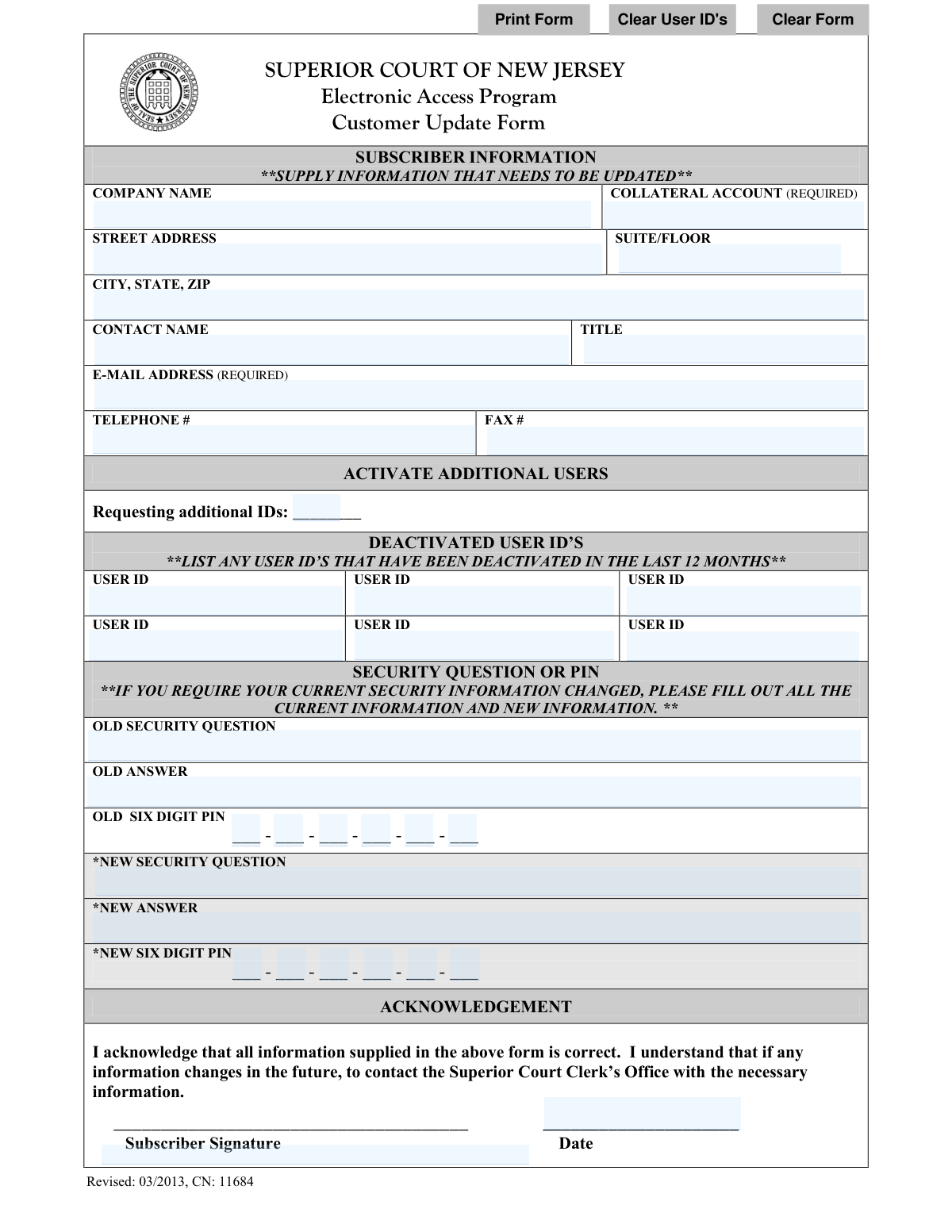
Yes! You can use AI to fill out Superior Court of New Jersey Electronic Access Program (EAP) Customer Update Form

This form is an official document from the Superior Court of New Jersey for subscribers of the Electronic Access Program (EAP) to update their account information. It is essential for maintaining accurate records, ensuring authorized access, and securing account information by allowing updates to company details, user IDs, and security questions/PINs. Today, this form can be filled out quickly and accurately using AI-powered services like Instafill.ai, which can also convert non-fillable PDF versions into interactive fillable forms.
EAP Customer Update Form (CN 11684) is part of the New Jersey forms and superior court forms categories on Instafill.
Our AI automatically handles information lookup, data retrieval, formatting, and form filling.
It takes less than a minute to fill out EAP Customer Update Form (CN 11684) using our AI form filling.
Securely upload your data. Information is encrypted in transit and deleted immediately after the form is filled out.

Form specifications

Form name: Superior Court of New Jersey Electronic Access Program (EAP) Customer Update Form
Number of fields: 38
Number of pages: 1
Language: English
main-image

Instafill Demo: How to fill out PDF forms in seconds with AI

How to Fill Out EAP Customer Update Form (CN 11684) Online for Free in 2026

Are you looking to fill out a EAP CUSTOMER UPDATE FORM (CN 11684) form online quickly and accurately? Instafill.ai offers the #1 AI-powered PDF filling software of 2026, allowing you to complete your EAP CUSTOMER UPDATE FORM (CN 11684) form in just 37 seconds or less.
Follow these steps to fill out your EAP CUSTOMER UPDATE FORM (CN 11684) form online using Instafill.ai:
  1. 1 Navigate to Instafill.ai and upload or select the 'EAP Customer Update Form'.
  2. 2 Provide the subscriber information that needs updating, such as company name, address, and contact details, in the designated fields.
  3. 3 Use the AI assistant to specify any additional user IDs to be activated or list any user IDs that have been deactivated in the last 12 months.
  4. 4 If changing security information, enter the old security question, answer, and PIN, then provide the new security details as required.
  5. 5 Review all the entered information for accuracy, ensuring all required fields like the collateral account and email address are complete.
  6. 6 Electronically sign the acknowledgment section and date the form to certify the correctness of the information provided.

Our AI-powered system ensures each field is filled out correctly, reducing errors and saving you time.

Why Choose Instafill.ai for Your Fillable EAP Customer Update Form (CN 11684) Form?

Speed

Complete your EAP Customer Update Form (CN 11684) in as little as 37 seconds.

Up-to-Date

Always use the latest 2026 EAP Customer Update Form (CN 11684) form version.

Cost-effective

No need to hire expensive lawyers.

Accuracy

Our AI performs 10 compliance checks to ensure your form is error-free.

Security

Your personal information is protected with bank-level encryption.

Frequently Asked Questions About Form EAP Customer Update Form (CN 11684)

This form is used by existing subscribers of the Superior Court of New Jersey's Electronic Access Program (EAP) to update their account information. This includes changing company details, contact information, managing user access, and updating security credentials.

No, the form states you should only supply the information that needs to be updated. However, you must always include your Collateral Account number for identification and sign the acknowledgement section.

The Collateral Account number is your unique identifier for the Electronic Access Program. It is required on every submission to ensure that any changes are correctly applied to your specific account.

To add new users, simply write the number of additional IDs you are requesting in the 'Activate Additional Users' section. The court will then process this request to create the new user accounts.

If an employee leaves, you must list their User ID in the 'Deactivated User ID’s' section to have their access removed. The form asks you to list any user IDs that have been deactivated in the last 12 months.

No, the form requires you to enter your old security information in order to set new credentials. If you have forgotten your old information, you must contact the Superior Court Clerk’s Office directly for assistance with resetting it.

Yes, the form explicitly states that the E-mail Address is a required field. This is likely for official communication regarding your account updates.

You should submit the completed and signed form to the Superior Court Clerk’s Office. Please refer to the official New Jersey Courts website for the most current mailing address or electronic submission instructions.

Processing times can vary. After submitting the form, you should contact the Superior Court Clerk’s Office for an estimate on when your account changes will take effect.

By signing the form, you acknowledge that you must contact the Superior Court Clerk’s Office with any future changes. You would do this by submitting a new, updated EAP Customer Update Form.

Yes, you can use services like Instafill.ai, which leverage AI to help you accurately auto-fill form fields from your saved information, saving time and reducing potential errors.

To fill this form out online, you can use a platform like Instafill.ai. Simply upload the form, and the tool will allow you to type your information into the fields, add your signature, and download the completed document.

If you have a non-fillable or 'flat' PDF, you can upload it to a service like Instafill.ai. The platform can convert the static document into an interactive, fillable form that you can easily complete on your computer.

Compliance EAP Customer Update Form (CN 11684)
Validation Checks by Instafill.ai

1
Required Collateral Account Number
This check ensures the 'COLLATERAL ACCOUNT' field is not empty. This account number is required to uniquely identify the subscriber's account for billing and access management. If this field is left blank, the form submission must be rejected, and the user should be prompted to enter the required information before proceeding.
2
Valid and Required Email Address
This validation verifies that the 'E-MAIL ADDRESS' field is populated and that the entry conforms to a standard email format (e.g., [email protected]). A valid email is mandatory for all account communications, including security notifications and password resets. The submission should be blocked if the email is missing or improperly formatted to ensure a reliable contact method is on file.
3
Six-Digit PIN Format
This check validates that both the 'OLD SIX DIGIT PIN' and 'NEW SIX DIGIT PIN' fields, if filled, contain exactly six numeric digits. The form specifies this format for security, and any deviation could compromise account integrity or cause system errors. Submissions with non-numeric characters or an incorrect number of digits should be rejected to enforce security standards.
4
Complete Security Information Change Logic
If any 'NEW' security field (Question, Answer, or PIN) is filled out, this check verifies that all corresponding 'OLD' security fields are also completed. This is a critical authentication step to confirm the user's identity before allowing changes to their security credentials. An incomplete request must be flagged, requiring the user to provide all current information before the update can be processed.
5
New Security Information Completeness
This validation ensures that if a user enters data into any one of the 'NEW' security fields (Question, Answer, or PIN), they must complete all three. This prevents partial updates that could result in an inconsistent or unusable security profile. The system should enforce the completion of all three fields as a single, atomic transaction to maintain account security.
6
At Least One Update Field Provided
This check verifies that the user has provided information in at least one of the updateable fields (e.g., Address, Contact Name, Deactivated Users, New Security Info). Since this is an 'Update Form', a submission with no changes is redundant and likely an error. The system should prompt the user with a confirmation message if no updates are detected, preventing empty submissions.
7
Standard US Telephone Number Format
This validation ensures the 'TELEPHONE #' field, if filled, follows a standard US phone number format like (XXX) XXX-XXXX or XXX-XXX-XXXX. Consistent formatting is essential for data integrity and ensures the number is programmatically usable for communication systems. If an invalid format is entered, the user should be shown an error message with an example of the expected format.
8
Valid City, State, and ZIP Code Combination
This check validates that the entered ZIP code exists within the specified city and state in the 'CITY, STATE, ZIP' field. This is crucial for ensuring that official mail and correspondence are deliverable. An invalid combination could lead to returned mail, so the system should flag the error and ask the user to review the address information.
9
New PIN Must Differ from Old PIN
When a user updates their PIN, this check verifies that the 'NEW SIX DIGIT PIN' is not identical to the 'OLD SIX DIGIT PIN'. This is a security best practice to ensure the user is creating a new credential and not simply reusing the old one, which would defeat the purpose of the update. If the PINs match, the system should display an error and require a different new PIN.
10
Required Subscriber Signature and Date
This validation confirms that the 'Subscriber Signature' and 'Date' fields are both filled out before submission. The signature and date serve as a legal acknowledgement that the information is correct and the user agrees to the terms. A submission lacking either of these is legally incomplete and must be blocked until the user signs and dates the form.
11
Valid Acknowledgement Date
This check ensures the 'Date' field contains a valid, logical date, preferably in MM/DD/YYYY format, and is not a future date. This date is a legal record of when the information was certified as correct. The system should reject invalid entries like '02/30/2023' or non-date text to maintain the integrity of the submission record.
12
Numeric Value for Additional IDs Request
This validation ensures that the value entered in the 'Requesting additional IDs' field is a positive integer. This field is intended to capture a specific quantity of new user IDs to be created. Accepting non-numeric or negative values would cause processing errors, so the system must reject any input that is not a whole number.

Common Mistakes in Completing EAP Customer Update Form (CN 11684)

Missing Required Account Identifiers

Users often overlook the '(REQUIRED)' labels next to the 'COLLATERAL ACCOUNT' and 'E-MAIL ADDRESS' fields. Since this is an update form, these fields are essential for the clerk's office to locate and verify the correct account before making any changes. Submitting the form without this information will result in immediate rejection and processing delays. To avoid this, always double-check for required fields, which AI-powered tools like Instafill.ai can automatically highlight to ensure they are not missed.

Misinterpreting the 'Update' Instruction

The instruction 'SUPPLY INFORMATION THAT NEEDS TO BE UPDATED' can be confusing. Users sometimes only fill in the single piece of information that has changed (e.g., a new phone number) but omit the required account identifiers. This leaves the office unable to process the request. To avoid this, always provide the required 'COLLATERAL ACCOUNT' and 'E-MAIL ADDRESS' along with any new or changed information to ensure your account can be identified correctly.

Incomplete Security Information Change

When updating a security question or PIN, users frequently provide only the 'NEW' information and leave the 'OLD' fields blank. The form requires the current security details to verify the user's identity before applying changes, protecting the account from unauthorized access. Failing to provide the old information will prevent the security update from being processed. Always fill out both the 'OLD' and 'NEW' sections completely when requesting a security change.

Incorrectly Requesting Additional Users

In the 'ACTIVATE ADDITIONAL USERS' section, the field 'Requesting additional IDs' is meant for a number (quantity) of new IDs needed. A common mistake is to write specific names or desired User IDs in this box. This leads to confusion and inaction, as the office cannot process such a request. To avoid this, simply enter the total count of new user accounts you are requesting in this field.

Misusing the 'Deactivated User ID’s' Section

Users often mistakenly list User IDs they *want* to deactivate in the 'DEACTIVATED USER ID’S' section. However, the form's instruction is to list IDs that have *already* been deactivated in the past 12 months, likely for auditing purposes. This form does not appear to have a section for requesting new deactivations, which could cause significant confusion and result in no action being taken on the accounts the user intended to remove.

Invalid PIN Formatting

The six-digit PIN fields are presented as separate boxes, which often leads to data entry errors. Users may try to enter multiple digits in one box, use non-numeric characters, or leave boxes blank, resulting in an invalid PIN. To prevent this, enter exactly one number per box to form the complete six-digit PIN. Using a smart form-filling tool like Instafill.ai can help by automatically formatting the entry across the separate fields correctly.

Forgetting the Signature or Date

Forgetting to sign and date the 'ACKNOWLEDGEMENT' section is one of the most common and critical errors. An unsigned or undated form is legally invalid and cannot be processed by the Superior Court Clerk’s Office. This oversight forces the office to return the form, causing significant delays in updating the account. Always perform a final review to ensure the signature and current date are present before submission.

Illegible Handwriting on Printed Forms

Since this is a non-fillable PDF, it is often printed and completed by hand, leading to illegible entries for critical data like email addresses, user IDs, and security answers. Unclear handwriting is a primary source of data entry errors on the receiving end, which can result in incorrect updates or complete rejection of the form. To guarantee clarity, it's best to use a tool like Instafill.ai, which can convert the flat PDF into a digitally fillable version, ensuring all entries are perfectly legible.

Inconsistent City, State, and ZIP Formatting

The form combines 'CITY, STATE, ZIP' into a single field, which invites inconsistent formatting (e.g., 'Anytown NJ 01234' vs. 'Anytown, NJ, 01234'). This ambiguity can cause data entry errors or parsing issues for the clerk's office when updating the address in their system. For best results, use a standard format like 'City, ST ZIP' (e.g., 'Trenton, NJ 08625'). AI form fillers can help by standardizing address formats automatically.
Saved over 80 hours a year

“I was never sure if my IRS forms like W-9 were filled correctly. Now, I can complete the forms accurately without any external help.”

Kevin Martin Green

Your data stays secure with advanced protection from Instafill and our subprocessors

Robust compliance program

Transparent business model

You’re not the product. You always know where your data is and what it is processed for.

ISO 27001, HIPAA, and GDPR

Our subprocesses adhere to multiple compliance standards, including but not limited to ISO 27001, HIPAA, and GDPR.

Security & privacy by design

We consider security and privacy from the initial design phase of any new service or functionality. It’s not an afterthought, it’s built-in, including support for two-factor authentication (2FA) to further protect your account.

Fill out EAP Customer Update Form (CN 11684) with Instafill.ai

Worried about filling PDFs wrong? Instafill securely fills superior-court-of-new-jersey-electronic-access-program-eap-customer-update-form forms, ensuring each field is accurate.

Related forms by category

New Jersey forms State of New Jersey Alternate Benefit Program Withdrawal Request Acknowledgement Receipt, Horizon Blue Cross Blue Shield of New Jersey Applied Behavior Analysis Supplemental Information Form, State of New Jersey Application for Employment (Form DPF-663), New Jersey Judiciary Plea Form (Plea 01), Supplemental Plea Form for Certain Sexual Offenses: Megan’s Law/Parole Supervision for Life/Community Supervision for Life (Plea 05), Financial Questionnaire to Establish Indigency, New Jersey Judiciary Resource Family Information Form, Foreclosure Case Information Statement (FCIS) - Appendix XII-B2, New Jersey Judiciary Records Request Form, Superior Court of New Jersey, Application for Appeal and Order, FL Certification of Requested Background Checks for Kinship Legal Guardianship, Certification of Caregiver as to Knowledge of Identity and/or Location of Parents, FL Order Judgment for Kinship Legal Guardianship, New Jersey Judiciary Certification of Repair and Plea of Guilty, Uniform Summary Support Order (USSO), New Jersey Judiciary Volunteer Application (CN 10293), Application to Take the New Jersey Court Interpreter Oral Examination, New Jersey Judiciary Attorney Fee Arbitration Request, Order to Show Cause with Temporary Restraints Pursuant to Rule 4:52, Tax Court of New Jersey, State Tax Complaint · + 223 more →
superior court forms FW-003, Order on Court Fee Waiver (Superior Court), FW-003, Order on Court Fee Waiver (Superior Court), Form FW-003, Order on Court Fee Waiver (Superior Court), Declaration of Facts of Death (California Superior Court), Form FW-003-GC, Order on Court Fee Waiver (Superior Court) (Ward or Conservatee), Superior Court of Chatham County, Georgia, Hearing Request Form, Form FW-006, Request for Hearing About Court Fee Waiver Order (Superior Court), Form FW-002, Request to Waive Additional Court Fees (Superior Court), Form FW-008, Order on Court Fee Waiver After Hearing (Superior Court), Form FW-002-GC, Request to Waive Additional Court Fees (Superior Court) (Ward or Conservatee), Form REC-001(N), Notice of Intent to Destroy Superior Court Records; Offer to Transfer Possession, Form REC-001(R), Request for Transfer or Extension of Time for Retention of Superior Court Records, Notice of Hearing on Request for Transfer or Extension of Time for Retention of Superior Court Records; Court Order; Release and Receipt of Superior Court Records, Form REC-002(R), Release and Receipt of Superior Court Records, Superior Court of New Jersey, Application for Appeal and Order, Superior Court of New Jersey Dissolution (FM) Case Management Order, New Jersey Judiciary – Superior Court, Appellate Division Application for Permission to File Emergent Motion, New Jersey Judiciary Superior Court - Appellate Division Civil Case Information Statement, New Jersey Judiciary Superior Court - Appellate Division Criminal Case Information Statement, New Jersey Judiciary Superior Court - Appellate Division Notice of Appeal (CN: 10502) · + 33 more →