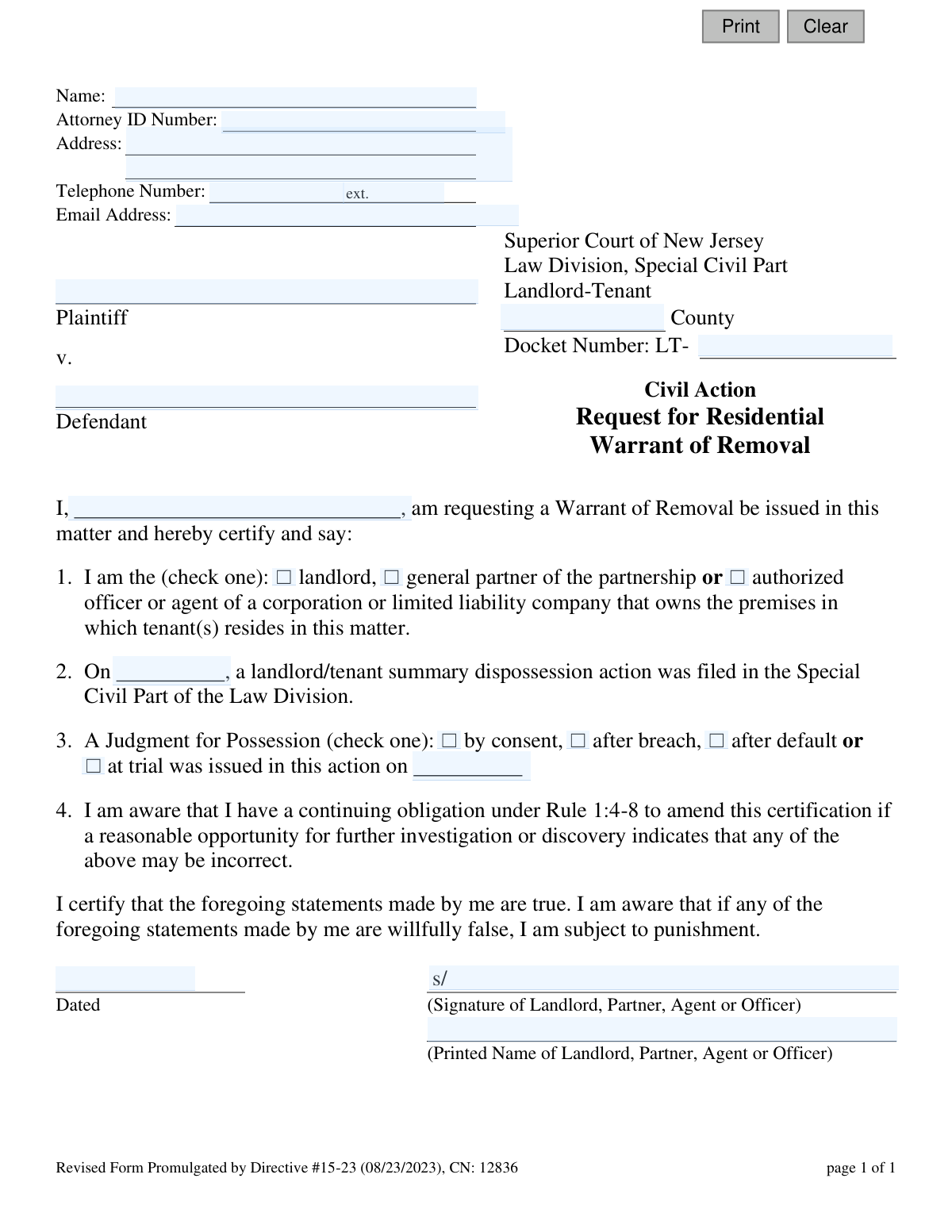
Yes! You can use AI to fill out Superior Court of New Jersey, Request for Residential Warrant of Removal
This form is a legal document used in the New Jersey Superior Court, Special Civil Part, by a landlord to formally request the final step in an eviction process. After a landlord wins a Judgment for Possession against a tenant, this request is filed to obtain a Warrant of Removal, which authorizes a court officer to legally remove the tenant and their belongings from the property. Today, this form can be filled out quickly and accurately using AI-powered services like Instafill.ai, which can also convert non-fillable PDF versions into interactive fillable forms.
Our AI automatically handles information lookup, data retrieval, formatting, and form filling.
It takes less than a minute to fill out CN 12836 using our AI form filling.
Securely upload your data. Information is encrypted in transit and deleted immediately after the form is filled out.
Form specifications
| Form name: | Superior Court of New Jersey, Request for Residential Warrant of Removal |
| Number of fields: | 25 |
| Number of pages: | 1 |
| Language: | English |
Instafill Demo: How to fill out PDF forms in seconds with AI
How to Fill Out CN 12836 Online for Free in 2026
Are you looking to fill out a CN 12836 form online quickly and accurately? Instafill.ai offers the #1 AI-powered PDF filling software of 2026, allowing you to complete your CN 12836 form in just 37 seconds or less.
Follow these steps to fill out your CN 12836 form online using Instafill.ai:
- 1 Navigate to Instafill.ai and upload or select the New Jersey Request for Residential Warrant of Removal form.
- 2 Provide the court case details, including the County, full Docket Number (LT-), Plaintiff (landlord) name, and Defendant (tenant) name.
- 3 Enter the filer's information, such as name, address, phone number, email, and attorney ID if applicable.
- 4 In the certification section, check the box that describes your relationship to the property (e.g., landlord, agent) and enter the date the original landlord/tenant action was filed.
- 5 Specify how the Judgment for Possession was obtained (e.g., by consent, after trial) and the date the judgment was issued.
- 6 Carefully review all the information populated by the AI for accuracy, then provide your digital signature and the current date to certify the statements.
- 7 Download the completed form to print and file with the appropriate Special Civil Part office of the New Jersey Superior Court.
Our AI-powered system ensures each field is filled out correctly, reducing errors and saving you time.
Why Choose Instafill.ai for Your Fillable CN 12836 Form?
Speed
Complete your CN 12836 in as little as 37 seconds.
Up-to-Date
Always use the latest 2026 CN 12836 form version.
Cost-effective
No need to hire expensive lawyers.
Accuracy
Our AI performs 10 compliance checks to ensure your form is error-free.
Security
Your personal information is protected with bank-level encryption.
Frequently Asked Questions About Form CN 12836
This form is used by a landlord in New Jersey to ask the court to issue a Warrant of Removal, which is the legal document authorizing a court officer to evict a tenant after a Judgment for Possession has already been granted.
The form must be completed and signed by the landlord, a general partner of the landlord partnership, or an authorized officer or agent of the corporation or LLC that owns the property.
You must have already obtained a 'Judgment for Possession' from the court in your landlord-tenant case. This form cannot be filed until after that judgment has been issued.
The Docket Number (which starts with 'LT-') is assigned by the court and can be found on all previous legal documents from your case, such as the initial complaint or the Judgment for Possession order.
A Warrant of Removal is an official court order that directs a Special Civil Part Officer to remove the tenant and their belongings from the rental property, thereby completing the legal eviction process.
These options describe how you won the judgment: 'by consent' (the tenant agreed), 'after breach' (the tenant violated a prior agreement), 'after default' (the tenant failed to appear in court), or 'at trial' (a judge ruled in your favor).
After you file the form and pay any fees, the court clerk processes it and issues the Warrant of Removal. The warrant is then given to a court officer who will schedule and carry out the physical lockout of the tenant.
By signing the certification, you are swearing under penalty of law that all statements on the form are true. Knowingly providing false information can result in punishment.
You must file the completed and signed form with the Clerk of the Special Civil Part in the New Jersey county where your original landlord-tenant case was filed and the judgment was issued.
Yes, services like Instafill.ai use AI to help you accurately auto-fill form fields with your case information, which can save time and help prevent errors.
You can use a service like Instafill.ai to upload the form, fill it out electronically on your computer or phone, and then download the completed PDF for printing and submission to the court.
If you have a non-fillable or 'flat' PDF, you can upload it to a platform like Instafill.ai. The service can convert the static document into an interactive, fillable form that you can easily complete online.
The form notes a continuing obligation to amend it if you discover an error. You should contact the Special Civil Part Clerk's office immediately to ask for the proper procedure to submit a correction.
Compliance CN 12836
Validation Checks by Instafill.ai
1
Docket Number Format Validation
Verifies the Docket Number field follows the required 'LT-######' format. This ensures the number is structured correctly for the court's filing and lookup systems. A malformed docket number would prevent the request from being associated with the correct case, leading to rejection or significant processing delays.
2
Exclusive Party Type Selection
Ensures that exactly one option is selected for the filer's role (landlord, partner, or agent). The form requires a single, unambiguous declaration of the filer's legal standing to request the warrant. Failure to select one and only one option will block submission, as it creates legal ambiguity.
3
Exclusive Judgment Type Selection
Validates that the user has selected exactly one type for the Judgment for Possession (consent, breach, default, or trial). This information is critical for the court to understand the basis of the judgment. The form cannot be processed if this choice is missing or if multiple options are selected.
4
Logical Date Sequence Verification
Checks that the dates are in a logical chronological order: the case filing date (`fileDt`) must be on or before the judgment date (`jopDt`), which must be on or before the signature date (`sigDt`). This validation prevents nonsensical submissions where events are recorded out of order. An illogical sequence indicates a data entry error and must be corrected.
5
Prevention of Future Dates for Past Events
Validates that the 'action filed' date (`fileDt`) and 'judgment issued' date (`jopDt`) are not in the future. These fields represent historical events that must have already occurred. Submitting a form with future dates for past events would render it invalid and lead to immediate rejection.
6
Signature Date Plausibility
Ensures the signature date (`sigDt`) is the current date or a very recent past date, and not a date in the future. This check confirms that the certification is timely and reflects the filer's attestation on or near the day of submission. An old or future date could call the validity of the certification into question.
7
Requester and Signatory Name Consistency
Verifies that the name of the individual making the request in the body of the form (`reqName`) matches the printed name in the signature block (`printName`). This ensures the person certifying the facts is the same person signing the document. A mismatch could raise legal questions about the document's authenticity.
8
Valid New Jersey County Check
Confirms that the value entered in the County field is one of the 21 official counties in New Jersey. This is crucial for routing the document to the correct court jurisdiction. An invalid or misspelled county name will cause the filing to be rejected or misdirected.
9
Attorney ID Number Format
Validates that the Attorney ID Number field, if provided, conforms to the expected format for New Jersey attorneys. This ensures the attorney is correctly identified in the court's records. An invalid ID could cause filing issues or prevent proper association of the attorney with the case.
10
Email Address Format Validation
Checks that the provided email address follows the standard '[email protected]' format. A valid email is essential for the court to send notifications, updates, and confirmations regarding the warrant request. An invalid format would prevent communication, potentially causing the filer to miss critical information.
11
Signature Presence Verification
Ensures that the signature field is not empty, verifying that a digital or physical signature has been provided. A signature is a fundamental legal requirement to certify the truthfulness of the statements in the document. A missing signature renders the request invalid and will result in its rejection.
12
Core Case Information Completeness
Verifies that essential case identifiers like Plaintiff Name (`plaName`), Defendant Name (`defName`), and County (`typeCounty`) are not empty. These fields are the primary means of identifying the legal action and the parties involved. A submission missing any of this core information is legally deficient and cannot be processed.
Common Mistakes in Completing CN 12836
Filers often mistype the docket number or omit the 'LT-' prefix or the two-digit year suffix (e.g., entering '12345' instead of 'LT-012345-23'). Since the docket number is the primary identifier for the case, any error will prevent the court clerk from locating the file, causing an immediate rejection of the request and significant delays in the eviction process. To avoid this, double-check the number against the original Judgment for Possession document. AI-powered tools like Instafill.ai can help by validating the format and cross-referencing case data to ensure accuracy.
The plaintiff and defendant names on this request must exactly match the names on the original Judgment for Possession. People sometimes use abbreviations, nicknames, or slightly different spellings, which creates a legal discrepancy. This can lead to the court rejecting the warrant application, as it may not be clear if it applies to the correct parties, potentially requiring a corrected re-filing. Always copy the names precisely from the official court documents.
In section 1, the filer must check a box to certify whether they are the landlord, a general partner, or an authorized officer/agent. Forgetting to check a box or checking the wrong one calls into question the filer's legal authority to request the warrant. For example, an employee of a property management company signing as the 'landlord' is incorrect if the owner is an LLC. This error can lead to rejection or future legal challenges by the tenant, so it's crucial to select the box that accurately reflects your legal relationship to the property-owning entity.
The form requires three separate dates: the original case filing date (Section 2), the Judgment for Possession date (Section 3), and the signature date. A common mistake is to mix these up, enter the current date for all, or leave them blank. Each date serves a distinct legal purpose, and incorrect information can cause the clerk to reject the form for being inconsistent with the court record. Carefully reference the original court papers for the filing and judgment dates to ensure accuracy.
Section 3 requires the filer to specify how the judgment was obtained (by consent, after breach, after default, or at trial). Filers may guess or not remember the exact circumstances, leading them to check the wrong box. This is a substantive detail of the case history, and an error can lead to rejection or procedural challenges. The correct judgment type is stated on the original Judgment for Possession document and should be verified before filling out this form.
The form has three fields for the filer's name: the certification ('I, [reqName]...'), the printed name, and the signature. All three must clearly refer to the same authorized individual. Mistakes occur when these names don't match, creating ambiguity about who is legally certifying the request. This can cause the court to question the document's validity and reject it. Ensure the same person's name is used consistently across all three fields.
Only the landlord (if an individual), a general partner of a partnership, or an authorized officer/agent of a corporation or LLC has the legal standing to sign this request. A building superintendent or a property manager who is not an officer of the owning corporation cannot legally sign. An unauthorized signature invalidates the entire request and can lead to its dismissal, forcing the landlord to start the process over.
Filers sometimes forget to enter the County where the property is located, which will cause the form to be rejected or misrouted. Additionally, landlords representing themselves (pro se) may mistakenly leave the top section (Name, Address, Phone) blank, thinking it's only for attorneys. This contact information is essential for the court to communicate with the plaintiff, and its absence will halt the process. Pro se landlords must fill this section out with their own information.
This form is often distributed as a flat, non-fillable PDF, forcing users to print and fill it out by hand. This frequently results in illegible handwriting, especially for complex information like docket numbers and names. If a court clerk cannot read the information, they will reject the form, causing delays. To prevent this, it's best to use a tool like Instafill.ai, which can convert non-fillable PDFs into interactive, fillable forms, ensuring all entries are typed, clear, and legible.
Saved over 80 hours a year
“I was never sure if my IRS forms like W-9 were filled correctly. Now, I can complete the forms accurately without any external help.”
Kevin Martin Green
Your data stays secure with advanced protection from Instafill and our subprocessors

Robust compliance program
Transparent business model
You’re not the product. You always know where your data is and what it is processed for.
ISO 27001, HIPAA, and GDPR
Our subprocesses adhere to multiple compliance standards, including but not limited to ISO 27001, HIPAA, and GDPR.
Security & privacy by design
We consider security and privacy from the initial design phase of any new service or functionality. It’s not an afterthought, it’s built-in, including support for two-factor authentication (2FA) to further protect your account.
Fill out CN 12836 with Instafill.ai
Worried about filling PDFs wrong? Instafill securely fills superior-court-of-new-jersey-request-for-residential-warrant-of-removal forms, ensuring each field is accurate.