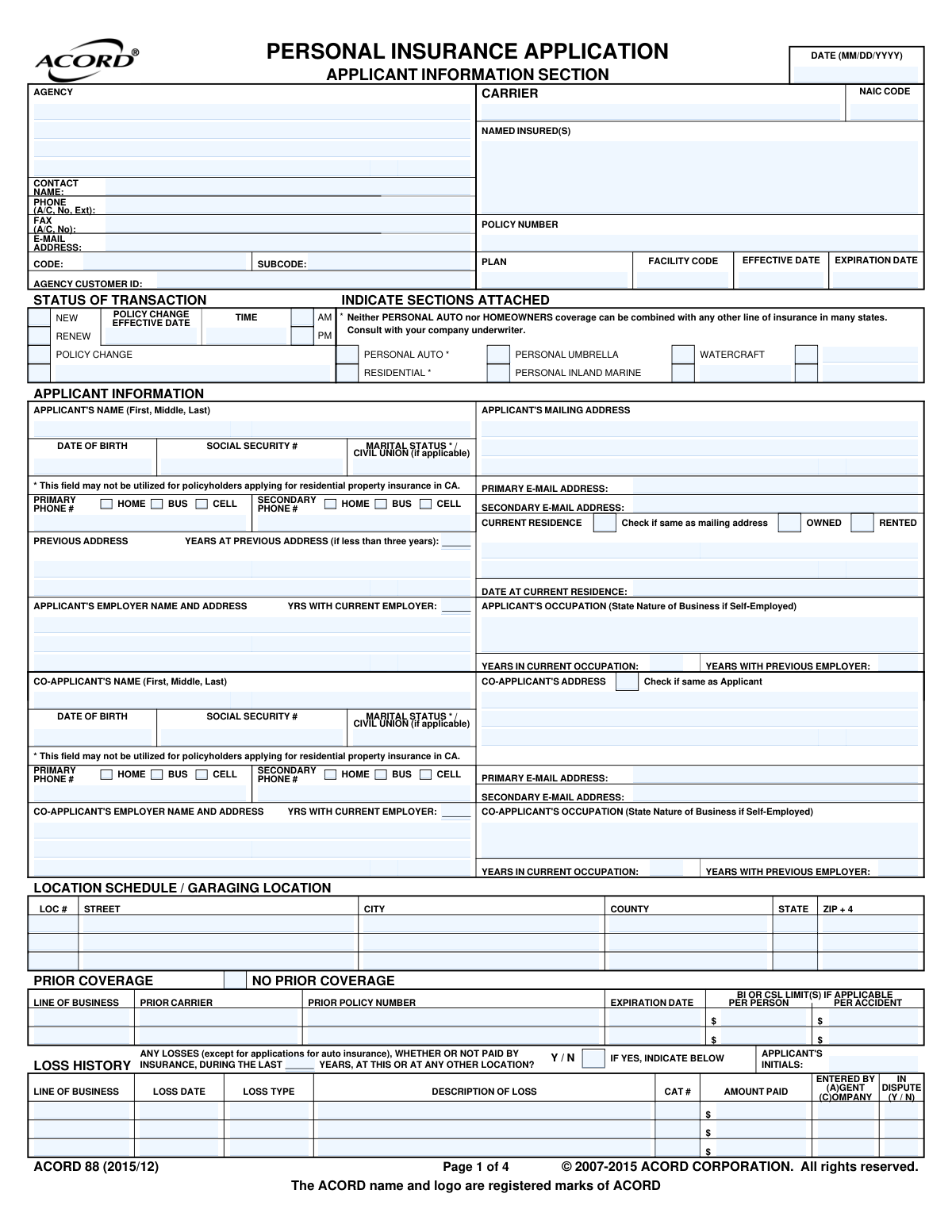
Yes! You can use AI to fill out ACORD 88, Personal Insurance Application - Applicant Information Section

ACORD 88 is the Personal Insurance Application's applicant information section, a standardized document created by ACORD for the insurance industry. It is used to collect comprehensive data about an applicant and co-applicant, including personal details, residence history, employment, prior insurance coverage, and loss history, which is critical for underwriters to evaluate risk and calculate premiums. Today, this form can be filled out quickly and accurately using AI-powered services like Instafill.ai, which can also convert non-fillable PDF versions into interactive fillable forms.
ACORD 88 is part of the ACORD forms and insurance application forms categories on Instafill.
Our AI automatically handles information lookup, data retrieval, formatting, and form filling.
It takes less than a minute to fill out ACORD 88 using our AI form filling.
Securely upload your data. Information is encrypted in transit and deleted immediately after the form is filled out.

Form specifications

Form name: ACORD 88, Personal Insurance Application - Applicant Information Section
Number of fields: 398
Number of pages: 1
Language: English
main-image

Instafill Demo: How to fill out PDF forms in seconds with AI

How to Fill Out ACORD 88 Online for Free in 2026

Are you looking to fill out a ACORD 88 form online quickly and accurately? Instafill.ai offers the #1 AI-powered PDF filling software of 2026, allowing you to complete your ACORD 88 form in just 37 seconds or less.
Follow these steps to fill out your ACORD 88 form online using Instafill.ai:
  1. 1 Navigate to Instafill.ai and upload your ACORD 88 PDF or select the template from the form library.
  2. 2 Use the AI assistant to automatically populate your personal details, including name, address, date of birth, and contact information.
  3. 3 Enter information for any co-applicants, along with details about your current and previous residences and employment history.
  4. 4 Provide details of your prior insurance coverage and any loss history within the specified timeframe.
  5. 5 Answer the 'General Information' questions regarding other insurance policies, bankruptcies, or legal judgments.
  6. 6 Carefully review all the information entered by the AI for accuracy, make any necessary edits, and then add your digital signature.
  7. 7 Download, print, or securely share the completed ACORD 88 form directly with your insurance agent or carrier.

Our AI-powered system ensures each field is filled out correctly, reducing errors and saving you time.

Why Choose Instafill.ai for Your Fillable ACORD 88 Form?

Speed

Complete your ACORD 88 in as little as 37 seconds.

Up-to-Date

Always use the latest 2026 ACORD 88 form version.

Cost-effective

No need to hire expensive lawyers.

Accuracy

Our AI performs 10 compliance checks to ensure your form is error-free.

Security

Your personal information is protected with bank-level encryption.

Frequently Asked Questions About Form ACORD 88

The ACORD 88 is a standardized Personal Insurance Application used by insurance agents to collect essential information from individuals applying for policies like auto, homeowners, or personal umbrella insurance.

A co-applicant is typically a spouse, civil union partner, or another person who will be jointly named on the insurance policy and shares an insurable interest in the property being covered.

To complete the form efficiently, you should have your personal details (DOB, SSN), contact information, employment history, prior insurance policy details, and information about any past losses or claims.

Insurers use your Social Security Number to verify your identity, check your credit history (which can impact your insurance score), and review your claims and driving records to determine eligibility and premium rates.

You must report any losses or damages that have occurred in the last few years, regardless of whether an insurance claim was filed or paid. This includes events like theft, fire, water damage, or liability incidents.

Yes, the 'General Information' section specifically asks if you have had a bankruptcy, foreclosure, or repossession within the past five years. You are required to answer this question truthfully.

An 'Additional Insured' is a person or entity who receives liability protection under your policy. A 'Lienholder' or 'Mortgagee' is a person or entity, like a bank, that has a financial interest in your property and is entitled to payment for damages.

If you have not been insured previously, you can indicate this in the 'Status of Transaction' section by checking the box for 'NO PRIOR COVERAGE'.

After submission, your application is reviewed by an underwriter who assesses the risk and determines your eligibility and premium. Your agent will then contact you with a quote or to request more information.

Insurers ask about unscheduled items like ATVs or snowmobiles to get a complete picture of your potential liability risk, even if those items are not covered under the policy you are applying for.

Yes, services like Instafill.ai use AI to accurately auto-fill form fields from your existing documents, which can save you significant time and help prevent errors.

You can use a service like Instafill.ai to upload the PDF. The platform will make it an interactive, fillable form that you can complete and sign electronically from any device.

Tools like Instafill.ai can convert non-fillable or 'flat' PDFs into interactive forms. Simply upload your file, and the platform will automatically detect and create fillable fields for you.

Compliance ACORD 88
Validation Checks by Instafill.ai

1
Social Security Number Format and Conditional Requirement
This check ensures the Social Security Number (SSN) is entered in the standard XXX-XX-XXXX format. It also validates that the field is only presented or required based on jurisdictional rules, such as the note that it may not be utilized for residential property insurance in California. Failure to meet the format will prompt a correction, while failure to adhere to jurisdictional rules could lead to compliance issues.
2
Applicant Age Verification from Date of Birth
This validation verifies that the 'DATE OF BIRTH' is a valid calendar date and that the calculated age of the applicant meets the minimum requirement for purchasing insurance, typically 18 years. It prevents the submission of applications for minors who are not legally able to enter into a contract. If the applicant is underage, the form submission will be blocked with an explanatory message.
3
Logical Consistency of Residence Duration
This check validates the relationship between 'DATE AT CURRENT RESIDENCE' and 'YEARS AT PREVIOUS ADDRESS'. If the duration at the current residence is less than three years, the 'YEARS AT PREVIOUS ADDRESS' and 'PREVIOUS ADDRESS' fields become mandatory. This ensures a continuous three-year residency history, which is crucial for underwriting and risk assessment. An inconsistency would trigger a prompt for the user to correct the information.
4
Conditional Requirement for Loss History Details
This validation ensures that if the 'ANY LOSSES... DURING THE LAST ___ YEARS?' question is answered 'Y' (Yes), then at least one complete loss record is entered in the Loss History table. Each required record must include a 'LOSS DATE', 'LOSS TYPE', 'DESCRIPTION', and 'AMOUNT PAID'. This is critical for assessing the applicant's risk profile based on past claims, and an incomplete entry will prevent form submission.
5
Conditional Requirement for 'General Information' Explanations
This check mandates that if any of the 'GENERAL INFORMATION' questions (e.g., #3, #4, #5) are answered 'YES', the corresponding 'EXPLAIN ALL "YES" RESPONSES' section must contain a non-empty textual explanation. This provides necessary context for underwriters to evaluate potential risks associated with bankruptcies, liens, or other declared situations. A missing explanation will result in a validation error, halting submission until the details are provided.
6
Policy Effective and Expiration Date Logic
This validation ensures that both the 'EFFECTIVE DATE' and 'EXPIRATION DATE' are valid dates and that the 'EXPIRATION DATE' occurs after the 'EFFECTIVE DATE'. This prevents logical impossibilities in the policy term, which is fundamental to defining the coverage period. An invalid date sequence would block the application and require the user to input a valid date range.
7
Primary Contact Information Completeness
This check verifies that the applicant has provided a 'PRIMARY PHONE #' and a 'PRIMARY E-MAIL ADDRESS'. It also validates that the phone number and email address adhere to standard formats (e.g., (XXX) XXX-XXXX and [email protected]). This information is essential for all communications regarding the policy, from billing to claim processing, so its absence or incorrect format will trigger a validation error.
8
Co-Applicant Information Dependency
This validation rule activates if the 'CO-APPLICANT'S NAME' field is populated. Upon entry of a name, other critical fields for the co-applicant, such as 'DATE OF BIRTH', 'SOCIAL SECURITY #', and 'OCCUPATION', become mandatory. This ensures that all necessary underwriting information is collected for every individual to be named on the policy, preventing incomplete submissions for joint applications.
9
Prior Coverage Information Requirement
This check ensures that if the 'NO PRIOR COVERAGE' box is unchecked, the 'PRIOR CARRIER', 'PRIOR POLICY NUMBER', and 'EXPIRATION DATE' fields are mandatory. This information is vital for verifying continuous coverage, which can impact eligibility and pricing. Failure to provide details about previous insurance when indicated will result in an error, prompting the user to complete the required fields.
10
Additional Interest Completeness
This validation ensures that if an interest type checkbox (e.g., 'MORTGAGEE', 'LIENHOLDER') is selected in the 'ADDITIONAL INTEREST' section, the corresponding 'NAME AND ADDRESS' fields are required. This is crucial to ensure that legally required notifications are sent to entities with a financial stake in the insured property. Submitting the form with a selected interest type but no contact details would be blocked.
11
State-Specific Field Validation (Producer Number)
This check enforces state-specific requirements, such as the mandatory 'NATIONAL PRODUCER NUMBER' for applications in Florida. The system would identify the application's jurisdiction (e.g., based on applicant's address) and make this field required accordingly. This is essential for regulatory compliance, and submissions for Florida without this number would be rejected.
12
Employment Duration Sanity Check
This validation performs a logical check on the 'YRS WITH CURRENT EMPLOYER' field. The number of years entered cannot be greater than the applicant's age minus a reasonable starting work age (e.g., 16). This helps catch obvious data entry errors or fraudulent information. If the validation fails, it would prompt the user to review and correct the employment history or date of birth.
13
Loss Date Chronology
This check validates that any 'LOSS DATE' entered in the Loss History section is a valid date that occurs in the past. It must be before the current date and after the applicant's date of birth. This prevents illogical entries and ensures the loss data is chronologically sound for underwriting analysis. An invalid date would trigger an error message requiring correction.
14
Signature Date Presence and Validity
This validation ensures the 'APPLICANT'S SIGNATURE' date field is populated upon submission, as it legally marks when the applicant attested to the information's accuracy. The date must be a valid calendar date that is not in the future. An absent or future-dated signature date would invalidate the application's legal standing and must be corrected before submission is allowed.

Common Mistakes in Completing ACORD 88

Using Incorrect or Incomplete Insured Names

Applicants often use nicknames instead of their full legal names or forget to include a co-applicant, such as a spouse or domestic partner, on the 'Named Insured(s)' line. This can create significant issues at the time of a claim, as coverage is tied to the specific names listed on the policy. To avoid this, always use the full legal name as it appears on government-issued ID for all individuals who need to be insured under the policy.

Confusing Mailing Address with Residence Location

The form distinguishes between a mailing address and the current residence address, which is used for rating. Applicants frequently enter a PO Box as their residence or forget to check the 'Check if same as mailing address' box, leading to incorrect risk assessment and premium miscalculation. This can also cause important documents to be sent to the wrong place, so it's critical to ensure the physical residence is listed correctly.

Providing Vague Occupation Descriptions

The 'Occupation' field is often filled with generic terms like 'Consultant' or 'Self-Employed' without the required details. The form specifically asks to 'State Nature of Business if Self-Employed' because occupation is a key factor in risk assessment. Vague information forces the underwriter to seek clarification, delaying the application, and can lead to incorrect rating.

Omitting Required Previous Address History

The application requires a previous address if the applicant has lived at their current residence for less than three years. Many people overlook this field, leaving it blank even when it applies to them. This missing information is a red flag for underwriters and can delay the application process, as residency history is used to assess stability and risk.

Failure to Disclose Full Loss History

Applicants may forget, misremember, or intentionally omit past insurance losses in the 'Loss History' section. The form requires a 'Yes' or 'No' answer and detailed descriptions for any 'Yes' responses, including date, type, and amount. Failure to disclose this accurately is considered a material misrepresentation and can lead to policy cancellation or denial of a future claim.

Providing Incorrect Prior Insurance Details

The 'Prior Coverage' section is crucial for determining eligibility for continuous coverage discounts. Common errors include guessing the prior carrier's name, providing an incorrect policy number, or misstating the coverage limits. These inaccuracies can result in losing valuable discounts and require the agent to spend extra time verifying the information, delaying the quote.

Failing to Explain 'Yes' Answers in General Information

The 'General Information' section contains several critical yes/no questions regarding bankruptcies, foreclosures, and prior cancellations. A frequent mistake is answering 'Yes' to a question but failing to provide the mandatory explanation in the designated 'EXPLAIN ALL YES RESPONSES' section. This automatically renders the application incomplete and requires follow-up, delaying the quoting and binding process.

Entering Incomplete or Incorrect Lender Information

When adding a mortgagee or lienholder in the 'Additional Interest' section, applicants often provide an incomplete name or address for the financial institution. This information is legally required to protect the lender's financial interest and must be perfectly accurate to issue the policy and satisfy loan requirements. Incomplete data here can halt the entire process, especially for home purchases.

Omitting Required Signatures, Dates, or Initials

A surprising number of applications are submitted without the applicant's signature and date on the final page, or without the required initials on the 'Notice of Information Practices'. An unsigned or uninitialed application is legally invalid and cannot be processed. This simple oversight is a common reason for immediate rejection, requiring the applicant to complete the step again.

Data Entry Errors in SSN and Date of Birth

Simple typographical errors, like transposing digits in the Social Security Number or Date of Birth, are extremely common when filling out forms manually. These errors can cause failures in identity verification and credit scoring, leading to processing delays or incorrect premium quotes. Using an AI-powered form filling tool like Instafill.ai can help prevent these mistakes by validating data formats and allowing for careful review before submission.

Misinterpreting a Non-Fillable PDF Layout

This ACORD form is often distributed as a non-fillable PDF, which is difficult to complete digitally. Applicants may try to type over the lines, resulting in misaligned, hard-to-read text, or they may print it and write by hand, leading to illegible entries. This creates extra work for the agent who has to manually re-enter all the data. Advanced tools like Instafill.ai can convert such flat PDFs into interactive, fillable forms, ensuring all data is entered clearly in the correct fields.
Saved over 80 hours a year

“I was never sure if my IRS forms like W-9 were filled correctly. Now, I can complete the forms accurately without any external help.”

Kevin Martin Green

Your data stays secure with advanced protection from Instafill and our subprocessors

Robust compliance program

Transparent business model

You’re not the product. You always know where your data is and what it is processed for.

ISO 27001, HIPAA, and GDPR

Our subprocesses adhere to multiple compliance standards, including but not limited to ISO 27001, HIPAA, and GDPR.

Security & privacy by design

We consider security and privacy from the initial design phase of any new service or functionality. It’s not an afterthought, it’s built-in, including support for two-factor authentication (2FA) to further protect your account.

Fill out ACORD 88 with Instafill.ai

Worried about filling PDFs wrong? Instafill securely fills acord-88-personal-insurance-application-applicant-information-section forms, ensuring each field is accurate.