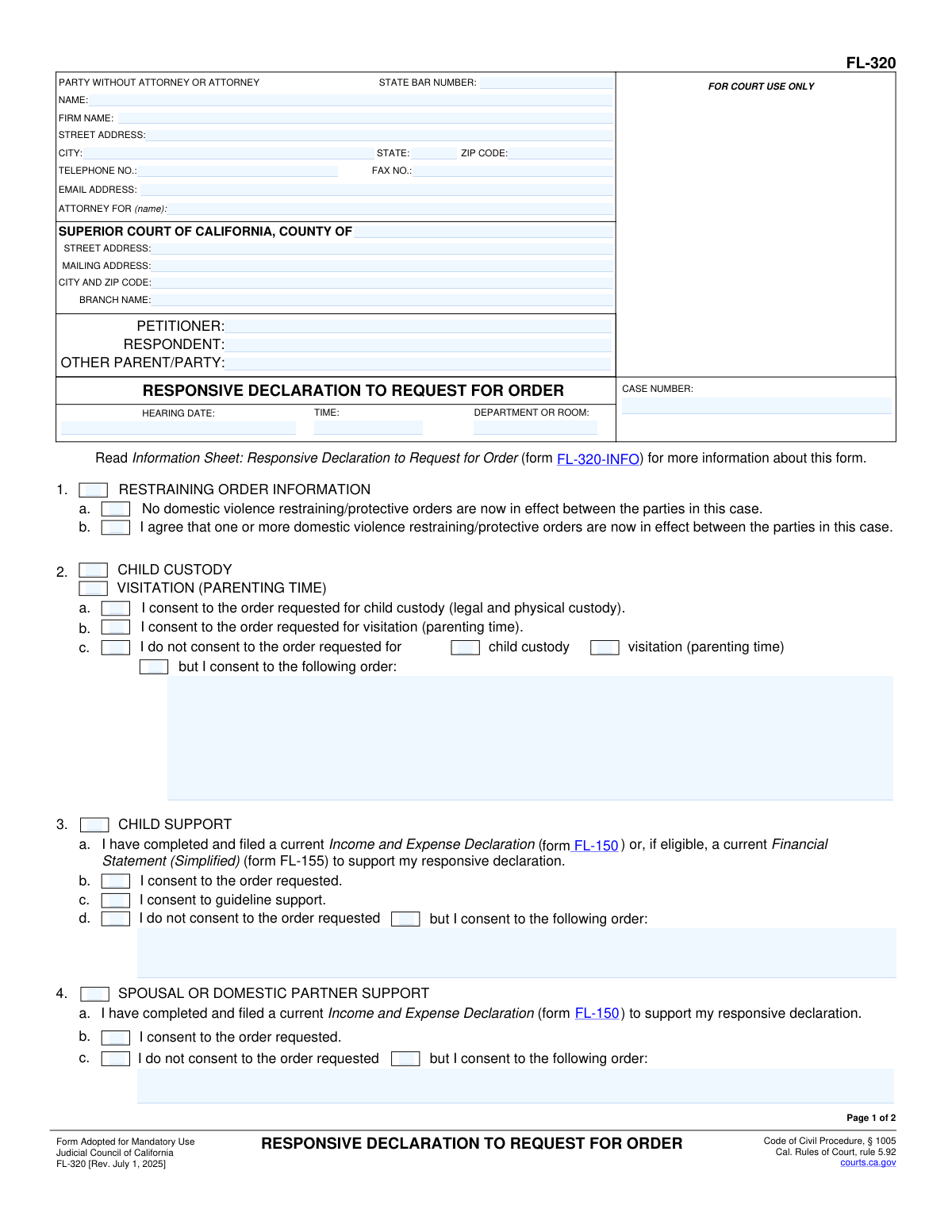
Yes! You can use AI to fill out Form FL-320, Responsive Declaration to Request for Order
Form FL-320 is a mandatory Judicial Council of California form used in family law cases to respond to a 'Request for Order' (Form FL-300). The person responding uses this form to tell the court and the other party whether they agree or disagree with the requests regarding child custody, visitation, support, property control, and other issues. Today, this form can be filled out quickly and accurately using AI-powered services like Instafill.ai, which can also convert non-fillable PDF versions into interactive fillable forms.
FL-320 is part of the
California court forms, family court forms and family law forms categories on Instafill.
Our AI automatically handles information lookup, data retrieval, formatting, and form filling.
It takes less than a minute to fill out FL-320 using our AI form filling.
Securely upload your data. Information is encrypted in transit and deleted immediately after the form is filled out.
Form specifications
| Form name: | Form FL-320, Responsive Declaration to Request for Order |
| Number of fields: | 85 |
| Number of pages: | 1 |
| Language: | English |
Instafill Demo: How to fill out PDF forms in seconds with AI
How to Fill Out FL-320 Online for Free in 2026
Are you looking to fill out a FL-320 form online quickly and accurately? Instafill.ai offers the #1 AI-powered PDF filling software of 2026, allowing you to complete your FL-320 form in just 37 seconds or less.
Follow these steps to fill out your FL-320 form online using Instafill.ai:
- 1 Navigate to Instafill.ai and upload or select Form FL-320.
- 2 Provide your personal, attorney (if any), court, and case number information as prompted by the AI.
- 3 For each section (Child Custody, Child Support, Spousal Support, etc.), indicate whether you consent to the requested order, do not consent, or consent to a different order, providing details for your proposed orders.
- 4 If you are requesting or responding to financial orders, indicate that you have filed an Income and Expense Declaration (FL-150).
- 5 Clearly state the facts that support your responses in the designated section (item 9), ensuring it does not exceed the page limit without court permission.
- 6 Review all the information populated by the AI for accuracy, then electronically sign and date the form under penalty of perjury.
- 7 Download the completed form to file with the court and serve on the other party according to court rules.
Our AI-powered system ensures each field is filled out correctly, reducing errors and saving you time.
Why Choose Instafill.ai for Your Fillable FL-320 Form?
Speed
Complete your FL-320 in as little as 37 seconds.
Up-to-Date
Always use the latest 2026 FL-320 form version.
Cost-effective
No need to hire expensive lawyers.
Accuracy
Our AI performs 10 compliance checks to ensure your form is error-free.
Security
Your personal information is protected with bank-level encryption.
Frequently Asked Questions About Form FL-320
Form FL-320 is used in California family law cases to respond to a Request for Order (Form FL-300) filed by another party. It allows you to tell the judge whether you agree with, disagree with, or want to propose different orders before your court hearing.
You should file this form if you have been served with a Request for Order and you want to respond to the requests being made. If you do not file a response, the judge may make orders based only on the other party's information.
Yes, if your response involves financial matters like child support, spousal support, or attorney's fees, you must also file a current Income and Expense Declaration (Form FL-150). You may also need other attachments depending on the specific requests.
In Section 2, check the box for 'I do not consent to the order requested for child custody/visitation.' Then, in the space provided, clearly write the specific custody and visitation schedule that you are asking the court to order instead.
Section 9 is where you provide a written statement explaining the reasons and evidence that support your position. This declaration is made under penalty of perjury and is limited to 10 pages unless the court gives you permission for more.
If you fail to file a response, the court can make orders without having your side of the story in writing. The judge may make decisions based solely on the information provided by the party who filed the Request for Order.
No, you only need to complete the sections that correspond to the orders being requested by the other party. If the request is only about child custody, you would primarily fill out Section 2 and Section 9.
After completing and signing the form, you must file the original with the court clerk and serve a copy on the other party or their attorney. Service must be done by someone over 18 who is not a party to the case.
You will need your court case number, the full names of the parties, and the hearing date, time, and department from the Request for Order you received. You should also be prepared to state your position on each requested order.
Yes, services like Instafill.ai use AI to help you accurately auto-fill form fields, which can save time and reduce errors. This ensures your information is entered correctly in the proper format.
You can use a service like Instafill.ai to easily fill out Form FL-320 online. The platform guides you through the required fields, making the process faster and more straightforward than using a standard PDF.
If you have a non-fillable or 'flat' PDF, you can upload it to a service like Instafill.ai. The platform's technology can convert it into an interactive, fillable form that you can complete, download, and print easily.
Consenting to guideline support means you agree to the child support amount calculated using the standard formula set by California law. This formula considers factors like both parents' incomes and the amount of time each parent spends with the children.
Compliance FL-320
Validation Checks by Instafill.ai
1
Case Number Presence and Consistency
This check ensures that the 'CASE NUMBER' field is filled out on both page 1 and page 2, and that the value is identical in both locations. The case number is the primary identifier for the legal proceeding, and any inconsistency or omission can lead to misfiling or rejection of the document by the court clerk. Failure to provide a consistent case number will prevent form submission until corrected.
2
Hearing Date Validity
Validates that the 'HEARING DATE' field contains a valid, future date. A hearing date must be in the future for the court to schedule the appearance. This check prevents the submission of forms with impossible, past, or incorrectly formatted dates, which would cause scheduling conflicts and processing errors.
3
Mutually Exclusive Restraining Order Selection
In Section 1, this validation ensures that the user selects either checkbox 1a ('No domestic violence restraining/protective orders are now in effect') or 1b ('I agree that one or more... orders are now in effect'), but not both. These two statements are contradictory, and selecting both would create ambiguity. The form will display an error if both or neither are selected, forcing the user to clarify the current status of protective orders.
4
Conditional Requirement for Child Custody/Visitation Details
This check verifies that if the user selects checkbox 2c ('I do not consent to the order requested... but I consent to the following order:'), the corresponding text field for detailing the proposed order is not empty. It is crucial for the court to understand the respondent's counter-proposal for custody and visitation. If this field is left blank after checking the box, the submission will be flagged as incomplete.
5
Conditional Requirement for Financial Declaration in Support Matters
This validation checks that if a user contests or proposes an alternative for Child Support (Section 3), Spousal Support (Section 4), or Attorney's Fees (Section 6), they have also checked the box indicating a current Income and Expense Declaration has been filed. Financial orders require supporting documentation, and failing to declare this can result in the court disregarding the response or delaying the hearing. The system should warn the user if they contest an order without this declaration.
6
Mutually Exclusive Consent Options for Property Control
In Section 5 (Property Control), this check ensures that the user selects either 5a ('I consent to the order requested') or 5b ('I do not consent to the order requested'), but not both. Selecting both options is logically inconsistent and makes the response unclear. The system will prevent submission until a single, unambiguous choice is made.
7
Conditional Requirement for Alternative Property Order
This validation ensures that if checkbox 5b ('I do not consent to the order requested') is selected in the Property Control section, the subsequent text field explaining the alternative order is filled out. Simply disagreeing is insufficient; the court requires a specific counter-proposal to consider. An error will be shown if the checkbox is ticked but the explanation is missing.
8
Attorney State Bar Number Validation
This check verifies that if an attorney's name is entered in the 'ATTORNEY FOR' section, the 'STATE BAR NUMBER' field is also filled and contains a valid numerical format. The State Bar Number is essential for verifying the attorney's credentials and good standing with the California Bar. Submissions with a listed attorney but a missing or invalid bar number may be rejected.
9
Party Name Consistency Across Pages
This validation ensures the names entered for 'PETITIONER' and 'RESPONDENT' on page 1 match the corresponding names on page 2. Consistent party identification is critical for legal document integrity and prevents confusion during court processing. The form will not be considered valid until the names match perfectly on all pages.
10
Signature Date Requirement and Validity
This check ensures the 'Date' field in the signature block on page 2 is completed with a valid date that is not in the future. The signature date legally attests to when the declaration was made under penalty of perjury. A missing or future date invalidates the declaration, so the system will require a valid date for submission.
11
Declarant's Printed Name Requirement
This validation confirms that the 'TYPE OR PRINT NAME' field below the signature line is filled out. This field clarifies the identity of the signatory, whose signature might be illegible. A missing printed name can cause ambiguity and lead to the document being rejected for improper execution.
12
Completeness of 'Attorney For' Field
This check ensures that the 'ATTORNEY FOR (name)' field is filled out, identifying which party the filer (or their attorney) represents. This is fundamental information for the court to understand who is making the declaration. The value should correspond to one of the parties listed, such as the Petitioner or Respondent.
13
Mutually Exclusive Child Support Response
In Section 3 (Child Support), this validation ensures that only one of the primary response options is selected: 3b ('I consent'), 3c ('I consent to guideline support'), or 3d ('I do not consent'). These options are mutually exclusive, and selecting more than one creates a conflicting response. The system must enforce a single selection to ensure the filer's position is clear.
14
Signature Action Completion
This validation ensures that the 'SIGNATURE OF DECLARANT' field has been acted upon. In a digital system, this means a digital signature has been applied or a specific 'Sign' button has been clicked to confirm the declaration. A form cannot be legally submitted without a signature, as it affirms the truthfulness of the contents under penalty of perjury.
Common Mistakes in Completing FL-320
Sections 3, 4, and 6 often require the submission of a separate Income and Expense Declaration (form FL-150) or a Financial Statement (FL-155). A very common and critical error is checking the box on this form but failing to complete and file the separate, detailed financial form. Without the required financial declaration, a judge cannot make orders for support or attorney's fees and will likely deny your request or grant the other party's request by default.
Filers often forget to enter the Case Number, Petitioner, and Respondent names on the second page, or they enter them inconsistently. All information in the header of every page must exactly match the court's records and the first page. This simple clerical error can cause the court clerk to reject the entire filing, forcing you to refile and potentially miss a critical deadline.
When checking 'I do not consent... but I consent to the following order,' many people write vague proposals like 'reasonable visitation' or 'a fair amount of support.' These statements are not specific enough for a judge to turn into a court order. Your proposal must be clear and detailed (e.g., 'I propose the children be with me on the 1st, 3rd, and 5th weekends of the month') to be seriously considered by the court.
Section 9, 'FACTS TO SUPPORT,' is the most important part of the form, yet it is often left blank, is too brief, or is filled with emotional statements rather than objective facts. This section is your opportunity to explain to the judge *why* your proposed orders should be granted. You must provide a clear, concise, and factual narrative that directly supports each request you are making or opposing in the form.
The signature under the phrase 'I declare under penalty of perjury' is what makes the document a valid legal declaration. An unsigned or undated form is legally invalid and will be rejected by the court clerk. This can lead to your response not being considered, and the court may make orders based solely on the other party's request as if you never responded.
Self-represented parties often get confused by the top-left box and may put their name in the 'ATTORNEY FOR' field or leave fields blank. If you do not have an attorney, you must enter your own name, address, and contact information, and write 'Self-Represented' or 'In Pro Per' on the 'ATTORNEY FOR' line. Incorrectly filling this section can cause confusion and delays in processing your documents.
This form is a *response* to the other party's 'Request for Order.' A common mistake is to only address the issues you care about (like custody) and ignore others (like property control or attorney's fees). If you do not check a box for a specific issue, the court may interpret your silence as agreement and grant the other party's request for that item.
Within a single numbered section (e.g., Section 2 for Child Custody), filers sometimes check multiple conflicting boxes, such as both 'I consent to the order requested' and 'I do not consent.' This makes your position on the issue completely unclear to the court. This ambiguity may cause a judge to disregard your filing for that topic and default to the other party's clear request.
The roles of 'Petitioner' (the person who started the case) and 'Respondent' are fixed throughout the life of a case. People sometimes get these reversed or put their own name in the wrong box. This creates confusion and can lead to filing rejections. AI-powered form-filling tools like Instafill.ai can help prevent this by saving case information and auto-populating party details correctly on all related forms.
When a form is only available as a non-fillable PDF, people often resort to filling it out by hand, which can result in illegible writing or information crammed into small spaces. A messy form is unprofessional and risks being misinterpreted by the clerk or the judge. Tools like Instafill.ai can convert flat PDFs into interactive, fillable versions, ensuring your submission is clean, legible, and professional.
When attorney's fees are at issue (Section 6), the court requires more than just the financial data in the FL-150. Filers often forget to also complete and attach the 'Supporting Declaration for Attorney's Fees and Costs Attachment' (form FL-158). This separate form details the legal work performed and justifies the amount requested. Forgetting this attachment will almost certainly lead to the denial of a request for fees.
Saved over 80 hours a year
“I was never sure if my IRS forms like W-9 were filled correctly. Now, I can complete the forms accurately without any external help.”
Kevin Martin Green
Your data stays secure with advanced protection from Instafill and our subprocessors

Robust compliance program
Transparent business model
You’re not the product. You always know where your data is and what it is processed for.
ISO 27001, HIPAA, and GDPR
Our subprocesses adhere to multiple compliance standards, including but not limited to ISO 27001, HIPAA, and GDPR.
Security & privacy by design
We consider security and privacy from the initial design phase of any new service or functionality. It’s not an afterthought, it’s built-in, including support for two-factor authentication (2FA) to further protect your account.
Fill out FL-320 with Instafill.ai
Worried about filling PDFs wrong? Instafill securely fills form-fl-320-responsive-declaration-to-request-for-order forms, ensuring each field is accurate.