Yes! You can use AI to fill out Request for Protected Address and Order

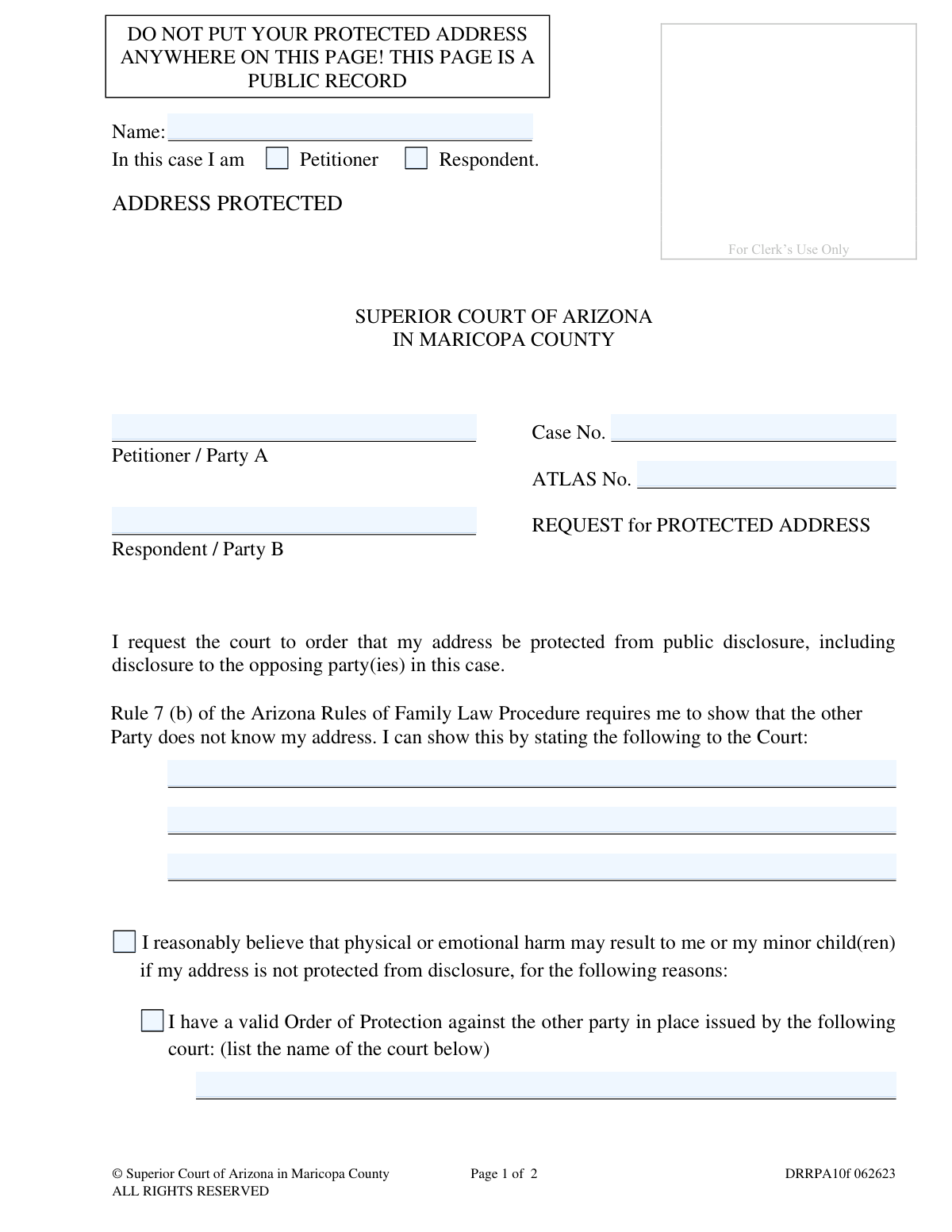
This form is a formal request to the Superior Court of Arizona in Maricopa County to protect an individual's address from public disclosure and from the opposing party in a legal case. It is crucial for individuals who fear physical or emotional harm if their location becomes known. Today, this form can be filled out quickly and accurately using AI-powered services like Instafill.ai, which can also convert non-fillable PDF versions into interactive fillable forms.
DRRPA10f is part of the County court forms and superior court forms categories on Instafill.
Our AI automatically handles information lookup, data retrieval, formatting, and form filling.
It takes less than a minute to fill out DRRPA10f using our AI form filling.
Securely upload your data. Information is encrypted in transit and deleted immediately after the form is filled out.

Form specifications

Form name: Request for Protected Address and Order
Number of fields: 37
Number of pages: 1
Language: English
main-image

Instafill Demo: How to fill out PDF forms in seconds with AI

How to Fill Out DRRPA10f Online for Free in 2026

Are you looking to fill out a DRRPA10F form online quickly and accurately? Instafill.ai offers the #1 AI-powered PDF filling software of 2026, allowing you to complete your DRRPA10F form in just 37 seconds or less.
Follow these steps to fill out your DRRPA10F form online using Instafill.ai:
  1. 1 Navigate to Instafill.ai and upload or select the 'Request for Protected Address and Order' form.
  2. 2 Enter your case information, including the Case Number, ATLAS Number, and the names of the Petitioner and Respondent.
  3. 3 Indicate your role in the case by checking the 'Petitioner' or 'Respondent' box.
  4. 4 State the grounds for your request by checking the appropriate box, such as a reasonable belief of harm or the existence of a valid Order of Protection.
  5. 5 Provide a detailed explanation in the space provided if you are selecting 'Other' as your reason, explaining why you need a protected address.
  6. 6 Acknowledge your understanding that you must provide your address separately to the court and keep it updated.
  7. 7 Review all the information for accuracy, then sign and date the form before downloading it for filing with the Superior Court.

Our AI-powered system ensures each field is filled out correctly, reducing errors and saving you time.

Why Choose Instafill.ai for Your Fillable DRRPA10f Form?

Speed

Complete your DRRPA10f in as little as 37 seconds.

Up-to-Date

Always use the latest 2026 DRRPA10f form version.

Cost-effective

No need to hire expensive lawyers.

Accuracy

Our AI performs 10 compliance checks to ensure your form is error-free.

Security

Your personal information is protected with bank-level encryption.

Frequently Asked Questions About Form DRRPA10f

This form is used to ask the Superior Court in Maricopa County to keep your residential address confidential from the public and the opposing party in a family law case.

You should fill out this form if you are a party in a family law case and you believe that you or your minor child may suffer physical or emotional harm if your address is disclosed.

You must provide your address on a separate sheet of paper submitted along with the request form. This separate sheet is for confidential court use only and will not be made public.

You must state that the other party does not know your address and explain why you fear harm if it's disclosed. You can also note if you have a valid Order of Protection against the other party.

No, an Order of Protection is not required. However, mentioning a valid, existing order can help support your request for a protected address.

A judicial officer will review your request. If good cause is found, the court will issue an 'Order for Protected Address,' and the Clerk of Court will protect your address from public disclosure.

The other party will serve documents to the Clerk of the Superior Court, who will then mail them to your protected address. Service is legally considered complete upon that mailing.

You have a continuing duty to provide the Clerk of Superior Court with your current and correct mailing address. Failure to do so may result in you not receiving important legal documents.

A judicial officer may deny your request if you do not provide a sufficient explanation for why you need a protected address. Simply leaving the reasons section blank is grounds for denial.

Yes, the request form becomes part of the public court file. This is why it is extremely important not to write your actual address anywhere on the main form.

Yes, services like Instafill.ai use AI to help you accurately auto-fill form fields with your case information, saving time and reducing the chance of errors.

Simply upload the PDF of the 'Request for Protected Address' to the Instafill.ai platform. The service will make the form fillable online, and you can securely input your information to complete it.

You can use a tool like Instafill.ai, which can convert flat, non-fillable PDFs into interactive forms. This allows you to type your answers directly into the fields instead of printing and writing by hand.

Compliance DRRPA10f
Validation Checks by Instafill.ai

1
Ensures Case Number is Provided
This check verifies that the 'Case No.' field is not empty. The Case Number is essential for associating this request with the correct legal case in the court's system. A missing Case Number would make the document impossible to file correctly, leading to rejection of the request.
2
Validates Case Number Format
This check ensures the 'Case No.' follows the specific format required by the Superior Court of Arizona in Maricopa County (e.g., 'FC2023-123456'). Incorrect formatting can cause data entry errors and prevent the document from being electronically filed or linked to the case file. If the format is invalid, the user should be prompted to correct it.
3
Confirms Requester's Role is Selected
This validation confirms that the user has selected either 'Petitioner' or 'Respondent' to identify their role in the case. This information is mandatory for the court to understand who is making the request. Failure to select a role will result in an incomplete form and processing delays.
4
Requires Justification for Protected Address
This check ensures that the requester has provided a reason for the request by filling out at least one of the justification sections. The user must either explain the fear of harm, provide details of an Order of Protection, or state other reasons. A request without any justification is legally insufficient and will be denied by a judicial officer.
5
Conditional Requirement for Court Name
This is a logical check that triggers if the user indicates they have a valid Order of Protection. It verifies that the corresponding field for the name of the issuing court is filled in. Leaving the court name blank when this option is chosen makes the claim unverifiable and incomplete.
6
Conditional Requirement for 'Other' Explanation
If the user selects the 'Other' option as their reason for needing a protected address, this validation ensures the explanation text box is not empty. The form explicitly states that a judicial officer may deny the request if no explanation is provided. This check enforces that requirement to prevent automatic denial.
7
Prohibits Address Information on Public Form
This is a critical security check that scans all free-text fields for patterns resembling a physical address, mailing address, or P.O. Box. The form explicitly warns the user not to include their address, as it's a public record. This validation helps protect the user from accidentally disclosing the very information they are trying to protect, which would defeat the purpose of the form.
8
Verifies Acknowledgment of Separate Address Sheet
This check confirms that the checkbox 'I have listed my address on a separate sheet of paper for court use' is ticked. This is a mandatory acknowledgment confirming the user understands their duty to provide the address to the court privately. Without this confirmation, the court cannot be sure it has a valid service address, and the request is incomplete.
9
Validates Signature Date
This check ensures the 'Date' field next to the signature line is filled with a valid, non-future date. An invalid or future date would call the document's authenticity into question. The date of signature is a key piece of metadata for legal documents, establishing when the request was formally made.
10
Ensures Protected Party is Identified
This validation verifies that the user has selected which party's address is to be protected (either 'Party A' or 'Party B'). This selection is present on both the request and the order, and is crucial for the Clerk of Court to know whose information to redact. An ambiguous request cannot be fulfilled.
11
Verifies Requester's Name is Provided
This check ensures the 'Name' field at the top of the form is filled out. This identifies the individual submitting the request. An anonymous or unnamed request is not legally valid and cannot be processed by the court.
12
Ensures Party Names are Present
This validation checks that the names for both 'Petitioner / Party A' and 'Respondent / Party B' are filled in. These fields define the primary parties of the case. Without this information, the request lacks the necessary context to be understood or acted upon by the court.

Common Mistakes in Completing DRRPA10f

Writing the Protected Address on the Public Form

This critical error occurs when a person, often under stress, overlooks the large, boxed warning and writes their confidential address directly on the request form. The consequence is severe: the address becomes part of the public record, completely defeating the purpose of the request and potentially exposing the filer to harm. To avoid this, carefully read all instructions and warnings, and remember to provide the address only on a separate, non-public sheet for the clerk's use.

Providing an Insufficient Reason for Protection

When not citing an existing Order of Protection, filers must explain why they fear harm. A common mistake is providing a vague or one-sentence reason like 'for safety.' This is often insufficient for a judicial officer to find 'good cause,' leading to the request being denied. To prevent this, provide a clear, concise, but detailed explanation of the circumstances that lead you to reasonably believe physical or emotional harm may occur, adding additional pages if necessary.

Forgetting to Provide the Address on a Separate Sheet

Filers sometimes focus so much on completing the main request form that they forget the crucial step of providing their actual protected address on a separate paper for court use. Without this separate sheet, the court has no address to protect or use for service, rendering the entire request useless and leading to its denial. Always prepare all required documents, including the separate address sheet, before submitting your request to the clerk.

Entering an Incorrect or Incomplete Case Number

The Case Number is the primary identifier linking this request to your ongoing family law case. People often make transcription errors or leave it blank if they don't have their case documents handy. An incorrect number can cause the request to be lost, filed in the wrong case, or rejected outright, causing significant delays in getting protection. To avoid this, carefully copy the full Case Number from other official court documents. AI-powered tools like Instafill.ai can help prevent this by validating the format or auto-filling it from existing case data.

Failing to Sign and Date the Request

An unsigned or undated form is not legally valid and will be rejected by the court clerk. This mistake often happens when people are in a hurry and overlook the signature line at the bottom of the page. A rejected form means the protection is not in place, and the filer must start the process over again, creating a dangerous delay. Always perform a final check of the entire document, specifically looking for the signature and date fields, before filing.

Incorrectly Identifying Role as Petitioner or Respondent

The form requires the filer to identify their role in the case by checking either 'Petitioner' or 'Respondent.' Confusion over these legal terms is common, especially for those without legal representation. Selecting the wrong role creates confusion in the court record and can delay processing while the clerk seeks clarification. To avoid this, remember the Petitioner is the party who started the case, and the Respondent is the party answering the initial filing.

Misunderstanding the 'Continuing Duty' to Update Address

Filers may believe that once the protected address order is granted, their work is done. However, the form states a 'continuing duty' to keep a current address on file with the Clerk of Court. Failing to update the court after moving means you will not receive important legal documents, which could result in missed hearings or default judgments against you. Always remember to formally notify the Clerk of Superior Court of any address change to ensure you continue to receive service.

Submitting an Illegible Handwritten Form

Often, these forms are only available online as flat, non-fillable PDFs, forcing users to print and fill them out by hand. This can result in illegible handwriting, which may lead to critical data entry errors by court staff or outright rejection of the form. To ensure clarity and professionalism, it is better to use a tool like Instafill.ai, which can convert a non-fillable PDF into an interactive, fillable version, allowing you to type your information cleanly and accurately.

Forgetting to Check Required Attestation Boxes

The form contains several checkboxes that serve as legal attestations, such as 'I have listed my address on a separate sheet of paper.' It's easy to focus on the written sections and overlook these small but mandatory boxes. An incomplete form, even if just missing a checkmark, can be rejected by the clerk, delaying the entire process. Avoid this by methodically reviewing the form field-by-field and ensuring every required box is checked before submission.
Saved over 80 hours a year

“I was never sure if my IRS forms like W-9 were filled correctly. Now, I can complete the forms accurately without any external help.”

Kevin Martin Green

Your data stays secure with advanced protection from Instafill and our subprocessors

Robust compliance program

Transparent business model

You’re not the product. You always know where your data is and what it is processed for.

ISO 27001, HIPAA, and GDPR

Our subprocesses adhere to multiple compliance standards, including but not limited to ISO 27001, HIPAA, and GDPR.

Security & privacy by design

We consider security and privacy from the initial design phase of any new service or functionality. It’s not an afterthought, it’s built-in, including support for two-factor authentication (2FA) to further protect your account.

Fill out DRRPA10f with Instafill.ai

Worried about filling PDFs wrong? Instafill securely fills request-for-protected-address-and-order forms, ensuring each field is accurate.

Related forms by category

County court forms Affidavit for Service by Publication/Posting (Circuit Court of Cook County, Illinois) (CCG 0013 A/B), Petition for Leave to Proceed In Forma Pauperis (Court of Common Pleas of Lehigh County, Pennsylvania, Civil Division), Designation of Record on Appeal (Civil) (Maricopa County Justice Courts, Arizona) (Form APP 8150-702), Maricopa County Justice Courts, Motion to Set Aside / Vacate Judgment, Circuit Court of Cook County, Illinois, Form CCM 0346, Order/Trial Call, Superior Court of Chatham County, Georgia, Hearing Request Form, Form CFS 601-2, County Treasurer's and Judge's Certification of Expenditures for Care and Support of Minors Other Than Wards of the Court, Tax Court of New Jersey, County Equalization Table Complaint (CN 10339), Application for Judgment to Apply Freeze Act using County Board of Taxation figures (N.J.S.A. 54:3-26), Family Department Pleading/Motion and Order, Disclosure Statement (Superior Court of Arizona in Maricopa County), Proposed Divorce / Legal Separation Resolution Statement, Notice of Default Hearing, Superior Court of Arizona in Maricopa County, Acceptance of Service for Family Court Cases, A.R.F.L.P. Rule 40(F), Affidavit of Direct Payments (Superior Court of Arizona in Maricopa County), Affidavit of Financial Information, Superior Court of Arizona in Maricopa County, Affidavit of Non-Compliance (Form DR41f), Affidavit Regarding Minor Children (Superior Court of Arizona in Maricopa County), Affidavit of Service with Signature Confirmation for Family Cases, Alternative Dispute Resolution Statement to the Court (A.R.F.L.P. 66(E)) · + 17 more →
superior court forms FW-003, Order on Court Fee Waiver (Superior Court), FW-003, Order on Court Fee Waiver (Superior Court), Form FW-003, Order on Court Fee Waiver (Superior Court), Declaration of Facts of Death (California Superior Court), Form FW-003-GC, Order on Court Fee Waiver (Superior Court) (Ward or Conservatee), Superior Court of Chatham County, Georgia, Hearing Request Form, Form FW-006, Request for Hearing About Court Fee Waiver Order (Superior Court), Form FW-002, Request to Waive Additional Court Fees (Superior Court), Form FW-008, Order on Court Fee Waiver After Hearing (Superior Court), Form FW-002-GC, Request to Waive Additional Court Fees (Superior Court) (Ward or Conservatee), Form REC-001(N), Notice of Intent to Destroy Superior Court Records; Offer to Transfer Possession, Form REC-001(R), Request for Transfer or Extension of Time for Retention of Superior Court Records, Notice of Hearing on Request for Transfer or Extension of Time for Retention of Superior Court Records; Court Order; Release and Receipt of Superior Court Records, Form REC-002(R), Release and Receipt of Superior Court Records, Superior Court of New Jersey, Application for Appeal and Order, Superior Court of New Jersey Dissolution (FM) Case Management Order, New Jersey Judiciary – Superior Court, Appellate Division Application for Permission to File Emergent Motion, New Jersey Judiciary Superior Court - Appellate Division Civil Case Information Statement, New Jersey Judiciary Superior Court - Appellate Division Criminal Case Information Statement, New Jersey Judiciary Superior Court - Appellate Division Notice of Appeal (CN: 10502) · + 71 more →