Yes! You can use AI to fill out Outpatient Behavioral Health (BH) – ABA Treatment Request: Required Information for Precertification
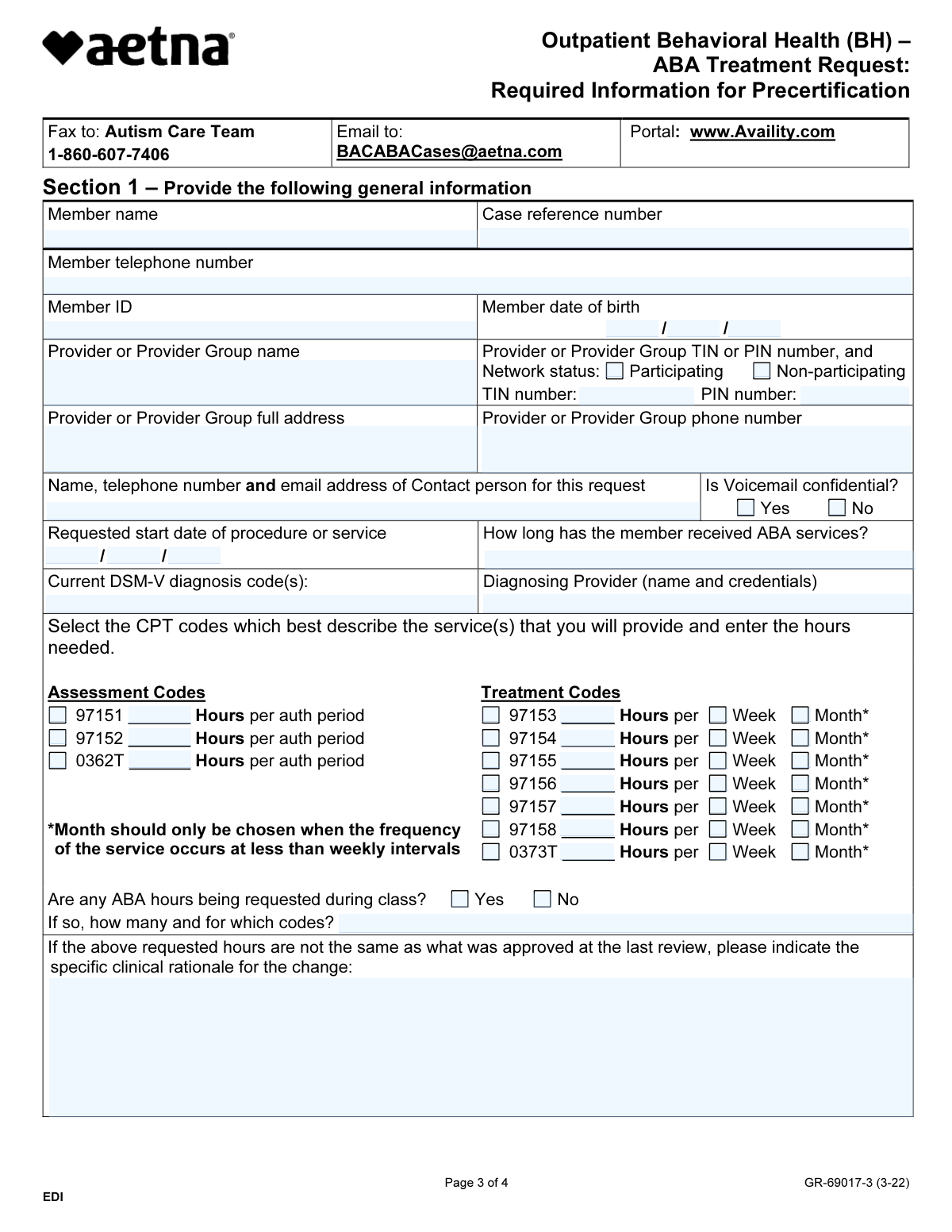
This form, also known as the ABA Treatment Request, is used by healthcare providers to submit the necessary clinical information to Aetna for the precertification of Applied Behavior Analysis (ABA) therapy. It ensures that all required details, from patient information to specific treatment codes and supporting documentation, are provided for a timely coverage determination. Today, this form can be filled out quickly and accurately using AI-powered services like Instafill.ai, which can also convert non-fillable PDF versions into interactive fillable forms.
GR-69017-3 is part of the
ABA treatment forms, behavioral health forms, health information forms, health treatment forms and patient health forms categories on Instafill.
Our AI automatically handles information lookup, data retrieval, formatting, and form filling.
It takes less than a minute to fill out GR-69017-3 using our AI form filling.
Securely upload your data. Information is encrypted in transit and deleted immediately after the form is filled out.
Form specifications
| Form name: | Outpatient Behavioral Health (BH) – ABA Treatment Request: Required Information for Precertification |
| Number of fields: | 92 |
| Number of pages: | 4 |
| Language: | English |
Instafill Demo: How to fill out PDF forms in seconds with AI
How to Fill Out GR-69017-3 Online for Free in 2026
Are you looking to fill out a GR-69017-3 form online quickly and accurately? Instafill.ai offers the #1 AI-powered PDF filling software of 2026, allowing you to complete your GR-69017-3 form in just 37 seconds or less.
Follow these steps to fill out your GR-69017-3 form online using Instafill.ai:
- 1 Navigate to Instafill.ai and upload or select the Aetna ABA Treatment Request form.
- 2 Use the AI assistant to automatically populate member details like name, ID number, and date of birth from your records.
- 3 Enter provider information, including name, TIN/PIN, network status, and contact details.
- 4 Specify the requested CPT codes for assessment and treatment, along with the required hours per week or month.
- 5 Complete the member-specific clinical information, checking off impairments, confirming essential treatment elements, and detailing any additional services.
- 6 Securely attach all required supporting documentation, such as standardized assessments (e.g., Vineland, VB-MAPP) and individualized treatment plans.
- 7 Review all entered information for accuracy, have the authorized provider sign the form, and submit it to Aetna's Autism Care Team as instructed.
Our AI-powered system ensures each field is filled out correctly, reducing errors and saving you time.
Why Choose Instafill.ai for Your Fillable GR-69017-3 Form?
Speed
Complete your GR-69017-3 in as little as 37 seconds.
Up-to-Date
Always use the latest 2026 GR-69017-3 form version.
Cost-effective
No need to hire expensive lawyers.
Accuracy
Our AI performs 10 compliance checks to ensure your form is error-free.
Security
Your personal information is protected with bank-level encryption.
Frequently Asked Questions About Form GR-69017-3
This form is used to provide the necessary clinical information for an existing precertification request for Applied Behavior Analysis (ABA) services. It helps Aetna's Autism Care Team review and process your request more quickly.
The patient's attending physician must complete all sections of the form to ensure all required clinical information is provided for the precertification request.
No, you cannot use this form to initiate a new precertification request. You must first initiate the request by calling the number on the member's ID card or by submitting it electronically through the provider portal.
You can submit the form and all documentation to the Autism Care Team via confidential fax to 1-860-607-7406, email to [email protected], or by uploading it to the provider portal at www.Availity.com.
You must include supporting documentation such as a recent standardized assessment (e.g., Vineland, ABAS), an individualized treatment plan with measurable goals, and data demonstrating the severity of impairment as detailed in Section 2.
Once Aetna receives your documentation, they will conduct a clinical review and make a coverage determination. You will be notified of the decision, and your administrative reference number will be included in the electronic response.
No, this form cannot be used for Aetna's Medicare Advantage plans or for Traditional Choice/Indemnity plans. It is intended for commercial Aetna plans and specific affiliated health plans listed on the form.
Yes, this form explicitly states that it should not be used for members in Maryland and Massachusetts.
For each treatment CPT code, enter the number of hours requested and check the box for either 'Week' or 'Month'. The form notes that 'Month' should only be chosen if the service occurs less frequently than weekly.
If the requested hours are different from what was previously approved, you must provide a specific clinical rationale for the change in the designated field in Section 1.
You are encouraged to review Clinical Policy Bulletin #648 and the Applied Behavior Analysis Medical Necessity Guide. These can be found by visiting the website on the back of the memberās ID card or on Aetna's healthcare professionals website.
Yes, services like Instafill.ai use AI to accurately auto-fill form fields from your records, which can save significant time and reduce errors. This helps you focus more on the clinical details and less on repetitive data entry.
Simply upload the ABA Treatment Request form to the Instafill.ai platform. The AI will make the form fillable and help you populate the fields with the correct member and provider information, allowing you to complete and submit it digitally.
If you have a non-fillable or 'flat' PDF, you can use a service like Instafill.ai. It can convert the static PDF into an interactive, fillable form that you can easily complete on your computer.
Compliance GR-69017-3
Validation Checks by Instafill.ai
1
Member Date of Birth Validity
Checks that the 'Member date of birth' is a valid date in MM/DD/YYYY format and falls within a reasonable age range for receiving ABA services. This prevents data entry errors and ensures the request is for an appropriately aged member, as ABA is most common for children and adolescents. If the date is invalid or implausible, the form cannot be processed.
2
Required Member and Case Identifiers
Verifies that the 'Member name', 'Member ID', and 'Case reference number' fields are all completed. These three fields are the primary keys for identifying the patient and linking this documentation to the correct precertification request in the system. A submission without this information is un-routable and will be rejected.
3
Provider Tax ID (TIN) Format
Validates that the 'TIN number' field, if filled, contains a 9-digit numeric value. The Taxpayer Identification Number is a standard identifier for providers and is crucial for network verification, claims processing, and payment. An incorrectly formatted TIN will cause downstream processing failures.
4
CPT Code Request Completeness
Ensures that for every Treatment CPT code (97153-0373T) where hours are entered, a corresponding time unit ('Week' or 'Month') is selected. This is vital for understanding the requested service frequency and volume for clinical review and authorization. Incomplete requests cannot be accurately adjudicated and will be returned.
5
Conditional Rationale for In-School ABA Hours
This check enforces a dependency: if 'Are any ABA hours being requested during class?' is answered 'Yes', the following field explaining the number of hours and codes must be filled. This justification is required for the clinical review team to assess the medical necessity of services within a school setting. Failure to provide it will result in a request for more information, delaying the decision.
6
DSM-V Diagnosis Code Presence
Confirms that the 'Current DSM-V diagnosis code(s)' field is not empty. A valid diagnosis is the foundational requirement for establishing medical necessity for any treatment, especially for ABA which is tied to specific conditions like Autism Spectrum Disorder. The request is invalid without a diagnosis code.
7
Logical Consistency of Requested Start Date
Checks that the 'Requested start date of procedure or service' is a valid date and is not in the distant past. This ensures the precertification request is for a relevant and timely period of care. Requests for services that have long since passed may be rejected or require manual intervention.
8
Conditional Explanation for Lack of Provider Collaboration
If the provider indicates the member receives other services but then answers 'No' to 'Do you collaborate with all the providers above?', this validation ensures the explanation text box is filled. Documenting the reason for a lack of collaboration is important for care coordination review and understanding potential barriers to integrated treatment. An incomplete response may delay the review process.
9
Attestation of Essential Treatment Elements
Verifies that all checkboxes in Section 2, item 3 ('Check box to ensure the following essential elements are met') are selected. These checkboxes represent a formal attestation by the provider that core requirements for ABA services are in place. An incomplete attestation means the request does not meet the minimum criteria for review and will be considered incomplete.
10
Minimum Impairment Selection
Ensures at least one impairment from the list in Section 2, item 4 is checked. Selecting one or more specific impairments is necessary to justify the need for ABA intervention by demonstrating how the member's condition adversely affects their functioning. A request with no selected impairments lacks clinical justification.
11
Supervising Provider Information Completeness
Validates that the name, credential/certification, and phone number for the supervising provider are all provided. This information is critical for verifying that the services are being directed by an appropriately qualified professional, which is a key requirement for coverage. Missing information will halt the review until it is supplied.
12
Form Signatory and Title Presence
Checks that the 'Form completed by' and 'Title' fields at the end of the form are both filled out. This signature block is required to identify the individual attesting to the accuracy of the information submitted on behalf of the provider group. An unsigned form is not legally valid and cannot be processed.
13
At Least One Service Hour Requested
Validates that at least one CPT code field (either Assessment or Treatment) contains a numeric value for requested hours. A treatment request form must actually request treatment; a submission with zero hours requested for all services is an empty request and cannot be processed. This prevents the submission of blank or incomplete forms.
14
Network Status Selection
Ensures the 'Network status' field has one of the two options, 'Participating' or 'Non-participating', selected. This information is critical for claims processing, determining member cost-share, and routing the request to the correct team. A missing status will cause processing delays.
Common Mistakes in Completing GR-69017-3
The form explicitly states it cannot be used to initiate a new precertification request; it is only for submitting required information after a request has been started via phone or an electronic portal. Submitting this form for a new case will result in the request being ignored or rejected, causing significant delays in starting treatment. To avoid this, always initiate the precertification by calling the number on the member's ID card or using the provider portal first to obtain a case reference number.
Providers often overlook the 'Case reference number' field, especially if they are used to filling out initial request forms. Since this form is for supporting an existing request, the reference number is the primary identifier linking the submitted documents to the member's case file. Without it, the submission cannot be processed, leading to delays and requiring the provider's office to be contacted for clarification, or the documents may be lost in the system.
The form specifies that hours for treatment codes (97153-0373T) should be requested per 'Week' or 'Month', with a footnote stating 'Month' should only be used for services occurring less than weekly. A common error is selecting 'Month' for a weekly service (e.g., requesting 40 hours/month instead of 10 hours/week). This ambiguity can lead to misinterpretation by the reviewer and result in an authorization for fewer hours than intended. Always use 'Week' for services that occur weekly or more frequently.
Section 2 lists extensive supporting documentation required, such as standardized assessments, treatment plans with baseline data, and parent goals. Providers frequently submit the form without all the necessary attachments. This is the most common reason for a 'pended' request, where the insurer sends a request for more information, halting the review process and delaying the start of care. Create a checklist based on Section 2, item 5 before submission to ensure every required document is included.
When requested hours differ from a previous authorization, the form requires a 'specific clinical rationale for the change.' Many providers enter vague statements like 'patient needs more hours' or 'lack of progress.' This is insufficient and will likely lead to a denial of the change. The rationale must be specific, data-driven, and linked to new target behaviors or a lack of progress on existing goals that a change in service intensity would address.
The form's first page details a complex list of applicable Aetna-affiliated plans and explicitly excludes Maryland, Massachusetts, Medicare Advantage, and Traditional Choice plans. Providers in busy practices may use a saved version of the form without verifying the member's specific plan eligibility. This mistake leads to an automatic rejection and wasted administrative time. Always confirm the member's plan is eligible for this specific form before filling it out.
The form requires the 'Diagnosing Provider (name and credentials).' A frequent omission is leaving out the credentials (e.g., M.D., Ph.D., Psy.D.). The credentials are required for the insurance company to verify that the diagnosis was made by a qualified professional according to their policy. Submitting only a name can trigger a request for more information, delaying the precertification review.
The form asks if ABA hours are requested during class time and, if so, for which codes and how many hours. Providers may check 'Yes' but fail to provide a clear justification in the supporting documentation. Insurers scrutinize in-school services to ensure they are for medical necessity and not replacing educational services the school should provide. Failure to provide a strong, detailed rationale can result in the denial of those specific hours.
The form requests the name, phone number, and email of a specific contact person, as well as their voicemail confidentiality. Often, a generic office number is provided, or the email address is left blank. If the reviewer has a simple question, the lack of direct contact information prevents a quick resolution and forces them to send a formal letter, delaying a decision by days or weeks. Always provide a direct contact to expedite communication.
As this form is a PDF, it may be printed, filled by hand, and scanned, often resulting in illegible handwriting, especially for critical numbers like Member ID or TIN. Furthermore, the signature line at the end is easily missed. An unsigned or illegible form is invalid and will be rejected outright, forcing the provider to start over. Using a tool like Instafill.ai can convert the non-fillable PDF into a clean, fillable version and helps ensure all required fields, including signatures, are completed before submission.
Saved over 80 hours a year
āI was never sure if my IRS forms like W-9 were filled correctly. Now, I can complete the forms accurately without any external help.ā
Kevin Martin Green
Your data stays secure with advanced protection from Instafill and our subprocessors

Robust compliance program
Transparent business model
Youāre not the product. You always know where your data is and what it is processed for.
ISO 27001, HIPAA, and GDPR
Our subprocesses adhere to multiple compliance standards, including but not limited to ISO 27001, HIPAA, and GDPR.
Security & privacy by design
We consider security and privacy from the initial design phase of any new service or functionality. Itās not an afterthought, itās built-in, including support for two-factor authentication (2FA) to further protect your account.
Fill out GR-69017-3 with Instafill.ai
Worried about filling PDFs wrong? Instafill securely fills outpatient-behavioral-health-bh-aba-treatment-request-required-information-for-precertification-2 forms, ensuring each field is accurate.