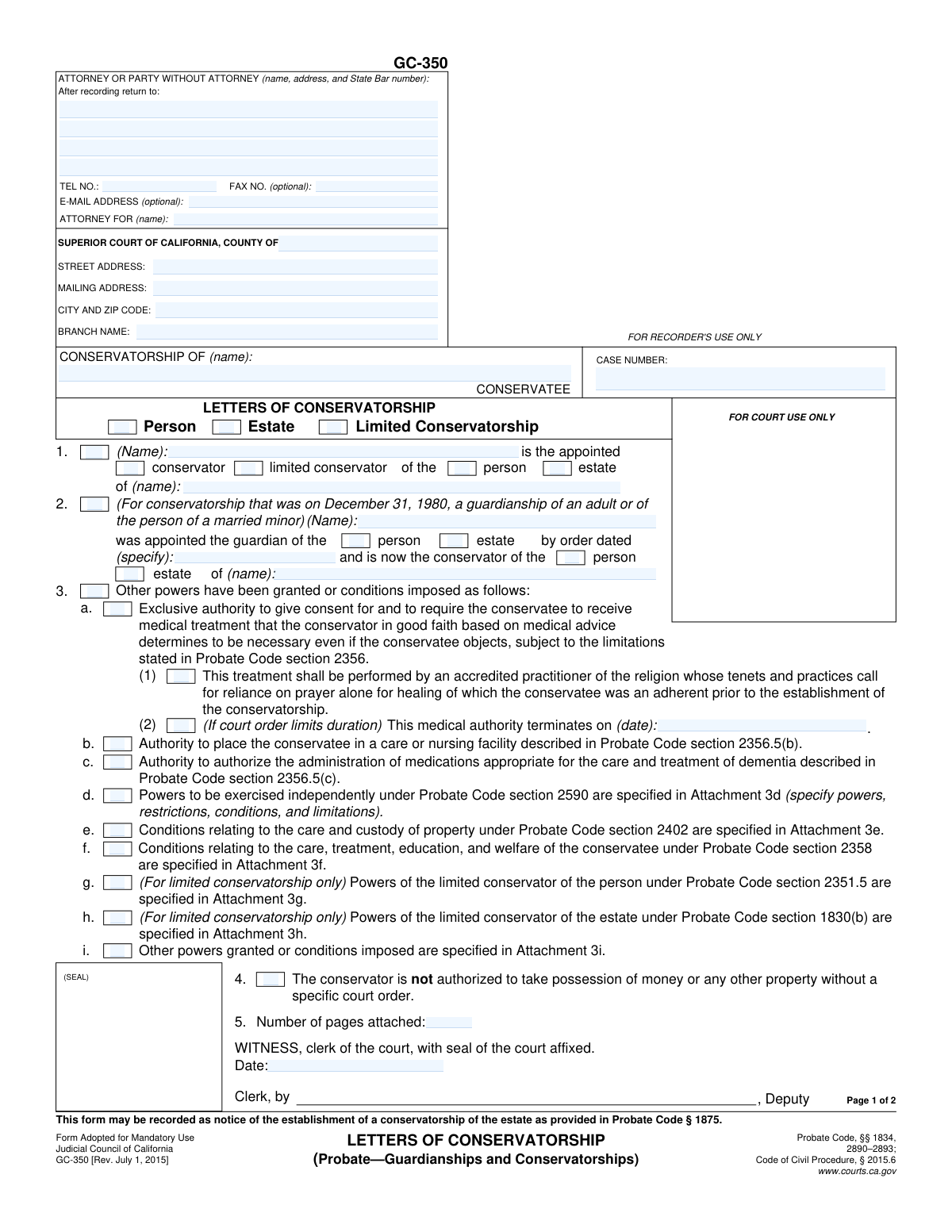
Yes! You can use AI to fill out Judicial Council of California Form GC-350, Letters of Conservatorship (Probate—Guardianships and Conservatorships)
California Form GC-350, Letters of Conservatorship, is a legal document issued by a court to certify the appointment of a conservator. It serves as official proof of the conservator's authority to act on behalf of the conservatee, outlining the specific powers and limitations of the appointment. Today, this form can be filled out quickly and accurately using AI-powered services like Instafill.ai, which can also convert non-fillable PDF versions into interactive fillable forms.
GC-350 is part of the
California court forms, California judicial forms, California probate forms and Judicial Council forms categories on Instafill.
Our AI automatically handles information lookup, data retrieval, formatting, and form filling.
It takes less than a minute to fill out GC-350 using our AI form filling.
Securely upload your data. Information is encrypted in transit and deleted immediately after the form is filled out.
Form specifications
| Form name: | Judicial Council of California Form GC-350, Letters of Conservatorship (Probate—Guardianships and Conservatorships) |
| Number of fields: | 61 |
| Number of pages: | 1 |
| Language: | English |
Instafill Demo: How to fill out PDF forms in seconds with AI
How to Fill Out GC-350 Online for Free in 2026
Are you looking to fill out a GC-350 form online quickly and accurately? Instafill.ai offers the #1 AI-powered PDF filling software of 2026, allowing you to complete your GC-350 form in just 37 seconds or less.
Follow these steps to fill out your GC-350 form online using Instafill.ai:
- 1 Navigate to Instafill.ai and upload or select the Letters of Conservatorship (Form GC-350).
- 2 Enter the attorney and court information, including the county, court address, and the name of the conservatee.
- 3 Input the case number and specify whether the conservatorship is for the person, estate, or is a limited conservatorship.
- 4 Detail the appointment by entering the conservator's name and the date of the court order.
- 5 Check the boxes corresponding to the specific powers granted or conditions imposed by the court, such as medical authority or powers related to property.
- 6 The appointed conservator must complete the Affirmation section by signing and dating the form.
- 7 Review all information for accuracy before having the court clerk certify the document, then download and distribute as needed.
Our AI-powered system ensures each field is filled out correctly, reducing errors and saving you time.
Why Choose Instafill.ai for Your Fillable GC-350 Form?
Speed
Complete your GC-350 in as little as 37 seconds.
Up-to-Date
Always use the latest 2026 GC-350 form version.
Cost-effective
No need to hire expensive lawyers.
Accuracy
Our AI performs 10 compliance checks to ensure your form is error-free.
Security
Your personal information is protected with bank-level encryption.
Frequently Asked Questions About Form GC-350
This form is the official court document that proves you have been appointed as a conservator. You present these 'Letters' to institutions like banks, hospitals, and government agencies to show you have the legal authority to act on behalf of the conservatee.
The court clerk prepares and issues this form after a judge has signed the order appointing you as conservator. You, the appointed conservator, will then receive the certified Letters to perform your duties.
No, this form is not an application. The Letters of Conservatorship are issued by the court at the end of the appointment process to grant you authority, after your petition has been approved.
A conservator of the person is responsible for the conservatee's personal and medical care, such as housing and health decisions. A conservator of the estate is responsible for managing the conservatee's finances and assets.
A limited conservatorship is specifically for adults with developmental disabilities who can manage some, but not all, of their own affairs. The powers granted to a limited conservator are tailored to the individual's specific needs and are less restrictive than a general conservatorship.
The Affirmation is your sworn oath, which you must sign, promising to perform your duties as conservator according to the law. This is a required step before the Letters are officially certified and issued to you.
You must present a certified copy of these Letters to any person or institution, such as a bank or doctor, where you need to make decisions or manage assets for the conservatee. This serves as legal proof of your authority.
This section informs banks, insurance companies, and other financial institutions of their legal obligation when you present these Letters. They are required to acknowledge your authority and file a specific form (GC-050 or GC-051) with the court confirming they have done so.
The Letters are issued by the court clerk shortly after the judge signs the order appointing you as conservator and you have fulfilled any other requirements, such as posting a bond. The timing depends on the court's processing schedule.
If you have a flat, non-fillable PDF, you can use a service like Instafill.ai. It can convert the PDF into an interactive, fillable form, making it easy to complete on your computer.
Yes, services like Instafill.ai use AI to accurately auto-fill form fields with your information, which can save you significant time and help prevent errors. You would typically use this for the top portion of the form before it is filed.
To use Instafill.ai, you would upload the GC-350 form to their platform. The AI will then populate the required fields, such as your name, address, and case information, which you can then review for accuracy before downloading the completed document.
This is a restriction, often used when a conservator of the person is appointed without being a conservator of the estate. It means you cannot access the conservatee's funds or property unless you get a separate, specific court order allowing it.
The attachments are separate pages that provide specific details about the conservator's powers or restrictions. For example, Attachment 3d would list any special financial powers, while Attachment 3f would detail conditions related to the conservatee's care and welfare.
Compliance GC-350
Validation Checks by Instafill.ai
1
Consistent Conservatee Name
This check verifies that the name of the Conservatee is entered identically in all relevant fields across the document, specifically in the page 1 header, section 2, and the page 2 header. Consistency is crucial for legal validity and to prevent ambiguity in identifying the subject of the conservatorship. A mismatch could lead to the document being rejected by the court or other institutions.
2
Consistent Case Number
This validation ensures the Case Number is identical in the header of page 1 and the header of page 2. The case number is the primary identifier for the legal proceeding in the court's filing system. Inconsistent numbers would cause filing errors, link the document to the wrong case, and render it legally ineffective.
3
Required Appointee Name
Validates that the name of the appointed conservator in Section 1 is not empty. This field identifies the individual or entity legally granted conservatorship powers. Failure to provide the appointee's name makes the entire document invalid as it does not specify who is being granted authority.
4
Appointment Type Selection
This check ensures that exactly one appointment type, either 'conservator' or 'limited conservator', is selected in Section 2. The type of conservatorship defines the legal scope and powers of the appointee. Selecting none, or both, creates ambiguity and would result in the form being legally deficient and rejected.
5
Appointment Scope Selection
Verifies that at least one scope of authority, 'person' or 'estate', is selected in Section 2. This defines whether the conservator has power over the conservatee's personal decisions (like healthcare) or financial matters. Without a defined scope, the conservator's duties are unclear, making the letters unenforceable.
6
Valid Order Date Format and Logic
This check ensures the 'order dated' field in Section 2 contains a valid date in a standard format (e.g., MM/DD/YYYY) and that the date is not in the future. This date establishes the legal origin of the appointment. An invalid or future date would call the document's authenticity and legal standing into question, likely leading to its rejection.
7
Conditional Medical Termination Date
Ensures the 'This medical authority terminates on' date field in section 3a(2) is populated only if the corresponding medical authority checkbox in 3a(1) is checked. Entering a termination date without granting the authority is illogical and contradictory. This validation prevents confusing or nonsensical entries on the legal document.
8
Logical Medical Termination Date
If a medical authority termination date is provided in section 3a(2), this check validates that the date is in the future relative to the 'order dated' from Section 2. A termination date that has already passed or precedes the appointment date is illogical. This ensures the specified conditions are meaningful and legally sound.
9
Limited Conservatorship Power Consistency
This validation confirms that if powers specific to a limited conservatorship are checked (sections 3g or 3h), the appointment type selected in Section 2 is 'limited conservator'. Granting limited conservator powers under a general conservatorship is a legal contradiction. This check maintains the logical and legal integrity of the document.
10
Attachment Count Logic
If the 'Number of pages attached' in Section 5 is a number greater than zero, this check verifies that at least one of the attachment checkboxes (3d, 3e, 3f, 3g, 3h, 3i) is marked. This ensures that if attachments are declared, the form specifies what those attachments pertain to. A mismatch could lead to confusion about which powers or conditions are officially included.
11
Attachment Checkbox Logic
This is the inverse of the attachment count check; it ensures that if any attachment checkbox (3d through 3i) is marked, the 'Number of pages attached' field contains a positive integer. Marking that an attachment exists without declaring the number of pages is an incomplete submission. This validation ensures the record is complete and all referenced documents are accounted for.
12
Affirmation Role Consistency
Verifies that the role selected in the Affirmation section on page 2 ('conservator' or 'limited conservator') is identical to the role selected in Section 2 on page 1. The appointee must affirm the correct role they are undertaking. A discrepancy would invalidate the affirmation and could be grounds for rejecting the entire document.
13
Required Affirmation Date
This check ensures the 'Executed on (date)' field within the Affirmation section on page 2 is filled with a valid date. The affirmation is the appointee's sworn statement to perform their duties, and the date of execution is a critical component of this legal act. An undated affirmation is incomplete and legally insufficient.
14
Required Attorney/Party Information
Validates that the name and address fields for the 'ATTORNEY OR PARTY WITHOUT ATTORNEY' section are completed. This information is essential for all official correspondence, service of legal documents, and identifying the responsible party for the submission. Missing information can halt legal proceedings and cause significant delays.
15
Required Court Name
This validation ensures the 'COUNTY OF' field under 'SUPERIOR COURT OF CALIFORNIA' is filled out. This identifies the specific court with jurisdiction over the case. Without this information, it's impossible to know which court issued the letters, making the document impossible to file or verify.
Common Mistakes in Completing GC-350
The appointed conservator fails to sign the 'Affirmation' section on page 2. This is one of the most common and critical omissions, often happening because the signature line is on a separate page from the main data entry fields. Without the conservator's sworn affirmation and signature, the Letters of Conservatorship are incomplete and legally invalid, and will be rejected by the court clerk. Always review both pages of the form to ensure all required signatures are present before filing.
The filer checks the wrong boxes in Section 2, selecting 'conservator' instead of 'limited conservator,' or 'person' instead of 'estate,' or vice-versa. This critical error occurs when the filer does not precisely follow the details of the court's appointment order. This mistake renders the Letters invalid as they do not reflect the actual authority granted by the court, preventing the conservator from managing the person's affairs or assets correctly. Always have the signed court order in front of you and check only the boxes that match the order exactly.
In Section 3, the filer checks boxes for specific powers, such as exclusive medical authority (3a) or placement authority (3b), that were not explicitly granted in the judge's order. This may happen from a misunderstanding of the process, assuming these powers are standard. This misrepresentation of authority is a serious error that will cause the clerk to reject the form and could have legal consequences. Only check boxes in Section 3 if the corresponding power is specifically listed in the signed court order.
The conservatee's name or the case number is entered differently across the form, such as in the header on page 1 and the header on page 2. This often happens due to simple typographical errors or not cross-referencing information. Inconsistent data can lead to the court clerk rejecting the form for filing, causing delays and requiring correction and resubmission. To avoid this, carefully proofread the entire document, ensuring the name and case number are identical in every field.
A filer checks a box in Section 3 (e.g., 3d, 3e, 3f) indicating that an attachment with specific powers is included, but then fails to attach the corresponding document. Conversely, they may include attachments but forget to check the relevant box on the form. This discrepancy creates confusion and can invalidate the powers the attachment is meant to confer. Ensure that for every attachment referenced on the form, the physical document is included, and that the 'Number of pages attached' in Section 5 is accurate.
The top-left section for 'ATTORNEY OR PARTY WITHOUT ATTORNEY' is left blank or filled out incorrectly. Self-represented parties (acting 'In Pro Per') often forget to enter their own name, address, and phone number in this section. This can result in the court being unable to contact the filer and may lead to rejection of the document. If you do not have an attorney, you must provide your own complete contact information in this box.
When filling out the court information, the filer enters the county but omits the specific branch name of the Superior Court where the case is being heard (e.g., 'Stanley Mosk Courthouse'). Many counties have multiple court locations, and filing at the wrong one causes significant delays as the Letters must be certified at the correct branch. Always verify the specific branch name from previous court documents or the court's website and enter it accurately in the 'BRANCH NAME' field.
The filer accidentally swaps the names of the conservator (the appointee) and the conservatee (the person being cared for) in Sections 1 and 2. This happens due to haste or confusion between the two roles. This fundamental error makes the document legally nonsensical and will be immediately rejected. To prevent this, carefully read the labels: Section 1 is for the appointed conservator's name, and Section 2 is for the conservatee's name.
The filer miscounts or forgets to enter the total number of attachments in the 'Number of pages attached' field (Section 5). This often occurs when multiple orders or power specifications are attached and the filer loses track. An incorrect count can lead the court clerk to question the document's completeness, potentially rejecting it or causing issues later if a page is deemed missing. Before filing, gather all attachments, count them carefully, and enter the correct number on the form.
Filers sometimes download and use an old version of the GC-350 form found through a search engine, rather than the official court website. Courts periodically update forms, and the revision date is shown in the bottom-left corner (e.g., 'Rev. July 1, 2015'). Submitting an obsolete form is a common reason for rejection by the clerk's office, forcing the filer to redo the entire document on the current version. Always download the latest version directly from the official California Courts website to ensure compliance.
Saved over 80 hours a year
“I was never sure if my IRS forms like W-9 were filled correctly. Now, I can complete the forms accurately without any external help.”
Kevin Martin Green
Your data stays secure with advanced protection from Instafill and our subprocessors

Robust compliance program
Transparent business model
You’re not the product. You always know where your data is and what it is processed for.
ISO 27001, HIPAA, and GDPR
Our subprocesses adhere to multiple compliance standards, including but not limited to ISO 27001, HIPAA, and GDPR.
Security & privacy by design
We consider security and privacy from the initial design phase of any new service or functionality. It’s not an afterthought, it’s built-in, including support for two-factor authentication (2FA) to further protect your account.
Fill out GC-350 with Instafill.ai
Worried about filling PDFs wrong? Instafill securely fills judicial-council-of-california-form-gc-350-letters-of-conservatorship-probateguardianships-and-conservatorships forms, ensuring each field is accurate.