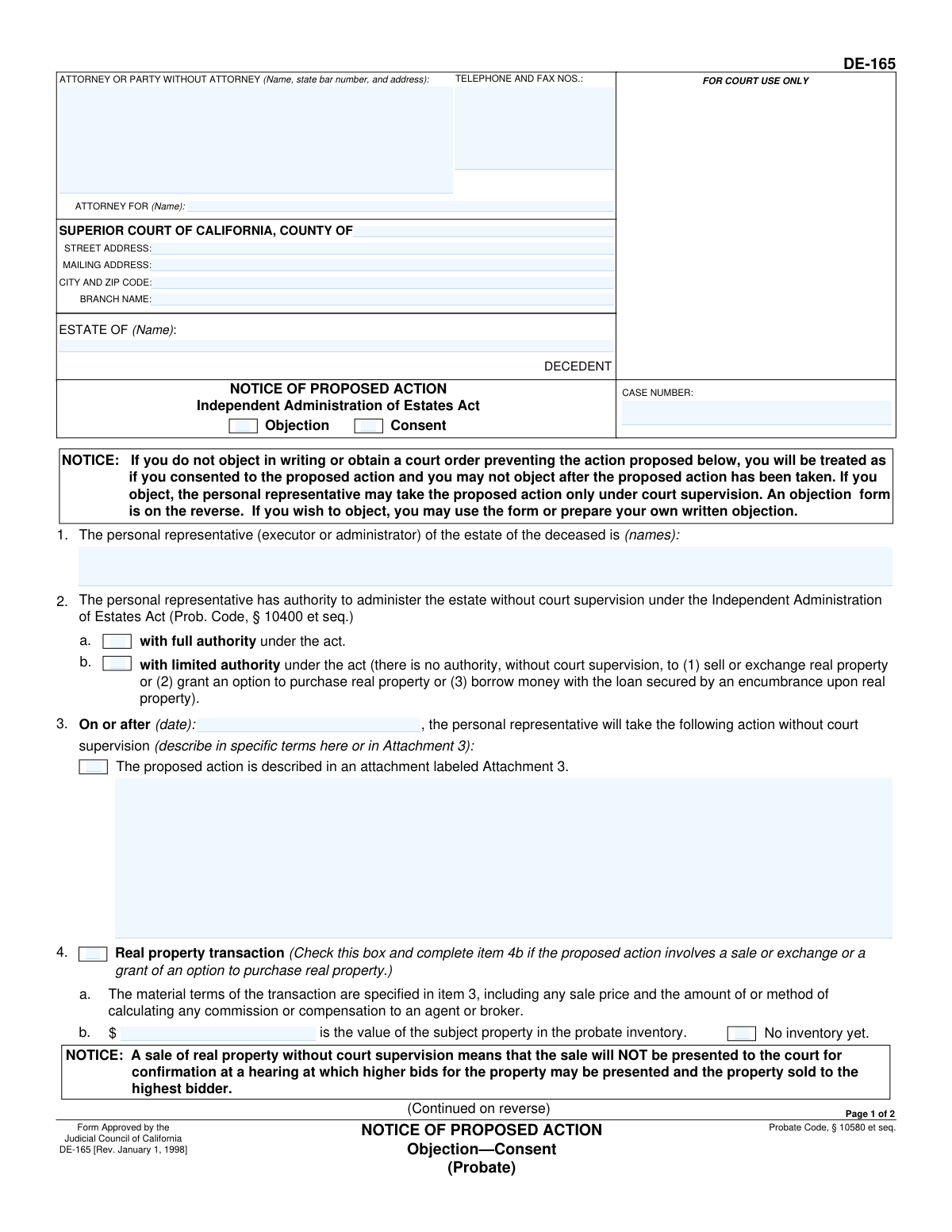
Yes! You can use AI to fill out Form DE-165, Notice of Proposed Action (Objection-Consent)
Form DE-165, the Notice of Proposed Action, is a legal document used in California probate cases when an estate is administered under the Independent Administration of Estates Act. The personal representative uses this form to inform heirs and other interested parties of a specific action they intend to take without court supervision, such as selling real property. This notice gives recipients the opportunity to either consent to the action or formally object, which would then require the representative to seek court approval. Today, this form can be filled out quickly and accurately using AI-powered services like Instafill.ai, which can also convert non-fillable PDF versions into interactive fillable forms.
DE-165 is part of the
California court forms, California probate forms and California state forms categories on Instafill.
Our AI automatically handles information lookup, data retrieval, formatting, and form filling.
It takes less than a minute to fill out DE-165 using our AI form filling.
Securely upload your data. Information is encrypted in transit and deleted immediately after the form is filled out.
Form specifications
| Form name: | Form DE-165, Notice of Proposed Action (Objection-Consent) |
| Number of fields: | 38 |
| Number of pages: | 1 |
| Language: | English |
Instafill Demo: How to fill out PDF forms in seconds with AI
How to Fill Out DE-165 Online for Free in 2026
Are you looking to fill out a DE-165 form online quickly and accurately? Instafill.ai offers the #1 AI-powered PDF filling software of 2026, allowing you to complete your DE-165 form in just 37 seconds or less.
Follow these steps to fill out your DE-165 form online using Instafill.ai:
- 1 Navigate to Instafill.ai and upload the DE-165 form or select it from the template library.
- 2 Provide the court and case information, including the county, court address, estate name, and case number.
- 3 Enter the personal representative's name and indicate whether they have full or limited authority under the Independent Administration of Estates Act.
- 4 Clearly describe the proposed action in detail. If it involves a real property transaction, check the appropriate box and provide all material terms.
- 5 Specify the date on or after which the proposed action will be taken.
- 6 Review all the information populated by the AI for accuracy, make any necessary edits, and then e-sign the document.
- 7 Download the completed form to be served to all required parties as specified in the California Probate Code.
Our AI-powered system ensures each field is filled out correctly, reducing errors and saving you time.
Why Choose Instafill.ai for Your Fillable DE-165 Form?
Speed
Complete your DE-165 in as little as 37 seconds.
Up-to-Date
Always use the latest 2026 DE-165 form version.
Cost-effective
No need to hire expensive lawyers.
Accuracy
Our AI performs 10 compliance checks to ensure your form is error-free.
Security
Your personal information is protected with bank-level encryption.
Frequently Asked Questions About Form DE-165
This form is used by the personal representative of an estate to inform heirs and beneficiaries about a specific action they intend to take, such as selling property, without court supervision. It gives you the opportunity to either consent to or object to the action.
You received this notice because you are an heir, beneficiary, or other interested party in the estate. The personal representative is legally required to notify you of the proposed action before it is taken.
You have three options: you can formally consent by signing and returning the form, you can formally object by signing and returning the objection portion, or you can do nothing. If you do not object in writing by the deadline, you are legally treated as if you have consented.
To object, you must complete and sign the 'Objection to Proposed Action' section on the second page and mail it to the personal representative at the address listed in item 5a. Your written objection must be received before the date specified in item 3.
If you object, the personal representative cannot take the proposed action without court supervision. They will have to file a petition with the court and get an order allowing the action.
If you do not send a written objection or get a court order by the deadline, you lose your right to object later. You will be treated as if you consented, and the personal representative can proceed with the action.
Full authority allows the personal representative to take most actions, including selling real estate, without court supervision. Limited authority is more restrictive and requires the representative to get court approval for major actions like selling real property.
It means the sale will not be presented to a court for confirmation. This is important because there will not be a court hearing where higher bids for the property can be presented and potentially accepted.
The personal representative of the estate (or their attorney) fills out and sends this form to all required parties. The recipients then fill out the objection or consent portion if they choose to respond.
The deadline is stated in item 3. Your objection must be received by the personal representative on or before the date listed in that box, or before the action is taken, whichever is later.
Item 7 on the form provides the name and telephone number of a person you can call for more information regarding the details of the proposed action.
Yes, if you are the personal representative, services like Instafill.ai can use AI to accurately auto-fill form fields. This helps save time and reduces the chance of errors when preparing the notice.
You can use a service like Instafill.ai to complete the form online. Simply upload the document, and the platform will provide an interactive version for you to fill out, save, and print.
If you have a flat or non-fillable PDF, you can use a tool like Instafill.ai. It can convert the static PDF into an interactive, fillable form that you can easily complete on your computer.
Compliance DE-165
Validation Checks by Instafill.ai
1
Case Number Consistency Across Pages
This check verifies that the 'CASE NUMBER' entered on page 1 is identical to the 'CASE NUMBER' entered on page 2. Mismatched case numbers can lead to filing errors and confusion, potentially invalidating the notice. If the numbers do not match, the form submission should be flagged for correction to ensure document integrity.
2
Decedent Name Consistency Across Pages
This validation ensures that the name of the decedent in the 'ESTATE OF' field is consistent on both page 1 and page 2. The decedent's name is a primary identifier for the case, and any discrepancy could cause the document to be misfiled or rejected. This check prevents administrative errors and ensures legal accuracy.
3
Exclusive Authority Selection
Validates that exactly one of the two authority options in Item 2 ('full authority' or 'limited authority') is selected. The personal representative must operate under one specific type of authority, and selecting both or neither is ambiguous and legally invalid. A failure in this check requires the user to make a single, clear choice.
4
Future Action Date Requirement
This check ensures the date provided in Item 3 ('On or after (date)') is a valid date format and is set in the future. A notice of proposed action must give recipients adequate time to respond before the action is taken. A past or invalid date would render the notice defective, so this validation is critical for legal compliance.
5
Action Description Completeness
Verifies that the proposed action is described by either filling in the text area in Item 3 or by checking the box indicating the description is in 'Attachment 3'. The notice is meaningless without a clear description of the action being proposed. If both are empty, the form is incomplete and must be corrected to inform recipients properly.
6
Conditional Real Property Information
If the 'Real property transaction' box in Item 4a is checked, this validation ensures that either a monetary value is entered in Item 4b or the 'No inventory yet' box is checked. For real property sales, the value is a material term of the transaction that must be disclosed. An error is flagged if box 4a is checked but neither of the sub-options is completed.
7
Valid Property Value Format
When a value is entered for the subject property in Item 4b, this check ensures it is a positive numerical or currency amount. A negative or non-numeric value is invalid and would misinform the recipient about the property's valuation. This maintains the integrity of the financial information presented in the notice.
8
Objection Recipient Address Completeness
This validation confirms that the name and address field in Item 5a, where objections must be sent, is not empty. This address is critical for recipients who wish to object, and its absence would disenfranchise them of their right to do so. The check ensures this vital piece of contact information is present.
9
Information Contact Phone Number Format
This check validates that the telephone number provided in Item 7 for 'more INFORMATION' follows a standard 10-digit format. An invalid or malformed phone number prevents recipients from easily seeking clarification about the proposed action. This ensures the contact method provided is functional and correctly formatted.
10
Required Personal Representative Name
Ensures that the name(s) of the personal representative(s) in Item 1 are provided. Identifying the personal representative is fundamental to the notice's validity, as it clarifies who is authorized to take the proposed action. An empty field would make the notice legally deficient and must be corrected.
11
Preparer Signature and Date Presence
This check verifies that the signature, printed name, and date for the personal representative or their attorney are all present on page 2. An unsigned or undated notice is not legally valid and cannot be enforced. The validation ensures all components of a proper execution are completed before the notice is sent.
12
Attachment Reference Validation
If the checkbox indicating the proposed action is 'described in an attachment labeled Attachment 3' is selected, this check verifies that a corresponding file or document is included with the form submission. Failing to include the referenced attachment would mean the notice lacks the required description of the action. The system should flag this to ensure the complete notice is assembled.
13
Required Court County
This validation ensures the 'COUNTY OF' field in the form's header is filled out. The county specifies the legal jurisdiction for the probate case, and this information is mandatory for court filing and record-keeping. A blank county field will result in rejection by the court clerk.
Common Mistakes in Completing DE-165
In Item 3, filers often provide a vague description of the proposed action, such as 'sell real property.' This is a mistake because the law requires a description of all material terms, including the sale price and any broker commissions. Ambiguity can lead to objections or future legal challenges, as heirs can claim they didn't have enough information to provide informed consent. To avoid this, be highly specific and detail all financial aspects of the transaction.
A frequent error is checking the wrong box in Item 2 regarding the personal representative's authority. Filers must accurately select either 'full authority' (2a) or 'limited authority' (2b) based on the official Letters of Administration issued by the court. Selecting the incorrect authority misrepresents the representative's legal power, which can invalidate the notice and void any action taken based on it.
The date entered in Item 3, specifying when the action can be taken, must be at least 15 days after the notice is mailed. People often miscalculate this date or even enter a past date, which invalidates the entire notice period required by law. This forces the representative to restart the process, causing significant delays in administering the estate. Always calculate the date carefully, adding extra days for mail delivery.
The header section containing the court, estate name, and case number is often filled out with typos or missing information. This happens due to simple data entry errors when copying from other documents. Such mistakes can lead to the notice being rejected by the court clerk or misfiled, delaying the legal process. Using a tool like Instafill.ai can help prevent these errors by auto-filling and validating case information from a central record.
Filers sometimes forget to complete Item 5a on the second page, which specifies the name and address where objections must be sent. This is a critical error as it effectively denies recipients the ability to formally object, since they don't know where to send the form. A notice without this information is legally defective and can be challenged, potentially nullifying the proposed action.
When the proposed action involves selling or granting an option on real estate, box 4a must be checked and item 4b must be completed. Forgetting to check this box is a significant oversight that fails to provide the specific, heightened notice required for real property transactions. This error can create a cloud on the property's title and may allow an heir to challenge the sale later on.
Item 4b requires the property's value as stated in the official, filed probate inventory, not a recent appraisal or market estimate. A common mistake is to enter an estimated value or leave it blank when an inventory value exists. If no inventory has been filed, the 'No inventory yet' box must be checked instead. Incorrectly reporting this value can be misleading and may trigger unnecessary objections from beneficiaries.
An unsigned Notice of Proposed Action has no legal effect. The personal representative or their attorney must sign at the bottom of page two before the notice is mailed to any interested parties. Forgetting this final step renders the document invalid, meaning any action taken is unauthorized and the entire notice process must be repeated.
Filers may describe the proposed action in a separate document but forget to check the 'described in an attachment' box in Item 3, or vice-versa. This mismatch creates confusion for the recipient, who may not know to look for an attachment or may be confused by a checked box with no corresponding document. This can lead to the notice being deemed incomplete or legally insufficient.
In the header, the 'ESTATE OF' field is for the decedent's name, while the 'ATTORNEY FOR' field is for the name of the living client (the personal representative). People often mistakenly put the decedent's name in both fields or the attorney's own name in the 'ATTORNEY FOR' field. This creates clerical confusion and may require the form to be corrected and re-filed, causing delays. AI-powered tools like Instafill.ai can help by populating these fields correctly based on case data.
Saved over 80 hours a year
“I was never sure if my IRS forms like W-9 were filled correctly. Now, I can complete the forms accurately without any external help.”
Kevin Martin Green
Your data stays secure with advanced protection from Instafill and our subprocessors

Robust compliance program
Transparent business model
You’re not the product. You always know where your data is and what it is processed for.
ISO 27001, HIPAA, and GDPR
Our subprocesses adhere to multiple compliance standards, including but not limited to ISO 27001, HIPAA, and GDPR.
Security & privacy by design
We consider security and privacy from the initial design phase of any new service or functionality. It’s not an afterthought, it’s built-in, including support for two-factor authentication (2FA) to further protect your account.
Fill out DE-165 with Instafill.ai
Worried about filling PDFs wrong? Instafill securely fills form-de-165-notice-of-proposed-action-objection-consent forms, ensuring each field is accurate.