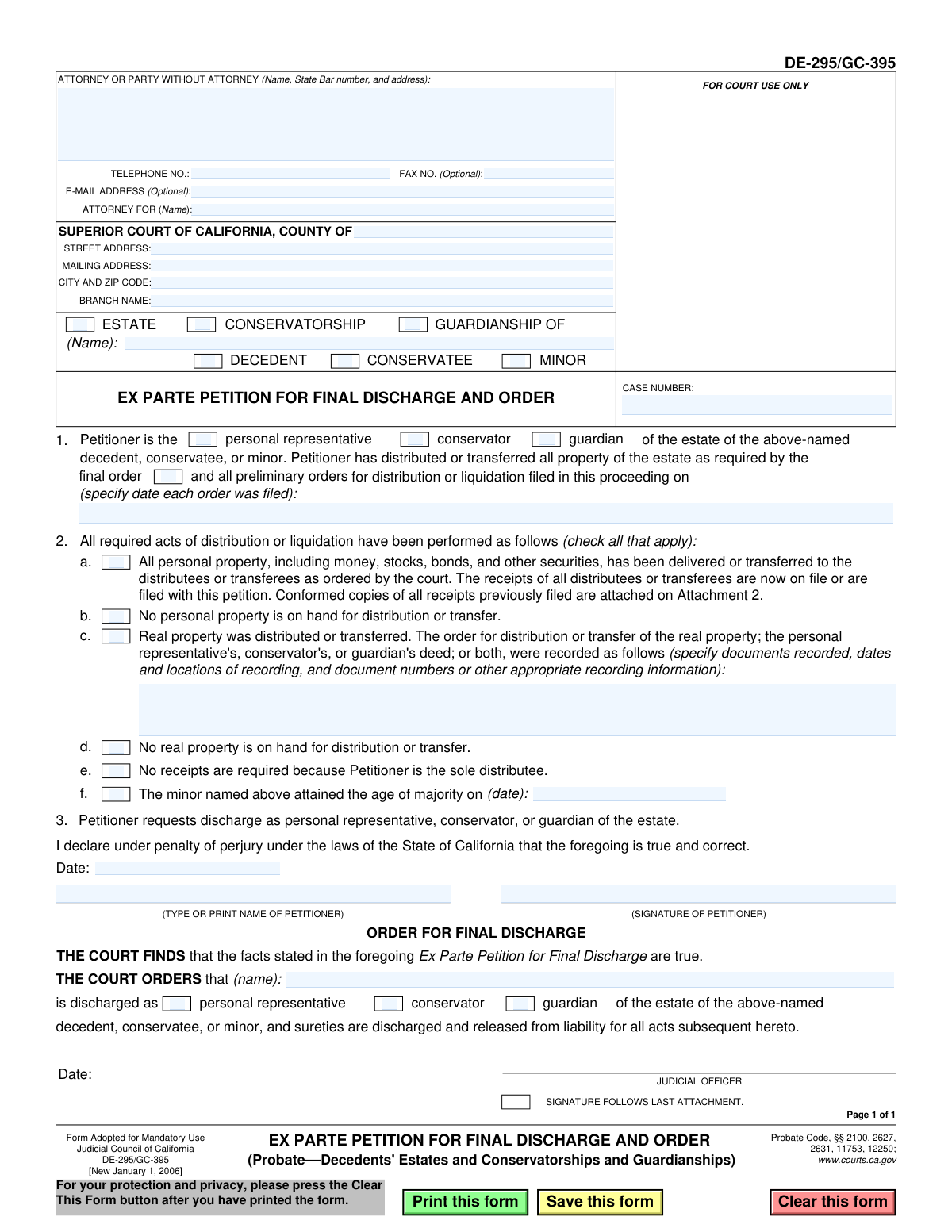
Yes! You can use AI to fill out Form DE-295/GC-395, Ex Parte Petition for Final Discharge and Order

Form DE-295/GC-395, the Ex Parte Petition for Final Discharge and Order, is a crucial legal document filed in California Superior Courts to conclude a probate, conservatorship, or guardianship case. The petitioner uses this form to declare that all required distributions of the estate's property have been completed according to the court's final order, seeking to be officially discharged from all duties and liabilities. Today, this form can be filled out quickly and accurately using AI-powered services like Instafill.ai, which can also convert non-fillable PDF versions into interactive fillable forms.
DE-295/GC-395 is part of the California court forms, California probate forms and California state forms categories on Instafill.
Our AI automatically handles information lookup, data retrieval, formatting, and form filling.
It takes less than a minute to fill out DE-295/GC-395 using our AI form filling.
Securely upload your data. Information is encrypted in transit and deleted immediately after the form is filled out.

Form specifications

Form name: Form DE-295/GC-395, Ex Parte Petition for Final Discharge and Order
Number of fields: 42
Number of pages: 1
Language: English
main-image

Instafill Demo: How to fill out PDF forms in seconds with AI

How to Fill Out DE-295/GC-395 Online for Free in 2026

Are you looking to fill out a DE-295/GC-395 form online quickly and accurately? Instafill.ai offers the #1 AI-powered PDF filling software of 2026, allowing you to complete your DE-295/GC-395 form in just 37 seconds or less.
Follow these steps to fill out your DE-295/GC-395 form online using Instafill.ai:
  1. 1 Navigate to Instafill.ai and upload or select the DE-295/GC-395 form.
  2. 2 Provide the case information, including the court, county, case number, and the name of the decedent, conservatee, or minor.
  3. 3 Identify yourself as the petitioner (personal representative, conservator, or guardian) and input your personal and attorney information.
  4. 4 Indicate the date of the final order and check the boxes that apply to confirm all acts of distribution have been performed, providing details on property transfers and receipts.
  5. 5 Review all the information auto-filled by the AI to ensure accuracy and completeness.
  6. 6 Electronically sign and date the petition under penalty of perjury.
  7. 7 Download the completed form, ready for filing with the appropriate California Superior Court.

Our AI-powered system ensures each field is filled out correctly, reducing errors and saving you time.

Why Choose Instafill.ai for Your Fillable DE-295/GC-395 Form?

Speed

Complete your DE-295/GC-395 in as little as 37 seconds.

Up-to-Date

Always use the latest 2026 DE-295/GC-395 form version.

Cost-effective

No need to hire expensive lawyers.

Accuracy

Our AI performs 10 compliance checks to ensure your form is error-free.

Security

Your personal information is protected with bank-level encryption.

Frequently Asked Questions About Form DE-295/GC-395

This form is a petition used by a personal representative, conservator, or guardian to be officially released from their duties after all assets of an estate have been distributed as ordered by the court. It is the final step to close the case and end your responsibilities.

The personal representative of a decedent's estate, the conservator of a conservatee's estate, or the guardian of a minor's estate must file this form after they have completed all court-ordered distributions.

Ex Parte means the petition is typically presented to the court without a formal hearing or notice to other parties. This is allowed because it's assumed all interested parties have already received their assets and signed receipts.

You will need your court case number, the date of the final order for distribution, and receipts from all distributees confirming they have received their property. If real property was transferred, you'll also need the recording information for the deed.

You must enter the date(s) when the final order for distribution or liquidation was filed with the court. This is the court order that authorized you to distribute the estate's assets.

You need signed receipts from every person or entity (distributee) who received money or personal property from the estate. These receipts serve as proof that you have followed the court's distribution order.

If you are the sole distributee (for example, the only heir receiving all assets), you can check box 2e. In this case, you do not need to file receipts from yourself.

No, you should leave the 'ORDER FOR FINAL DISCHARGE' section blank. This part is for the judicial officer (the judge) to complete and sign after they approve your petition.

Once the judge signs the order, you are officially discharged from your duties and you and any sureties on your bond are released from liability for any future acts related to the estate. Keep a copy of the signed order for your records.

You must file the completed and signed petition with the clerk of the Superior Court in the county and branch where your case is being handled, as listed at the top of the form.

Yes, services like Instafill.ai use AI to accurately auto-fill form fields with your case information, which can save time and help prevent common errors.

You can use a service like Instafill.ai to upload the form, fill it out interactively on your computer, and then download the completed document for printing and filing with the court.

If you have a non-fillable or 'flat' PDF, you can use a tool like Instafill.ai to convert it into an interactive, fillable form that you can easily complete online.

Compliance DE-295/GC-395
Validation Checks by Instafill.ai

1
Case Number Presence
Verifies that the 'CASE NUMBER' field is not empty. The case number is a critical identifier for linking this petition to the correct legal proceeding in the court's system. A missing case number will result in the document being rejected or misfiled, causing significant delays.
2
Case Type Consistency Check
Ensures a logical pairing between the case type and the subject's status (e.g., 'GUARDIANSHIP' must be paired with 'MINOR', 'CONSERVATORSHIP' with 'CONSERVATEE', and 'ESTATE' with 'DECEDENT'). This validation prevents incorrect or ambiguous case definitions on a legal document. An inconsistent selection would require clarification and correction, delaying the court's processing.
3
Petitioner and Subject Role Consistency
Validates that the petitioner's role selected in Section 1 corresponds logically to the subject's status (e.g., 'personal representative' for a 'decedent'). This check maintains the legal accuracy of the petition. An incorrect pairing indicates a fundamental misunderstanding of the roles and would lead to the petition's rejection.
4
Subject Name Is Required
Ensures the name of the minor, conservatee, or decedent is provided in the header section. This is the primary subject of the petition, and its absence makes the document legally meaningless. Failure to provide the name would result in an immediate rejection of the filing.
5
Petitioner Information Completeness
Checks that the name and address for the 'ATTORNEY OR PARTY WITHOUT ATTORNEY' are filled in. This information is mandatory for identifying the filer and for all official correspondence from the court. If this information is missing, the court cannot process the petition or contact the responsible party.
6
Valid Phone Number Format
Validates that the telephone number, if provided, is in a recognizable format (e.g., XXX-XXX-XXXX). This ensures the court has a reliable means of contacting the petitioner or their attorney for any urgent matters or clarifications. An invalid format could prevent successful communication.
7
Final Order Date Presence and Validity
Verifies that the date of the final order for distribution in Section 1 is provided and is a valid date in the past. This date is crucial as it establishes the legal context and timeline for the actions being reported in the petition. An invalid or future date would render the petition logically unsound.
8
Mutually Exclusive Personal Property Status
Prevents checkboxes 2a ('All personal property...has been delivered') and 2b ('No personal property is on hand') from being selected simultaneously. These two statements are contradictory. Selecting both would create ambiguity and require the court to seek clarification, delaying the discharge process.
9
Mutually Exclusive Real Property Status
Prevents checkboxes 2c ('Real property was distributed') and 2d ('No real property is on hand') from being selected at the same time. These options are mutually exclusive, and selecting both would indicate a filing error. The court would reject the petition for being logically inconsistent.
10
Conditional Real Property Recording Details
If checkbox 2c ('Real property was distributed') is selected, this validation ensures the corresponding text field with recording details is not empty. This information is required to provide proof of the legal transfer of real property. Failure to provide these details makes the claim of distribution unverifiable.
11
Conditional Age of Majority Date
If checkbox 2f ('The minor named above attained the age of majority') is checked, this rule validates that a date is entered. This date is the legal basis for terminating the guardianship. A missing date would make the reason for discharge incomplete and legally insufficient.
12
At Least One Distribution Status Required
Ensures that at least one checkbox from 2a to 2f is selected. The petitioner must declare the final status of all estate assets (personal and real property). Failing to select any option leaves the status of the estate's assets unknown, making it impossible for the court to grant a final discharge.
13
Declaration Date Requirement
Verifies that the 'Date' field in the declaration section (Section 3) is filled with a valid date that is not in the future. This date confirms when the petitioner attested to the truthfulness of the petition under penalty of perjury. A missing or future date invalidates the declaration.
14
Petitioner Printed Name Requirement
Ensures the 'TYPE OR PRINT NAME OF PETITIONER' field in Section 3 is completed. This field clearly identifies the person signing the declaration. Without a printed name, the signature may be illegible or unidentifiable, compromising the legal validity of the document.

Common Mistakes in Completing DE-295/GC-395

Incorrect Case Caption and Party Roles

Users often confuse the roles and case types at the top of the form, such as checking 'CONSERVATORSHIP' for a decedent's estate or vice-versa. This also occurs in Section 1, where the petitioner might select the wrong role (e.g., 'guardian' instead of 'personal representative'). Such errors create legal ambiguity and can lead to the court rejecting the petition, requiring the filer to start over. To avoid this, carefully read each option and match it precisely to the existing case file documents.

Inaccurate Court and Case Information

Entering an incorrect case number, county, or court branch name in the header is a frequent and critical error. A single transposed digit in the case number can prevent the document from being filed into the correct record, causing it to be lost or significantly delayed. Always double-check the case number and court details against previous official court correspondence or filings to ensure accuracy.

Failure to Provide Proof of Distribution

A common mistake is checking box 2a, which states that all personal property has been delivered, but failing to file the required receipts from the distributees. The form explicitly requires that receipts 'are now on file or are filed with this petition.' Submitting the petition without these proofs will result in its denial, as the court cannot verify that the distribution order has been followed.

Incomplete Real Property Recording Details

When box 2c is applicable, filers often provide vague information like 'Deed recorded' without the necessary specifics. The court requires precise details, including the document name (e.g., 'Personal Representative's Deed'), the date and location (county) of recording, and the document number. Omitting these details makes it impossible for the court to verify the transfer, leading to rejection of the petition.

Contradictory Checkbox Selections in Section 2

Filers sometimes make logically inconsistent selections in Section 2, such as checking both box 2a ('All personal property...has been delivered') and box 2b ('No personal property is on hand'). Similarly, checking both 2c and 2d for real property creates a contradiction. These conflicting statements will cause the court clerk to reject the form for being unclear and internally inconsistent.

Missing Critical Dates

The form requires specific dates in several places, which are often overlooked. In Section 1, the date(s) of the final or preliminary orders for distribution must be entered. Likewise, if box 2f is checked, the date the minor attained the age of majority is mandatory. Leaving these date fields blank makes the petition incomplete and will result in its rejection pending correction.

Forgetting Signature or Date

Submitting an unsigned or undated petition is one of the most common reasons for immediate rejection. A petition without a signature is legally invalid, and a missing date can create issues with filing deadlines and legal effect. The petitioner must physically or electronically sign and date the document under penalty of perjury. AI-powered form filling tools like Instafill.ai can often flag missing signature fields to help prevent this error.

Improperly Handling Attachments

The form references attachments, such as 'Attachment 2' for conformed copies of receipts, but filers may forget to include them, label them incorrectly, or fail to reference them properly in the petition. All required documents, especially receipts proving distribution, must be securely attached and clearly labeled. Failure to do so results in an incomplete filing that the court cannot approve.

Incorrectly Filling the Attorney/Party Section

Parties representing themselves (pro se or in pro per) often get confused by the 'ATTORNEY FOR (Name)' field and incorrectly write their own name there. This field should be left blank or marked 'Pro Se' or 'In Pro Per'. The filer's name, address, and contact information should be entered in the main box labeled 'ATTORNEY OR PARTY WITHOUT ATTORNEY'. This mistake can cause confusion and processing delays at the clerk's office.

Submitting an Illegible or Poorly Prepared Form

Many court forms are only available as flat, non-fillable PDFs. A common mistake is to print the form and fill it out by hand with illegible handwriting, which can lead to data entry errors by court staff or outright rejection. To avoid this, use a fillable version of the form whenever possible. If only a non-fillable PDF is available, a tool like Instafill.ai can convert it into a fillable format, ensuring all entries are clear, legible, and properly formatted.
Saved over 80 hours a year

“I was never sure if my IRS forms like W-9 were filled correctly. Now, I can complete the forms accurately without any external help.”

Kevin Martin Green

Your data stays secure with advanced protection from Instafill and our subprocessors

Robust compliance program

Transparent business model

You’re not the product. You always know where your data is and what it is processed for.

ISO 27001, HIPAA, and GDPR

Our subprocesses adhere to multiple compliance standards, including but not limited to ISO 27001, HIPAA, and GDPR.

Security & privacy by design

We consider security and privacy from the initial design phase of any new service or functionality. It’s not an afterthought, it’s built-in, including support for two-factor authentication (2FA) to further protect your account.

Fill out DE-295/GC-395 with Instafill.ai

Worried about filling PDFs wrong? Instafill securely fills form-de-295gc-395-ex-parte-petition-for-final-discharge-and-order forms, ensuring each field is accurate.

Related forms by category

California court forms Judicial Council of California Form SC-105, Request for Court Order and Answer (Small Claims), Judicial Council of California Form SC-120, Defendant’s Claim and ORDER to Go to Small Claims Court (Small Claims), Judicial Council of California Form SER-001, Request for Sheriff to Serve Court Papers, Judicial Council of California Form SER-001, Request for Sheriff to Serve Court Papers, Affidavit for Collection of Personal Property California Probate Code Section 13100, Form POS-040, Proof of Service—Civil, Declaration of Facts of Death (California Superior Court), declaration-of-marriage-for-court-proceeding-california-family-law, ADOPT-200, Adoption Request, ADOPT-200, Stepparent Adoption Request, ADOPT-210, Adoption Agreement, ADOPT-310, Contact After Adoption Agreement, Judicial Council of California Form ADOPT-200, Adoption Request, Form ADR-107, Mediation Attendance Sheet, Form ADR-110, Order Appointing Referee, Form ADR-109, Stipulation or Motion for Order Appointing Referee, Form ADR-102, Request for Trial De Novo After Judicial Arbitration, Form ADR-108, Referee's Report (Code Civ. Proc., §§ 638, 639), Form ADR-106, Petition to Confirm, Correct, or Vacate Contractual Arbitration Award, Form ADR-104, Rejection of Award and Request for Trial After Attorney-Client Fee Arbitration · + 268 more →
California probate forms Judicial Council of California Form DE-111, Petition for Probate (Probate—Decedents Estates), Judicial Council of California Form DE-111, Petition for Probate (Probate—Decedents Estates), Affidavit for Collection of Personal Property California Probate Code Section 13100, Form DE-142/DE-111(A-3e), Waiver of Bond by Heir or Beneficiary (Probate—Decedents Estates), Form DE-140, Order for Probate, Form DE-150, Letters (Probate), Form DE-154/GC-035, Request for Special Notice (Probate), Form DE-157, Notice of Administration to Creditors, Form DE-120(P), Proof of Personal Service of Notice of Hearing—Decedent's Estate or Trust, Form DE-131, Proof of Subscribing Witness (Probate), Form DE-172, Creditor's Claim (Probate), Form DE-174, Allowance or Rejection of Creditor's Claim, Form DE-221, Spousal or Domestic Partner Property Petition (Probate—Decedents Estates), Form DE-270 / GC-070, Ex Parte Petition for Authority to Sell Securities and Order, Form DE-315, Order Determining Succession to Primary Residence, Form DE-351/GC-101, Order Appointing Guardian Ad Litem—Probate, form-de-115gc-015-notice-of-hearing-on-petition-to-determine-claim-to-property, attachment-to-notice-of-hearing-proof-of-service-by-mail-probatedecedents-estates-and-guardianships-and-conservatorships, attachment-to-notice-of-hearing-proof-of-personal-service-probatedecedents-estates-and-guardianships-and, form-de-125-summons-probate · + 3 more →
California state forms Judicial Council of California Form DE-111, Petition for Probate (Probate—Decedents Estates), Judicial Council of California Form DE-111, Petition for Probate (Probate—Decedents Estates), DS 1891, Applicant/Vendor Disclosure Statement (State of California Department of Developmental Services), DL 142, Request for Cancellation or Surrender of a Driver License or Identification Card (State of California Department of Motor Vehicles), Judicial Council of California Form DE-120, Notice of Hearing—Decedent's Estate or Trust, Judicial Council of California Form DE-120, Notice of Hearing—Decedent's Estate or Trust, Murrieta Police Department Citizen Complaint Form (California Penal Code § 148.6 Advisory Statement), California Department of Social Services, Sworn Statement, State of California Department of Transportation California Civil Rights Laws Certification, State of California Department of Transportation Darfur Contracting Act Certification, Form DOT ADM-0077, State of California Department of Transportation, Contract Requirements, State of California Department of Transportation Subcontractor List, State of California Department of Transportation, Certified DVBE Summary, Bidder Declaration GSPD-05-105, State of California Level of Care Rate Determination Protocol Matrix, State of California Accessible Form, State of California Form SOC 321, Request for Order and Consent - Paramedical Services, State of California Darfur Contracting Act Certification, State of California Department of Veterans Affairs COMMERCIALLY USEFUL FUNCTION (CUF) CERTIFICATION FORM, Form ADR-100, Statement of Agreement or Nonagreement · + 35 more →