Yes! You can use AI to fill out Form DV-250, Proof of Service by Mail (CLETS) (Domestic Violence Prevention)
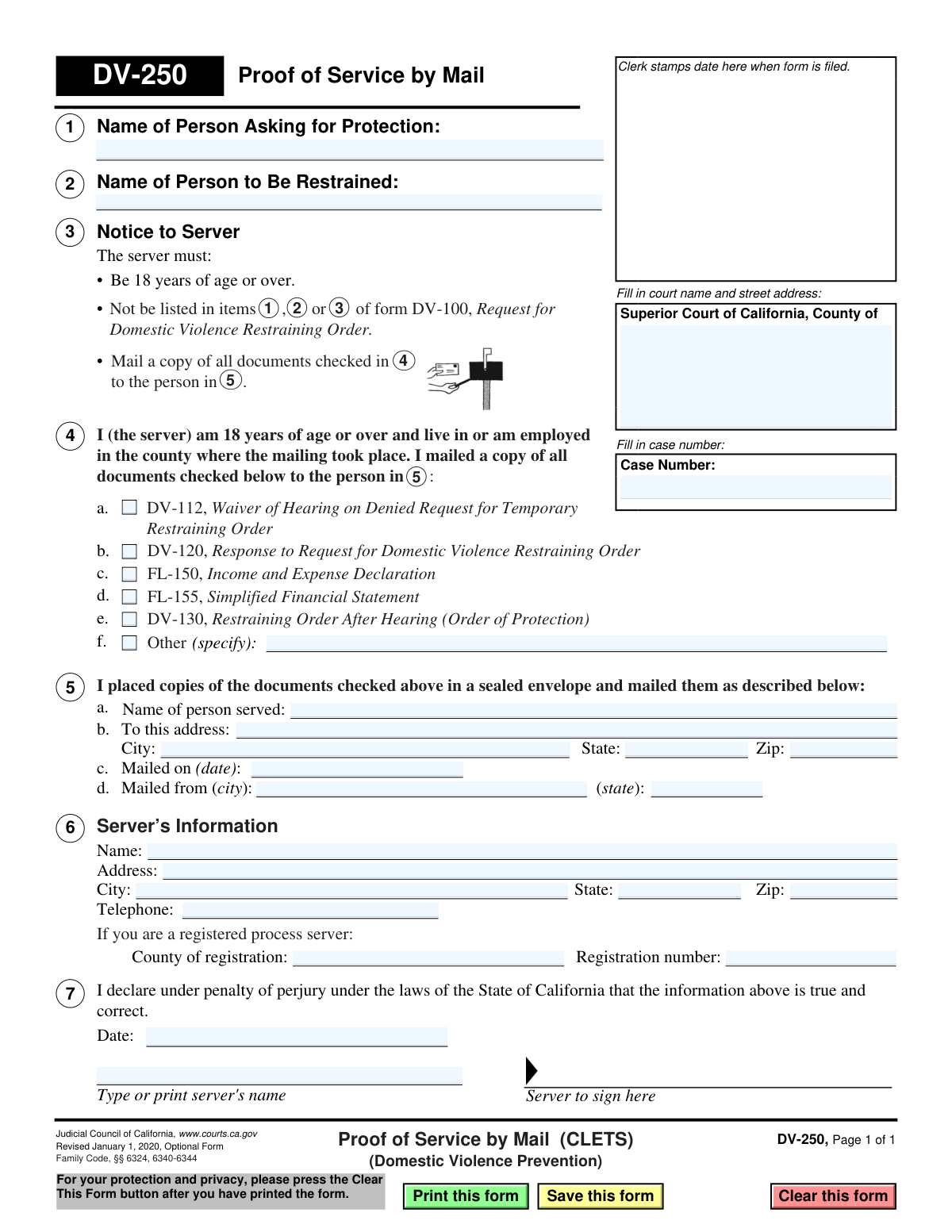
Form DV-250, Proof of Service by Mail, is a legal document filed with the Superior Court of California to certify that copies of domestic violence prevention court orders or related documents have been mailed to the involved parties. This form provides the court with official proof that a party has been properly notified, which is a critical step in legal proceedings to ensure due process is followed. Today, this form can be filled out quickly and accurately using AI-powered services like Instafill.ai, which can also convert non-fillable PDF versions into interactive fillable forms.
DV-250 is part of the
California court forms, domestic violence forms and proof of service forms categories on Instafill.
Our AI automatically handles information lookup, data retrieval, formatting, and form filling.
It takes less than a minute to fill out DV-250 using our AI form filling.
Securely upload your data. Information is encrypted in transit and deleted immediately after the form is filled out.
Form specifications
| Form name: | Form DV-250, Proof of Service by Mail (CLETS) (Domestic Violence Prevention) |
| Number of fields: | 33 |
| Number of pages: | 1 |
| Language: | English |
Instafill Demo: How to fill out PDF forms in seconds with AI
How to Fill Out DV-250 Online for Free in 2026
Are you looking to fill out a DV-250 form online quickly and accurately? Instafill.ai offers the #1 AI-powered PDF filling software of 2026, allowing you to complete your DV-250 form in just 37 seconds or less.
Follow these steps to fill out your DV-250 form online using Instafill.ai:
- 1 Navigate to Instafill.ai and upload or select the DV-250 form.
- 2 Enter the court information, including the county and street address, along with the case number.
- 3 Identify the parties involved by filling in the names of the person asking for protection and the person to be restrained.
- 4 Check the boxes corresponding to all the legal documents that were mailed, such as the Restraining Order After Hearing (DV-130) or Response (DV-120).
- 5 Provide the server's information, including their name, address, and details about the mailing such as the date and location it was sent from.
- 6 The server must carefully review the declaration, then sign and date the form to certify the information is true under penalty of perjury.
- 7 Download the completed form to print and file with the court clerk.
Our AI-powered system ensures each field is filled out correctly, reducing errors and saving you time.
Why Choose Instafill.ai for Your Fillable DV-250 Form?
Speed
Complete your DV-250 in as little as 37 seconds.
Up-to-Date
Always use the latest 2026 DV-250 form version.
Cost-effective
No need to hire expensive lawyers.
Accuracy
Our AI performs 10 compliance checks to ensure your form is error-free.
Security
Your personal information is protected with bank-level encryption.
Frequently Asked Questions About Form DV-250
This form is used to prove to the court that copies of domestic violence prevention court documents, such as a Restraining Order After Hearing (DV-130), were successfully delivered to the other party by mail.
The 'server' must fill out and sign this form. The server is the person who mailed the documents and must be 18 or older and not a party to the restraining order case.
No, you cannot serve your own court papers. You must have a neutral third party, like a friend, relative, or professional, who is at least 18 years old mail the documents and complete this form.
CLETS stands for California Law Enforcement Telecommunications System. It means the information on the served restraining order will be entered into a statewide law enforcement database, making it accessible to police officers.
The server should check the box next to the title of each specific document that was placed in the envelope and mailed to the person being restrained. This list must be accurate.
No, it is not required. While you can hire a registered process server, any person who is at least 18 and not involved in the case can act as your server for service by mail.
This section should only be completed if the server is a registered professional process server. If a friend or family member is the server, they can leave this section blank.
After the server signs the form, you must file the original DV-250 with the court clerk. It is also important to keep a copy for your own records.
The Case Number is located on the top right of all documents previously filed with the court for your case, such as the initial Request for Domestic Violence Restraining Order (Form DV-100).
Yes, services like Instafill.ai use AI to accurately auto-fill form fields, which saves time and helps prevent common errors. The server must still personally review the information and sign the form.
You can upload the DV-250 PDF to the Instafill.ai platform. Its AI will identify all the fields, allowing you or your server to quickly enter the required information before printing the completed form for a signature.
If you have a non-fillable or 'flat' PDF, you can use a service like Instafill.ai. It can convert the document into an interactive, fillable form that you can easily complete on your computer.
Compliance DV-250
Validation Checks by Instafill.ai
1
Ensures Case Information is Complete
This check verifies that the court name and case number fields at the top of the form are filled out. This information is essential for the court clerk to correctly file the document with the corresponding case file. A failure to provide this information would result in the form being rejected, delaying the legal process.
2
Confirms Identification of All Parties
Validates that the full names for both the 'Person Asking for Protection' (Item 1) and the 'Person to Be Restrained' (Item 2) are provided. These names are fundamental to the legal proceeding, identifying the protected and restrained individuals. Incomplete information would make the proof of service ambiguous and legally insufficient.
3
Verifies At Least One Document Was Served
This check ensures that at least one checkbox is marked in section 3, indicating which legal documents were mailed. The entire purpose of this form is to prove service of specific documents, so without this selection, the form is meaningless. If no documents are selected, the form cannot be accepted as valid proof.
4
Requires Specification for 'Other' Documents
If the 'Other' checkbox (3f) is selected, this validation confirms that the corresponding text field specifying the document(s) is not empty. This prevents ambiguity and ensures a clear record of all items that were served. An empty specification field would render the 'Other' selection invalid and may require clarification.
5
Recipient Name Consistency Check
This validation cross-references the 'Name of person served' in section 5a with the 'Name of Person to Be Restrained' in section 2. The names must match to confirm that the documents were served to the correct individual as required by the court order. A mismatch would invalidate the proof of service, as it would indicate service on the wrong person.
6
Validates Completeness of Service Address
Ensures that the full mailing address of the person served in section 5b, including street address, city, state, and ZIP code, is complete. A complete and accurate address is required to demonstrate that the service was directed to a location where the recipient could reasonably receive it. A partial address would call the validity of the service attempt into question.
7
Validates Mailing Date Format and Logic
This check verifies that the 'Mailed on (date)' field in section 5c contains a validly formatted date and that the date is not in the future. The date of service is a critical legal fact that determines deadlines and compliance with court orders. An invalid or future date would make the declaration nonsensical and legally void.
8
Ensures Server is Not a Party to the Case
This is a critical logical check to ensure the server is a neutral third party. It verifies that the server's name, printed in section 7, does not match the name of the person asking for protection (Item 1) or the person to be restrained (Item 2). Service by a party to the action is legally improper and would invalidate the proof of service.
9
Chronological Order of Mailing and Declaration Dates
This check confirms that the 'Mailed on (date)' in section 5c is on or before the 'Date' of the server's declaration in section 7. A person cannot legally declare under penalty of perjury that they have completed an action that has not yet occurred. A declaration dated before the mailing date would invalidate the sworn statement.
10
Server Information Completeness
Validates that the server's name and address are filled out in section 6. Identifying the server is necessary for accountability and to verify their eligibility to serve documents. Missing information could lead to the rejection of the form, as the identity and location of the person making the sworn statement would be unknown.
11
Validates Declaration Date and Signature
This check ensures that the server has provided a signature and a date in section 7. The signature and date are what make the document a sworn declaration under penalty of perjury. Without them, the form is just an unverified statement and has no legal weight as proof of service.
12
Registered Process Server Information Consistency
If a 'Registration number' is provided in section 6d, this check ensures that the 'County of registration' field is also filled. For registered process servers, both pieces of information are required to verify their professional status and jurisdiction. Incomplete registration information could prevent verification and cast doubt on the service.
13
Valid ZIP Code Format
This validation checks that the ZIP code fields in the service address (5b) and server's address (6b) follow a standard 5-digit or 9-digit (ZIP+4) format. Correct formatting ensures data integrity and is crucial for mail delivery verification. An incorrectly formatted ZIP code could suggest a data entry error or an invalid address.
14
Valid Telephone Number Format
This check verifies that the server's telephone number in section 6c is in a recognizable format (e.g., 10 digits, possibly with parentheses, spaces, or dashes). While not always legally essential, a valid phone number is important for contact and verification purposes if questions about the service arise. It helps ensure the server can be reached for clarification.
Common Mistakes in Completing DV-250
The person asking for protection (listed in box 1) incorrectly fills out the server information and signs the form in box 7. This is a critical error because you cannot legally serve documents in your own case. This will invalidate the proof of service, causing the court to reject it and potentially leading to the dismissal of the restraining order for lack of service. To avoid this, a neutral third party who is 18 or older and not a party to the case must be the one to mail the documents and sign this form.
Filers often forget to enter the full court name and address or mistype the Case Number at the top of the form. This happens due to oversight or not having the case file readily available. An incorrect case number can lead to the document being misfiled or rejected, causing significant delays and preventing the court from knowing that the restrained person has been properly notified. Always double-check the Case Number and court details against your other case documents before filing.
In section 2, the server fails to check the boxes for all the documents that were included in the mailing. This can create legal challenges later, as there is no official record that the restrained person received crucial documents like the Restraining Order After Hearing (DV-130). The server must carefully review the contents of the envelope and check off every single form that was mailed to ensure a complete and accurate record.
The server enters the date they are filling out the form in box 5b, rather than the actual date the documents were placed in the mail. The date of mailing is legally significant for calculating deadlines and confirming compliance with court orders. An incorrect date can jeopardize the validity of the service. The server should fill out this form immediately after mailing the documents to ensure the date is accurate.
The person chosen to mail the documents is one of the parties listed in the restraining order case. The instructions explicitly state the server cannot be a party listed on form DV-100. Using an ineligible server invalidates the service entirely, meaning the court will not recognize that the documents were delivered, which can halt the case proceedings. Ensure the server is a neutral adult, such as a friend, relative not involved in the case, or a professional process server.
The filer incorrectly enters the 'Name of Person to Be Restrained' in the field for the 'Name of Person Asking for Protection,' and vice-versa. This simple mix-up can cause significant confusion in the court record and may lead to the form being rejected by the clerk. To prevent this, carefully read each label and cross-reference the names with the initial Request for Domestic Violence Restraining Order (DV-100) to ensure they are in the correct fields.
The form is submitted without the server's signature or the date of signing in box 7. An unsigned form is not a valid legal declaration and will be immediately rejected by the court. This mistake often happens when the protected person fills out the form for the server but forgets to have them actually sign it. The server must personally sign and date the form under penalty of perjury after all other information has been accurately entered.
In section 5a, the server enters their own address instead of the address where the documents were mailed *to* (the restrained person's address). The purpose of this section is to record where the restrained person was served. This error makes it appear as if the server mailed the documents to themselves, invalidating the proof of service. Always enter the restrained person's full and correct mailing address in the 'To this address' fields.
The server's printed name in box 7 or other key information is unreadable. Court clerks must be able to read all information, especially the server's name, to process the form correctly. If the form is illegible, the clerk may reject it, causing delays. To avoid this, print clearly in block letters. AI-powered tools like Instafill.ai can convert flat PDFs into fillable versions, allowing you to type information for maximum clarity.
The server checks the 'Other' box in section 2f but fails to write in a description of the additional documents that were served. This makes the proof of service incomplete, as the court has no record of what these 'other' documents were. If you check the 'Other' box, you must always provide a specific list of the additional forms or papers that were included in the mailing.
Saved over 80 hours a year
“I was never sure if my IRS forms like W-9 were filled correctly. Now, I can complete the forms accurately without any external help.”
Kevin Martin Green
Your data stays secure with advanced protection from Instafill and our subprocessors

Robust compliance program
Transparent business model
You’re not the product. You always know where your data is and what it is processed for.
ISO 27001, HIPAA, and GDPR
Our subprocesses adhere to multiple compliance standards, including but not limited to ISO 27001, HIPAA, and GDPR.
Security & privacy by design
We consider security and privacy from the initial design phase of any new service or functionality. It’s not an afterthought, it’s built-in, including support for two-factor authentication (2FA) to further protect your account.
Fill out DV-250 with Instafill.ai
Worried about filling PDFs wrong? Instafill securely fills form-dv-250-proof-of-service-by-mail-clets-domestic-violence-prevention forms, ensuring each field is accurate.