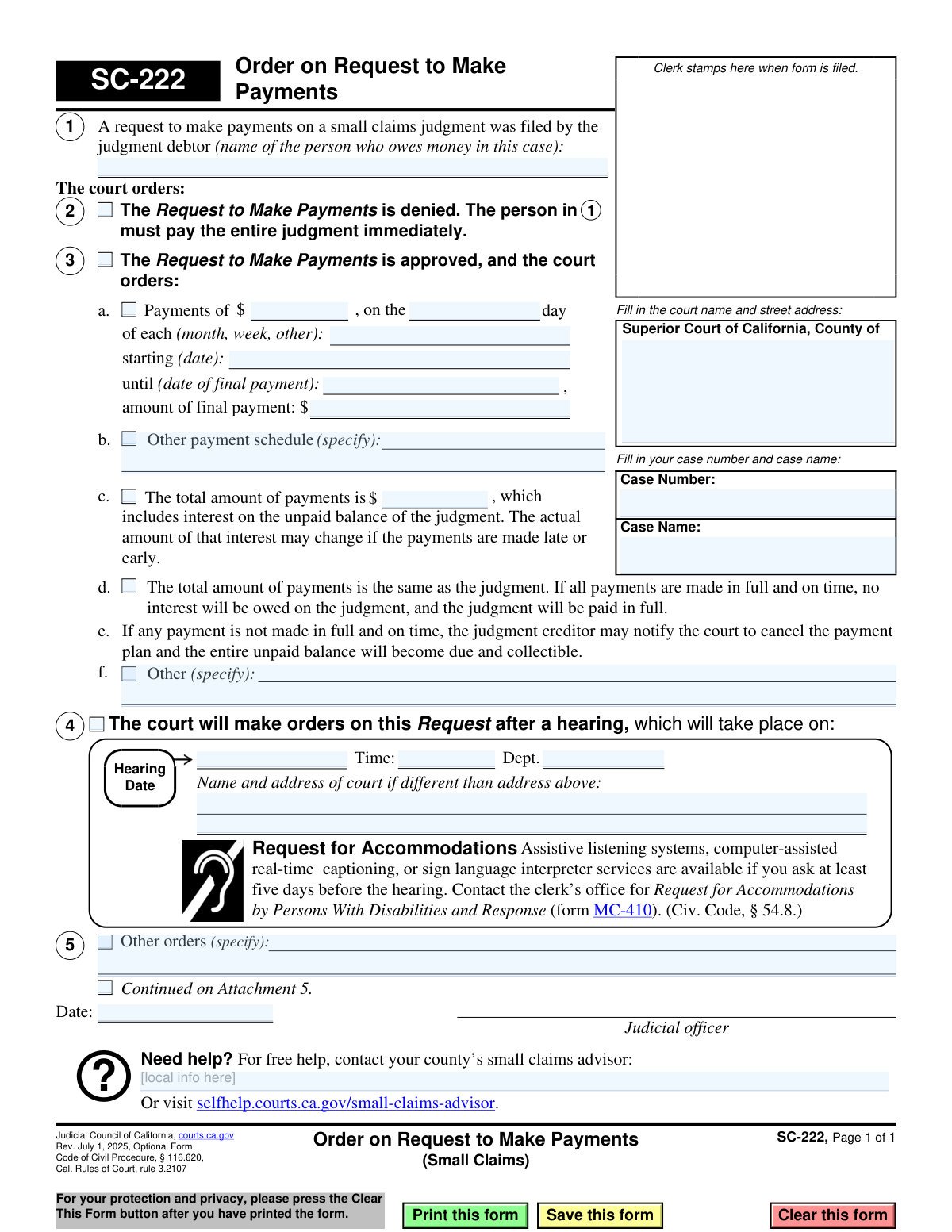
Yes! You can use AI to fill out Form SC-222, Order on Request to Make Payments (Small Claims)
Form SC-222 is a judicial order issued by a California Superior Court in a small claims case. It formalizes the court's decision on a judgment debtor's request to pay a judgment in installments rather than a lump sum. The order will either deny the request, making the full judgment due immediately, or approve it and specify the exact payment schedule. Today, this form can be filled out quickly and accurately using AI-powered services like Instafill.ai, which can also convert non-fillable PDF versions into interactive fillable forms.
SC-222 is part of the
California court forms, court claim forms and small claims forms categories on Instafill.
Our AI automatically handles information lookup, data retrieval, formatting, and form filling.
It takes less than a minute to fill out SC-222 using our AI form filling.
Securely upload your data. Information is encrypted in transit and deleted immediately after the form is filled out.
Form specifications
| Form name: | Form SC-222, Order on Request to Make Payments (Small Claims) |
| Number of fields: | 34 |
| Number of pages: | 1 |
| Language: | English |
Instafill Demo: How to fill out PDF forms in seconds with AI
How to Fill Out SC-222 Online for Free in 2026
Are you looking to fill out a SC-222 form online quickly and accurately? Instafill.ai offers the #1 AI-powered PDF filling software of 2026, allowing you to complete your SC-222 form in just 37 seconds or less.
Follow these steps to fill out your SC-222 form online using Instafill.ai:
- 1 Navigate to Instafill.ai and upload or select the SC-222 form.
- 2 Enter the court information, case number, and case name in the designated fields at the top of the form.
- 3 Identify the name of the judgment debtor who filed the request to make payments in section 1.
- 4 Indicate the court's decision by checking the box for either denying the request (section 2) or approving it (section 3).
- 5 If the request is approved, fill in the details of the payment plan in section 3, including the payment amount, frequency, start date, and total amount.
- 6 If the court is setting a hearing on the matter, provide the hearing date, time, and location in section 4.
- 7 The judicial officer will review the completed form, add any other specific orders, and then date and sign it to make the order official.
Our AI-powered system ensures each field is filled out correctly, reducing errors and saving you time.
Why Choose Instafill.ai for Your Fillable SC-222 Form?
Speed
Complete your SC-222 in as little as 37 seconds.
Up-to-Date
Always use the latest 2026 SC-222 form version.
Cost-effective
No need to hire expensive lawyers.
Accuracy
Our AI performs 10 compliance checks to ensure your form is error-free.
Security
Your personal information is protected with bank-level encryption.
Frequently Asked Questions About Form SC-222
Form SC-222 is the court's official decision on a request made by a judgment debtor to pay a small claims judgment in installments. It is not a form you fill out, but rather an order you receive from the court.
A judge or judicial officer completes and signs Form SC-222. It is an order that communicates the court's ruling on a payment plan request previously submitted by the person who owes money (the judgment debtor).
If box 2 is checked, it means the court has denied the request to make payments in installments. The judgment debtor must pay the entire judgment amount immediately.
If box 3 is checked, the court has approved the request for a payment plan. The form will specify the exact payment amount, how often payments are due, and the date the first payment must be made.
According to the form, if any payment is not made in full and on time, the judgment creditor can notify the court to cancel the payment plan. If canceled, the entire unpaid balance of the judgment becomes due immediately.
If box 4 is checked, the court has scheduled a hearing to make a decision on the payment request. You must appear in court on the date, time, and at the location specified on the form.
The order will specify how interest is handled. The court may order a total payment amount that includes future interest, or it may state that no interest will be owed if all payments are made on time as agreed.
The judgment debtor is the person or party who lost the small claims case and has been ordered by the court to pay money to the other party, who is known as the judgment creditor.
The form advises that you can get free help from your county’s small claims advisor. You can also visit the California Courts self-help website for more information and resources.
If a hearing is scheduled, you must contact the clerk’s office at least five days before the hearing to request accommodations. You will need to fill out a 'Request for Accommodations by Persons With Disabilities' (form MC-410).
Yes, while the court fills out this specific order (SC-222), you would have first filed a request form. Services like Instafill.ai use AI to help you accurately auto-fill the initial 'Request to Make Payments' form, saving time and reducing errors.
You can use a service like Instafill.ai to complete the necessary request form online. Simply upload the form to the platform, and its AI will help you fill in the required fields accurately before you print and file it.
If you have a flat, non-fillable PDF, you can use Instafill.ai to make it interactive. The service can convert the document into a fillable form, allowing you to easily type your information directly onto it.
Compliance SC-222
Validation Checks by Instafill.ai
1
Ensures Core Case Information is Complete
This check verifies that the 'Court Name', 'Case Number', and 'Case Name' fields are all filled out. This information is fundamental for identifying and filing the document correctly within the court system. A failure to provide this information would render the form unusable as it cannot be associated with a specific legal case.
2
Validates Case Number Format
This validation ensures the 'Case Number' field conforms to the standard format used by the Superior Court of California. Incorrect case numbers can lead to misfiling, delays in processing, or the order being applied to the wrong case. This check prevents data entry errors and ensures the document is correctly routed.
3
Requires Judgment Debtor Name
This check confirms that the name of the judgment debtor in section 1 is provided. The entire order is contingent upon identifying the person who owes money and is subject to the payment plan. Without this name, the order is legally unenforceable and has no subject.
4
Enforces Mutually Exclusive Order Selection
This validation ensures that only one of the primary order checkboxes in sections 2, 3, or 4 is selected. The court can either deny the request (2), approve it (3), or schedule a hearing (4), but it cannot do more than one of these simultaneously. This prevents logical contradictions in the court's order.
5
Conditional Requirement for Approved Payment Details
If the 'Request is approved' checkbox (section 3) is selected, this check verifies that a payment schedule is defined in either sub-section 3a or 3b. An approved request must specify the terms of payment. Failure to provide these details makes the approval order incomplete and unenforceable.
6
Validates Payment Amount and Final Payment Format
This check ensures that the payment amount and final payment amount fields in section 3a are entered as valid, positive currency values. These fields must contain numeric data to define the payment plan. Non-numeric or negative values would make the financial terms of the order nonsensical.
7
Verifies Payment Date Sequence
This validation confirms that the 'starting date' for payments in section 3a is a valid date and that the 'date of final payment' is a valid date that occurs after the starting date. A payment plan cannot end before it begins. This check maintains the logical integrity of the payment timeline.
8
Conditional Requirement for 'Other' Payment Frequency
If the payment frequency in section 3a is set to 'other', this check ensures the adjacent text field is filled out to specify what that frequency is. The term 'other' is insufficient on its own to create a clear and enforceable payment schedule. This validation prevents ambiguity in the court's order.
9
Enforces Mutually Exclusive Total Payment Specification
This check ensures that for an approved payment plan (section 3), either a specific 'total amount of payments' is entered in 3c OR the checkbox in 3d ('total amount is the same as the judgment') is selected, but not both. These are two different ways to define the total, and selecting both would be contradictory. This prevents conflicting information on the form.
10
Conditional Requirement for Hearing Details
If the checkbox in section 4 is selected to schedule a hearing, this validation verifies that the 'Hearing Date', 'Time', and 'Dept.' fields are all completed. Scheduling a hearing requires specifying when and where it will occur. Missing this information would make the notice of hearing invalid and ineffective.
11
Validates Future Hearing Date
This check ensures that the 'Hearing Date' entered in section 4 is a date in the future. A court hearing cannot be scheduled for a past date. This validation prevents clerical errors and ensures the parties are given proper and valid notice of a future court appearance.
12
Requires Judicial Officer Signature Date
This validation verifies that the 'Date' field next to the 'Judicial officer' signature line is filled. This date is crucial as it establishes when the order was officially made by the court. An undated order may be considered invalid or its effective date could be disputed.
Common Mistakes in Completing SC-222
Users often enter a partial court name, transpose digits in the case number, or use informal party names. This happens due to haste or not having the official court documents for reference. An incorrect case identifier will cause the court clerk to reject the filing, as it cannot be matched to the existing case file, leading to significant delays. To avoid this, meticulously copy the full court name, address, case number, and case name exactly as they appear on previous court documents. AI-powered tools like Instafill.ai can help by saving and auto-filling correct case information across multiple forms.
In section 1, filers may misspell the judgment debtor's name or use a nickname instead of the full legal name listed on the judgment. This error can render the payment order ambiguous or legally unenforceable, as it doesn't clearly identify the obligated party. Always verify the debtor's full legal name from the original small claims judgment before filling out this form. This ensures the order is precise and can be properly enforced.
When detailing the payment plan in section 3a, people often write vague terms like 'bi-weekly' in the frequency field instead of specifying 'week' or 'month', or they fail to describe the schedule when selecting 'other'. This ambiguity makes the order unenforceable and leads to future disputes about payment due dates. To prevent this, clearly specify a standard interval (week, month) or provide a precise, unambiguous description if the schedule is irregular. Using a tool that structures this data can prevent such vague entries.
A frequent error is when the payment amounts in section 3a do not logically add up to the total judgment, or the final payment amount is calculated incorrectly. This often results from manual math errors or misunderstanding how interest accrues. An illogical payment plan will be rejected by the judge, delaying the resolution. It's crucial to double-check all calculations to ensure the periodic payments, final payment, and total judgment amount are consistent. AI form-fillers can integrate calculators to validate these fields automatically.
In section 3a, users may enter dates in an incorrect format (e.g., DD-MM-YYYY instead of MM/DD/YYYY) or input illogical dates, such as a start date in the past or an end date before the start date. These errors make the payment schedule nonsensical and will cause the court to reject the form for correction. Always use the standard MM/DD/YYYY format and carefully check that the payment timeline is logical. Tools like Instafill.ai can enforce correct date formatting and flag logical inconsistencies.
Filers often get confused between section 3c (total payments include interest) and 3d (interest is waived if all payments are on time), leading them to check the wrong box or miscalculate the total amount. This mistake can create significant financial confusion and disputes over whether interest is owed. It is vital to understand the judge's order or the agreement between parties regarding interest before selecting an option. If unsure, seek advice from the small claims advisor.
A person filling out a proposed order might mistakenly check conflicting boxes, such as checking both 'Denied' (section 2) and 'Approved' (section 3). This usually happens from rushing or misunderstanding that these options are mutually exclusive. A form with contradictory selections is invalid and will be returned, halting the entire process. Carefully read each section and select only one primary outcome for the request. AI-powered form fillers can be designed to prevent the selection of mutually exclusive checkboxes.
When using section 5 for 'Other orders', a user might write 'See Attachment 5' but forget to check the 'Continued on Attachment 5' box or fail to physically include the attachment with the filing. This oversight means the court cannot legally consider the information on the missing page. To avoid this, always check the corresponding box for any attachment and ensure all referenced documents are securely stapled or clipped to the main form before submission.
If a hearing is required (section 4), filers may check the box but leave the date, time, or department fields blank, assuming the clerk will fill them in. While the clerk schedules the hearing, leaving these fields blank on a proposed order can cause confusion and processing delays. If you are preparing a proposed order, it's best to leave this section for the court to complete unless you have been given a specific hearing date to enter. If the form is a non-fillable PDF, a tool like Instafill.ai can convert it into a fillable version, making it easier to manage these fields.
A self-represented litigant or clerk might mistakenly sign or date the form in the space reserved for the 'Judicial officer' at the bottom of the page. This is a critical error as only a judge or commissioner can sign here to make the order official. A form signed in the wrong place is invalid and will be immediately rejected by the court. Always check forms for designated signature lines and only sign in the area specified for you, if any.
Saved over 80 hours a year
“I was never sure if my IRS forms like W-9 were filled correctly. Now, I can complete the forms accurately without any external help.”
Kevin Martin Green
Your data stays secure with advanced protection from Instafill and our subprocessors

Robust compliance program
Transparent business model
You’re not the product. You always know where your data is and what it is processed for.
ISO 27001, HIPAA, and GDPR
Our subprocesses adhere to multiple compliance standards, including but not limited to ISO 27001, HIPAA, and GDPR.
Security & privacy by design
We consider security and privacy from the initial design phase of any new service or functionality. It’s not an afterthought, it’s built-in, including support for two-factor authentication (2FA) to further protect your account.
Fill out SC-222 with Instafill.ai
Worried about filling PDFs wrong? Instafill securely fills form-sc-222-order-on-request-to-make-payments-small-claims forms, ensuring each field is accurate.