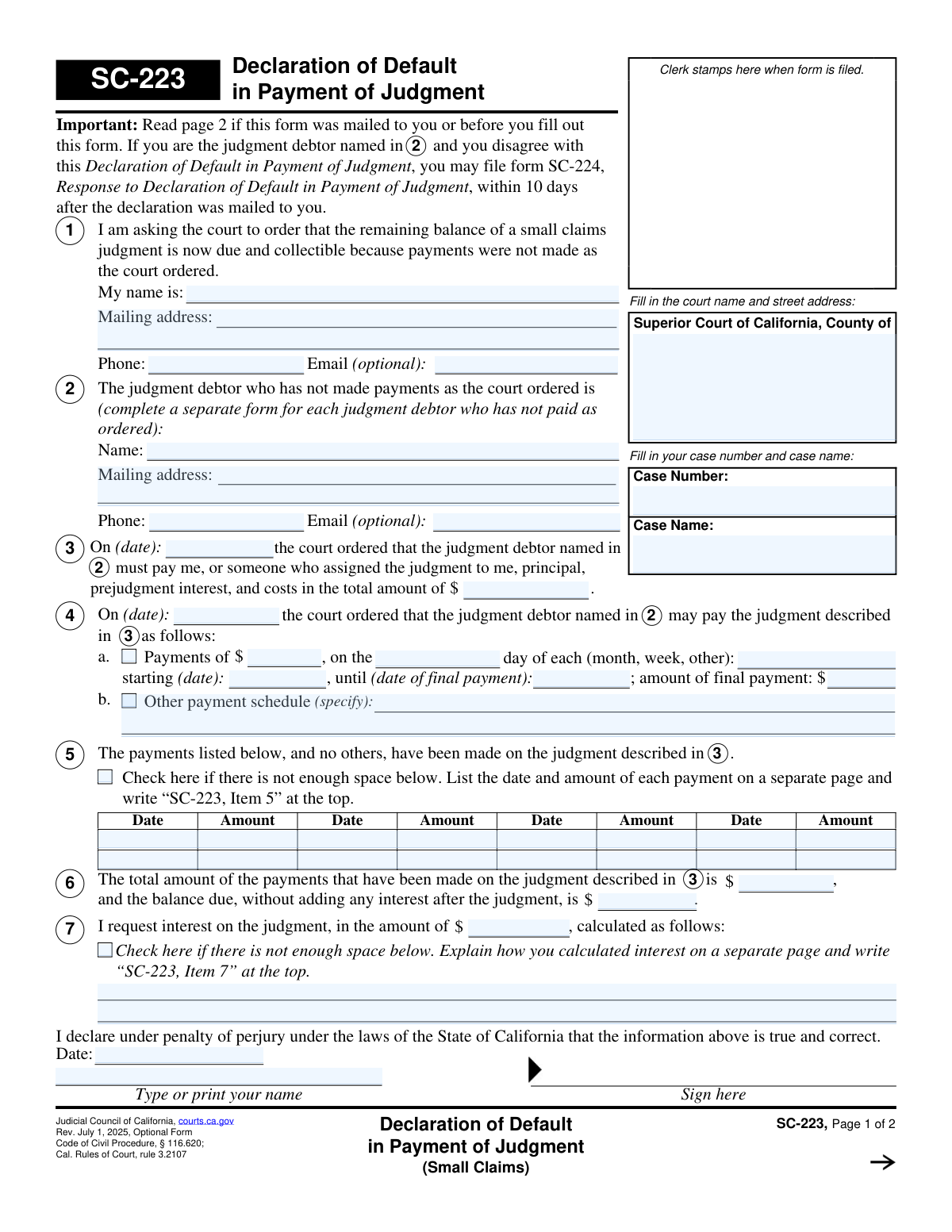
Yes! You can use AI to fill out Form SC-223, Declaration of Default in Payment of Judgment (Small Claims)
Form SC-223, the Declaration of Default in Payment of Judgment, is filed by a judgment creditor in a California small claims case when the judgment debtor fails to make payments as ordered by the court. By filing this form, the creditor asks the court to make the entire remaining balance of the judgment immediately due and collectible. Today, this form can be filled out quickly and accurately using AI-powered services like Instafill.ai, which can also convert non-fillable PDF versions into interactive fillable forms.
SC-223 is part of the
California court forms, court claim forms and small claims forms categories on Instafill.
Our AI automatically handles information lookup, data retrieval, formatting, and form filling.
It takes less than a minute to fill out SC-223 using our AI form filling.
Securely upload your data. Information is encrypted in transit and deleted immediately after the form is filled out.
Form specifications
| Form name: | Form SC-223, Declaration of Default in Payment of Judgment (Small Claims) |
| Number of fields: | 52 |
| Number of pages: | 1 |
| Language: | English |
Instafill Demo: How to fill out PDF forms in seconds with AI
How to Fill Out SC-223 Online for Free in 2026
Are you looking to fill out a SC-223 form online quickly and accurately? Instafill.ai offers the #1 AI-powered PDF filling software of 2026, allowing you to complete your SC-223 form in just 37 seconds or less.
Follow these steps to fill out your SC-223 form online using Instafill.ai:
- 1 Navigate to Instafill.ai and upload or select the SC-223 Declaration of Default in Payment of Judgment form.
- 2 Use the AI assistant to input the court information, case number, and case name.
- 3 Provide your personal information as the judgment creditor and the details of the judgment debtor who has defaulted on payments.
- 4 Enter the specifics of the original judgment, including the date it was ordered and the total amount.
- 5 Detail the court-ordered payment schedule that the debtor was supposed to follow.
- 6 List all payments that have been made, calculate the total paid amount, and determine the remaining balance due.
- 7 Calculate any post-judgment interest owed, then review the entire form for accuracy, sign and date it, and file it with the court clerk.
Our AI-powered system ensures each field is filled out correctly, reducing errors and saving you time.
Why Choose Instafill.ai for Your Fillable SC-223 Form?
Speed
Complete your SC-223 in as little as 37 seconds.
Up-to-Date
Always use the latest 2026 SC-223 form version.
Cost-effective
No need to hire expensive lawyers.
Accuracy
Our AI performs 10 compliance checks to ensure your form is error-free.
Security
Your personal information is protected with bank-level encryption.
Frequently Asked Questions About Form SC-223
This form is used to notify the court when a person (the judgment debtor) has failed to make payments on a small claims judgment according to a court-ordered payment plan. It asks the court to make the full remaining balance of the judgment due immediately.
The person who won the small claims case and is owed money (the judgment creditor) should fill out this form if the debtor stops making their scheduled payments.
If you disagree with the claims made in the declaration, you must file form SC-224, Response to Declaration of Default, within 10 days. If you do not dispute the claim, you do not need to do anything, and the full balance will likely become due.
The court clerk will mail a copy to the judgment debtor, who then has 10 days to file a response. Afterwards, the court will either mail a decision or schedule a hearing.
You must fill out and file a separate SC-223 form for each individual judgment debtor who has defaulted on the payment agreement.
In Item 5, you must list the date and amount of each payment you have received. If you run out of space, check the box and attach a separate sheet with the complete payment history.
Interest is calculated on the unpaid principal balance from the date the judgment was entered. For detailed instructions and the correct interest rate, you should consult the Information Sheet for Calculating Interest (form MC-013-INFO).
You must file the completed form with the small claims court clerk in the county where the original judgment was issued. The court will then serve the other parties.
Yes, services like Instafill.ai use AI to auto-fill form fields accurately and save time. This can help ensure all required information is entered correctly before you file.
You can upload the SC-223 PDF to the Instafill.ai platform. The service will make the form fillable online, allowing you to type in your information, which the AI can help auto-complete, before you download the finished document.
If you have a non-fillable PDF, you can use a tool like Instafill.ai. It can convert flat PDFs into interactive, fillable forms that you can complete on your computer.
You will need your case number, the full name and address of the debtor, the original judgment amount and date, and a complete record of all payments received, including dates and amounts.
If the court approves your declaration, the installment payment plan is terminated, and the entire unpaid balance of the judgment becomes immediately due and collectible. You can then use legal means to collect the full amount.
Compliance SC-223
Validation Checks by Instafill.ai
1
Case Information Completeness
Ensures that the 'Court Name', 'Case Number', and 'Case Name' fields at the top of the form are all filled out. This information is critical for identifying and filing the document within the correct court and case file. A submission will be rejected if this core identifying information is missing.
2
Declarant and Debtor Name Requirement
Verifies that the name of the person filing the declaration (Section 1) and the name of the judgment debtor (Section 2) are both provided. These fields are essential for identifying the parties involved in the judgment. Failure to provide these names would make the declaration legally insufficient and unable to be processed.
3
Valid Date Formatting
Checks that all date fields on the form (e.g., judgment date, payment schedule dates, payment dates, declaration date) are entered in a valid format, such as MM/DD/YYYY. This prevents data entry errors and ensures all dates are unambiguous and can be correctly interpreted by the court system. An invalid format will trigger an error message requiring the user to correct the entry.
4
Logical Date Sequence
Validates the chronological order of key dates. The original judgment date (Section 3) must occur before or on the payment order date (Section 4), which must be before any payment dates listed (Section 5). The final declaration signature date must be the most recent date on the form. This ensures the events described are logically possible and prevents contradictory information.
5
Valid Currency Formatting
Ensures all fields intended for monetary values (e.g., judgment amount, payment amounts, balance due) contain only valid numeric and currency characters. This is crucial for accurate financial calculations and to prevent processing errors. Any non-numeric text entered in these fields will be flagged as an error.
6
Positive Original Judgment Amount
Checks that the total judgment amount entered in Section 3 is a positive number greater than zero. A default cannot be declared on a judgment of zero or a negative amount. This validation prevents nonsensical or erroneous submissions from being filed.
7
Payment Schedule Selection Logic
Verifies that in Section 4, either the installment payment details (4a) or the 'Other payment schedule' description (4b) is completed, but not both. If one option is chosen, its corresponding required fields must be filled. This ensures the filer clearly specifies the court-ordered payment terms that were defaulted on.
8
Payment Total Calculation Accuracy
Automatically calculates the sum of all individual payment amounts listed in the table in Section 5 and verifies that it matches the 'total amount of the payments' entered in Section 6. This cross-check ensures mathematical accuracy and the integrity of the financial data presented. A mismatch will require the user to review and correct the payment entries or the total.
9
Balance Due Calculation Accuracy
Validates that the 'balance due' in Section 6 is correctly calculated by subtracting the 'total amount of payments' (Section 6) from the 'total amount' of the original judgment (Section 3). This check confirms the final claimed balance is arithmetically correct based on the other figures provided. If the calculation is incorrect, the form will be flagged for correction.
10
Conditional Interest Calculation Explanation
Ensures that if an amount is entered for interest in Section 7, the corresponding text box explaining the calculation is also filled out, or the checkbox indicating a separate attachment is checked. This rule enforces the requirement to justify any interest being claimed. A failure to provide the calculation will prevent submission until it is added.
11
Declarant Name Consistency
Compares the name of the declarant in Section 1 with the name typed or printed on the signature line at the bottom of the form. The names must match to ensure the person signing the declaration is the same person making the claim. A mismatch could indicate an error or an unauthorized signature.
12
Email Address Format Validation
Checks that any email address entered in Section 1 or 2 follows the standard '[email protected]' format. While optional, if an email is provided, it must be valid to ensure successful electronic communication from the court. An invalid format will prompt the user for correction.
13
Phone Number Format Validation
Validates that any phone number provided in Section 1 or 2 consists of a plausible number of digits, typically conforming to a standard US format (e.g., 10 digits). This helps ensure the contact information is accurate for potential communication. An entry with too few or too many digits would be flagged.
14
Declaration Date Requirement
Ensures the 'Date' field on the signature line is filled out. The signature date is legally significant as it establishes when the declaration was made under penalty of perjury. The form cannot be considered complete and valid without this date.
Common Mistakes in Completing SC-223
Filers often enter the wrong court address or mistype the case number from memory. These errors can lead to the form being rejected by the clerk or misfiled, causing significant delays in the process. Always double-check the original court documents for the exact court name, address, and case number before filling out the form.
Providing an old or incorrect mailing address for the judgment debtor in Item 2 is a critical error. If the debtor is not properly served notice, they can challenge the default, potentially nullifying the entire process and forcing you to start over. It is crucial to use the most current address known for the debtor to ensure proper legal notification.
In Item 3, filers may incorrectly calculate the original judgment amount by adding post-judgment interest or other fees that were not part of the initial award. This creates an immediate discrepancy that the debtor can dispute, weakening the credibility of your declaration. The amount entered must precisely match the principal, prejudgment interest, and costs listed in the original court order.
Listing payments in Item 5 is a common source of error, as filers may forget payments, transpose numbers, or misremember dates. An inaccurate payment history is easily challenged by a debtor with good records and can lead to a hearing or denial of your request. To avoid this, maintain meticulous records of all payments received and carefully transcribe them onto the form.
Simple mathematical errors in Item 6, when totaling the payments made and calculating the remaining balance, are surprisingly frequent. An incorrect total undermines the entire declaration and may cause the court to question all the figures provided. Carefully re-check your addition and subtraction before filing to ensure accuracy.
Interest calculation in Item 7 is the most complex part of the form and highly prone to mistakes. Filers often use the wrong interest rate, misapply it after partial payments are made, or fail to show their calculation as required. An incorrect interest claim is likely to be disputed by the debtor and may be denied by the court, so it's vital to follow the guidelines in form MC-013-INFO.
An unsigned or undated form is legally invalid and will be immediately rejected by the court clerk, halting the process. This simple oversight requires you to refile the entire document, causing unnecessary delays. Always perform a final check to ensure you have signed and dated the form under penalty of perjury.
The instructions in Item 2 explicitly require a separate SC-223 form for each judgment debtor who has defaulted on payments. Filers sometimes miss this and incorrectly list multiple debtors on one form. This procedural error will result in the form being rejected, forcing the filer to prepare and file new, separate forms for each debtor.
When a payment history or interest calculation is too long for the space provided in Items 5 and 7, filers must use an attachment. A common mistake is forgetting to attach the extra page or failing to label it correctly as instructed (e.g., 'SC-223, Item 5'). This can lead the court to disregard the incomplete information, weakening the claim. AI-powered tools like Instafill.ai can help manage and format such data correctly, even converting flat PDFs into fillable forms to ensure all information is captured digitally.
Saved over 80 hours a year
“I was never sure if my IRS forms like W-9 were filled correctly. Now, I can complete the forms accurately without any external help.”
Kevin Martin Green
Your data stays secure with advanced protection from Instafill and our subprocessors

Robust compliance program
Transparent business model
You’re not the product. You always know where your data is and what it is processed for.
ISO 27001, HIPAA, and GDPR
Our subprocesses adhere to multiple compliance standards, including but not limited to ISO 27001, HIPAA, and GDPR.
Security & privacy by design
We consider security and privacy from the initial design phase of any new service or functionality. It’s not an afterthought, it’s built-in, including support for two-factor authentication (2FA) to further protect your account.
Fill out SC-223 with Instafill.ai
Worried about filling PDFs wrong? Instafill securely fills form-sc-223-declaration-of-default-in-payment-of-judgment-small-claims forms, ensuring each field is accurate.