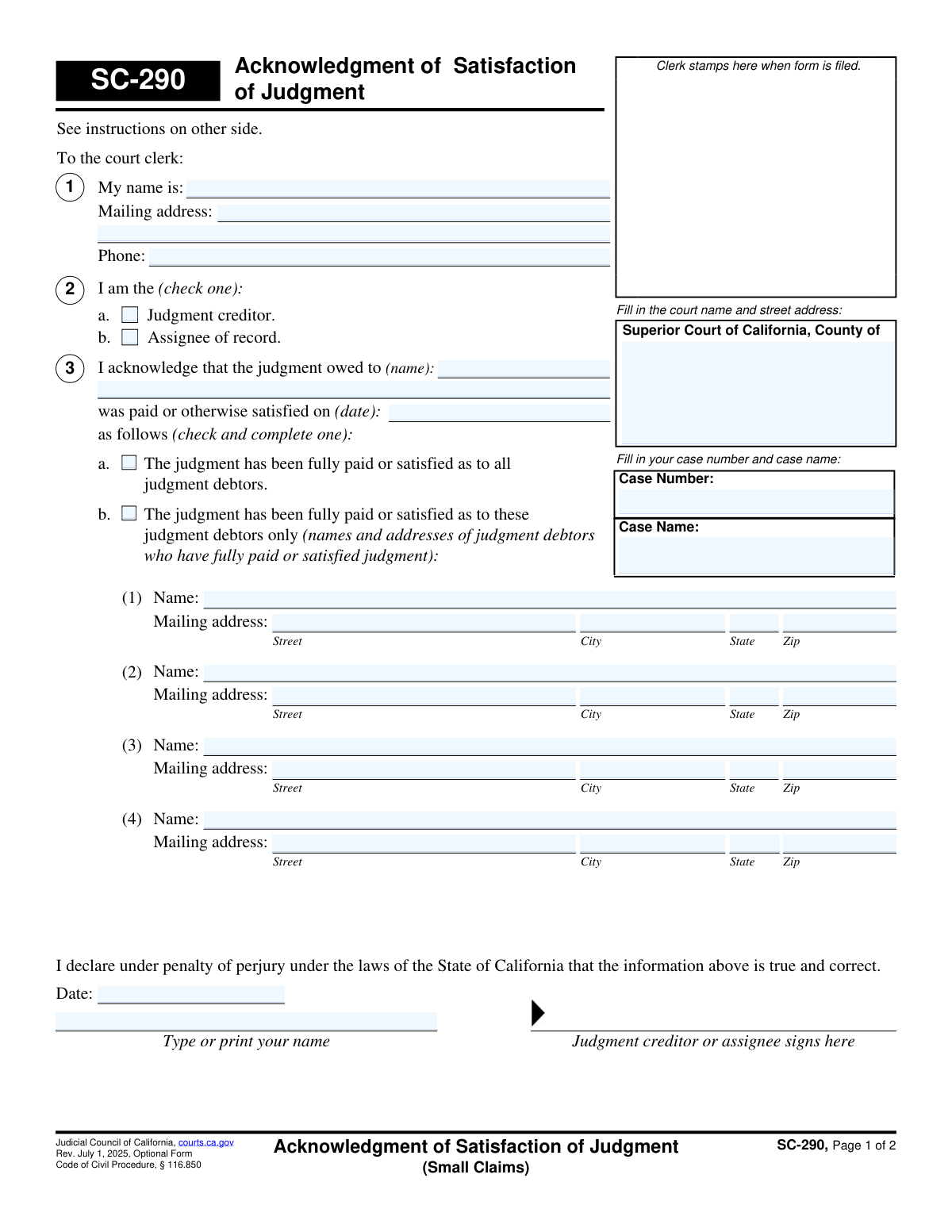
Yes! You can use AI to fill out Form SC-290, Acknowledgment of Satisfaction of Judgment (Small Claims)
Form SC-290, Acknowledgment of Satisfaction of Judgment, is a legal document filed in California's small claims court by a judgment creditor to confirm that a court-ordered debt has been fully paid by the judgment debtor. Filing this form is a mandatory step to officially close the case and clear the debtor's record for that specific judgment. Today, this form can be filled out quickly and accurately using AI-powered services like Instafill.ai, which can also convert non-fillable PDF versions into interactive fillable forms.
SC-290 is part of the
California court forms, court claim forms and small claims forms categories on Instafill.
Our AI automatically handles information lookup, data retrieval, formatting, and form filling.
It takes less than a minute to fill out SC-290 using our AI form filling.
Securely upload your data. Information is encrypted in transit and deleted immediately after the form is filled out.
Form specifications
| Form name: | Form SC-290, Acknowledgment of Satisfaction of Judgment (Small Claims) |
| Number of fields: | 41 |
| Number of pages: | 1 |
| Language: | English |
Instafill Demo: How to fill out PDF forms in seconds with AI
How to Fill Out SC-290 Online for Free in 2026
Are you looking to fill out a SC-290 form online quickly and accurately? Instafill.ai offers the #1 AI-powered PDF filling software of 2026, allowing you to complete your SC-290 form in just 37 seconds or less.
Follow these steps to fill out your SC-290 form online using Instafill.ai:
- 1 Navigate to Instafill.ai and upload or select the Form SC-290, Acknowledgment of Satisfaction of Judgment.
- 2 Provide the court information, including the Superior Court name and county, as well as the specific case number and case name.
- 3 Enter your personal details, including your full name, mailing address, and phone number, and indicate whether you are the judgment creditor or an assignee of record.
- 4 Specify the details of the judgment satisfaction, including the name of the person owed the judgment and the date it was paid or satisfied.
- 5 Indicate whether the judgment has been fully satisfied for all debtors or only for specific debtors, providing their names and addresses if applicable.
- 6 Review all the auto-filled information for accuracy, then date and e-sign the form to declare the information is true and correct under penalty of perjury.
- 7 Download the completed form and file it with the court clerk as required by California law.
Our AI-powered system ensures each field is filled out correctly, reducing errors and saving you time.
Why Choose Instafill.ai for Your Fillable SC-290 Form?
Speed
Complete your SC-290 in as little as 37 seconds.
Up-to-Date
Always use the latest 2026 SC-290 form version.
Cost-effective
No need to hire expensive lawyers.
Accuracy
Our AI performs 10 compliance checks to ensure your form is error-free.
Security
Your personal information is protected with bank-level encryption.
Frequently Asked Questions About Form SC-290
This form is used by a judgment creditor to officially notify the small claims court that a judgment has been fully paid or otherwise satisfied by the judgment debtor.
The judgment creditor (the person who won the case and is owed money) or their assignee of record must complete and file this form after the judgment has been paid in full.
You should file the form with the court immediately. If the judgment debtor requests it, you must file it within 14 days to avoid potential damages and penalties.
If you fail to file the form within 14 days of a request from the judgment debtor, you may be liable for damages and a penalty.
You will need the court name and address, the case number and name, the date the judgment was paid, and the names of the debtors who have satisfied the judgment.
You must use Form EJ-100 if the debtor has only paid part of the judgment, or if an Abstract of Judgment (Form EJ-001) was previously recorded to create a lien on property.
Select option 3a if the judgment has been fully paid by all judgment debtors. Select option 3b if only specific debtors have fully paid, and list their names and addresses.
You must file the completed and signed form with the clerk of the Superior Court where your small claims case was originally filed.
Yes, services like Instafill.ai use AI to help you accurately auto-fill form fields, which can save you time and reduce errors.
To fill out the form online, you can use a service like Instafill.ai. Simply upload the form, and the AI-powered platform will guide you through filling out the necessary information before you download it for filing.
If you have a non-fillable or 'flat' PDF, you can use a tool like Instafill.ai. It can convert the document into an interactive, fillable form that you can complete on your computer.
An assignee of record is a person or entity to whom the original judgment creditor has legally transferred the right to collect the debt. If you are the assignee, you are responsible for filing this form.
No, the second page contains instructions and does not need to be copied, served, or filed with the court.
Compliance SC-290
Validation Checks by Instafill.ai
1
Mandatory Case Number
This check ensures that the 'Case Number' field is not empty. The case number is a unique identifier for the legal proceeding, and without it, the court clerk cannot associate this acknowledgment with the correct case file. A failure would result in the form being rejected as it cannot be processed.
2
Exclusive Filer Role Selection
Validates that exactly one checkbox is selected in Section 2, identifying the filer as either the 'Judgment creditor' or 'Assignee of record'. The filer's legal standing is critical for the validity of the acknowledgment. If zero or both options are selected, the form is ambiguous and cannot be processed.
3
Exclusive Satisfaction Type Selection
Ensures that exactly one checkbox is selected in Section 3, specifying whether the judgment was satisfied as to all debtors (3a) or only specific debtors (3b). This choice is fundamental to the document's purpose and dictates which parties are released from the judgment. An invalid selection makes the form's intent unclear.
4
Conditional Debtor Information Requirement
This check is triggered if option 3b ('The judgment has been fully paid or satisfied as to these judgment debtors only') is selected. It verifies that the name and address of at least one judgment debtor are provided. Failure to provide this information makes the selection of 3b meaningless and the form incomplete.
5
Valid Satisfaction Date
Verifies that the date of satisfaction provided in Section 3 is a valid calendar date and is not in the future. An acknowledgment cannot be filed for a satisfaction that has not yet occurred. An invalid or future date would render the legal declaration false and lead to rejection.
6
Logical Date Sequence
This validation confirms that the 'Date' in the signature block is on or after the 'date' of satisfaction listed in Section 3. A person cannot legally declare under penalty of perjury that a judgment was satisfied on a date that is after the date they are signing the form. This logical check prevents chronological inconsistencies.
7
Court Information Completeness
Ensures that the 'Superior Court of California, County of' field is filled in. This information is essential for identifying the correct court jurisdiction where the form should be filed. A missing court name or county would result in the form being sent to the wrong location or rejected outright.
8
Filer and Signer Name Consistency
This check compares the filer's name from Section 1 ('My name is:') with the printed name in the final declaration section. The names should match to confirm the identity of the person signing the document. A mismatch could indicate a potential error or fraudulent filing.
9
Judgment Creditor Name Verification
If 'Judgment creditor' (2a) is checked, this validation ensures the name in Section 1 ('My name is:') matches the name in Section 3 ('judgment owed to (name):'). This confirms that the person filing the acknowledgment is the same person who was originally owed the judgment. This is a critical integrity check to prevent unauthorized filings.
10
Valid Phone Number Format
Checks that the 'Phone' number provided in Section 1 follows a standard, valid format (e.g., 10 digits, possibly with parentheses, spaces, or hyphens). This ensures the court has a reliable means of contacting the filer if there are questions about the submission. An invalid format could hinder communication.
11
Declaration Section Completeness
Verifies that both the 'Date' and 'Type or print your name' fields in the signature section are completed. These elements are required for the declaration 'under penalty of perjury' to be legally valid. Missing either piece would invalidate the signature block and cause the form to be rejected.
12
Mutually Exclusive Satisfaction Details
If option 3a ('The judgment has been fully paid or satisfied as to all judgment debtors') is checked, this validation ensures that no debtor information is entered in the fields under option 3b. Entering information in both sections would create a contradiction. This check maintains the logical integrity of the filing.
13
Mandatory Case Name
This check ensures that the 'Case Name' field is filled out. Along with the case number, the case name (e.g., 'Plaintiff v. Defendant') is a primary identifier used by the court to locate the correct file. A missing case name can cause processing delays or rejection.
14
Valid ZIP Code Format
Validates that all 'Zip' code fields, both for the filer in Section 1 and any debtors listed in Section 3b, contain a valid 5-digit or 9-digit (ZIP+4) numeric format. Correct ZIP codes are essential for mail deliverability and data accuracy within the court's records. An invalid format would be flagged for correction.
Common Mistakes in Completing SC-290
Filers often use form SC-290 when they should be using EJ-100. The instructions specify that SC-290 is only for cases where the judgment is fully paid AND no Abstract of Judgment (EJ-001) has been recorded. Using the wrong form will lead to rejection by the court clerk, causing significant delays and requiring the filer to start over with the correct paperwork. Always double-check the instructions on page 2 to confirm you are using the appropriate form for your specific circumstances.
Entering the wrong case number or leaving it blank is a frequent error that prevents the court from processing the document. Without the correct case number, the acknowledgment cannot be linked to the proper legal file, rendering it ineffective. This can lead to the judgment remaining on the debtor's record and potential penalties for the creditor. To avoid this, carefully copy the case number exactly as it appears on previous court documents.
In cases with multiple debtors, a creditor might check box 3a ('fully paid or satisfied as to all judgment debtors') when only one debtor has paid. This is a critical error that could legally release all other debtors from their obligation to pay. It is crucial to check box 3b and list only the specific debtors who have paid if the satisfaction is not for everyone involved. This mistake can result in the unintentional loss of the right to collect from the remaining debtors.
When acknowledging satisfaction for only specific debtors (box 3b), filers often fail to provide the full name and complete mailing address for each debtor listed. Missing information, such as a zip code or street name, can make the acknowledgment ambiguous or invalid for the intended debtor. This prevents the court from properly updating the record for that individual. Ensure every name and address field in this section is filled out completely and accurately.
People sometimes enter the date they are filling out the form instead of the actual date the judgment was paid or satisfied. The date of satisfaction is legally significant and marks when the debt was officially settled. An incorrect date can cause confusion and potential disputes later on. Always use the specific date the final payment was received or the non-monetary obligation was fulfilled.
Forgetting to sign the form or date the signature is a simple but fatal mistake. The declaration under penalty of perjury is what gives the document its legal weight, and an unsigned or undated form is invalid and will be immediately rejected by the court clerk. Always review the bottom of the form to ensure you have printed your name, signed, and dated it before submission.
The form's instructions explicitly warn that the judgment creditor must file the acknowledgment immediately upon satisfaction, and within 14 days if requested by the debtor. Many creditors delay this step, unaware of the consequences. Failure to file on time can expose the creditor to liability for damages and a financial penalty payable to the debtor. It is a legal obligation, not just a procedural suggestion.
The filer must clearly identify their role by checking either 'Judgment creditor' or 'Assignee of record' in section 2. Some people leave this blank, check both boxes, or are unsure what an 'assignee' is, leading to ambiguity. This can delay processing as the court needs to know who has the legal authority to acknowledge the satisfaction. If you are the original person who won the judgment, you are the 'Judgment creditor'.
Many legal forms are still printed and filled out by hand, leading to errors from illegible handwriting. If the clerk cannot read the case number, names, or addresses, the form cannot be processed correctly and may be rejected. This forces the filer to complete and resubmit the document, causing delays. Using an AI-powered tool like Instafill.ai can convert a non-fillable PDF into a fillable version, ensuring all information is typed, legible, and correctly formatted.
In section 3, the form asks for the name of the person the judgment was owed to. Filers, especially if they are an assignee, sometimes mistakenly enter the debtor's name or their own name again. This field must contain the name of the original judgment creditor. An error here creates confusion about the core details of the case and can lead to the form's rejection. AI-powered form-filling tools like Instafill.ai can help prevent such errors by cross-referencing data across fields to ensure consistency.
Saved over 80 hours a year
“I was never sure if my IRS forms like W-9 were filled correctly. Now, I can complete the forms accurately without any external help.”
Kevin Martin Green
Your data stays secure with advanced protection from Instafill and our subprocessors

Robust compliance program
Transparent business model
You’re not the product. You always know where your data is and what it is processed for.
ISO 27001, HIPAA, and GDPR
Our subprocesses adhere to multiple compliance standards, including but not limited to ISO 27001, HIPAA, and GDPR.
Security & privacy by design
We consider security and privacy from the initial design phase of any new service or functionality. It’s not an afterthought, it’s built-in, including support for two-factor authentication (2FA) to further protect your account.
Fill out SC-290 with Instafill.ai
Worried about filling PDFs wrong? Instafill securely fills form-sc-290-acknowledgment-of-satisfaction-of-judgment-small-claims forms, ensuring each field is accurate.