Yes! You can use AI to fill out Form SC-300, Petition for Writ (Small Claims)
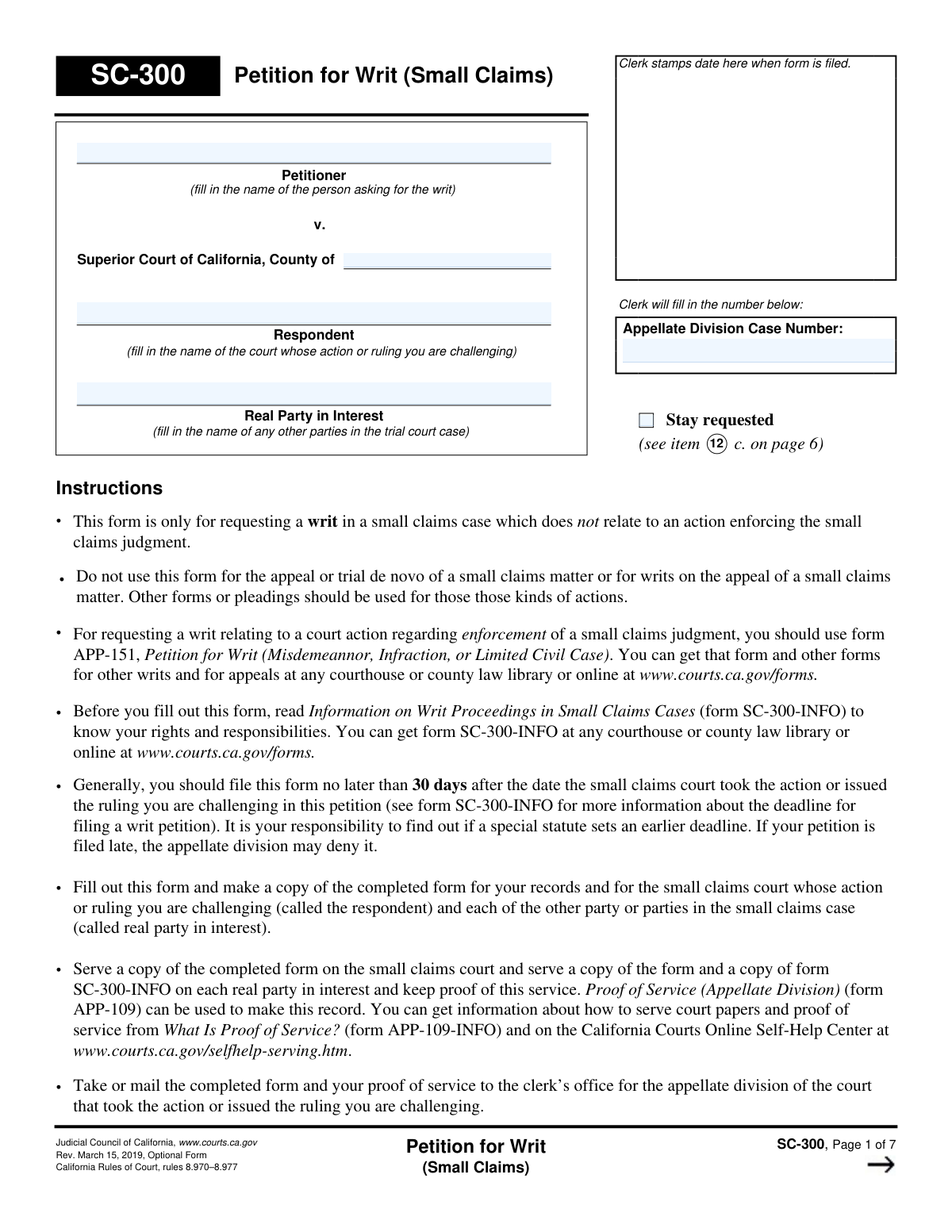
Form SC-300, Petition for Writ (Small Claims), is a legal document used in California to ask an appellate division court to review and correct a perceived legal error made by a small claims court. It is crucial for parties who believe the lower court has exceeded its jurisdiction or failed to perform a required legal duty. Today, this form can be filled out quickly and accurately using AI-powered services like Instafill.ai, which can also convert non-fillable PDF versions into interactive fillable forms.
SC-300 is part of the
California court forms, court claim forms and small claims forms categories on Instafill.
Our AI automatically handles information lookup, data retrieval, formatting, and form filling.
It takes less than a minute to fill out SC-300 using our AI form filling.
Securely upload your data. Information is encrypted in transit and deleted immediately after the form is filled out.
Form specifications
| Form name: | Form SC-300, Petition for Writ (Small Claims) |
| Number of fields: | 104 |
| Number of pages: | 1 |
| Language: | English |
Instafill Demo: How to fill out PDF forms in seconds with AI
How to Fill Out SC-300 Online for Free in 2026
Are you looking to fill out a SC-300 form online quickly and accurately? Instafill.ai offers the #1 AI-powered PDF filling software of 2026, allowing you to complete your SC-300 form in just 37 seconds or less.
Follow these steps to fill out your SC-300 form online using Instafill.ai:
- 1 Navigate to Instafill.ai and upload or select Form SC-300, Petition for Writ (Small Claims).
- 2 Provide the small claims court case information, including the case name, number, and the specific action or ruling you are challenging.
- 3 Enter your personal information as the petitioner, and your lawyer's details if applicable.
- 4 Clearly state the reasons for the petition, detailing the legal error(s) made by the small claims court and citing relevant laws or legal authority.
- 5 Explain why this writ is necessary, how you will be irreparably harmed without it, and what order you are requesting from the appellate division.
- 6 List all supporting documents that are attached to the petition as required by court rules.
- 7 Review the AI-populated form for accuracy, then use the platform to e-sign and download the completed document for filing with the appellate division clerk's office.
Our AI-powered system ensures each field is filled out correctly, reducing errors and saving you time.
Why Choose Instafill.ai for Your Fillable SC-300 Form?
Speed
Complete your SC-300 in as little as 37 seconds.
Up-to-Date
Always use the latest 2026 SC-300 form version.
Cost-effective
No need to hire expensive lawyers.
Accuracy
Our AI performs 10 compliance checks to ensure your form is error-free.
Security
Your personal information is protected with bank-level encryption.
Frequently Asked Questions About Form SC-300
This form is used to ask the appellate division of a superior court to review and correct a specific legal error made in a ruling or action by a small claims court. It is not for a general appeal of the case outcome or for enforcing a judgment.
Anyone who was a party in a small claims case (or is directly affected by it) and believes the court made a specific legal error should fill out this form. The person filing is called the 'Petitioner'.
You should generally file this form no later than 30 days after the date of the small claims court action or ruling you are challenging. If you file late, you must explain the extraordinary circumstances, or the court may deny your petition.
No, this form is not for a standard appeal or a 'trial de novo' of a small claims matter. You must use different forms for those actions; this petition is only for challenging specific legal errors.
You must attach a copy of the ruling you are challenging, all documents and exhibits that were submitted to the small claims court, and any other documents necessary for the appellate division to understand the case.
The 'Respondent' is the Superior Court whose ruling you are challenging. The 'Real Party in Interest' is the other party or parties from your original small claims case.
You must file the completed form and proof of service with the clerk for the appellate division. You also need to 'serve' (formally deliver) a copy to the small claims court and to each 'Real Party in Interest'.
Requesting a 'stay' asks the court to pause any further proceedings in the small claims case until your petition for a writ has been decided. You must explain why this is urgent and necessary.
In extraordinary circumstances, you may file without the documents, but you must explain the urgency and why they are unavailable. You also need to provide a fair summary of what the missing documents contain.
You can claim that the court failed to do something the law requires, did something the law forbids, or acted in a way it did not have the legal power to. You must cite the specific law and provide evidence from the case.
Yes, services like Instafill.ai use AI to help you accurately auto-fill form fields, which can save time and reduce the chance of making mistakes on complex legal forms.
You can use a service like Instafill.ai to upload the SC-300 PDF. Their platform makes the form interactive so you can easily type your information, save your progress, and download the completed document.
Services like Instafill.ai can convert flat, non-fillable PDFs into interactive forms. This allows you to easily type in your information directly on your computer instead of printing and filling it out by hand.
You will need to provide the case name, the case number, and the date the small claims court took the action or made the ruling you are challenging.
Compliance SC-300
Validation Checks by Instafill.ai
1
Completeness of Case Parties
Ensures the Petitioner, Respondent (Superior Court County), and Real Party in Interest fields on page 1 are all filled. These names are fundamental for identifying the case and the parties involved. A petition with missing party information is legally deficient and would be rejected by the clerk.
2
Required Small Claims Case Identification
Validates that both the small claims court case name (Item 1a) and case number (Item 1b) are provided. This information is essential for the appellate division to locate the original case file being challenged. Without it, the petition is impossible to process and would be returned as incomplete.
3
Valid and Past Date of Ruling
Checks that the date entered in Item 2 is a valid calendar date and is not in the future. This date is critical for calculating the filing deadline, which is generally 30 days from the ruling. An invalid or future date would prevent the clerk from assessing timeliness and could lead to rejection.
4
Conditional Requirement for Filing Delay Explanation
If the submission date is more than 30 days after the ruling date in Item 2, this check ensures the explanation field in Item 4 is not empty. Courts have strict deadlines, and failing to provide a required justification for a late filing will likely result in the petition being denied without consideration of its merits.
5
Petitioner Contact Information Completeness
Verifies that the petitioner's name and full street address (street, city, state, zip) are provided in Item 3a. This contact information is non-negotiable for all official correspondence and legal notices. An incomplete address would halt the processing of the petition until the information is corrected.
6
Conditional Lawyer State Bar Number
If a lawyer's name is entered in Item 3b, this check ensures the corresponding State Bar number field is also filled. The State Bar number is required to verify the lawyer is in good standing and authorized to practice. A missing number for a listed lawyer would render the filing invalid.
7
Conditional Explanation for Non-Party Status
If the petitioner checks box 6b, indicating they were not a party in the original case, this validation requires an explanation in the corresponding text box. This explanation is critical for the court to determine if the petitioner has legal standing to file the writ. Without it, the petition would likely be dismissed.
8
Conditional Appeal Date Entry
Validates that if the user checks 'Yes' for a previously filed appeal in Item 7b, a valid date for the appeal/new trial must be entered. This information is crucial for the court to understand the full procedural history and avoid conflicting proceedings. Failure to provide the date would make the submission incomplete.
9
Required Details for Previous Writ Petition
If the user indicates a previous writ petition was filed by checking 'Yes' in Item 8b, this check ensures that the petition title, filing date, and case number are all provided. This prevents duplicate or improper successive petitions. Missing any of this information would require the court to seek clarification, delaying the process.
10
Minimum One Reason for Petition
Verifies that at least one of the main reason checkboxes (10a, 10b, or 10c) is selected. A petition must state a legal basis for the request. A submission without any selected reason is fundamentally incomplete and has no legal argument to consider, leading to immediate rejection.
11
Conditional Explanation for Selected Reason
If a checkbox in Item 10 (a, b, or c) is selected, this validation ensures that the corresponding descriptive fields are not empty. Simply checking a box is insufficient; the petitioner must provide specific facts and arguments. A checked box with no explanation provides no basis for relief and would be deemed incomplete.
12
Consistent Stay Request
Ensures that if the 'Stay requested' box on page 1 is checked, then the corresponding request in Item 12c is also checked and its explanation field is filled. This cross-form consistency is vital for the clerk and judge to quickly identify and prioritize urgent requests. An inconsistent request could cause the urgency to be overlooked.
13
Specification of Requested Relief
Validates that the petitioner has selected at least one of the options in Item 12 (a, b, c, or d) to specify the relief they are seeking. The petition's purpose is to ask the court for a specific order. Failing to request any relief makes the petition pointless and would result in its denial.
14
Conditional Explanation for Missing Documents
If the petitioner indicates that required supporting documents are not attached (Item 13b is checked), this check ensures the explanation field is completed. Court rules require these documents or a compelling reason for their absence. Failure to provide the documents or a valid explanation will likely lead to the petition being denied as unsubstantiated.
15
Mandatory Petitioner Signature and Date
Verifies that the petitioner has provided a signature date and printed their name in Item 14. An unsigned petition is not a valid legal document and will be rejected outright by the court clerk. The date must also be a valid date that is not in the future.
Common Mistakes in Completing SC-300
Petitioners often mistakenly use this form (SC-300) for a standard small claims appeal or to enforce a judgment, rather than its intended purpose of challenging a specific court action or ruling via a writ. The instructions explicitly state this form is not for appeals or judgment enforcement, and using it incorrectly results in immediate rejection by the clerk, wasting time and potentially causing the filer to miss deadlines for the correct procedure. Always read the form's instructions carefully to confirm it matches your specific legal need.
Users frequently get confused by the legal terms and incorrectly list the parties. A common error is naming the opposing party from the small claims case as the 'Respondent' when the 'Respondent' should be the Superior Court itself. The opposing party should be listed as the 'Real Party in Interest'. This mistake can cause confusion and processing delays, as legal notices may be sent to the wrong entities. Double-check the definitions on the form to ensure the court, yourself (Petitioner), and the other original parties are listed in the correct sections.
The form states it should generally be filed within 30 days of the court's ruling, and that late petitions may be denied. People often miscalculate this deadline or underestimate the time needed to prepare the petition and its attachments, leading to a late filing. A late filing requires a compelling explanation for the delay (item 5) and is often a reason for the court to deny the petition outright. It is crucial to calculate the deadline immediately and prepare the filing well in advance.
In section 2, filers may enter the wrong small claims case number, misspell the case name, or list an incorrect date for the ruling being challenged. These data entry errors can prevent the appellate division from locating the original case file, leading to significant delays or rejection of the petition. To avoid this, carefully copy all information directly from the original court documents. AI-powered tools like Instafill.ai can help by saving and accurately auto-filling recurring information like case numbers across a document.
In section 10, petitioners are required to state a specific legal error, not just their dissatisfaction with the outcome. A common mistake is writing a narrative about why the ruling was 'unfair' without citing a specific law, rule, or legal authority that the court violated. A petition for a writ is a legal argument, and without a valid legal basis, it will be denied. You must clearly identify the law the court failed to follow or acted against.
A writ is an extraordinary remedy, and the court will only grant it if there is no other adequate path for relief, such as a direct appeal. In section 11, many filers provide a weak explanation or skip it entirely, which is a fatal flaw. You must clearly articulate why an appeal is not available or will not provide a solution to the harm you will suffer. Failure to meet this high standard is a primary reason for the denial of writ petitions.
Section 13 requires attaching copies of the ruling being challenged and all documents submitted to the small claims court that are relevant to the issue. This is one of the most common and critical errors. Filing the petition without the required evidence makes it impossible for the appellate court to evaluate your claim. The petition will likely be rejected or denied unless you can prove extraordinary circumstances prevented you from obtaining the documents.
Filers often check the box to request a stay (item 12c) without providing the necessary justification. The form requires explaining the urgency and, crucially, stating whether a stay was already requested from the small claims court (items 12d and 12e). Simply asking for a stay without a detailed explanation of the irreparable harm and the procedural history of the request will result in its denial. The court needs a compelling reason to halt the underlying case.
The instructions mandate that the petitioner serve a copy of the petition on the respondent court and all real parties in interest, and then file a Proof of Service (form APP-109) with the court. Many self-represented litigants file the petition without completing this crucial step. The court cannot proceed with the case until all parties have been properly notified, and failure to provide proof of service will halt all progress and can lead to dismissal.
Many sections of this form (e.g., 10, 11, 12) are not simple checkboxes but require detailed written explanations. A common mistake is to provide one-sentence answers or leave these sections blank, assuming the attached documents speak for themselves. The court relies on your written arguments within the petition itself to understand your position. Insufficient detail will be interpreted as a failure to make a compelling case for the writ.
The signature in section 14 is a declaration under penalty of perjury, making the document legally valid. It is surprisingly common for filers, especially when rushing, to submit a form without a signature or date. An unsigned form is not valid and will be rejected by the court clerk, causing delays and requiring the filer to resubmit the entire package. Always perform a final check for the signature before filing.
The form repeatedly instructs the user on how to label additional pages (e.g., 'At the top of each page, write “SC-300, item 10b.”'). People often attach unlabelled pages of explanation, making it difficult for the clerk and judge to understand which part of the petition the attachment refers to. This lack of organization can frustrate the reader and may result in the court overlooking important parts of your argument. Using a tool like Instafill.ai can help manage and organize digital documents, and can also convert flat, non-fillable PDFs into fillable versions to ensure a clean, organized submission.
Saved over 80 hours a year
“I was never sure if my IRS forms like W-9 were filled correctly. Now, I can complete the forms accurately without any external help.”
Kevin Martin Green
Your data stays secure with advanced protection from Instafill and our subprocessors

Robust compliance program
Transparent business model
You’re not the product. You always know where your data is and what it is processed for.
ISO 27001, HIPAA, and GDPR
Our subprocesses adhere to multiple compliance standards, including but not limited to ISO 27001, HIPAA, and GDPR.
Security & privacy by design
We consider security and privacy from the initial design phase of any new service or functionality. It’s not an afterthought, it’s built-in, including support for two-factor authentication (2FA) to further protect your account.
Fill out SC-300 with Instafill.ai
Worried about filling PDFs wrong? Instafill securely fills form-sc-300-petition-for-writ-small-claims forms, ensuring each field is accurate.