Yes! You can use AI to fill out Judicial Council of California Form GV-200, Proof of Personal Service (Gun Violence Prevention)
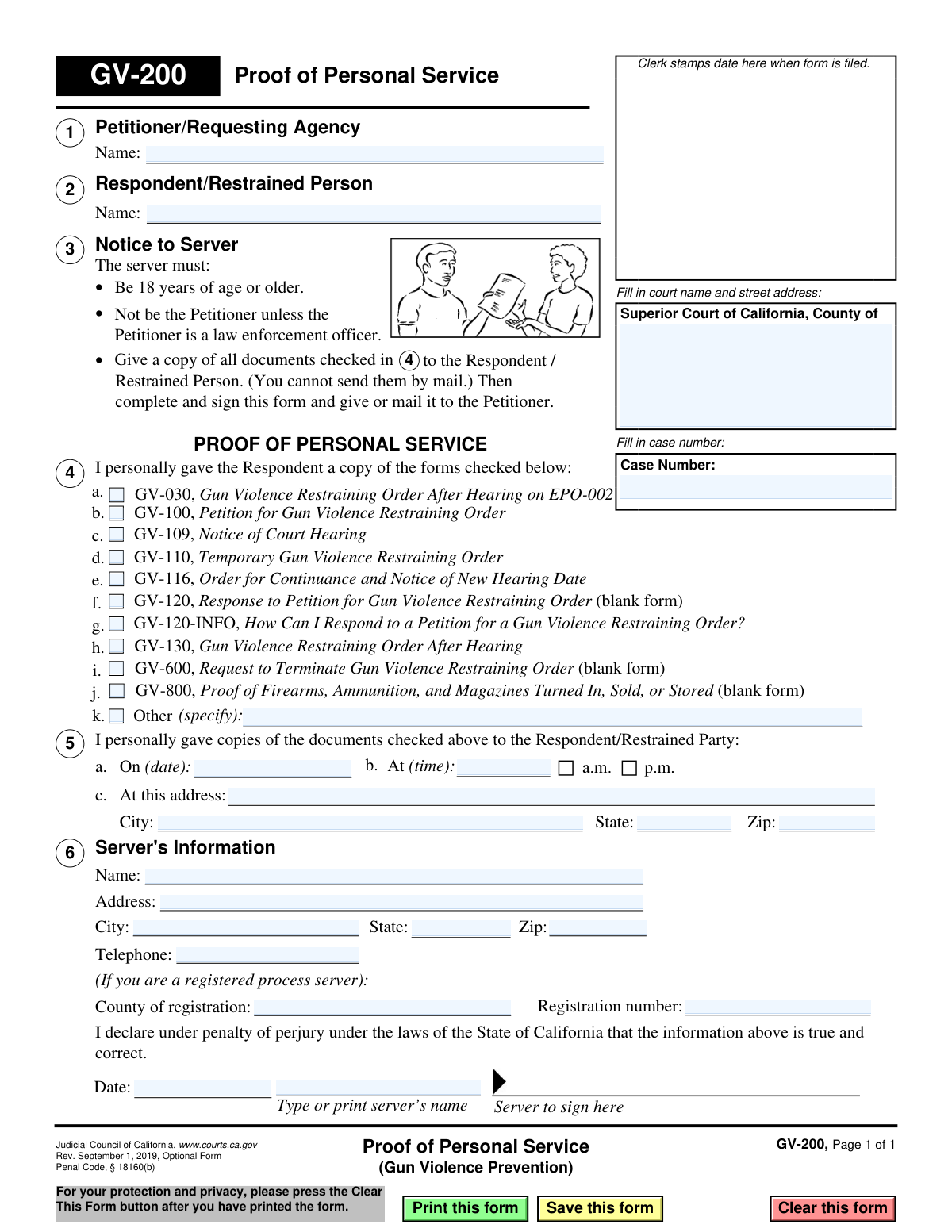
Form GV-200, Proof of Personal Service, is a legal document used in the Superior Court of California to formally declare that court documents related to a gun violence restraining order have been personally delivered to the respondent. This form is crucial as it provides the court with evidence that the respondent has been properly notified of the legal action, which is a requirement for the case to proceed. Today, this form can be filled out quickly and accurately using AI-powered services like Instafill.ai, which can also convert non-fillable PDF versions into interactive fillable forms.
GV-200 is part of the
California court forms, California judicial forms, Judicial Council forms and proof of service forms categories on Instafill.
Our AI automatically handles information lookup, data retrieval, formatting, and form filling.
It takes less than a minute to fill out GV-200 using our AI form filling.
Securely upload your data. Information is encrypted in transit and deleted immediately after the form is filled out.
Form specifications
| Form name: | Judicial Council of California Form GV-200, Proof of Personal Service (Gun Violence Prevention) |
| Number of fields: | 38 |
| Number of pages: | 1 |
| Language: | English |
Instafill Demo: How to fill out PDF forms in seconds with AI
How to Fill Out GV-200 Online for Free in 2026
Are you looking to fill out a GV-200 form online quickly and accurately? Instafill.ai offers the #1 AI-powered PDF filling software of 2026, allowing you to complete your GV-200 form in just 37 seconds or less.
Follow these steps to fill out your GV-200 form online using Instafill.ai:
- 1 Navigate to Instafill.ai and upload the GV-200 form or select it from the template library.
- 2 Provide the court and case information, including the Superior Court name, county, and case number.
- 3 Enter the names of the Petitioner/Requesting Agency and the Respondent/Restrained Person.
- 4 Detail the service by entering the date, time, and address where the documents were personally delivered.
- 5 Check the boxes corresponding to all the specific forms that were served to the respondent.
- 6 Fill in the server's information, including name, address, contact details, and registration number if applicable.
- 7 Carefully review all entered information for accuracy, then have the server sign and date the form to declare it true under penalty of perjury.
Our AI-powered system ensures each field is filled out correctly, reducing errors and saving you time.
Why Choose Instafill.ai for Your Fillable GV-200 Form?
Speed
Complete your GV-200 in as little as 37 seconds.
Up-to-Date
Always use the latest 2026 GV-200 form version.
Cost-effective
No need to hire expensive lawyers.
Accuracy
Our AI performs 10 compliance checks to ensure your form is error-free.
Security
Your personal information is protected with bank-level encryption.
Frequently Asked Questions About Form GV-200
This form is used to provide legal proof to the court that you have successfully delivered (served) the required legal documents in person to the Respondent in a Gun Violence Restraining Order case.
The person who personally delivers the documents, known as the 'server,' must fill out and sign this form. The server must be 18 or older and cannot be the Petitioner in the case, unless they are a law enforcement officer.
No, unless you are a law enforcement officer, you cannot serve the papers yourself. You must have another person who is at least 18 years old, and not a party to the case, serve the documents for you.
After the server signs the form, they must give it back to the Petitioner. The Petitioner is then responsible for filing the completed GV-200 with the court to prove that service was completed.
The server must check the box next to each and every form that was personally handed to the Respondent. The Petitioner should provide the server with a complete stack of all documents that need to be served.
In Section 4, the server must write the exact date, time, and the full street address, city, and state where they personally handed the documents to the Respondent.
No, you are not required to be a registered process server. However, if you are, you must provide your registration number and county of registration in Section 5.
No, the law requires that these documents be served in person, which is called 'personal service.' This form is specifically used to prove that you did not use the mail.
The server must provide their full name, address, and telephone number in Section 5. They must also sign and date the form under penalty of perjury.
Yes, services like Instafill.ai use AI to help you accurately fill in form fields with your saved information, which saves time and helps prevent common errors.
You can use a service like Instafill.ai to upload the GV-200 PDF. The platform's AI will help you fill in the required fields like names, addresses, and case details quickly and easily.
If you have a non-fillable or 'flat' PDF, you can upload it to a platform like Instafill.ai. It can convert the document into an interactive, fillable form that you can complete on your computer.
Filing the GV-200 is critical because it proves to the judge that the Respondent was legally notified of the court hearing and restraining order. Without this proof, the case may be delayed or dismissed.
Compliance GV-200
Validation Checks by Instafill.ai
1
Ensures Service Date is Logically Valid
This check verifies that the 'Date' of service in section 4 is a valid calendar date and is not a future date. Serving documents is a past event, so a future date is impossible and would invalidate the proof of service. If this validation fails, the form cannot be accepted as it contains a logical impossibility.
2
Verifies Signature Date is After Service Date
This validation ensures the server's signature date in section 6 is on or after the date of service specified in section 4. A server must complete the service before they can legally declare under penalty of perjury that they have done so. A signature date preceding the service date would invalidate the declaration and the entire form.
3
Mandatory Service Location and Time
This check confirms that the time of service, AM/PM selection, and the full service address (street, city, state, zip) in section 4 are all filled out. These details are the core of the 'proof' and are legally required to establish where and when the service occurred. Incomplete information would render the proof of service deficient and potentially invalid.
4
Requires at Least One Document Served
This validation ensures that at least one checkbox from items 3a through 3k is checked, indicating which legal documents were served. A Proof of Service form is meaningless if it does not specify what was served. Failure to select at least one document makes the form incomplete and legally insufficient.
5
Conditional Requirement for 'Other' Document Specification
This check verifies that if the 'Other' checkbox (item 3h) is selected, the corresponding text field specifying the document(s) is not empty. Simply checking 'Other' without clarification provides no useful information for the court. If the box is checked, the field is mandatory to ensure a complete and accurate record of all served documents.
6
Completeness of Server's Information
This validation ensures that the server's full name, address, city, state, and zip code in section 5 are all provided. This information is critical for identifying the server and verifying their legal capacity to serve documents. Missing information could lead to the service being challenged and invalidated.
7
Case Number Presence
This check verifies that the 'Case Number' field at the top of the form is filled in. The case number is the primary identifier that links this proof of service to the correct legal proceeding in the court's system. Without it, the document cannot be correctly filed or associated with the case, making it effectively useless.
8
Server and Petitioner Identity Check
This validation compares the server's name in section 5 with the petitioner's name in section 1. According to the 'Notice to Server', the server cannot be the petitioner in the case (unless they are a law enforcement officer). A match indicates a potential violation of service rules, which would invalidate the service and require a flag for manual review.
9
Server Declaration Fields Mandatory
This check ensures that the 'Date' and 'Type or print server’s name' fields in section 6 are both completed. These fields are part of the server's sworn declaration and are essential for its validity. An unsigned or undated declaration is not legally binding, so these fields must be filled for the form to be accepted.
10
Server Phone Number Format
This validation checks that the 'Telephone' number provided in section 5 follows a standard US phone number format (e.g., 10 digits, with optional parentheses, spaces, or hyphens). This ensures the court or parties can contact the server if necessary. An invalid format could hinder communication and follow-up.
11
ZIP Code Format Validation
This check ensures that all ZIP code fields on the form (for both the service address and server's address) contain a valid 5-digit or 9-digit (ZIP+4) numeric format. Correctly formatted ZIP codes are essential for mail delivery and address verification. An invalid format would indicate a data entry error and could cause filing or communication issues.
12
Consistent Server Name Entry
This validation compares the server's name entered in the 'Server's Information' section (5a) with the printed name under the signature line (section 6). The names should match to ensure the person providing their details is the same person signing the declaration. A mismatch could indicate an error or that the form was filled out by multiple people, potentially compromising its integrity.
13
Registered Process Server Field Consistency
This check validates that if a 'Registration number' is entered in section 5, the 'County of registration' field is also filled out. These two fields are logically linked for registered process servers. Providing one without the other suggests incomplete data entry and should be flagged to ensure the server's professional status is documented correctly.
Common Mistakes in Completing GV-200
The server's signature and date are the most critical parts of the form, as they certify the information under penalty of perjury. This is often missed in the rush to complete paperwork. An unsigned or undated form is legally invalid and will be rejected by the court clerk, leading to a failure to prove service and potentially requiring the documents to be served all over again. To avoid this, always perform a final review, focusing on the signature block at the bottom.
People often forget to fill in the court's full name and address or make typos in the case number. This happens due to haste or not having the primary case documents on hand. Without this information, the clerk cannot file the proof of service in the correct case file, causing significant delays and potentially leading to the dismissal of the proof. Always double-check the case number against the original petition or court documents.
The server may forget to check a box for a document they served or mistakenly check a box for one they did not. This creates a discrepancy between the proof of service and the reality of what the respondent received, which can be challenged in court. It's crucial to have all the served documents present when filling out this section to ensure 100% accuracy.
Servers sometimes write an incomplete address for where the service occurred, such as omitting the city, state, or zip code, or being vague about the specific location. An ambiguous address can be grounds for the respondent to challenge the validity of the service. The address must be complete and precise enough for anyone to identify the exact physical location of the service.
The form explicitly states the server must be 18 or older and not a party to the case (the petitioner). Petitioners sometimes mistakenly believe they can serve the documents themselves to save time or money. Using an unqualified server, such as the petitioner, will invalidate the service entirely, forcing the process to start over and delaying the court proceedings.
The exact date and time of service are legally significant as they start the clock for the respondent's deadline to reply. Servers may fill out the form later from memory and record the wrong date, time, or mix up 'a.m.' and 'p.m.' This error can create legal disputes over deadlines and the validity of the service. The server should fill out the form immediately after service to ensure accuracy.
The full legal names of the Petitioner and Respondent must be entered exactly as they appear on other court documents. People often use nicknames, initials, or spell names incorrectly. This can cause filing errors and confusion, and in a worst-case scenario, could be used by the respondent to argue they were not properly identified and served. AI-powered tools like Instafill.ai can help prevent this by auto-populating names from a central record, ensuring consistency.
When serving a document not listed in the checkboxes, the server must check the 'Other' box and write a specific description of the document. A common mistake is to check the box but forget to specify the document served. This makes the entry meaningless and fails to prove that the additional document was actually served.
Court forms are often filled out by hand, leading to illegible entries. A particularly problematic area is the server's printed name next to their signature. If the name is unreadable, it becomes difficult for the court or other parties to identify and contact the server if questions about the service arise. Since this form is a non-fillable PDF, a tool like Instafill.ai can convert it to a fillable version, allowing you to type directly into the fields to ensure perfect legibility.
If the service is performed by a registered process server, they must include their registration number and county of registration. Forgetting this information can raise questions about their professional standing and the validity of the service. Professional servers should have this information readily available. AI-powered tools like Instafill.ai can securely store and auto-populate this type of repetitive information, preventing omissions and ensuring consistency across all forms.
Saved over 80 hours a year
“I was never sure if my IRS forms like W-9 were filled correctly. Now, I can complete the forms accurately without any external help.”
Kevin Martin Green
Your data stays secure with advanced protection from Instafill and our subprocessors

Robust compliance program
Transparent business model
You’re not the product. You always know where your data is and what it is processed for.
ISO 27001, HIPAA, and GDPR
Our subprocesses adhere to multiple compliance standards, including but not limited to ISO 27001, HIPAA, and GDPR.
Security & privacy by design
We consider security and privacy from the initial design phase of any new service or functionality. It’s not an afterthought, it’s built-in, including support for two-factor authentication (2FA) to further protect your account.
Fill out GV-200 with Instafill.ai
Worried about filling PDFs wrong? Instafill securely fills judicial-council-of-california-form-gv-200-proof-of-personal-service-gun-violence-prevention forms, ensuring each field is accurate.