Yes! You can use AI to fill out Order on Request to Correct or Cancel Judgment (Small Claims)
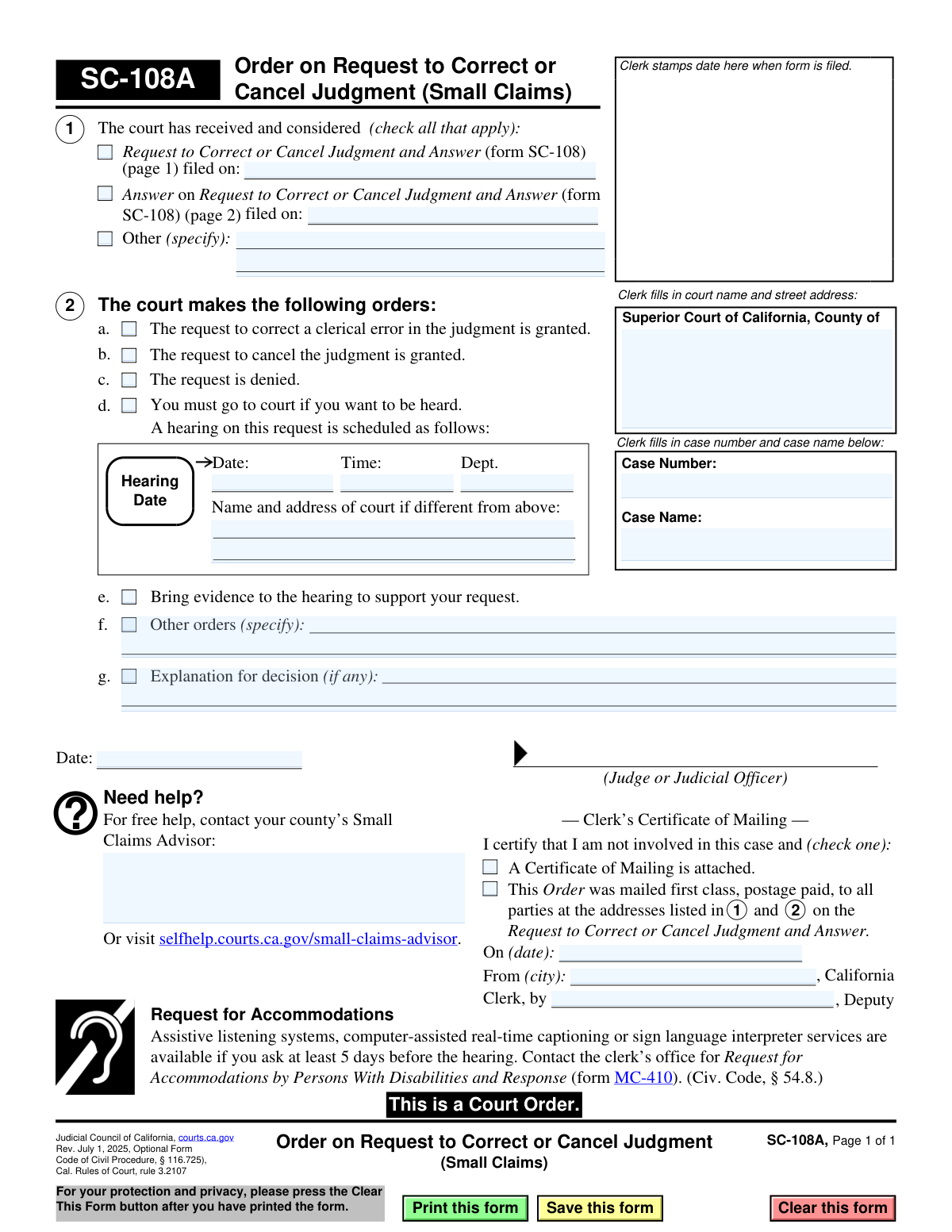
Form SC-108A, the Order on Request to Correct or Cancel Judgment, is a legal document issued by the Superior Court of California in small claims cases. It communicates the court's decision on a party's request (made via Form SC-108) to either fix a clerical mistake in a judgment or to void the judgment entirely. This order is crucial as it officially modifies or upholds the court's final decision. Today, this form can be filled out quickly and accurately using AI-powered services like Instafill.ai, which can also convert non-fillable PDF versions into interactive fillable forms.
SC-108A is part of the
California court forms, court claim forms and small claims forms categories on Instafill.
Our AI automatically handles information lookup, data retrieval, formatting, and form filling.
It takes less than a minute to fill out SC-108A using our AI form filling.
Securely upload your data. Information is encrypted in transit and deleted immediately after the form is filled out.
Form specifications
| Form name: | Order on Request to Correct or Cancel Judgment (Small Claims) |
| Number of fields: | 33 |
| Number of pages: | 1 |
| Language: | English |
Instafill Demo: How to fill out PDF forms in seconds with AI
How to Fill Out SC-108A Online for Free in 2026
Are you looking to fill out a SC-108A form online quickly and accurately? Instafill.ai offers the #1 AI-powered PDF filling software of 2026, allowing you to complete your SC-108A form in just 37 seconds or less.
Follow these steps to fill out your SC-108A form online using Instafill.ai:
- 1 Navigate to Instafill.ai and upload or select the SC-108A form.
- 2 Provide the court name, case number, and case name in the designated fields at the top of the form.
- 3 In Section 1, check the boxes corresponding to the documents the court considered and enter the filing dates.
- 4 In Section 2, select the court's order by checking the appropriate box, such as granting or denying the request, or scheduling a hearing.
- 5 If a hearing is scheduled, enter the date, time, department, and court address information.
- 6 Enter any additional explanations or specific orders from the judge in the provided fields.
- 7 Once the judge has signed and dated the order, the court clerk completes the 'Clerk’s Certificate of Mailing' section before distributing the form to all parties.
Our AI-powered system ensures each field is filled out correctly, reducing errors and saving you time.
Why Choose Instafill.ai for Your Fillable SC-108A Form?
Speed
Complete your SC-108A in as little as 37 seconds.
Up-to-Date
Always use the latest 2026 SC-108A form version.
Cost-effective
No need to hire expensive lawyers.
Accuracy
Our AI performs 10 compliance checks to ensure your form is error-free.
Security
Your personal information is protected with bank-level encryption.
Frequently Asked Questions About Form SC-108A
Form SC-108A is a court order that communicates a judge's decision regarding a request to fix a clerical error in a judgment or to cancel (vacate) a judgment entirely in a small claims case. It is the court's official response to a previously filed request (Form SC-108).
No, you do not fill out Form SC-108A. This form is completed and signed by a judge or judicial officer to issue their ruling, and then filed and mailed to the parties by the court clerk.
You should carefully read Section 2, 'The court makes the following orders,' to understand the judge's decision. The form will tell you if the judgment was corrected, canceled, if the request was denied, or if you need to attend a court hearing.
This means the judge has approved the request to fix a typo or minor mistake in the original judgment. The corrected judgment is now the official and legally binding one.
This indicates the judge has voided the original small claims judgment. This often happens for specific legal reasons, such as a party not being properly notified of the lawsuit, and may lead to a new hearing on the case.
If the 'request is denied' box is checked, it means the judge did not approve the request to correct or cancel the judgment. The original judgment remains in full effect.
If a hearing is scheduled, you must go to court on the specified date and time to present your arguments. Be sure to bring any evidence that supports your position on whether the judgment should be corrected or canceled.
Form SC-108 is the 'Request' that a party files to ask the court to change or cancel a judgment. Form SC-108A is the 'Order' that the judge uses to communicate their final decision on that request.
For free assistance, you can contact your county's Small Claims Advisor. Their contact information is often available on your local superior court's website or at selfhelp.courts.ca.gov.
You must request accommodations, such as a sign language interpreter, at least 5 days before the hearing. Contact the clerk’s office to obtain and file a 'Request for Accommodations' (Form MC-410).
No, because this form is a court order that only a judge can complete. However, for other court forms that you need to file yourself, AI-powered services like Instafill.ai can help auto-fill your information accurately and save you time.
You can upload a court form, like the initial request form, to the Instafill.ai website. The service will help you fill in the required fields quickly and accurately, directly in your web browser, before you print and file it.
Services like Instafill.ai can convert non-fillable, 'flat' PDFs into interactive forms. This allows you to easily type your information into the fields instead of having to print the form and fill it out by hand.
Compliance SC-108A
Validation Checks by Instafill.ai
1
Case Identification Completeness
This check ensures that both the 'Case Number' and 'Case Name' fields are filled out by the clerk. These fields are essential for uniquely identifying the legal matter to which this order applies. If this information is missing, the order cannot be correctly filed or associated with the proper case record.
2
Case Number Format Validation
Validates that the 'Case Number' field follows the specific format designated by the Superior Court of California. An incorrect format can lead to filing errors, difficulty in retrieving the case electronically, and potential rejection of the document. This check prevents data entry mistakes and ensures system compatibility.
3
Document Consideration Check
Verifies that at least one checkbox in Section 1 is checked, indicating which documents the court considered (e.g., 'Request to Correct...', 'Answer on Request...', 'Other'). This is crucial for the legal record, showing the basis for the court's decision. An order without a specified basis could be challenged for procedural insufficiency.
4
Conditional Filing Date for Request
If the checkbox for 'Request to Correct or Cancel Judgment' (form SC-108) is checked in Section 1, this validation ensures the corresponding 'filed on' date field is populated with a valid, non-future date. This date is a critical part of the case timeline. Failure to provide it creates an incomplete and potentially invalid record of the proceedings.
5
Conditional 'Other' Document Specification
Checks that if the 'Other' checkbox is selected in Section 1, the adjacent text field specifying the document is not empty. This provides clarity on what additional materials were considered by the court. An empty field would make the record ambiguous and the basis for the order unclear.
6
Exclusive Order Decision
Ensures that only one of the primary order decisions in Section 2 (a, b, c, or d) is selected. The court can either grant the request, deny it, or schedule a hearing; these actions are mutually exclusive. Selecting multiple options would create a contradictory and unenforceable order.
7
Required Hearing Information
If the checkbox for 'You must go to court' (Section 2d) is selected, this validation confirms that the 'Date', 'Time', and 'Dept.' fields for the hearing are all filled in. Without this information, the parties would not know when or where to appear, making the order to attend court ineffective. Failure to provide these details would require a corrected order to be issued.
8
Future Hearing Date Validation
Validates that the 'Hearing Date' in Section 2d is a valid date that occurs in the future. Scheduling a hearing for a past date is a logical impossibility and would render the notice invalid. This check prevents clerical errors that would cause confusion and require immediate correction.
9
Conditional 'Other Orders' Specification
Verifies that if the 'Other orders' checkbox (Section 2f) is checked, the corresponding text field is filled with the specific details of the order. This is necessary to make the order clear, specific, and enforceable. An unchecked box with text, or a checked box without text, creates ambiguity that could lead to legal challenges.
10
Order Date Presence and Validity
This check ensures the date field next to the Judge or Judicial Officer's signature line is populated with a valid, non-future date. This date is the official date of the order and is legally significant for deadlines and appeals. An invalid or missing date would call the validity of the entire order into question.
11
Order Date Chronology
Confirms that the 'Order Date' (by the judge's signature) is on or after any document 'filed on' dates listed in Section 1. A judge cannot issue an order based on a document before it has been officially filed with the court. This check maintains the logical and legal timeline of the case.
12
Mailing Certification Selection
Ensures that exactly one of the two checkboxes in the 'Clerk’s Certificate of Mailing' section is selected. This certifies how the parties were notified of the order, which is a critical step for due process. Selecting neither or both options creates an ambiguous record of service.
13
Conditional Mailing Details Completion
If the checkbox indicating the Order was mailed by the clerk is selected, this validation ensures the 'On (date)', 'From (city)', and 'Clerk, by' fields are all completed. This information provides a complete record of service, including when, where, and by whom the order was mailed. Missing details could compromise the proof of service.
14
Mailing Date Chronology
Validates that the mailing date in the 'Clerk’s Certificate of Mailing' is on or after the Order Date signed by the judge. An order cannot be mailed to the parties before it has been officially signed and dated. This check prevents logical impossibilities and ensures the integrity of the service record.
Common Mistakes in Completing SC-108A
This form, SC-108A, is an 'Order' to be completed exclusively by a judge and court clerk, not by the plaintiff or defendant. Parties mistakenly fill it out thinking they are helping the process, but this invalidates the document and can cause significant delays or rejection of their filings. Always read form titles and instructions carefully; forms titled 'Order' are almost always for court use only, whereas forms titled 'Request' or 'Motion' are for parties to complete.
A party might check a box in Section 2, such as 'The request to cancel the judgment is granted,' believing they are indicating their desired outcome. This section is where the judge makes their official ruling, and any markings by a party will void the form. This action demonstrates a misunderstanding of the legal process and requires the court to issue a new, clean order, delaying the final decision.
The signature line on this form is clearly marked for the 'Judge or Judicial Officer.' A party signing here is a serious error that immediately invalidates the legal order. This often happens when people are in a hurry and sign every line they see, but it results in the form being rejected by the clerk. It is crucial to only sign in fields designated for you.
The 'Clerk’s Certificate of Mailing' at the bottom is an official certification by the court clerk that the order has been sent to all parties. A litigant might fill this section out, thinking they need to certify that they mailed a copy to the other side. This is incorrect and interferes with the court's official notification process, potentially causing confusion about legal service dates and deadlines.
Parties sometimes use the 'Explanation for decision' field (Section 2g) to write their arguments or explain why they want the judgment corrected or canceled. This space is reserved for the judge to explain their ruling. Arguments and evidence belong on the initial 'Request' form (SC-108), not the 'Order' form (SC-108A).
Although parties should not fill out this form, those who do often incorrectly transcribe the case number or case name at the top. This can happen due to typos or misunderstanding the required format, leading to filing errors and difficulty linking the order to the correct case file. Using a tool like Instafill.ai can help prevent this on forms you *are* supposed to fill out by auto-populating correct case information from a central record.
In Section 1, a party might check the boxes and enter the filing dates for the documents they submitted, such as the 'Request to Correct or Cancel Judgment'. This section is for the court to officially record which documents it considered before making a decision. A party filling this in is misrepresenting the court's actions and will cause the form to be rejected.
If a hearing is required, a party might fill in a desired date, time, and department in Section 2d. This section is not for proposing a hearing; it is where the court clerk officially schedules and provides notice of the hearing details. Entering your own information here will be ignored and can create confusion about whether a hearing has actually been set.
Saved over 80 hours a year
“I was never sure if my IRS forms like W-9 were filled correctly. Now, I can complete the forms accurately without any external help.”
Kevin Martin Green
Your data stays secure with advanced protection from Instafill and our subprocessors

Robust compliance program
Transparent business model
You’re not the product. You always know where your data is and what it is processed for.
ISO 27001, HIPAA, and GDPR
Our subprocesses adhere to multiple compliance standards, including but not limited to ISO 27001, HIPAA, and GDPR.
Security & privacy by design
We consider security and privacy from the initial design phase of any new service or functionality. It’s not an afterthought, it’s built-in, including support for two-factor authentication (2FA) to further protect your account.
Fill out SC-108A with Instafill.ai
Worried about filling PDFs wrong? Instafill securely fills order-on-request-to-correct-or-cancel-judgment-small-claims forms, ensuring each field is accurate.