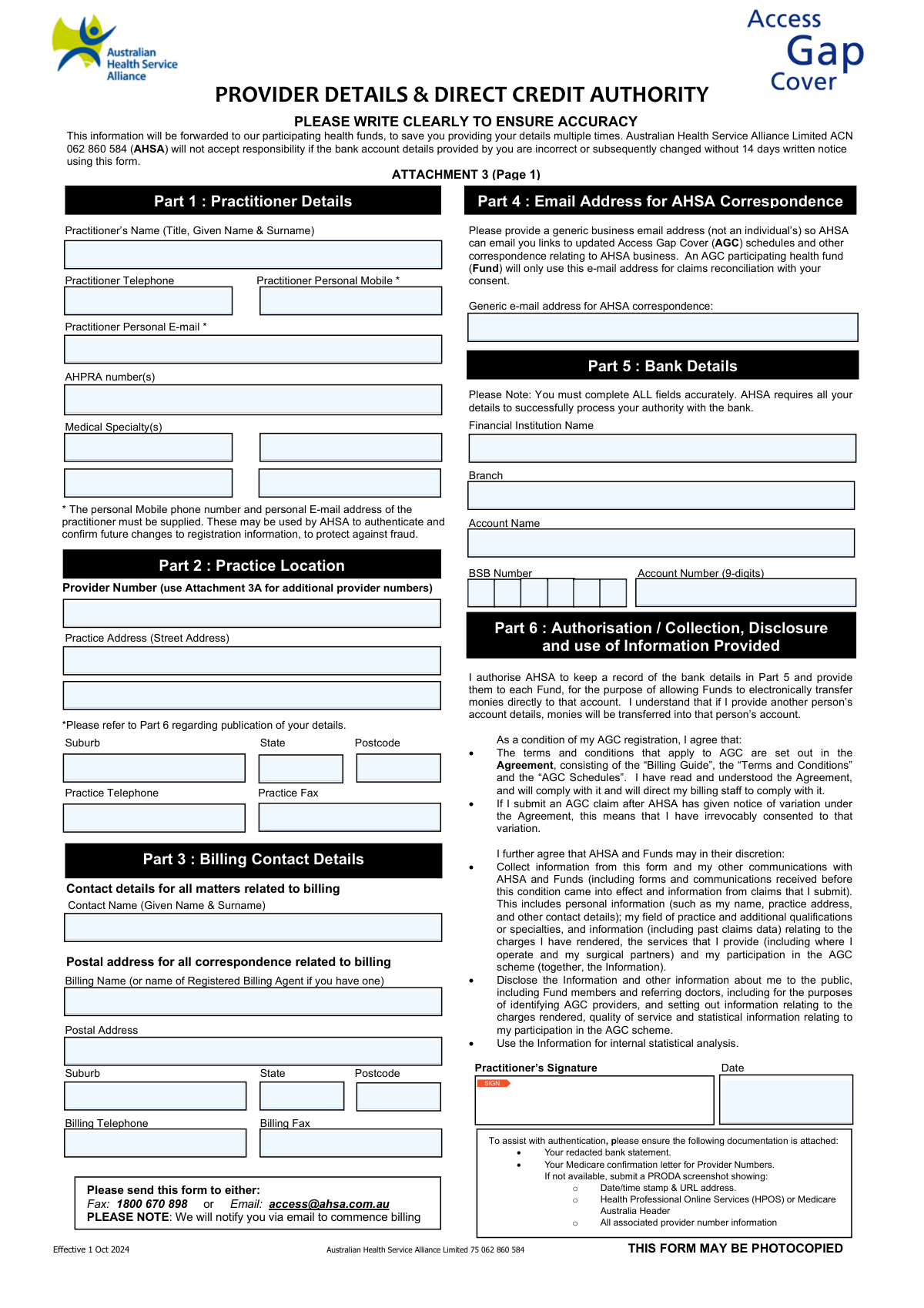
Yes! You can use AI to fill out Provider Details & Direct Credit Authority (Attachment 3)

This form, also known as Attachment 3, is a crucial document for Australian healthcare practitioners who wish to participate in the Access Gap Cover (AGC) scheme. It allows them to register their personal, practice, and bank account details with the Australian Health Service Alliance (AHSA) to receive direct credit payments from participating health funds. Completing this form accurately ensures timely and correct remuneration for services provided under the AGC. Today, this form can be filled out quickly and accurately using AI-powered services like Instafill.ai, which can also convert non-fillable PDF versions into interactive fillable forms.
AHSA Provider Details & Direct Credit Authority is part of the ACH forms, credit forms and ETA forms categories on Instafill.
Our AI automatically handles information lookup, data retrieval, formatting, and form filling.
It takes less than a minute to fill out AHSA Provider Details & Direct Credit Authority using our AI form filling.
Securely upload your data. Information is encrypted in transit and deleted immediately after the form is filled out.

Form specifications

Form name: Provider Details & Direct Credit Authority (Attachment 3)
Number of fields: 82
Number of pages: 2
Language: English
main-image

Instafill Demo: How to fill out PDF forms in seconds with AI

How to Fill Out AHSA Provider Details & Direct Credit Authority Online for Free in 2026

Are you looking to fill out a AHSA PROVIDER DETAILS & DIRECT CREDIT AUTHORITY form online quickly and accurately? Instafill.ai offers the #1 AI-powered PDF filling software of 2026, allowing you to complete your AHSA PROVIDER DETAILS & DIRECT CREDIT AUTHORITY form in just 37 seconds or less.
Follow these steps to fill out your AHSA PROVIDER DETAILS & DIRECT CREDIT AUTHORITY form online using Instafill.ai:
  1. 1 Navigate to Instafill.ai and upload the Provider Details & Direct Credit Authority form.
  2. 2 The AI will analyze the document and identify all required fields, such as practitioner details, practice locations, and bank information.
  3. 3 Provide your personal and professional information, including your name, AHPRA number, medical specialties, and contact details.
  4. 4 Enter your practice location(s), billing contact information, and the bank account details for direct credit payments.
  5. 5 Review all the information pre-filled by the AI for accuracy, making any necessary corrections.
  6. 6 Digitally sign and date the form in the authorization section to validate your agreement.
  7. 7 Download the completed form and submit it to AHSA via fax or email, ensuring you attach the required supporting documents like a redacted bank statement and Medicare confirmation letter.

Our AI-powered system ensures each field is filled out correctly, reducing errors and saving you time.

Why Choose Instafill.ai for Your Fillable AHSA Provider Details & Direct Credit Authority Form?

Speed

Complete your AHSA Provider Details & Direct Credit Authority in as little as 37 seconds.

Up-to-Date

Always use the latest 2026 AHSA Provider Details & Direct Credit Authority form version.

Cost-effective

No need to hire expensive lawyers.

Accuracy

Our AI performs 10 compliance checks to ensure your form is error-free.

Security

Your personal information is protected with bank-level encryption.

Frequently Asked Questions About Form AHSA Provider Details & Direct Credit Authority

This form is used to register a medical practitioner's provider numbers and bank details with the Australian Health Service Alliance (AHSA). This enables participation in the Access Gap Cover (AGC) scheme and allows health funds to make direct credit payments to the practitioner's bank account.

Any medical practitioner who wishes to register for the Access Gap Cover (AGC) scheme to receive direct electronic payments from participating health funds must complete this form.

You must attach a redacted bank statement to verify your bank details and a Medicare confirmation letter for your provider numbers. If the letter is unavailable, a specific PRODA screenshot is an acceptable alternative.

Your personal mobile and email are required for security purposes. AHSA uses this information to authenticate your identity and confirm future changes to your registration, which helps protect against fraud.

The practitioner's personal email is used for identity authentication, while the generic business email is used for receiving general AHSA correspondence, such as updated Access Gap Cover (AGC) schedules.

Registrations and changes can take up to 14 days to process. AHSA will notify you via email once your registration is complete and you can commence billing under the scheme.

You can send the completed and signed form, along with all required attachments, either by fax to 1800 670 898 or by email to [email protected].

Use the main form (Page 1) for your primary practice location and provider number. For additional locations, you must fill out the 'ADDITIONAL PRACTICE LOCATIONS' section on Attachment 3 (Page 2) for each one.

You are responsible for ensuring the bank account details are correct, as AHSA will not accept responsibility for errors. Incorrect details will lead to payment delays or failures, so double-check all information before submitting.

By signing, you agree to the AGC terms, authorize AHSA to share your bank details with health funds for payment, and consent to the collection and potential public disclosure of your practice information to help patients and referrers identify AGC providers.

If a Medicare letter is not available, you can submit a screenshot from your PRODA account. The screenshot must show the date/time stamp, URL, HPOS or Medicare Australia header, and all your associated provider number information.

Yes, services like Instafill.ai use AI to accurately auto-fill form fields, which can save you time and help prevent errors when completing your details.

You can use a service like Instafill.ai to upload the PDF and fill it out online. This allows you to easily type your information, add a digital signature, and download the completed document for submission.

If you have a non-fillable or 'flat' PDF, you can use a tool like Instafill.ai to convert it into an interactive, fillable form. This will allow you to type your information directly into the fields instead of printing and writing by hand.

Compliance AHSA Provider Details & Direct Credit Authority
Validation Checks by Instafill.ai

1
Practitioner Personal Contact Information Completeness
This check ensures that both the 'Practitioner Personal Mobile' and 'Practitioner Personal E-mail' fields are mandatory and have been filled. These details are critical for AHSA to authenticate the practitioner and confirm future changes to registration information, which helps protect against fraud. If either field is left empty, the form submission will be rejected with a message indicating which required field is missing.
2
Australian BSB Number Format
Validates that the 'BSB Number' in the Bank Details section is a 6-digit number, which may be entered with or without a hyphen. This is crucial for ensuring payments are directed to the correct bank branch. The validation should check for exactly six numeric digits, and if it fails, the user should be prompted to enter a valid 6-digit Australian BSB number.
3
Bank Account Number Length
Verifies that the 'Account Number' field contains exactly 9 digits, as specified on the form. Incorrect account numbers are a primary cause of payment failures and require manual intervention to resolve. If the entered value does not consist of 9 digits, the submission should be blocked, and an error message should instruct the user to correct the entry.
4
Generic Business Email Validation
This check confirms the 'Generic e-mail address for AHSA correspondence' is a valid email format and is intended to be a non-personal, business address. The validation should flag common personal email domains (e.g., gmail.com, outlook.com, icloud.com) or if the address matches the practitioner's personal email. A warning message should be displayed, advising the user to provide a generic business address to ensure continuity of communication if an individual staff member leaves.
5
Signature and Date Presence
Confirms that the 'Practitioner’s Signature' has been provided and the 'Date' field next to it is filled. The signature and date are legally required to authorize AHSA to act on the information provided, including sharing bank details with health funds. For digital forms, this means a digital signature or a mandatory checkbox is checked, and the date field is populated. A missing signature or date invalidates the authorization and must prevent submission.
6
Authorization Date Logic
Ensures the 'Date' in the authorization section is a valid calendar date, is not set in the future, and is not unreasonably old. This confirms the authorization is current and was signed at a plausible time. A submission with a future date or a date from many years in the past should be rejected, as it could indicate a user error or fraudulent entry.
7
AHPRA Number Format Validation
This check validates that the 'AHPRA number(s)' field is not empty and that the entered value conforms to the standard format for an Australian Health Practitioner Regulation Agency registration number (e.g., 'MED' followed by 10 digits). An invalid AHPRA number prevents verification of the practitioner's registration status. The system should reject entries that do not match the expected pattern.
8
State and Postcode Consistency
For every address block on the form (Practice, Billing, and Additional Locations), this validation cross-references the 'State' and 'Postcode' fields. It ensures that the entered postcode is a valid postcode within the selected Australian state or territory. This prevents mail from being misdirected due to simple data entry errors and improves overall data quality. If a mismatch is found, an error should highlight both fields and ask for correction.
9
Completeness of Bank Details Section
Verifies that all fields in Part 5 ('Financial Institution Name', 'Branch', 'Account Name', 'BSB Number', 'Account Number') are completed. The form explicitly states that all fields must be completed accurately for the authority to be processed by the bank. An incomplete section will lead to processing delays or failure, so the submission must be blocked until all fields in this section are filled.
10
Additional Practice Location Integrity
For each of the six 'Additional Practice Location' sections, this check ensures that if any part of the address or contact information is entered, the corresponding 'Provider Number' for that location is also provided. A practice location is useless for billing and registration without its associated provider number. If address details are present without a provider number, the form should prompt the user to either add the provider number or clear the location's details.
11
Phone and Fax Number Format
This validation applies to all telephone and fax number fields across the form. It checks that the input contains only valid characters (numbers, spaces, parentheses, hyphens) and conforms to a plausible length for an Australian phone number (typically 10 digits including area code). This ensures that contact numbers are usable and reduces the chance of communication failures. Invalid formats should trigger an error message requesting a valid phone number.
12
Provider Number Presence
Ensures that at least one 'Provider Number' is entered on the form, either in the main 'Practice Location' section (Part 2) or in one of the 'Additional Practice Locations' on the second page. The entire purpose of the form is to register provider numbers for Access Gap Cover, so a submission without any provider numbers is invalid. If no provider number is found, the submission should be blocked with an error.
13
Required Attachments Confirmation
Verifies that the user has acknowledged the requirement to attach supporting documents (a redacted bank statement and Medicare provider number confirmation). In a digital system, this would be implemented as mandatory checkboxes on the checklist that must be ticked before submission is allowed. This check ensures the user is aware of the requirements, reducing the number of incomplete applications that require follow-up.
14
Account Name vs. Practitioner Name Check
This validation compares the 'Account Name' in Part 5 with the 'Practitioner's Name' in Part 1. While the form allows for another person's account, a significant mismatch could indicate an error or potential fraud. If the names are substantially different, the system should display a confirmation prompt, such as 'The Account Name does not match the Practitioner's Name. Please confirm this is correct before proceeding.' This provides a safeguard against accidental payment misdirection.

Common Mistakes in Completing AHSA Provider Details & Direct Credit Authority

Confusing Personal vs. Generic Email Addresses

The form requires a practitioner's personal email for authentication (Part 1) and a separate generic business email for correspondence (Part 4). Applicants often use the same email for both, leading to failed security authentications or important updates being missed if a staff member leaves. To avoid this, provide the practitioner's private email in Part 1 and a shared address like '[email protected]' in Part 4.

Incorrect or Mismatched Bank Account Details

Transposing digits in the BSB or account number, or entering an 'Account Name' that doesn't exactly match bank records, are frequent errors. This will cause direct credit payments to fail, leading to significant delays in receiving funds. Always cross-reference the details with the bank statement you are attaching, paying close attention to the exact legal name of the account holder.

Missing or Incomplete Supporting Documentation

Applications are often submitted without the mandatory attachments: a redacted bank statement and a Medicare/PRODA confirmation for each provider number. Forgetting these documents or providing a PRODA screenshot that lacks the required date/time stamp, URL, or header will result in immediate rejection and require a full resubmission. Use the provided checklist to ensure all required, correctly formatted documents are attached before sending.

Forgetting to Sign and Date the Form

A missing signature or date in Part 6 invalidates the entire application, as it is a legal authorisation for direct payments and data use. This simple oversight is a common reason for rejection, causing processing delays of 14 days or more while the form is sent back for completion. Always perform a final review to ensure the practitioner has physically signed and dated the form before submission.

Incorrectly Listing Multiple Provider Numbers

Practitioners with multiple practice locations often try to cram all provider numbers onto the first page, instead of using the designated attachment for additional locations. This results in an incomplete registration, as AHSA will only process the numbers they can clearly identify. To ensure all locations are registered for Access Gap Cover, list the primary provider number on page one and all others on the 'Additional Practice Locations' attachment.

Illegible Handwriting or Poor Scan Quality

Since this is a non-fillable PDF, illegible handwriting is a primary cause of data entry errors, especially for critical bank and provider numbers. This can lead to payment rejections and significant delays. To prevent this, write in clear block capitals or, ideally, use a tool like Instafill.ai to convert the non-fillable PDF into a fillable version, allowing you to type your details for perfect clarity before printing to sign.

Incomplete Billing Contact Information

The distinction between the 'Contact Name' and 'Billing Name' (for billing agents) in Part 3 is often misunderstood. Practitioners may enter their own practice details when a third-party billing agent is used, causing correspondence and reconciliation queries to be sent to the wrong place. This creates administrative confusion and can delay payments. If you use a billing agent, ensure their official registered name and contact details are entered accurately.

Failing to Attach Proof for Each Provider Number

The form requires verification for every provider number submitted, not just the primary one. Applicants sometimes only attach the Medicare confirmation for the first provider number, leaving the additional locations on the attachment unverified. AHSA cannot register a provider number without its corresponding proof, meaning claims from those locations will be rejected. Ensure you collate and attach a valid Medicare letter or PRODA screenshot for every single provider number on the form.

Submitting an Unredacted or Poorly Redacted Bank Statement

To verify bank details, a redacted bank statement is required, but people often make one of two mistakes: redacting too much (like the account name or number) or not redacting enough (leaving transaction history visible). An improperly redacted statement can either be unverifiable or pose a privacy risk, leading to rejection. Ensure the statement clearly shows the institution, account name, BSB, and account number, while all other details like balances and transactions are blacked out.
Saved over 80 hours a year

“I was never sure if my IRS forms like W-9 were filled correctly. Now, I can complete the forms accurately without any external help.”

Kevin Martin Green

Your data stays secure with advanced protection from Instafill and our subprocessors

Robust compliance program

Transparent business model

You’re not the product. You always know where your data is and what it is processed for.

ISO 27001, HIPAA, and GDPR

Our subprocesses adhere to multiple compliance standards, including but not limited to ISO 27001, HIPAA, and GDPR.

Security & privacy by design

We consider security and privacy from the initial design phase of any new service or functionality. It’s not an afterthought, it’s built-in, including support for two-factor authentication (2FA) to further protect your account.

Fill out AHSA Provider Details & Direct Credit Authority with Instafill.ai

Worried about filling PDFs wrong? Instafill securely fills provider-details-direct-credit-authority-attachment-3 forms, ensuring each field is accurate.