
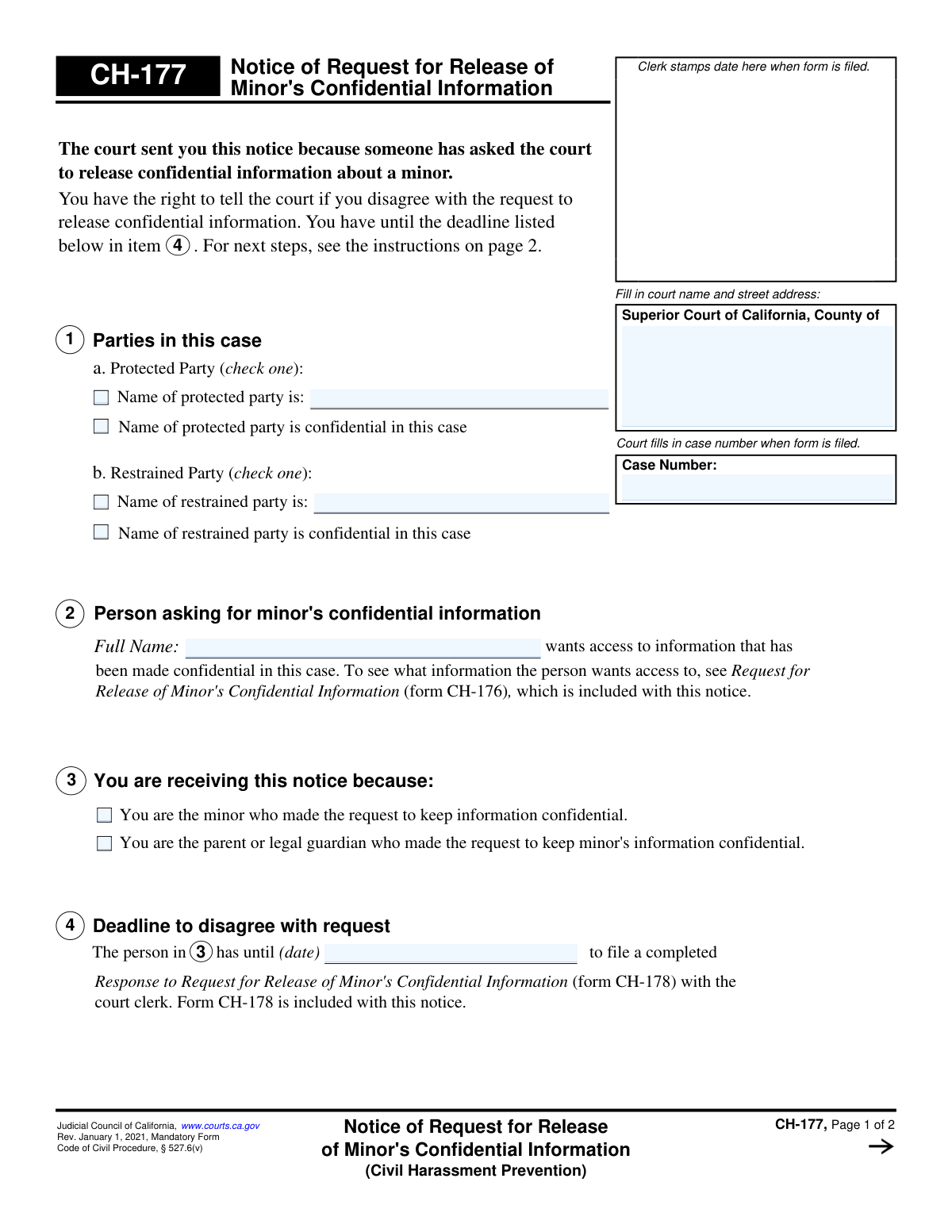
Yes! You can use AI to fill out Judicial Council of California Form CH-177, Notice of Request for Release of Minor's Confidential Information (Civil Harassment Prevention)
Don't type 22 fields by hand. Tell our AI about yourself, or upload the listing or an old lease, and it fills every field in seconds. You check it, then download, print or sign.
The AI does the filling. You just check it.
No typing into boxes, nothing to install.
What this form asks for
The AI fills all of it, from your answers or your documents.
The AI checks your answers before you download
12 checks built for this form, so a wrong date or a missing answer is caught before anyone else sees it.
Validates that the 'Case Number' entered on page 1 is identical to the 'Case Number' on page 2. This is critical for ensuring the document is internally consistent and refers to a single legal case throughout. If the numbers do not match, it could lead to filing errors and confusion, potentially associating the notice with the wrong case file.
For both the Protected Party (Section 1a) and Restrained Party (Section 1b), this check ensures that exactly one of the two available checkboxes is selected. A party's name cannot be both explicitly listed and confidential simultaneously. This validation prevents ambiguous or contradictory information about the case parties, which is essential for legal clarity.
If the checkbox for 'Name of protected party is:' or 'Name of restrained party is:' is selected in Section 1, this validation confirms that the corresponding name field is not empty. It is illogical to indicate a name will be provided without actually providing it. Failure to provide the name would make the form incomplete and unusable for identifying the party.
Verifies that the 'Full Name' field in Section 2, identifying the person asking for the minor's information, is not left blank. This field is essential for identifying the requester to both the court and the notice recipient. Without this information, the recipient cannot know who is requesting the data, making it impossible to formulate a meaningful response.
Ensures that one, and only one, checkbox is selected in Section 3. This selection clarifies why the recipient is receiving the notice (either as the minor or as the parent/guardian). This information is vital for context and for the court to understand who has been properly notified of the request.
This is a critical cross-field validation that checks the date in Section 4 against the 'Date of mailing' on page 2. It verifies that the deadline date is correctly calculated as the first court business day occurring 21 or more days after the mailing date, as per the form's instructions. This ensures the recipient is given the legally mandated amount of time to respond, protecting their due process rights.
And 6 more checks
- Valid Date Format for All Date Fields
- Chronological Date Integrity
- Future Deadline Date
- Court Information Completeness
- Clerk's Certificate Completeness
- Case Number Format Validation
Let AI fill out your CH-177
No typing. Every field filled in seconds, checked, ready to sign.
How to Fill Out CH-177 Online for Free in 2026
What the AI walks you through.
- Navigate to Instafill.ai and upload or select the CH-177 form.
- Enter the Superior Court name, address, and case number at the top of the form.
- In Part 1, identify the protected and restrained parties involved in the case, checking the appropriate boxes.
- In Part 2, provide the full name of the person who is requesting access to the minor's confidential information.
- In Part 3, check the box that correctly identifies why you are receiving this notice (e.g., you are the minor or the parent/guardian).
- Review Part 4, which will be filled in by the court clerk, to understand your deadline for filing a response if you disagree with the request.
- After reviewing all entered information for accuracy, use the platform's features to save, print, or prepare the form for filing with the court.
Common Mistakes in Completing CH-177
The ones the AI is built to catch.
Ignoring or Discarding the Notice
Miscalculating or Missing the Response Deadline
Failing to Use the Correct Response Form (CH-178)
Entering Incorrect Case Information on the Response Form
Failing to Review the Attached Request (Form CH-176)
Attempting to Fill Out the Notice Form (CH-177)
Assuming Silence Equals Disagreement
Improperly Filing or Serving the Response
Struggling with a Non-Fillable PDF
Submitting an Incomplete or Unpersuasive Response
Frequently Asked Questions About CH-177
Is it really free for 7 days?
Can I fill other forms too?
How do I cancel?
How does the AI fill out CH-177?
What happens to my information?
How complex is CH-177 to fill out?
Why did I receive Form CH-177?
What is the purpose of Form CH-177?
Do I need to fill out Form CH-177?
What should I do if I disagree with the request to release the minor's information?
What happens if I do nothing after receiving this notice?
How do I know what specific information is being requested?
What is the deadline to respond to this notice?
How will I know what the judge decides?
What other documents should have been included with Form CH-177?
Can AI help me prepare my response to this notice?
How can I fill out the response form (CH-178) online?
The PDF of Form CH-178 I found online is not fillable. What can I do?
Get your CH-177 filled out by AI
$0 today. Cancel before Nov 1 and you pay nothing.
Other forms like this one
California court forms: Judicial Council of California Form SC-105, Request for Court Order and Answer (Small Claims), Judicial Council of California Form SC-120, Defendant’s Claim and ORDER to Go to Small Claims Court (Small Claims), Judicial Council of California Form SER-001, Request for Sheriff to Serve Court Papers, Judicial Council of California Form SER-001, Request for Sheriff to Serve Court Papers, Affidavit for Collection of Personal Property California Probate Code Section 13100, Form POS-040, Proof of Service—Civil, Declaration of Facts of Death (California Superior Court), declaration-of-marriage-for-court-proceeding-california-family-law, ADOPT-200, Adoption Request, ADOPT-200, Stepparent Adoption Request, ADOPT-210, Adoption Agreement, ADOPT-310, Contact After Adoption Agreement, Judicial Council of California Form ADOPT-200, Adoption Request, Form ADR-107, Mediation Attendance Sheet, Form ADR-110, Order Appointing Referee, Form ADR-109, Stipulation or Motion for Order Appointing Referee, Form ADR-102, Request for Trial De Novo After Judicial Arbitration, Form ADR-108, Referee's Report (Code Civ. Proc., §§ 638, 639), Form ADR-106, Petition to Confirm, Correct, or Vacate Contractual Arbitration Award, Form ADR-104, Rejection of Award and Request for Trial After Attorney-Client Fee Arbitration
Judicial Council forms: Judicial Council of California Form FL-300, Request for Order, Judicial Council of California Form FL-150, Income and Expense Declaration, Judicial Council of California Form SC-104, Proof of Service (Small Claims), Judicial Council of California Form SC-105, Request for Court Order and Answer (Small Claims), Judicial Council of California Form DE-111, Petition for Probate (Probate—Decedents Estates), Judicial Council of California Form SC-104, Proof of Service (Small Claims), Judicial Council of California Form SC-108, Request to Correct or Cancel Judgment and Answer (Small Claims), Judicial Council of California Form SC-120, Defendant’s Claim and ORDER to Go to Small Claims Court (Small Claims), Civil Case Cover Sheet (Judicial Council of California Form CM-010), Civil Case Cover Sheet (Judicial Council of California Form CM-010), Judicial Council of California Form TR-205, Request for Trial by Written Declaration (Trial by Written Declaration—Traffic), Judicial Council of California Form DE-120, Notice of Hearing—Decedent's Estate or Trust, Inventory and Appraisal Attachment (Judicial Council of California Form DE-161, GC-041), CLETS-001, Confidential Information for Law Enforcement (Judicial Council of California), Judicial Council of California Form SER-001, Request for Sheriff to Serve Court Papers, Judicial Council of California Form UD-105, Answer—Unlawful Detainer, CLETS-001, Confidential Information for Law Enforcement (Judicial Council of California), Judicial Council of California Form ADOPT-210, Adoption Agreement, Judicial Council of California Form DE-120, Notice of Hearing—Decedent's Estate or Trust, Inventory and Appraisal (Judicial Council of California) (Form DE-160/GC-040)
California judicial forms: Judicial Council of California Form FL-300, Request for Order, Judicial Council of California Form FL-150, Income and Expense Declaration, Judicial Council of California Form SC-104, Proof of Service (Small Claims), Judicial Council of California Form SC-105, Request for Court Order and Answer (Small Claims), Judicial Council of California Form DE-111, Petition for Probate (Probate—Decedents Estates), Judicial Council of California Form SC-104, Proof of Service (Small Claims), Judicial Council of California Form SC-108, Request to Correct or Cancel Judgment and Answer (Small Claims), Judicial Council of California Form SC-120, Defendant’s Claim and ORDER to Go to Small Claims Court (Small Claims), Civil Case Cover Sheet (Judicial Council of California Form CM-010), Civil Case Cover Sheet (Judicial Council of California Form CM-010), Judicial Council of California Form TR-205, Request for Trial by Written Declaration (Trial by Written Declaration—Traffic), Judicial Council of California Form DE-120, Notice of Hearing—Decedent's Estate or Trust, Inventory and Appraisal Attachment (Judicial Council of California Form DE-161, GC-041), CLETS-001, Confidential Information for Law Enforcement (Judicial Council of California), Judicial Council of California Form SER-001, Request for Sheriff to Serve Court Papers, Judicial Council of California Form UD-105, Answer—Unlawful Detainer, CLETS-001, Confidential Information for Law Enforcement (Judicial Council of California), Judicial Council of California Form ADOPT-210, Adoption Agreement, Judicial Council of California Form DE-120, Notice of Hearing—Decedent's Estate or Trust, Inventory and Appraisal (Judicial Council of California) (Form DE-160/GC-040)
civil court forms: Petition for Leave to Proceed In Forma Pauperis (Court of Common Pleas of Lehigh County, Pennsylvania, Civil Division), Designation of Record on Appeal (Civil) (Maricopa County Justice Courts, Arizona) (Form APP 8150-702), Certificate of Service (Civil Court Claim), Pfändungs- und Überweisungsbeschluss (Garnishment and Transfer Order) – German Civil Enforcement Court Form, AOPC 308A, Civil Complaint, Form MC 03, Answer, Civil, Form POS-040, Proof of Service—Civil, ONTARIO Form 8: Application (General), Form ATJ 601.9, Application for Waiver of Court Fees (Civil), Nevada Justice / Municipal Civil Court Cover Sheet, Form MC 01, Summons, Form MC 10, Judgment, Civil, Form MC 99, Motion and Affidavit to Set Aside Default (Civil), Form MC 281a, Civil Mediator Application, Ex Parte Motion and Order to Renew Civil Judgment, AO 88B, Subpoena to Produce Documents, Information, or Objects or to Permit Inspection of Premises in a Civil Action, Form APP-031A, Application for Extension of Time to File Brief (Civil Case), Civil Appeal Case Information Statement, Form APP-014, Appellant's Proposed Statement on Appeal (Unlimited Civil Case), form-app-015-respondents-proposed-corrections-toadditions-to-appellants-proposed-settled-statement-unlimited-civil-case
Let AI fill out your CH-177
Your trial starts once a card is added. You pay nothing before Nov 1.
Our AI already knows this form, all 22 fields of it. Skip the typing: tell it about yourself, or upload what you have, and it fills the whole form in seconds.
- AI fills every field on both pages, checkboxes included
- No typing into boxes: answer a few questions, or upload the listing or an old lease, an old copy of this form, a photo of a document
- The AI checks the answers; you review and change anything before you download
- Download the finished PDF, print it, or sign it online
- Encrypted, and never used to train AI
Cancel before Nov 1 and you pay nothing.
A card is needed to start the trial. Cancel in two clicks from your account.
Terms · Privacy