
Yes! You can use AI to fill out Form CR-144, Order Concerning Appellant's Proposed Statement on Appeal (Infraction)
Don't type 23 fields by hand. Tell our AI about yourself, or upload a document you already have, and it fills every field in seconds. You check it, then download, print or sign.
The AI does the filling. You just check it.
No typing into boxes, nothing to install.
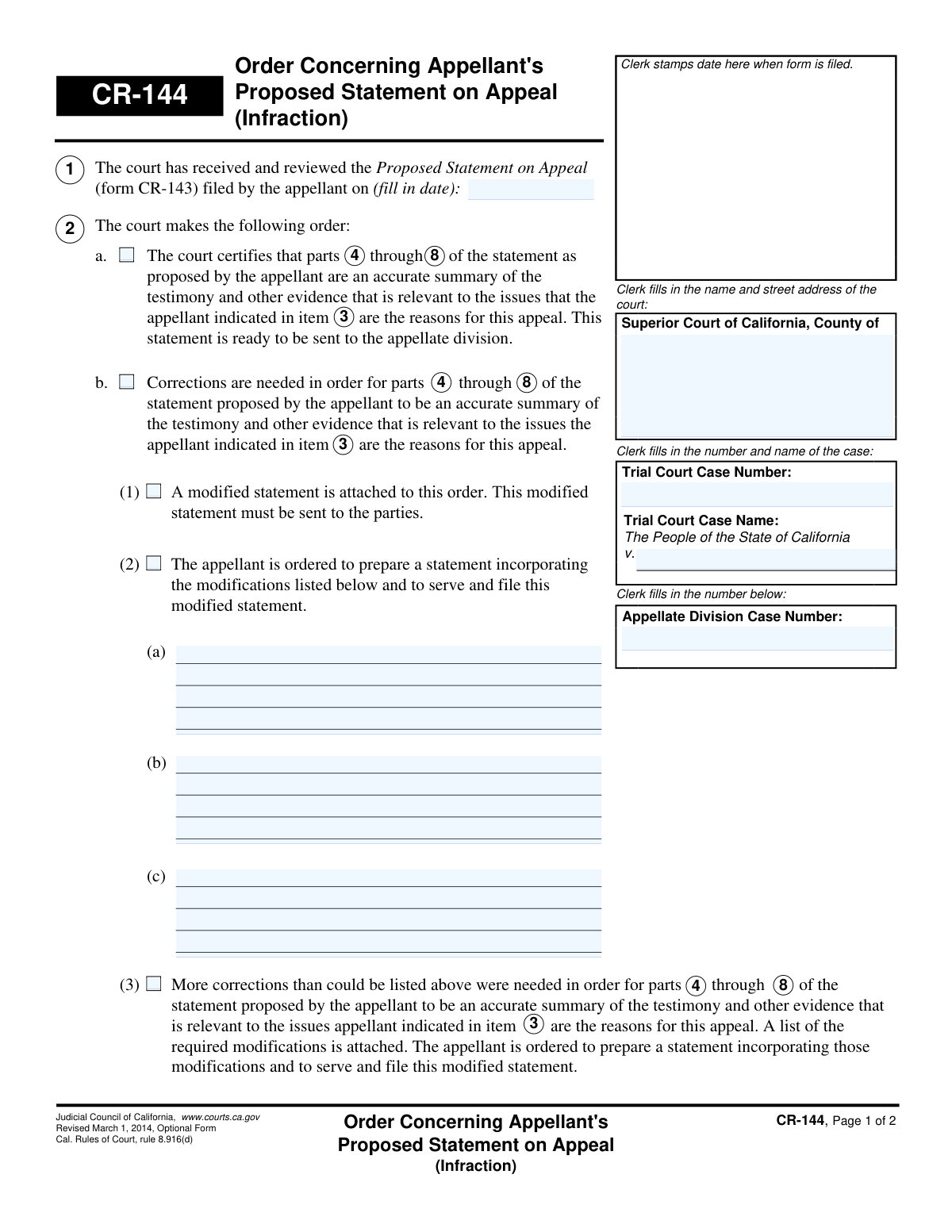
What this form asks for
The AI fills all of it, from your answers or your documents.
The AI checks your answers before you download
12 checks built for this form, so a wrong date or a missing answer is caught before anyone else sees it.
This check verifies that the clerk has filled in all required case identification fields in the header on page 1, including the court name and address, the Trial Court Case Name, and the Trial Court Case Number. These fields are essential for uniquely identifying the case and the jurisdiction. A failure in this validation would mean the order is incomplete and cannot be correctly filed or associated with the proper case record.
This validation confirms that the 'Trial Court Case Number' entered on page 1 is identical to the 'Trial Court Case Number' entered on page 2. Maintaining consistency is crucial for document integrity and ensures that both pages of the order unequivocally belong to the same case. A mismatch could lead to filing errors or the pages being separated and misattributed.
This check ensures that the 'Trial Court Case Name' on page 1 matches the 'Trial Court Case Name' on page 2. This consistency is vital for preventing administrative errors and confirming that the entire document pertains to the correct appellant. If the names do not match, it could indicate a data entry error that needs correction before the order is finalized.
This check validates that the date entered for when the 'Proposed Statement on Appeal (form CR-143)' was filed is a valid calendar date and is not a future date. This date provides context for the court's order and its timeliness. An invalid or future date would be logically impossible and would need to be corrected to ensure the record is accurate.
This validation ensures that only one of the primary order options (2a, 2b, 2c, 2d, or 2e) is selected. These options represent distinct and mutually exclusive outcomes for the proposed statement on appeal. Selecting more than one would create a contradictory and legally unenforceable order, so the form must be returned for clarification.
If option '2a' is checked, certifying the statement as accurate, this validation ensures that the corresponding fields for 'parts ___ through ___' and 'item ___' are filled. These numbers specify which parts of the appellant's statement are being certified. Failure to provide these numbers would make the order vague and unenforceable, as it would not be clear what the court has certified.
And 6 more checks
- Conditional Requirement for Order 2b Details
- Validates Logical Range for Part Numbers
- Conditional Requirement for Order 2c Explanation
- Validates Judicial Officer's Signature Date
- Verifies Chronological Order of Dates
- Ensures Selection of a Sub-Option for Order 2b
Let AI fill out your CR-144
No typing. Every field filled in seconds, checked, ready to sign.
How to Fill Out CR-144 Online for Free in 2026
What the AI walks you through.
- Navigate to Instafill.ai and upload or select Form CR-144.
- Use the AI assistant to automatically populate court, case name, and case number information into the header fields.
- Enter the date the appellant's Proposed Statement on Appeal (form CR-143) was filed.
- Review the court's decision and check the appropriate box to indicate the order being made (e.g., certifying the statement, ordering corrections, or ordering a transcript).
- If corrections are required, type the specific modifications into the designated text boxes or note that an attachment is included.
- Enter the date of the order and provide the digital or physical signature of the trial court judicial officer.
- Review all AI-populated and manually entered information for accuracy before printing and filing the completed form with the court clerk.
Common Mistakes in Completing CR-144
The ones the AI is built to catch.
Completing Fields Reserved for Court Personnel
Signing in the Judicial Officer's Signature Block
Misunderstanding the Form's Purpose and Filer's Role
Entering Incorrect or Incomplete Case Information
Incorrectly Referencing the Proposed Statement on Appeal (CR-143)
Selecting Multiple, Contradictory Orders
Failing to Include Required Attachments
Omitting the Filing Date of the Prior Document
Illegible Handwriting on a Non-Fillable Form
Submitting an Incomplete Header
Frequently Asked Questions About CR-144
Is it really free for 7 days?
Can I fill other forms too?
How do I cancel?
How does the AI fill out CR-144?
What happens to my information?
How complex is CR-144 to fill out?
What is the purpose of Form CR-144, Order Concerning Appellant's Proposed Statement on Appeal?
Who fills out this form? Do I need to complete it?
Why did I receive this form in the mail?
What does it mean if box 2a is checked on my order?
What do I need to do if box 2b, 2c, or 2d is checked?
My order has box 2e or 2f checked. What does that mean?
How long do I have to make the corrections ordered by the court?
What happens after I submit the corrected statement?
Do I need to sign Form CR-144?
Can AI tools help me if I need to correct my appeal statement?
How would I use Instafill.ai to create a corrected statement?
The form I need to correct (CR-143) is a non-fillable PDF. What can I do?
Get your CR-144 filled out by AI
$0 today. Cancel before Nov 1 and you pay nothing.
Other forms like this one
California state forms: Judicial Council of California Form DE-111, Petition for Probate (Probate—Decedents Estates), DS 1891, Applicant/Vendor Disclosure Statement (State of California Department of Developmental Services), Judicial Council of California Form DE-120, Notice of Hearing—Decedent's Estate or Trust, Judicial Council of California Form DE-120, Notice of Hearing—Decedent's Estate or Trust, Murrieta Police Department Citizen Complaint Form (California Penal Code § 148.6 Advisory Statement), California Department of Social Services, Sworn Statement, State of California Department of Transportation California Civil Rights Laws Certification, State of California Department of Transportation Darfur Contracting Act Certification, Form DOT ADM-0077, State of California Department of Transportation, Contract Requirements, State of California Department of Transportation Subcontractor List, State of California Department of Transportation, Certified DVBE Summary, Bidder Declaration GSPD-05-105, State of California Level of Care Rate Determination Protocol Matrix, State of California Accessible Form, State of California Form SOC 321, Request for Order and Consent - Paramedical Services, State of California Darfur Contracting Act Certification, State of California Department of Veterans Affairs COMMERCIALLY USEFUL FUNCTION (CUF) CERTIFICATION FORM, Form ADR-100, Statement of Agreement or Nonagreement, Civil Appeal Case Information Statement, Form APP-014, Appellant's Proposed Statement on Appeal (Unlimited Civil Case)
California court forms: Judicial Council of California Form SC-105, Request for Court Order and Answer (Small Claims), Judicial Council of California Form SC-120, Defendant’s Claim and ORDER to Go to Small Claims Court (Small Claims), Judicial Council of California Form SER-001, Request for Sheriff to Serve Court Papers, Judicial Council of California Form SER-001, Request for Sheriff to Serve Court Papers, Affidavit for Collection of Personal Property California Probate Code Section 13100, Form POS-040, Proof of Service—Civil, Declaration of Facts of Death (California Superior Court), declaration-of-marriage-for-court-proceeding-california-family-law, ADOPT-200, Adoption Request, ADOPT-200, Stepparent Adoption Request, ADOPT-210, Adoption Agreement, ADOPT-310, Contact After Adoption Agreement, Judicial Council of California Form ADOPT-200, Adoption Request, Form ADR-107, Mediation Attendance Sheet, Form ADR-110, Order Appointing Referee, Form ADR-109, Stipulation or Motion for Order Appointing Referee, Form ADR-102, Request for Trial De Novo After Judicial Arbitration, Form ADR-108, Referee's Report (Code Civ. Proc., §§ 638, 639), Form ADR-106, Petition to Confirm, Correct, or Vacate Contractual Arbitration Award, Form ADR-104, Rejection of Award and Request for Trial After Attorney-Client Fee Arbitration
court appeal forms: Form N161, Appellant's Notice (All appeals except small claims track appeals and appeals to the Family Division of the High Court), Designation of Record on Appeal (Civil) (Maricopa County Justice Courts, Arizona) (Form APP 8150-702), Form N161, Appellant’s notice (All appeals except small claims track appeals and appeals to the Family Division of the High Court), Declaration for Court of Appeal Proceedings, Form MC 55, Claim of Appeal, Form MC 56, Bond on Appeal, Form MC 57, Certificate of Records Transmitted for Appeal and Notice to Parties, Form MC 60, Notice of Record Return from Circuit Court/Court of Appeals, Form MC 501, Reporter/Recorder Certificate of Ordering Transcript on Appeal, Form MC 503, Motion to Change Time for Filing Transcript on Appeal, Civil Appeal Case Information Statement, Form APP-014, Appellant's Proposed Statement on Appeal (Unlimited Civil Case), Form CR-125, Notice of Appeal—Commitment (Penal Code or Welfare and Institutions Code), Form CR-134, Notice Regarding Record on Appeal (Misdemeanor), Form CR-135, Proposed Statement on Appeal (Misdemeanor), Form CR-136, Order Concerning Appellant's Proposed Statement on Appeal (Misdemeanor), Form CR-137, Abandonment of Appeal (Misdemeanor), Form CR-142, Notice of Appeal and Record on Appeal (Infraction), Form CR-143, Proposed Statement on Appeal (Infraction), Form CR-105, Defendant's Financial Statement on Eligibility for Appointment of Counsel and Reimbursement and Record on Appeal at Public Expense
Let AI fill out your CR-144
Your trial starts once a card is added. You pay nothing before Nov 1.
Our AI already knows this form, all 23 fields of it. Skip the typing: tell it about yourself, or upload what you have, and it fills the whole form in seconds.
- AI fills every field on both pages, checkboxes included
- No typing into boxes: answer a few questions, or upload a document you already have, an old copy of this form, a photo of a document
- The AI checks the answers; you review and change anything before you download
- Download the finished PDF, print it, or sign it online
- Encrypted, and never used to train AI
Cancel before Nov 1 and you pay nothing.
A card is needed to start the trial. Cancel in two clicks from your account.
Terms · Privacy