Yes! You can use AI to fill out Indiana Health Coverage Programs Prior Authorization Request Form
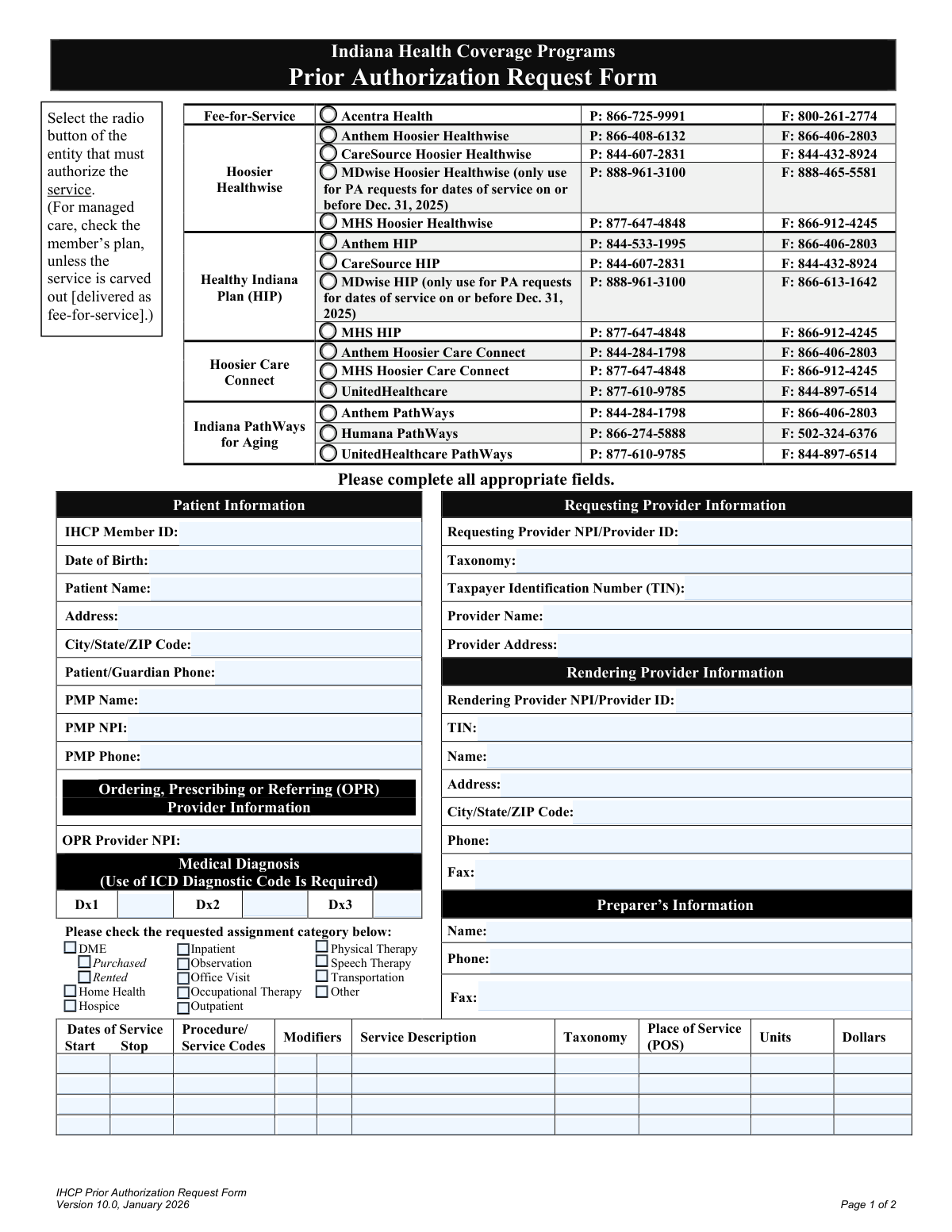
This form is a formal request submitted by healthcare providers to a patient's health plan under the Indiana Health Coverage Programs (IHCP) to obtain pre-approval for specific medical services, procedures, or equipment. It is a crucial step to ensure that the proposed treatment is deemed medically necessary and will be covered by the insurance plan, preventing unexpected costs for the patient. Today, this form can be filled out quickly and accurately using AI-powered services like Instafill.ai, which can also convert non-fillable PDF versions into interactive fillable forms.
Our AI automatically handles information lookup, data retrieval, formatting, and form filling.
It takes less than a minute to fill out IHCP PA Request Form using our AI form filling.
Securely upload your data. Information is encrypted in transit and deleted immediately after the form is filled out.
Form specifications
| Form name: | Indiana Health Coverage Programs Prior Authorization Request Form |
| Number of pages: | 2 |
| Language: | English |
| Categories: | prior authorization forms, authorization forms, health forms |
Instafill Demo: How to fill out PDF forms in seconds with AI
How to Fill Out IHCP PA Request Form Online for Free in 2026
Are you looking to fill out a IHCP PA REQUEST FORM form online quickly and accurately? Instafill.ai offers the #1 AI-powered PDF filling software of 2026, allowing you to complete your IHCP PA REQUEST FORM form in just 37 seconds or less.
Follow these steps to fill out your IHCP PA REQUEST FORM form online using Instafill.ai:
- 1 Navigate to Instafill.ai and upload or select the IHCP Prior Authorization Request Form.
- 2 Use the AI assistant to automatically populate patient information, including their name, date of birth, and IHCP Member ID.
- 3 Enter the details for the requesting, rendering, and OPR (Ordering, Prescribing, or Referring) providers, including NPI and TIN numbers.
- 4 Specify the medical diagnosis using the required ICD codes and select the correct health plan entity that must authorize the service.
- 5 Detail each requested service by entering the procedure codes, modifiers, dates of service, units, and costs in the provided table.
- 6 Attach all necessary medical documentation to the form to support the request for medical necessity.
- 7 Review all entered information for accuracy, then have the qualified practitioner digitally sign and date the form before submitting it to the appropriate entity.
Our AI-powered system ensures each field is filled out correctly, reducing errors and saving you time.
Why Choose Instafill.ai for Your Fillable IHCP PA Request Form Form?
Speed
Complete your IHCP PA Request Form in as little as 37 seconds.
Up-to-Date
Always use the latest 2026 IHCP PA Request Form form version.
Cost-effective
No need to hire expensive lawyers.
Accuracy
Our AI performs 10 compliance checks to ensure your form is error-free.
Security
Your personal information is protected with bank-level encryption.
Frequently Asked Questions About Form IHCP PA Request Form
This form is used by healthcare providers to request approval from Indiana Health Coverage Programs (IHCP) for specific medical services or equipment before they are provided to a patient. This process, known as prior authorization (PA), confirms that the service is medically necessary and covered under the patient's plan.
A healthcare provider's office, such as a doctor, therapist, or hospital staff, must complete and submit this form on behalf of the patient (IHCP member). The form requires a signature from a qualified practitioner to be valid.
You must submit supporting medical documentation along with the form to demonstrate the medical necessity of the requested service. The form explicitly states that requests submitted without this documentation will not be reviewed.
You need to verify the patient's current health plan (e.g., Anthem Hoosier Healthwise, CareSource HIP) and check the corresponding box. If the service is 'carved out' and managed by the state's Fee-for-Service program, you should select Acentra Health.
Submit the form to the entity you selected at the top of the page, which corresponds to the patient's health plan. Each plan has a specific fax number listed; for mailing addresses, you should refer to the IHCP Quick Reference Guide.
The 'Requesting Provider' is the individual or facility formally asking for the authorization. The 'Rendering Provider' is the individual or facility that will actually perform the service if it is approved; they may be the same or different entities.
This section requires you to enter the patient's diagnosis using the appropriate ICD (International Classification of Diseases) diagnostic codes. These codes are essential for justifying the medical necessity of the requested services.
This note indicates that MDwise will no longer be a participating plan after that date. You should only use the MDwise contact information for services rendered on or before December 31, 2025; for later dates, you must use the patient's new health plan.
Yes, the form includes a table with several rows where you can detail multiple services. For each service, you must provide the dates, procedure codes, modifiers, units, and cost.
If you have a non-fillable or 'flat' PDF, you can use a service like Instafill.ai to convert it into an interactive, fillable form. This allows you to easily type your information into the correct fields before submitting.
Yes, modern services like Instafill.ai use AI to help you complete forms more efficiently. These tools can auto-fill recurring information, such as provider details, which saves time and helps reduce data entry errors.
To fill out this form online, you can upload it to a platform like Instafill.ai. Their system allows you to digitally enter all the required patient, provider, and service information directly onto the form, which you can then save or print.
NPI stands for National Provider Identifier, a unique 10-digit ID for healthcare providers. It is required for the requesting, rendering, and OPR (Ordering, Prescribing, or Referring) providers to ensure accurate identification and claims processing.
Compliance IHCP PA Request Form
Validation Checks by Instafill.ai
1
Exclusive Health Plan Selection
This check ensures that exactly one health plan entity is selected from the list of radio buttons. Selecting a plan is critical for routing the prior authorization request to the correct processing entity. If zero or more than one plan is selected, the form submission will be rejected with an error prompting the user to select a single, appropriate plan.
2
MDwise Date of Service Restriction
This validation cross-references the selected health plan with the 'Dates of Service'. If 'MDwise Hoosier Healthwise' or 'MDwise HIP' is selected, all 'Start' and 'Stop' dates for services must be on or before December 31, 2025. This is crucial for compliance with plan-specific rules. A failure will prevent submission and inform the user that the selected plan is not valid for the requested service dates.
3
Logical Service Date Chronology
For each service line item, this validation ensures the 'Stop' date is on or after the 'Start' date. This prevents logical errors in billing and service tracking, ensuring the service period is valid. If a 'Stop' date precedes a 'Start' date, an error will be displayed, requiring the user to correct the date range before proceeding.
4
NPI Format and Validity
This check verifies that all National Provider Identifier (NPI) fields (Requesting, Rendering, OPR, PMP) contain a valid 10-digit number. A valid NPI is essential for correctly identifying providers for communication, payment, and regulatory compliance. An invalid format will trigger an error message indicating which NPI field is incorrect and needs to be fixed.
5
Primary Diagnosis Code Requirement
This validation ensures that the 'Dx1' field is populated with a medical diagnosis code. A primary diagnosis is mandatory to establish medical necessity for the requested services. If this field is left blank, the form cannot be processed, and the user will be prompted to enter at least one valid diagnosis code.
6
ICD Diagnosis Code Format
This check validates that any entered diagnosis codes (Dx1, Dx2, Dx3) conform to the standard International Classification of Diseases (ICD) format, typically ICD-10. Using valid codes is fundamental for accurate medical records and billing. The system should flag any non-conforming codes and require the user to input a valid ICD code.
7
Patient Date of Birth Validity
This validation confirms that the 'Date of Birth' field contains a complete, valid date that occurs in the past. This is a basic identity verification step and is required for eligibility checks. An invalid or future date will result in a validation error, preventing submission until a logical and correctly formatted date is provided.
8
Service Line Item Completeness
This check ensures that for any service line where a 'Procedure/Service Code' is entered, the corresponding 'Dates of Service (Start/Stop)', 'Place of Service (POS)', and 'Units' fields are also filled. Incomplete service lines lead to processing delays and rejections. The system will highlight the incomplete row and specify which required fields are missing.
9
Required Provider Information
This validation ensures that the 'Requesting Provider' and 'Patient Information' sections are fully completed, as they are essential for identifying who is asking for the service and for whom. This includes fields like NPI, TIN, Name, and Address. Missing information in these core sections will block submission and prompt the user to fill in all required fields.
10
Taxpayer Identification Number (TIN) Format
This check verifies that the 'Taxpayer Identification Number (TIN)' for the Requesting and Rendering providers is a 9-digit number. A valid TIN is required for financial and tax purposes related to provider payment. If the format is incorrect, the system will return an error and require the user to enter a valid 9-digit TIN.
11
Signature and Date Requirement
This validation confirms that the 'Signature of Qualified Practitioner' field is signed and the 'Date' field is populated. A dated signature is a legal requirement, attesting to the accuracy of the information and the medical necessity of the request. A missing signature or date will render the form incomplete and invalid, preventing its submission.
12
Requested Assignment Category Selection
This check ensures that at least one checkbox is selected from the 'requested assignment category' list (e.g., DME, Inpatient, Home Health). This information helps categorize the request and may influence which review criteria are applied. If no category is selected, the user will be notified that a selection is required to proceed.
13
Service Units Value Validation
This validation ensures that the 'Units' field for each service line contains a positive, non-zero integer. The number of units is a critical component for determining the scope and cost of a service. Submitting zero, negative, or non-integer values would be illogical and cause processing errors, so the system must enforce a valid entry.
14
Place of Service (POS) Code Validity
This check validates that the 'Place of Service (POS)' code entered for each service line is a valid, 2-digit code as defined by the Centers for Medicare & Medicaid Services (CMS). The POS code is crucial as it indicates the setting where the service was provided, which affects reimbursement and coverage rules. An invalid code will be flagged for correction.
Common Mistakes in Completing IHCP PA Request Form
Saved over 80 hours a year
“I was never sure if my IRS forms like W-9 were filled correctly. Now, I can complete the forms accurately without any external help.”
Kevin Martin Green
Your data stays secure with advanced protection from Instafill and our subprocessors

Robust compliance program
Transparent business model
You’re not the product. You always know where your data is and what it is processed for.
ISO 27001, HIPAA, and GDPR
Our subprocesses adhere to multiple compliance standards, including but not limited to ISO 27001, HIPAA, and GDPR.
Security & privacy by design
We consider security and privacy from the initial design phase of any new service or functionality. It’s not an afterthought, it’s built-in, including support for two-factor authentication (2FA) to further protect your account.
Fill out IHCP PA Request Form with Instafill.ai
Worried about filling PDFs wrong? Instafill securely fills indiana-health-coverage-programs-prior-authorization-request-form forms, ensuring each field is accurate.