
Yes! You can use AI to fill out Form CIV-010/FL-935, Application for Appointment of Guardian Ad Litem—Civil and Family Law
Don't type 76 fields by hand. Tell our AI about yourself, or upload a document you already have, and it fills every field in seconds. You check it, then download, print or sign.
The AI does the filling. You just check it.
No typing into boxes, nothing to install.
What this form asks for
The AI fills all of it, from your answers or your documents.
The AI checks your answers before you download
14 checks built for this form, so a wrong date or a missing answer is caught before anyone else sees it.
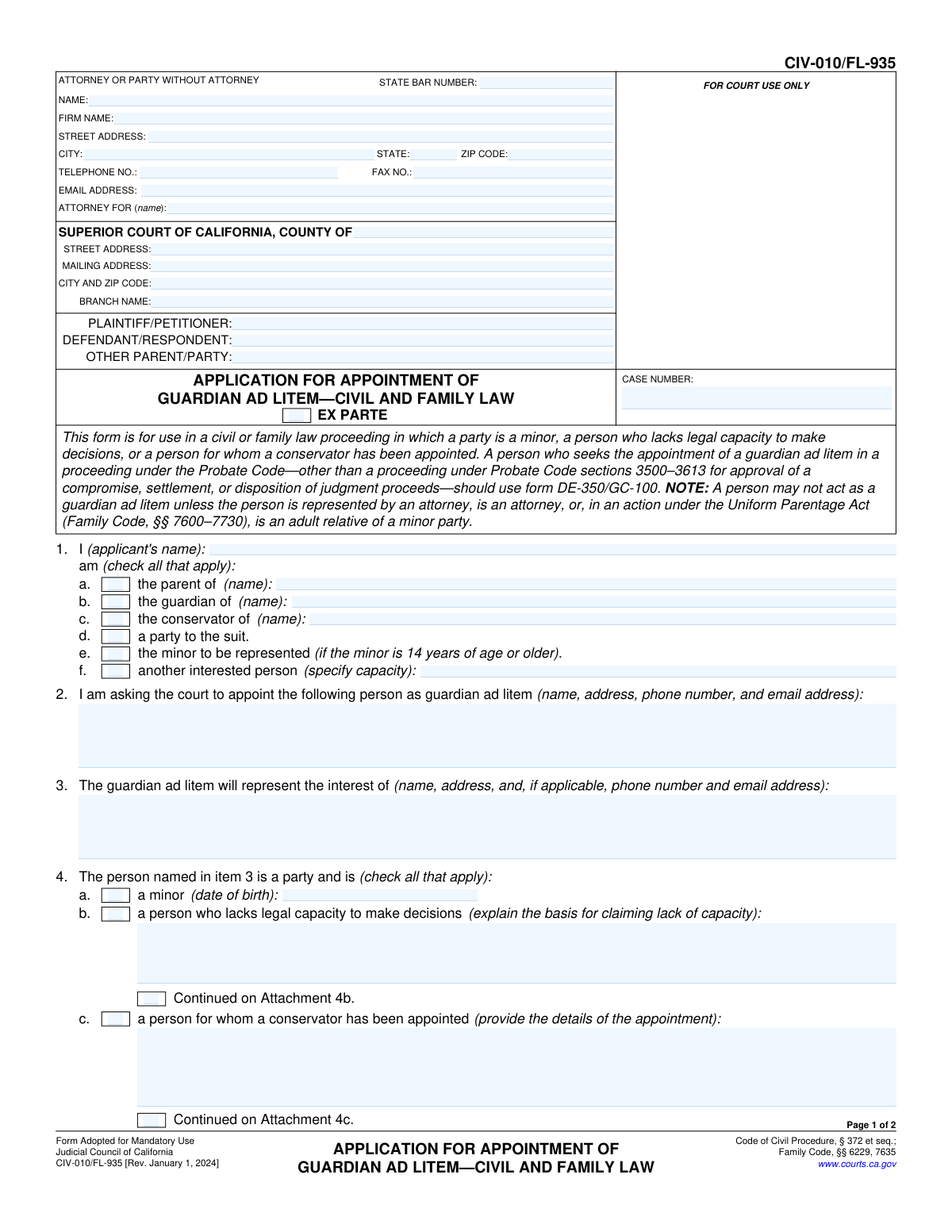
This check ensures that if checkbox 1f ('another interested person') is selected, the corresponding text field specifying the applicant's capacity is not empty. This is crucial for the court to understand the applicant's standing and relationship to the case. If the field is left blank while the box is checked, the form submission should be flagged as incomplete.
Validates that if checkbox 4a ('a minor') is selected, the associated date of birth field is filled with a valid date in a proper format (e.g., MM/DD/YYYY). The date must also be in the past. This information is legally required to establish the person's status as a minor, and failure to provide it prevents the court from proceeding.
This is a logical check that cross-references two fields. If the applicant checks box 1e, indicating they are the minor to be represented, the system must verify that the date of birth entered in item 4a shows the minor is 14 years of age or older. This is a legal requirement for a minor to apply on their own behalf, and an invalid entry would halt the application process.
Ensures that if checkbox 4b ('a person who lacks legal capacity to make decisions') is selected, the corresponding explanation text box is filled. The court requires a detailed basis for this claim to make a determination. A missing explanation makes the application insufficient and will result in its rejection.
This validation confirms that if checkbox 4c ('a person for whom a conservator has been appointed') is checked, the text field for providing the details of the appointment is completed. This information is necessary for the court to understand the existing legal arrangements. Failure to provide these details will render the application incomplete.
Verifies that if checkbox 6d is selected, indicating an existing guardian or conservator is inadequate, the explanation field is completed. The court cannot evaluate the claim of inadequacy without a specific reason. If this field is empty, the application cannot be properly assessed and will be considered deficient.
And 8 more checks
- Conditional Minor's Objection Status
- Relationship Specification Requirement
- Conflict of Interest Disclosure
- Case Information Completeness
- State Bar Number Format
- Signature Date Validity
- Applicant Identity Selection
- Mutually Exclusive Selection in Item 5
Let AI fill out your CIV-010/FL-935
No typing. Every field filled in seconds, checked, ready to sign.
How to Fill Out CIV-010/FL-935 Online for Free in 2026
What the AI walks you through.
- Navigate to Instafill.ai and upload your CIV-010/FL-935 form, or select it from their library of official California court forms.
- Allow the AI to scan and process the form, identifying all necessary fields for case details, applicant information, and the person to be represented.
- Provide the required information by answering simple questions in the Instafill.ai interface. This includes details about the applicant, the proposed guardian ad litem, and the reasons for the appointment.
- Watch as the AI populates the corresponding sections of the form, such as applicant details (Item 1), proposed guardian information (Item 2), and the status of the person being represented (Item 4).
- Review the completed form for accuracy. The platform will guide you to the signature sections for the applicant and the proposed guardian ad litem, which can often be signed electronically.
- Download the finalized, properly formatted CIV-010/FL-935 form, ready for filing with the appropriate California Superior Court.
Common Mistakes in Completing CIV-010/FL-935
The ones the AI is built to catch.
Missing or Invalid Signatures
Insufficient Explanation for Incapacity or Need
Failure to Disclose Conflicts of Interest
Confusing the Parties Involved
Incomplete Header and Case Information
Omitting Required Contact Information
Incorrectly Handling Checkboxes
Using the Wrong Form for a Probate Case
Ignoring Nested Questions within a Section
Submitting a Non-Fillable PDF Scan
Frequently Asked Questions About CIV-010/FL-935
Is it really free for 7 days?
Can I fill other forms too?
How do I cancel?
How does the AI fill out CIV-010/FL-935?
What happens to my information?
How complex is CIV-010/FL-935 to fill out?
What is the purpose of Form CIV-010/FL-935?
Who is a 'guardian ad litem'?
Who can fill out this application?
What information do I need to provide for the proposed guardian ad litem?
What does it mean to 'lack legal capacity to make decisions' in item 4b?
What if the person already has a legal guardian or conservator?
Who needs to sign this form?
What should I do if the proposed guardian ad litem has a potential conflict of interest?
Where do I file the completed Form CIV-010/FL-935?
Can I use AI to help me fill out this form?
How can I fill out Form CIV-010/FL-935 online?
The PDF version of this form I found is not fillable. What can I do?
Get your CIV-010/FL-935 filled out by AI
$0 today. Cancel before Nov 1 and you pay nothing.
Other forms like this one
California court forms: Judicial Council of California Form SC-105, Request for Court Order and Answer (Small Claims), Judicial Council of California Form SC-120, Defendant’s Claim and ORDER to Go to Small Claims Court (Small Claims), Judicial Council of California Form SER-001, Request for Sheriff to Serve Court Papers, Judicial Council of California Form SER-001, Request for Sheriff to Serve Court Papers, Affidavit for Collection of Personal Property California Probate Code Section 13100, Form POS-040, Proof of Service—Civil, Declaration of Facts of Death (California Superior Court), declaration-of-marriage-for-court-proceeding-california-family-law, ADOPT-200, Adoption Request, ADOPT-200, Stepparent Adoption Request, ADOPT-210, Adoption Agreement, ADOPT-310, Contact After Adoption Agreement, Judicial Council of California Form ADOPT-200, Adoption Request, Form ADR-107, Mediation Attendance Sheet, Form ADR-110, Order Appointing Referee, Form ADR-109, Stipulation or Motion for Order Appointing Referee, Form ADR-102, Request for Trial De Novo After Judicial Arbitration, Form ADR-108, Referee's Report (Code Civ. Proc., §§ 638, 639), Form ADR-106, Petition to Confirm, Correct, or Vacate Contractual Arbitration Award, Form ADR-104, Rejection of Award and Request for Trial After Attorney-Client Fee Arbitration
family law forms: Form 12.902(b), Family Law Financial Affidavit (Short Form), Florida Supreme Court Approved Family Law Form 12.901(b)(3), Petition for Dissolution of Marriage with No Dependent or Minor Child(ren) or Property (02/18), Form FL-170, Declaration for Default or Uncontested Dissolution or Legal Separation (Family Law), Form FL-100, Petition—Marriage/Domestic Partnership (Family Law), declaration-of-marriage-for-court-proceeding-california-family-law, Florida Supreme Court Approved Family Law Form 12.902(d), Uniform Child Custody Jurisdiction and Enforcement Act (UCCJEA) Affidavit, Florida Family Law Rules of Procedure Form 12.910(a), Summons: Personal Service on an Individual, Florida Supreme Court Approved Family Law Form 12.941(a), Petition for Enforcement of Out-of-State Custody Decree and for Order to Pick Up Minor Child(ren), Florida Supreme Court Approved Family Law Form 12.970(a), Petition for Temporary Custody by Extended Family, Form FL-110, Summons (Family Law), Form FL-120, Response—Marriage/Domestic Partnership (Family Law), ADOPT-200, Adoption Request, ADOPT-200, Stepparent Adoption Request, ADOPT-210, Adoption Agreement, ADOPT-310, Contact After Adoption Agreement, Adoption Assistance Program Nonrecurring Adoption Expense Agreement and Claim, Adoption Request (Stepparent), Adoption and Safe Families Act (ASFA) Survey, Florida Family Law Rules of Procedure Form 12.900(b), Notice of and Consent to Limited Appearance, Florida Family Law Rules of Procedure Form 12.900(d), Termination of Limited Appearance
civil court forms: Petition for Leave to Proceed In Forma Pauperis (Court of Common Pleas of Lehigh County, Pennsylvania, Civil Division), Designation of Record on Appeal (Civil) (Maricopa County Justice Courts, Arizona) (Form APP 8150-702), Certificate of Service (Civil Court Claim), Pfändungs- und Überweisungsbeschluss (Garnishment and Transfer Order) – German Civil Enforcement Court Form, AOPC 308A, Civil Complaint, Form MC 03, Answer, Civil, Form POS-040, Proof of Service—Civil, ONTARIO Form 8: Application (General), Form ATJ 601.9, Application for Waiver of Court Fees (Civil), Nevada Justice / Municipal Civil Court Cover Sheet, Form MC 01, Summons, Form MC 10, Judgment, Civil, Form MC 99, Motion and Affidavit to Set Aside Default (Civil), Form MC 281a, Civil Mediator Application, Ex Parte Motion and Order to Renew Civil Judgment, AO 88B, Subpoena to Produce Documents, Information, or Objects or to Permit Inspection of Premises in a Civil Action, Form APP-031A, Application for Extension of Time to File Brief (Civil Case), Civil Appeal Case Information Statement, Form APP-014, Appellant's Proposed Statement on Appeal (Unlimited Civil Case), form-app-015-respondents-proposed-corrections-toadditions-to-appellants-proposed-settled-statement-unlimited-civil-case
family court forms: Form 12.995(c), Safety-Focused Parenting Plan, Florida Supreme Court Approved Family Law Form 12.901(b)(3), Petition for Dissolution of Marriage with No Dependent or Minor Child(ren) or Property (02/18), Form N161, Appellant’s notice (All appeals except small claims track appeals and appeals to the Family Division of the High Court), Form N161, Appellant's Notice (All appeals except small claims track appeals and appeals to the Family Division of the High Court), declaration-of-marriage-for-court-proceeding-california-family-law, Florida Supreme Court Approved Family Law Form 12.902(d), Uniform Child Custody Jurisdiction and Enforcement Act (UCCJEA) Affidavit, Florida Supreme Court Approved Family Law Form 12.941(a), Petition for Enforcement of Out-of-State Custody Decree and for Order to Pick Up Minor Child(ren), Florida Supreme Court Approved Family Law Form 12.970(a), Petition for Temporary Custody by Extended Family, Adoption Request (Stepparent), Florida Family Law Rules of Procedure Form 12.900(b), Notice of and Consent to Limited Appearance, Florida Family Law Rules of Procedure Form 12.900(d), Termination of Limited Appearance, Florida Family Law Rules of Procedure Form 12.900(e), Acknowledgment of Assistance by Attorney, Florida Family Law Rules of Procedure Form 12.900(g), Agreement Limiting Representation, Florida Family Law Rules of Procedure Form 12.900(h), Notice of Related Cases, Florida Family Law Rules of Procedure Form 12.901(a), Joint Petition for Simplified Dissolution of Marriage, Form 12.902(b), Family Law Financial Affidavit (Short Form), Florida Family Law Rules of Procedure Form 12.902(c), Family Law Financial Affidavit (Long Form), Florida Family Law Rules of Procedure Form 12.902(e), Child Support Guidelines Worksheet, Florida Supreme Court Approved Family Law Form 12.902(f)(1), Marital Settlement Agreement for Dissolution of Marriage with Dependent or Minor Child(ren), Florida Supreme Court Approved Family Law Form 12.902(f)(2), Marital Settlement Agreement for Dissolution of Marriage with Property but No Dependent or Minor Child(ren)
Let AI fill out your CIV-010/FL-935
Your trial starts once a card is added. You pay nothing before Nov 1.
Our AI already knows this form, all 76 fields of it. Skip the typing: tell it about yourself, or upload what you have, and it fills the whole form in seconds.
- AI fills every field on both pages, checkboxes included
- No typing into boxes: answer a few questions, or upload a document you already have, an old copy of this form, a photo of a document
- The AI checks the answers; you review and change anything before you download
- Download the finished PDF, print it, or sign it online
- Encrypted, and never used to train AI
Cancel before Nov 1 and you pay nothing.
A card is needed to start the trial. Cancel in two clicks from your account.
Terms · Privacy