
Yes! You can use AI to fill out Judicial Council of California Form CD-100, Application for Writ of Possession (Claim and Delivery)
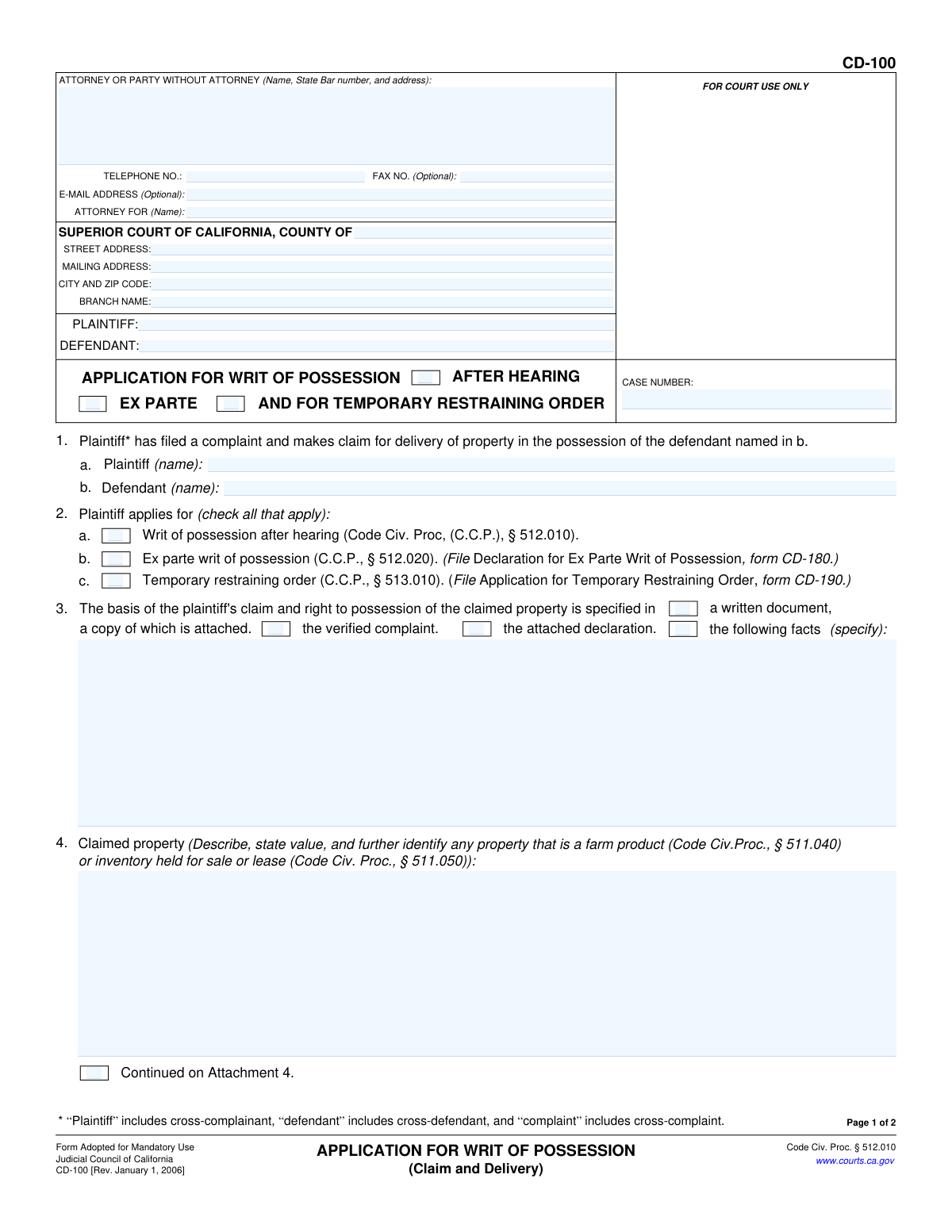
Don't type 58 fields by hand. Tell our AI about yourself, or upload a document you already have, and it fills every field in seconds. You check it, then download, print or sign.
The AI does the filling. You just check it.
No typing into boxes, nothing to install.
What this form asks for
The AI fills all of it, from your answers or your documents.
The AI checks your answers before you download
14 checks built for this form, so a wrong date or a missing answer is caught before anyone else sees it.
This check verifies that the Case Number entered in the header of page 1 matches the Case Number in the header of page 2. Maintaining consistency is crucial for correct document association within the court's filing system. A mismatch could lead to the pages being separated or the entire document being rejected by the court clerk.
This validation ensures that at least one checkbox in section 2 (a, b, or c) is selected to specify the type of application being made. The court needs to know whether the plaintiff is applying for a writ after a hearing, an ex parte writ, or a temporary restraining order to process the request correctly. Failure to select an option makes the application's purpose unclear and will result in rejection.
This check validates the logical dependency in section 2b. If the 'Ex parte writ of possession' box is checked, the system should verify that the required 'Declaration for Ex Parte Writ of Possession' (form CD-180) is included or referenced in the submission. This is a mandatory supporting document required by Code of Civil Procedure § 512.020, and its absence will halt the ex parte process.
This validation confirms that the plaintiff has provided the basis for their claim in section 3. The user must either check a box indicating the information is in the complaint or an attachment, or provide a specific factual summary in the text field. An application without a clear basis for the claim is fundamentally incomplete and cannot be evaluated by the court.
This check ensures that the text field in section 4, which describes the property to be seized, is not empty. A clear and specific description of the property, including its value, is the central subject of the writ and is legally required. An application lacking this information is invalid and cannot be acted upon by law enforcement.
This validation enforces the connection between sections 6 and 7 regarding entry into private property. If the property location described in section 6 is identified as a 'private place,' section 7 must be completed to provide the probable cause required for entry. This is a critical legal requirement, and failure to provide this justification will prevent the court from authorizing entry into a private location.
And 8 more checks
- Exclusive Seizure Status Declaration
- Required Code Section for Exempt Property
- Attachment Count Consistency
- Valid Signature Date
- Completeness of Filer Contact Information
- Party Name Consistency
- Standard Phone Number Format
- Complete Declaration and Signature
Let AI fill out your CD-100
No typing. Every field filled in seconds, checked, ready to sign.
How to Fill Out CD-100 Online for Free in 2026
What the AI walks you through.
- Navigate to Instafill.ai and upload or select the Form CD-100, Application for Writ of Possession.
- Enter the court information, including the county, court address, and branch name, as well as the case number.
- Provide the names of the plaintiff and defendant, and fill in the attorney or self-represented party's contact information.
- Indicate the type of writ you are applying for (e.g., after hearing, ex parte) and state the basis for your claim to the property.
- Describe the property in detail, including its value and location, and specify if it is located within a private place.
- Explain how the defendant came into possession of the property and the reasons for their wrongful detention of it.
- Review all the information populated by the AI for accuracy, then e-sign the declaration under penalty of perjury before downloading the completed form for filing.
Common Mistakes in Completing CD-100
The ones the AI is built to catch.
Incomplete or Vague Property Description
Selecting the Wrong Application Type or Missing Supplemental Forms
Failure to Establish Probable Cause for Entry into a Private Place
Insufficient Factual Basis for Claim and Detention
Inconsistent or Incorrect Party and Case Information
Forgetting to Sign and Date the Declaration
Failure to Attach Referenced Documents
Ignoring Consumer Contract Requirements
Incorrectly Filling Out Header Information
Using a Non-Fillable PDF without Proper Tools
Frequently Asked Questions About CD-100
Is it really free for 7 days?
Can I fill other forms too?
How do I cancel?
How does the AI fill out CD-100?
What happens to my information?
How complex is CD-100 to fill out?
What is Form CD-100, the Application for Writ of Possession?
Who should fill out this form?
What is the difference between a writ 'after hearing' and an 'ex parte' writ in Section 2?
What information do I need to provide about the property in Section 4?
What documents should I attach to support my application?
What do I do if the property is inside a private location like a house or locked garage?
Do I need to file other forms with this application?
What does the declaration in Section 8 mean?
Where do I file the completed Form CD-100?
What happens after I file the application?
Can I use an AI tool to help me fill out this form?
How can I fill out Form CD-100 online?
The PDF version of this form I found isn't fillable. What can I do?
Get your CD-100 filled out by AI
$0 today. Cancel before Nov 1 and you pay nothing.
Other forms like this one
California court forms: Judicial Council of California Form SC-105, Request for Court Order and Answer (Small Claims), Judicial Council of California Form SC-120, Defendant’s Claim and ORDER to Go to Small Claims Court (Small Claims), Judicial Council of California Form SER-001, Request for Sheriff to Serve Court Papers, Judicial Council of California Form SER-001, Request for Sheriff to Serve Court Papers, Affidavit for Collection of Personal Property California Probate Code Section 13100, Form POS-040, Proof of Service—Civil, Declaration of Facts of Death (California Superior Court), declaration-of-marriage-for-court-proceeding-california-family-law, ADOPT-200, Adoption Request, ADOPT-200, Stepparent Adoption Request, ADOPT-210, Adoption Agreement, ADOPT-310, Contact After Adoption Agreement, Judicial Council of California Form ADOPT-200, Adoption Request, Form ADR-107, Mediation Attendance Sheet, Form ADR-110, Order Appointing Referee, Form ADR-109, Stipulation or Motion for Order Appointing Referee, Form ADR-102, Request for Trial De Novo After Judicial Arbitration, Form ADR-108, Referee's Report (Code Civ. Proc., §§ 638, 639), Form ADR-106, Petition to Confirm, Correct, or Vacate Contractual Arbitration Award, Form ADR-104, Rejection of Award and Request for Trial After Attorney-Client Fee Arbitration
Judicial Council forms: Judicial Council of California Form FL-300, Request for Order, Judicial Council of California Form FL-150, Income and Expense Declaration, Judicial Council of California Form SC-104, Proof of Service (Small Claims), Judicial Council of California Form SC-105, Request for Court Order and Answer (Small Claims), Judicial Council of California Form DE-111, Petition for Probate (Probate—Decedents Estates), Judicial Council of California Form SC-104, Proof of Service (Small Claims), Judicial Council of California Form SC-108, Request to Correct or Cancel Judgment and Answer (Small Claims), Judicial Council of California Form SC-120, Defendant’s Claim and ORDER to Go to Small Claims Court (Small Claims), Civil Case Cover Sheet (Judicial Council of California Form CM-010), Civil Case Cover Sheet (Judicial Council of California Form CM-010), Judicial Council of California Form TR-205, Request for Trial by Written Declaration (Trial by Written Declaration—Traffic), Judicial Council of California Form DE-120, Notice of Hearing—Decedent's Estate or Trust, Inventory and Appraisal Attachment (Judicial Council of California Form DE-161, GC-041), CLETS-001, Confidential Information for Law Enforcement (Judicial Council of California), Judicial Council of California Form SER-001, Request for Sheriff to Serve Court Papers, Judicial Council of California Form UD-105, Answer—Unlawful Detainer, CLETS-001, Confidential Information for Law Enforcement (Judicial Council of California), Judicial Council of California Form ADOPT-210, Adoption Agreement, Judicial Council of California Form DE-120, Notice of Hearing—Decedent's Estate or Trust, Inventory and Appraisal (Judicial Council of California) (Form DE-160/GC-040)
California judicial forms: Judicial Council of California Form FL-300, Request for Order, Judicial Council of California Form FL-150, Income and Expense Declaration, Judicial Council of California Form SC-104, Proof of Service (Small Claims), Judicial Council of California Form SC-105, Request for Court Order and Answer (Small Claims), Judicial Council of California Form DE-111, Petition for Probate (Probate—Decedents Estates), Judicial Council of California Form SC-104, Proof of Service (Small Claims), Judicial Council of California Form SC-108, Request to Correct or Cancel Judgment and Answer (Small Claims), Judicial Council of California Form SC-120, Defendant’s Claim and ORDER to Go to Small Claims Court (Small Claims), Civil Case Cover Sheet (Judicial Council of California Form CM-010), Civil Case Cover Sheet (Judicial Council of California Form CM-010), Judicial Council of California Form TR-205, Request for Trial by Written Declaration (Trial by Written Declaration—Traffic), Judicial Council of California Form DE-120, Notice of Hearing—Decedent's Estate or Trust, Inventory and Appraisal Attachment (Judicial Council of California Form DE-161, GC-041), CLETS-001, Confidential Information for Law Enforcement (Judicial Council of California), Judicial Council of California Form SER-001, Request for Sheriff to Serve Court Papers, Judicial Council of California Form UD-105, Answer—Unlawful Detainer, CLETS-001, Confidential Information for Law Enforcement (Judicial Council of California), Judicial Council of California Form ADOPT-210, Adoption Agreement, Judicial Council of California Form DE-120, Notice of Hearing—Decedent's Estate or Trust, Inventory and Appraisal (Judicial Council of California) (Form DE-160/GC-040)
court claim forms: Form SC-100, Plaintiff's Claim and ORDER to Go to Small Claims Court, Judicial Council of California Form SC-105, Request for Court Order and Answer (Small Claims), SC-120, Defendant’s Claim and ORDER to Go to Small Claims Court (Small Claims), SC-105, Request for Court Order and Answer (Small Claims), Judicial Council of California Form SC-120, Defendant’s Claim and ORDER to Go to Small Claims Court (Small Claims), Form SC-100, Plaintiff’s Claim and ORDER to Go to Small Claims Court, Certificate of Service (Civil Court Claim), Form N161, Appellant’s notice (All appeals except small claims track appeals and appeals to the Family Division of the High Court), Plaintiff's Claim and ORDER to Go to Small Claims Court (SC-100), Form N161, Appellant's Notice (All appeals except small claims track appeals and appeals to the Family Division of the High Court), Form SC-100A, Other Plaintiffs or Defendants (Attachment to Plaintiff's Claim and ORDER to Go to Small Claims Court), Form N461: Claim for judicial review, Statement of Small Claim and Notice, Trial Court of Massachusetts, State of Michigan, Form MC 25, Notice of Intent to Escheat Unclaimed Personal Property, Form MC 35, Complaint, Claim and Delivery, Form MC 36, Motion for Possession Pending Judgment, Claim and Delivery, Order of Possession Pending Judgment, Claim and Delivery, Form MC 38, Bond, Claim and Delivery, Form MC 39, Judgment, Claim and Delivery, Form MC 55, Claim of Appeal
Let AI fill out your CD-100
Your trial starts once a card is added. You pay nothing before Nov 1.
Our AI already knows this form, all 58 fields of it. Skip the typing: tell it about yourself, or upload what you have, and it fills the whole form in seconds.
- AI fills every field on both pages, checkboxes included
- No typing into boxes: answer a few questions, or upload a document you already have, an old copy of this form, a photo of a document
- The AI checks the answers; you review and change anything before you download
- Download the finished PDF, print it, or sign it online
- Encrypted, and never used to train AI
Cancel before Nov 1 and you pay nothing.
A card is needed to start the trial. Cancel in two clicks from your account.
Terms · Privacy