
Yes! You can use AI to fill out Judicial Council of California, Form CD-130, Writ of Possession (Claim and Delivery)
Don't type 22 fields by hand. Tell our AI about yourself, or upload a document you already have, and it fills every field in seconds. You check it, then download, print or sign.
The AI does the filling. You just check it.
No typing into boxes, nothing to install.
What this form asks for
The AI fills all of it, from your answers or your documents.
The AI checks your answers before you download
12 checks built for this form, so a wrong date or a missing answer is caught before anyone else sees it.
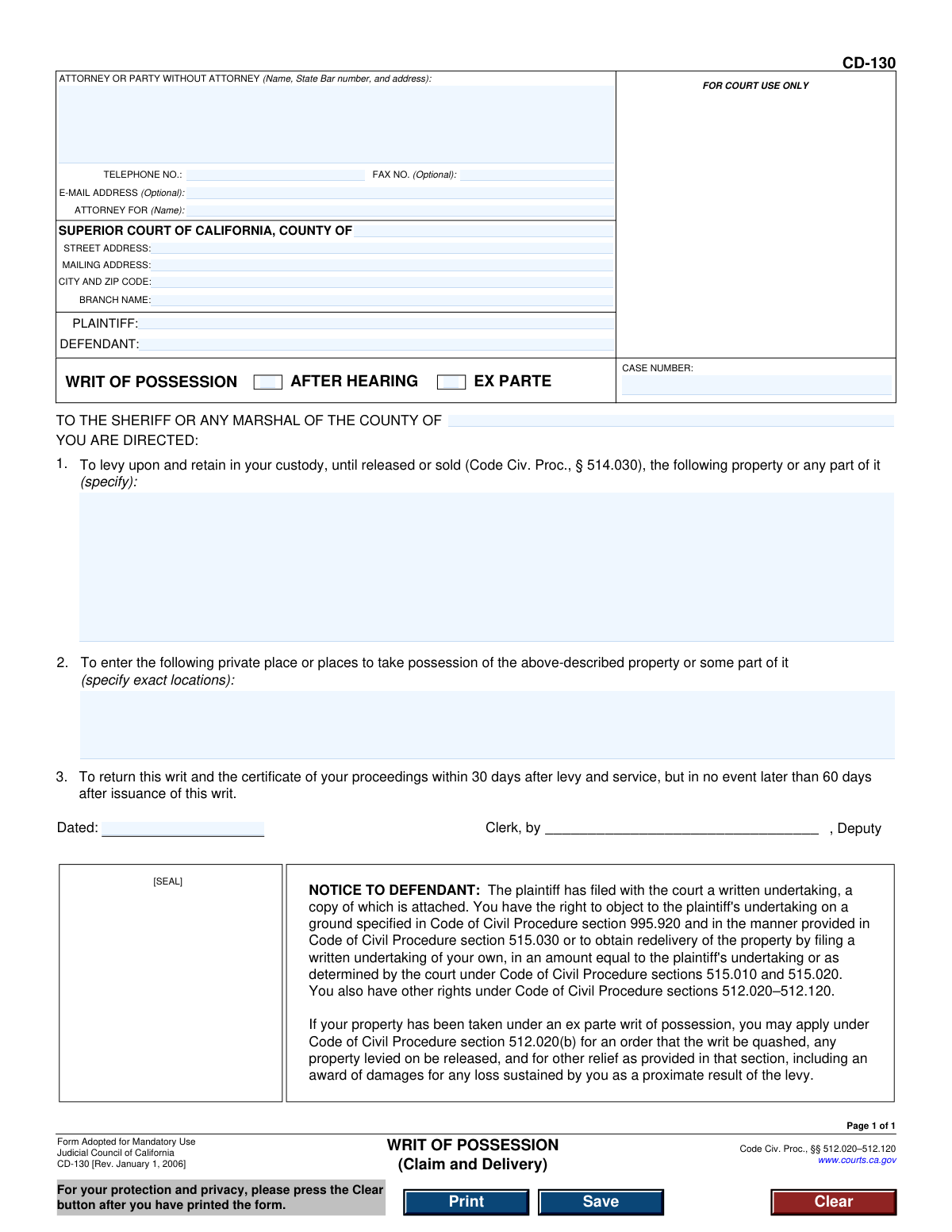
This check ensures the 'CASE NUMBER' field is not empty and conforms to the standard format used by the California court system. The case number is the primary identifier for the legal proceeding, and its absence or incorrect format would make the document impossible to file or track. A failed validation would prevent form submission until a valid case number is entered.
Validates that exactly one of the two checkboxes, 'AFTER HEARING' or 'EX PARTE', is selected. These options are mutually exclusive and define the legal basis on which the writ was granted. Failing to select one, or selecting both, creates ambiguity and renders the writ legally invalid, so the form cannot be processed.
This check verifies that the field describing the property to be seized is not left blank. A specific description is legally required for the Sheriff or Marshal to identify and take possession of the correct items. An empty or vague description would make the writ unenforceable and could lead to legal challenges.
Ensures that the field specifying the 'private place or places to take possession' contains a specific, identifiable location or address. The Sheriff needs an exact location to execute the writ legally and without trespassing on uninvolved properties. If this field is empty, the writ cannot be executed and the form submission should be blocked.
This validation confirms that both the 'PLAINTIFF' and 'DEFENDANT' fields contain names. These fields identify the primary parties in the legal action, which is fundamental information for any court document. A writ missing the name of either party is incomplete and legally deficient.
Verifies that the 'ATTORNEY OR PARTY WITHOUT ATTORNEY' block, including name and address, is filled out. This information is required to identify who is filing the document and where to send official correspondence. A failure to provide this information would halt processing as the court would not know who submitted the form.
And 6 more checks
- Court County Presence
- Enforcement County Presence
- Phone Number Format Validation
- Optional Email Address Format
- Attorney for Party Consistency
- Court Address Completeness
Let AI fill out your CD-130
No typing. Every field filled in seconds, checked, ready to sign.
How to Fill Out CD-130 Online for Free in 2026
What the AI walks you through.
- Navigate to Instafill.ai and upload or select the Form CD-130, Writ of Possession.
- Provide the court and case information, including the county, court address, case number, and names of the plaintiff and defendant.
- Enter the details for the attorney or party filing the form, such as name, address, and contact information.
- Indicate whether the writ is being issued 'After Hearing' or 'Ex Parte' by checking the appropriate box.
- Clearly describe the specific property that the sheriff is directed to seize in the designated section.
- Specify the exact private locations the sheriff is authorized to enter to take possession of the property.
- Review all auto-filled information for accuracy, then e-sign and download the completed form to be presented to the court clerk for issuance.
Common Mistakes in Completing CD-130
The ones the AI is built to catch.
Incorrect or Incomplete Case Number
Ambiguous Property Description
Specifying the Wrong County for Enforcement
Inaccurate Address for Property Seizure
Failure to Select Writ Type
Incorrect Court and Branch Information
Inconsistent or Misspelled Party Names
Filing as a Pro Se Litigant Without Full Contact Information
Signing or Dating in the Court Clerk's Section
Reversing Plaintiff and Defendant Roles
Frequently Asked Questions About CD-130
Is it really free for 7 days?
Can I fill other forms too?
How do I cancel?
How does the AI fill out CD-130?
What happens to my information?
How complex is CD-130 to fill out?
What is the purpose of the Writ of Possession (Form CD-130)?
Who needs to fill out this form?
What is the difference between a writ issued 'After Hearing' versus 'Ex Parte'?
How specific do I need to be when describing the property in Section 1?
What information should I put in Section 2 for entering a private place?
I am the defendant. What are my rights if I receive this writ?
What is the 'undertaking' mentioned in the Notice to Defendant?
What happens after the Writ of Possession is issued by the court?
How long is this writ valid?
What information do I need to fill in the header of the form?
Can AI tools help me fill out Form CD-130?
How can I use Instafill.ai to complete this form online?
The PDF of this form I found is not fillable. What should I do?
Get your CD-130 filled out by AI
$0 today. Cancel before Oct 30 and you pay nothing.
Other forms like this one
California court forms: Judicial Council of California Form SC-105, Request for Court Order and Answer (Small Claims), Judicial Council of California Form SC-120, Defendant’s Claim and ORDER to Go to Small Claims Court (Small Claims), Judicial Council of California Form SER-001, Request for Sheriff to Serve Court Papers, Judicial Council of California Form SER-001, Request for Sheriff to Serve Court Papers, Affidavit for Collection of Personal Property California Probate Code Section 13100, Form POS-040, Proof of Service—Civil, Declaration of Facts of Death (California Superior Court), declaration-of-marriage-for-court-proceeding-california-family-law, ADOPT-200, Adoption Request, ADOPT-200, Stepparent Adoption Request, ADOPT-210, Adoption Agreement, ADOPT-310, Contact After Adoption Agreement, Judicial Council of California Form ADOPT-200, Adoption Request, Form ADR-107, Mediation Attendance Sheet, Form ADR-110, Order Appointing Referee, Form ADR-109, Stipulation or Motion for Order Appointing Referee, Form ADR-102, Request for Trial De Novo After Judicial Arbitration, Form ADR-108, Referee's Report (Code Civ. Proc., §§ 638, 639), Form ADR-106, Petition to Confirm, Correct, or Vacate Contractual Arbitration Award, Form ADR-104, Rejection of Award and Request for Trial After Attorney-Client Fee Arbitration
Judicial Council forms: Judicial Council of California Form FL-300, Request for Order, Judicial Council of California Form FL-150, Income and Expense Declaration, Judicial Council of California Form SC-104, Proof of Service (Small Claims), Judicial Council of California Form SC-105, Request for Court Order and Answer (Small Claims), Judicial Council of California Form DE-111, Petition for Probate (Probate—Decedents Estates), Judicial Council of California Form SC-104, Proof of Service (Small Claims), Judicial Council of California Form SC-108, Request to Correct or Cancel Judgment and Answer (Small Claims), Judicial Council of California Form SC-120, Defendant’s Claim and ORDER to Go to Small Claims Court (Small Claims), Civil Case Cover Sheet (Judicial Council of California Form CM-010), Civil Case Cover Sheet (Judicial Council of California Form CM-010), Judicial Council of California Form TR-205, Request for Trial by Written Declaration (Trial by Written Declaration—Traffic), Judicial Council of California Form DE-120, Notice of Hearing—Decedent's Estate or Trust, Inventory and Appraisal Attachment (Judicial Council of California Form DE-161, GC-041), CLETS-001, Confidential Information for Law Enforcement (Judicial Council of California), Judicial Council of California Form SER-001, Request for Sheriff to Serve Court Papers, Judicial Council of California Form UD-105, Answer—Unlawful Detainer, CLETS-001, Confidential Information for Law Enforcement (Judicial Council of California), Judicial Council of California Form ADOPT-210, Adoption Agreement, Judicial Council of California Form DE-120, Notice of Hearing—Decedent's Estate or Trust, Inventory and Appraisal (Judicial Council of California) (Form DE-160/GC-040)
California judicial forms: Judicial Council of California Form FL-300, Request for Order, Judicial Council of California Form FL-150, Income and Expense Declaration, Judicial Council of California Form SC-104, Proof of Service (Small Claims), Judicial Council of California Form SC-105, Request for Court Order and Answer (Small Claims), Judicial Council of California Form DE-111, Petition for Probate (Probate—Decedents Estates), Judicial Council of California Form SC-104, Proof of Service (Small Claims), Judicial Council of California Form SC-108, Request to Correct or Cancel Judgment and Answer (Small Claims), Judicial Council of California Form SC-120, Defendant’s Claim and ORDER to Go to Small Claims Court (Small Claims), Civil Case Cover Sheet (Judicial Council of California Form CM-010), Civil Case Cover Sheet (Judicial Council of California Form CM-010), Judicial Council of California Form TR-205, Request for Trial by Written Declaration (Trial by Written Declaration—Traffic), Judicial Council of California Form DE-120, Notice of Hearing—Decedent's Estate or Trust, Inventory and Appraisal Attachment (Judicial Council of California Form DE-161, GC-041), CLETS-001, Confidential Information for Law Enforcement (Judicial Council of California), Judicial Council of California Form SER-001, Request for Sheriff to Serve Court Papers, Judicial Council of California Form UD-105, Answer—Unlawful Detainer, CLETS-001, Confidential Information for Law Enforcement (Judicial Council of California), Judicial Council of California Form ADOPT-210, Adoption Agreement, Judicial Council of California Form DE-120, Notice of Hearing—Decedent's Estate or Trust, Inventory and Appraisal (Judicial Council of California) (Form DE-160/GC-040)
court claim forms: Form SC-100, Plaintiff's Claim and ORDER to Go to Small Claims Court, Judicial Council of California Form SC-105, Request for Court Order and Answer (Small Claims), SC-120, Defendant’s Claim and ORDER to Go to Small Claims Court (Small Claims), SC-105, Request for Court Order and Answer (Small Claims), Judicial Council of California Form SC-120, Defendant’s Claim and ORDER to Go to Small Claims Court (Small Claims), Form SC-100, Plaintiff’s Claim and ORDER to Go to Small Claims Court, Certificate of Service (Civil Court Claim), Form N161, Appellant’s notice (All appeals except small claims track appeals and appeals to the Family Division of the High Court), Plaintiff's Claim and ORDER to Go to Small Claims Court (SC-100), Form N161, Appellant's Notice (All appeals except small claims track appeals and appeals to the Family Division of the High Court), Form SC-100A, Other Plaintiffs or Defendants (Attachment to Plaintiff's Claim and ORDER to Go to Small Claims Court), Form N461: Claim for judicial review, Statement of Small Claim and Notice, Trial Court of Massachusetts, State of Michigan, Form MC 25, Notice of Intent to Escheat Unclaimed Personal Property, Form MC 35, Complaint, Claim and Delivery, Form MC 36, Motion for Possession Pending Judgment, Claim and Delivery, Order of Possession Pending Judgment, Claim and Delivery, Form MC 38, Bond, Claim and Delivery, Form MC 39, Judgment, Claim and Delivery, Form MC 55, Claim of Appeal
Let AI fill out your CD-130
Your trial starts once a card is added. You pay nothing before Oct 30.
Our AI already knows this form, all 22 fields of it. Skip the typing: tell it about yourself, or upload what you have, and it fills the whole form in seconds.
- AI fills every field on the form, checkboxes included
- No typing into boxes: answer a few questions, or upload a document you already have, an old copy of this form, a photo of a document
- The AI checks the answers; you review and change anything before you download
- Download the finished PDF, print it, or sign it online
- Encrypted, and never used to train AI
Cancel before Oct 30 and you pay nothing.
A card is needed to start the trial. Cancel in two clicks from your account.
Terms · Privacy