
Yes! You can use AI to fill out Recommendation and Attestation Form Rollovers, Transfers and Changes to Account Type
Don't type 189 fields by hand. Tell our AI about yourself, or upload a document you already have, and it fills every field in seconds. You check it, then download, print or sign.
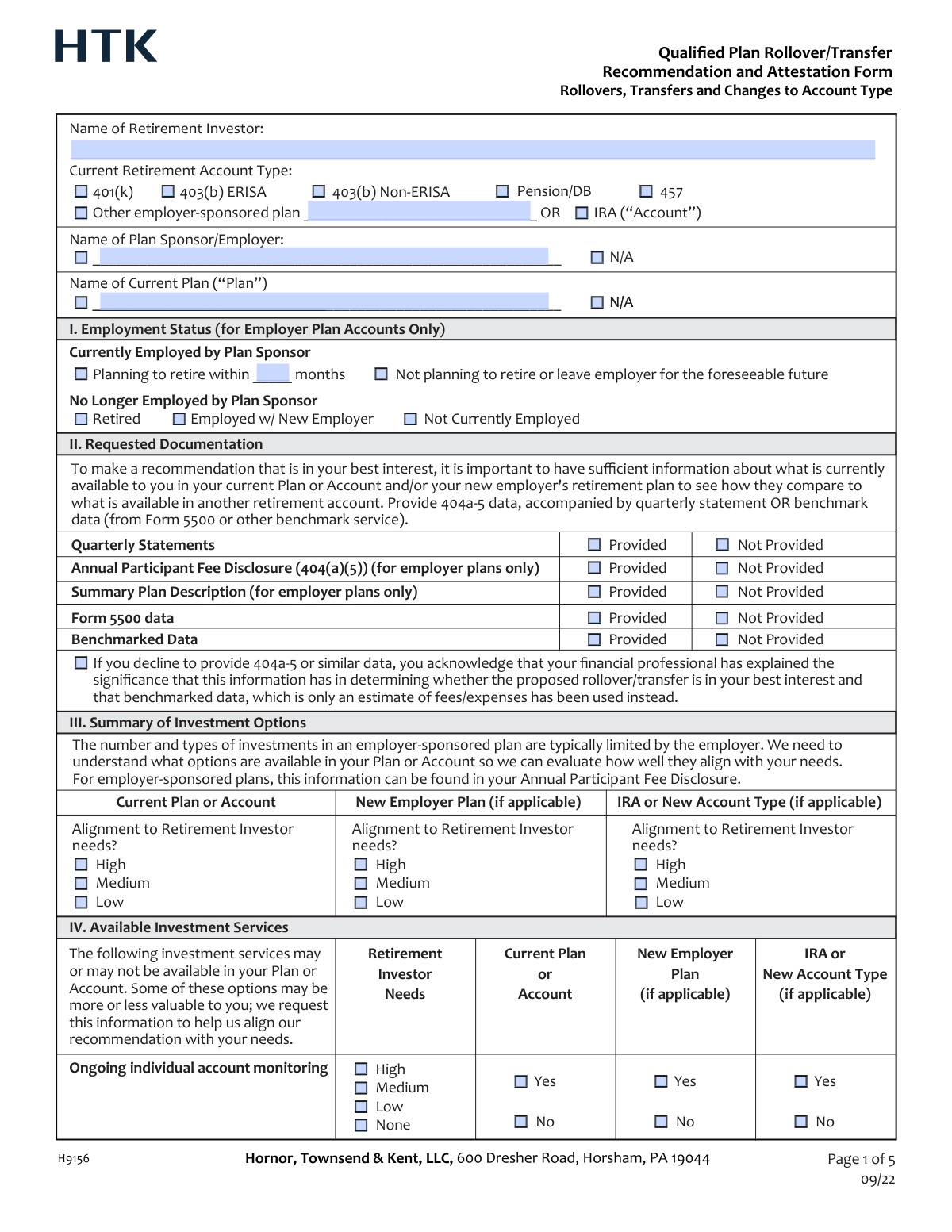
The AI does the filling. You just check it.
No typing into boxes, nothing to install.
What this form asks for
The AI fills all of it, from your answers or your documents.
The AI checks your answers before you download
14 checks built for this form, so a wrong date or a missing answer is caught before anyone else sees it.
If the user checks the box for 'Other employer-sponsored plan', this validation ensures the corresponding 'Other Employer-Sponsored Plan Name' text field is not empty. This is crucial for accurately identifying the source account type, which impacts the entire analysis. A failure would prompt the user to specify the plan name before proceeding.
This check ensures that if the selected 'Current Retirement Account Type' is any employer-sponsored plan (not an IRA), then either the 'Plan Sponsor/Employer Name' field is filled or the 'N/A' box is checked. It prevents ambiguity about the employer associated with the plan. If the account is an IRA, this section should be disabled or not required.
The form presents multiple employment statuses under 'Currently Employed' and 'No Longer Employed'. This validation ensures that a user can only select one status across all options. This is critical for determining which rollover options are viable and what documentation is relevant.
If the user selects the 'Planning to retire within ____ months' option, this validation confirms that a positive integer is entered in the corresponding 'Months until planned retirement' field. This specific timeframe is a key data point for financial planning and recommendation suitability. Failure to provide a valid number would prevent submission until corrected.
For each item in the 'Requested Documentation' section (e.g., Quarterly Statements, Form 5500), the user can select 'Provided' or 'Not Provided'. This validation ensures that for each document type, one and only one of these options is selected. This prevents contradictory data and ensures a clear record of what information was used for the analysis.
This is a critical compliance check. If the 'Annual Participant Fee Disclosure (404(a)(5))' is marked as 'Not Provided', this validation confirms that the user has checked the acknowledgement box regarding the use of benchmarked data. This is legally significant as it documents that the client understands the limitations of the analysis. The form cannot be submitted without this acknowledgement if the document is missing.
And 8 more checks
- Validates relevance of 'New Employer Plan' data
- Validates context for 'Desire to sever relationship with former employer'
- Enforces single selection in rating groups (High, Medium, Low, None)
- Requires description for 'Other' factor if rated
- Ensures a final recommendation is selected
- Verifies Retirement Investor Signature and Date
- Ensures at least one Financial Professional has signed
- Validates that the client signature date is not after the professional's signature date
Let AI fill out your H9156
No typing. Every field filled in seconds, checked, ready to sign.
How to Fill Out H9156 Online for Free in 2026
What the AI walks you through.
- Navigate to Instafill.ai and upload or select the Recommendation and Attestation Form H9156.
- Use the AI assistant to automatically populate your name and details about your current retirement account, such as account type and employer information.
- In Section II, check the boxes to indicate which supporting documents, like quarterly statements or fee disclosures, you have provided.
- Complete Sections III, IV, and V by evaluating and comparing your current plan, a potential new employer plan, and an IRA across investment options, available services, and associated fees.
- In Section VI, rate the personal importance of additional factors such as tax considerations, distribution options, and creditor protection for each potential account type.
- Carefully review the special disclosures in Section VII and the final recommendation provided by your financial professional.
- Complete the Retirement Investor Attestation in Section VIII by providing your electronic signature and the date to confirm your understanding and independent decision.
Common Mistakes in Completing H9156
The ones the AI is built to catch.
Neglecting to Provide Requested Documentation
Inconsistent Needs and Alignment Ratings
Confusing Plan Sponsor with Plan Name
Omitting Fee and Cost Comparison Data
Misidentifying the Current Retirement Account Type
Selecting Contradictory Employment Statuses
Signing the Attestation Without Full Understanding
Incomplete Comparison Across All Account Options
Entering an Informal or Abbreviated Employer Name
Failing to Fill Conditional Fields Correctly
Frequently Asked Questions About H9156
Is it really free for 7 days?
Can I fill other forms too?
How do I cancel?
How does the AI fill out H9156?
What happens to my information?
How complex is H9156 to fill out?
What is the purpose of the Recommendation and Attestation Form (H9156)?
Who needs to complete this form?
What documents do I need to provide to help fill out this form?
What happens if I can't find my Annual Participant Fee Disclosure or other requested documents?
How do I fill out Section VI, 'Additional Factors Beyond Investments, Services & Fees'?
I'm leaving my employer but am not yet employed elsewhere. How do I indicate my employment status?
What does signing the 'Retirement Investor Attestation' in Section VIII mean?
The form compares my current plan to a 'New Employer Plan' and an 'IRA.' What if a new employer plan isn't an option for me?
What is the main conflict of interest mentioned in the attestation?
Why does the form ask about my desire to work with a financial professional?
Can I use an AI tool to help me fill out this form?
How can I fill out this form online?
The PDF version of this form I have is not fillable. What can I do?
Get your H9156 filled out by AI
$0 today. Cancel before Nov 10 and you pay nothing.
Other forms like this one
rollover forms: Fidelity Investments Transfer/Rollover/Exchange Form, Rollover Request — 529 College Savings Plan, Fidelity Investments Transfer/Rollover Form, Fidelity Advisor IRA Distribution Request for Automatic Rollover Accounts, Special Tax Notice: Your Rollover Options - Fidelity Investments, Rollover Contribution Instructions & Application, A Place for Mom 401(k) Plan Request for Rollover Contribution Form, 401(k) Program Rollover Certification, New York State Deferred Compensation Plan Outgoing Rollover, Rollover Valet™ Request Form, Special Tax Notice: Your Rollover Options, New York State Deferred Compensation Plan Direct Rollover to a Roth IRA, WTIA 401(k) Plan Rollover Contribution Employee Certification, Fidelity Plan-to-Plan Direct Rollover Form, Fidelity Distribution—Rollover, Plan-to-Plan Direct Rollover Form, Rollover/Transfer Request — ABLE Account, Rollover Valet™ Request Form, Vanguard Direct Rollover IRA Adoption Agreement, The Vanguard 529 College Savings Plan Direct Rollover Out to Roth IRA Form
account transfer forms: Fidelity Funds Account Transfer of Assets Form, Group Transfer Form Fidelity Health Savings Account (HSA), Form APP13017-29, Transfer Your Account to Schwab, Transfer of Assets Out - Partial Account or Charitable Gift Transfers, Charles Schwab & Co., Inc. Account Transfer Form, HSA Bank Investment Account Transfer Form, Rollover/Transfer Request — ABLE Account, Schwab Health Savings Brokerage Account (HSBA) to HSA Invest Choice Account Transfer Form, Retirement Transfer Between Existing Vanguard Accounts, The Vanguard 529 College Savings Plan Transfer Due to Death of Account Owner Form, Vanguard Brokerage Account CREST Transfer Form, Account Transfer Authorization (ACATS) Form, AbbVie Savings Plan 401(k) Account Transfer Notice, Transfer Between Existing Fidelity Accounts, Rollover/Transfer Request — ABLE Account, TIAA Brokerage Incoming Account Transfer Form, TIAA Brokerage Joint Transfer on Death Account Agreement, TIAA Brokerage Incoming Managed Account Transfer Form (F11319), Health Savings Account (HSA) Transfer Request, Client Account Transfer Form to Merrill Lynch, Pierce, Fenner & Smith Incorporated
transfer forms: Form REG 227, Application for Replacement or Transfer of Title, City of Harvey Real Estate Transfer Declaration & Application (with Certificate for Exemption), DBPR ABT-6002 – Application for Transfer of Ownership of an Alcoholic Beverage License, DBPR ABT-6002, Division of Alcoholic Beverages and Tobacco Application for Transfer of Ownership of an Alcoholic Beverage License, Request for Transfer of Records (Adelaide Health Care) – AHC-0013-05-PS (Version 2), DBPR Form ABT-6002, Division of Alcoholic Beverages and Tobacco Application for Transfer of Ownership of an Alcoholic Beverage License, Pfändungs- und Überweisungsbeschluss (Garnishment and Transfer Order) – German Civil Enforcement Court Form, Fidelity Funds Account Transfer of Assets Form, Fidelity Stock Plan Services (SPS) Transfer Request Form, How to Transfer Assets from Morgan Stanley to Fidelity Investments (Fidelity Stock Plan Services Guide), Transfer Due to Divorce — IRA/HSA/529, Fidelity Investments Transfer/Rollover/Exchange Form, Fidelity Investments Standing Transfer Instructions Form, Fidelity Investments Transfer/Rollover Form, Group Transfer Form Fidelity Health Savings Account (HSA), Plan–to-Plan Transfer, Plan Exchange, or Service Credit Authorization Form, Beneficiaries — Nonretirement Transfer on Death, Transfer Shares as a Gift — Nonretirement, Form APP13017-29, Transfer Your Account to Schwab, Transfer of Assets Out - Partial Account or Charitable Gift Transfers
Let AI fill out your H9156
Your trial starts once a card is added. You pay nothing before Nov 10.
Our AI already knows this form, all 189 fields of it. Skip the typing: tell it about yourself, or upload what you have, and it fills the whole form in seconds.
- AI fills every field on all 5 pages, tables and checkboxes included
- No typing into boxes: answer a few questions, or upload a document you already have, an old copy of this form, a photo of a document
- The AI checks the answers; you review and change anything before you download
- Download the finished PDF, print it, or sign it online
- Encrypted, and never used to train AI
Cancel before Nov 10 and you pay nothing.
A card is needed to start the trial. Cancel in two clicks from your account.
Terms · Privacy