Yes! You can use AI to fill out Vanguard Wholesale Funds – Know Your Customer (KYC) Refresh Form – Company

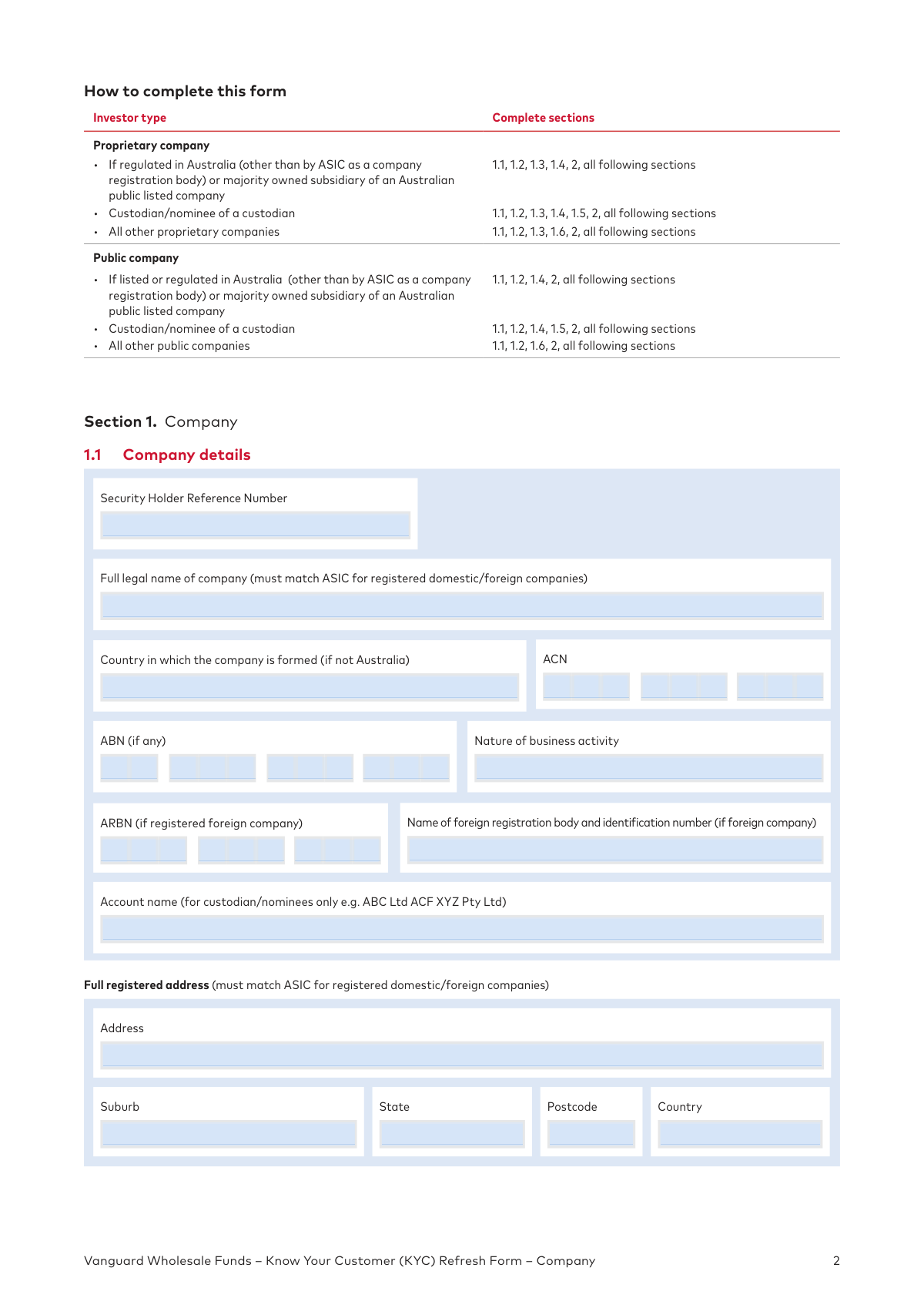
This form, issued by Vanguard Investments Australia, is a Know Your Customer (KYC) Refresh Form for companies. It is used to collect and maintain up-to-date client records as required by the Anti-Money Laundering and Counter-Terrorism Financing Act (AML/CTF Act) to protect accounts from fraud and improper use. Today, this form can be filled out quickly and accurately using AI-powered services like Instafill.ai, which can also convert non-fillable PDF versions into interactive fillable forms.
Our AI automatically handles information lookup, data retrieval, formatting, and form filling.
It takes less than a minute to fill out KYC Refresh Form - Company using our AI form filling.
Securely upload your data. Information is encrypted in transit and deleted immediately after the form is filled out.

Form specifications

Form name: Vanguard Wholesale Funds – Know Your Customer (KYC) Refresh Form – Company
Number of pages: 1
Language: English
Categories: company forms, Vanguard forms
main-image

Instafill Demo: How to fill out PDF forms in seconds with AI

How to Fill Out KYC Refresh Form - Company Online for Free in 2026

Are you looking to fill out a KYC REFRESH FORM - COMPANY form online quickly and accurately? Instafill.ai offers the #1 AI-powered PDF filling software of 2026, allowing you to complete your KYC REFRESH FORM - COMPANY form in just 37 seconds or less.
Follow these steps to fill out your KYC REFRESH FORM - COMPANY form online using Instafill.ai:
  1. 1 Navigate to Instafill.ai and upload or select the Vanguard KYC Refresh Form for Companies.
  2. 2 Use the AI assistant to automatically fill in Section 1 with your company's details, including legal name, ACN/ABN, registered address, and contact information.
  3. 3 Specify your company type (Proprietary or Public) and provide the required details for directors, listing, or regulatory status as prompted.
  4. 4 Identify and provide information for all beneficial owners (individuals with 25% or more ownership), appointors, or the Senior Managing Official as applicable.
  5. 5 Complete the declarations in Section 2 and have authorized signatories sign the form.
  6. 6 Gather and attach certified copies of all required identification documents, such as company extracts and director IDs, as specified in the form.
  7. 7 Review the entire form and all attachments for accuracy before submitting it to Vanguard as per the instructions.

Our AI-powered system ensures each field is filled out correctly, reducing errors and saving you time.

Why Choose Instafill.ai for Your Fillable KYC Refresh Form - Company Form?

Speed

Complete your KYC Refresh Form - Company in as little as 37 seconds.

Up-to-Date

Always use the latest 2026 KYC Refresh Form - Company form version.

Cost-effective

No need to hire expensive lawyers.

Accuracy

Our AI performs 10 compliance checks to ensure your form is error-free.

Security

Your personal information is protected with bank-level encryption.

Frequently Asked Questions About Form KYC Refresh Form - Company

Vanguard is required by Australian law (the Anti-Money Laundering and Counter-Terrorism Financing Act) to collect and maintain up-to-date client records. Completing this form helps keep your account secure, protects it from fraud, and ensures compliance with legal obligations.

This form is for existing company clients of Vanguard Wholesale Funds, including custodians, platforms, dealer groups, and other Australian or New Zealand companies that need to update their account information.

You are asked to complete and return the form, along with all required identification documents, within 30 days of receiving it.

Please mail your completed form and certified identification documents to: Vanguard Investments Australia Ltd, C/- MUFG Corporate Markets, Locked Bag 5038, Parramatta NSW 2124.

You must provide certified copies of identification documents, which vary by company type. For example, a proprietary company needs a current ASIC extract and ID for beneficial owners, such as a certified copy of a driver's license or passport.

Documents must be certified in Australia by an eligible certifier like a Justice of the Peace, lawyer, police officer, or pharmacist. The certifier must write that it is a true copy, sign and date it, and provide their full name and occupation.

A beneficial owner is any individual who ultimately owns or controls 25% or more of the company. You must provide the personal details for all individuals who meet this threshold, whether through direct shareholdings or indirect control.

You only need to complete the Senior Managing Official section (1.6.3) if no individual can be identified as a beneficial owner holding 25% or more of the company. The SMO is a high-level executive, such as the CEO, who makes significant business decisions.

Yes, if your company is a proprietary (private) company, you must provide the full details for all company directors in Section 1.3. This section is not required for public companies.

The form must be signed by at least two directors, or by the sole director and the company secretary if applicable. Please note that stamped signatures will not be accepted.

Yes, services like Instafill.ai use AI to accurately auto-fill form fields from your saved information, which can save you significant time and help reduce errors.

You can use a service like Instafill.ai to complete the form online. Simply upload the PDF, and the platform will make it fillable, allowing you to type your answers, add signatures, and then download the completed document for mailing.

If you have a non-fillable or 'flat' PDF, you can use a tool like Instafill.ai to convert it into an interactive, fillable form. This allows you to easily type your information directly into the fields before printing.

Compliance KYC Refresh Form - Company
Validation Checks by Instafill.ai

1
ACN Format and Structure Validation
This check ensures the Australian Company Number (ACN) entered in Section 1.1 consists of exactly nine digits. It may also include a check-digit validation to ensure the number is mathematically valid according to ASIC's algorithm. This is crucial for correctly identifying the legal entity and cross-referencing with official databases, and failure to provide a valid ACN will prevent processing.
2
Conditional Section Completion Based on Company Type
This validation verifies that the user has completed the correct sections based on their 'Company type' selection in Section 1.2. For example, if 'Proprietary/Private' is selected, the system must confirm that Section 1.3 (Directors) is filled out. This ensures the logical flow of the form is followed and all required information for that specific entity type is captured, preventing incomplete submissions.
3
Prohibition of PO Boxes in Residential Addresses
This check scans all fields designated as a 'Full residential address' (e.g., for Directors, Beneficial Owners) to ensure they do not contain 'PO Box' or similar postal box indicators. AML/CTF regulations require a physical residential address for identity verification purposes. A submission with a PO Box in a residential address field will be rejected and require correction.
4
Date of Birth Logical and Format Check
This validation confirms that all date of birth fields are in the specified DDMMYYYY format and represent a valid, logical date. It checks that the date is not in the future and that the individual is of a legal age (e.g., over 18). This is essential for identity verification and risk assessment, and an invalid date will halt the processing of that individual's details.
5
Beneficial Ownership Section Logic
This check enforces the complex conditional logic of Section 1.6. It verifies that if a company is not exempt via Section 1.4, the user has answered questions (A) and (B) in Section 1.6 and has completed the correct corresponding subsection (1.6.1 for Beneficial Owners, 1.6.2 for Appointors, or 1.6.3 for a Senior Managing Official). This ensures the ultimate owners or controllers are identified as required by law.
6
Custodian Certification 'No' Answer Flag
This validation specifically checks the answers in the Custodian Certification (Section 1.5.1). If any of the five questions are answered 'No', the submission is flagged for rejection or special handling. This is a critical check because the form explicitly states that a 'No' answer requires the applicant to use a different form ('Trust Form'), and continuing would violate the stated procedure.
7
Occupation Field Value Constraint
This check ensures that any value entered or selected in an 'Occupation' field is from the pre-defined list in 'Appendix A'. It prevents free-text entries that are not part of the standardized list. This standardization is important for consistent data collection and risk profiling, and an invalid entry would require the user to select a valid option.
8
Required Email Address Format Validation
This validation ensures the 'Email address' in the contact details section is present and formatted correctly (e.g., contains '@' and a domain). The form states this field is 'required to view statements,' making it a critical piece of contact information for account servicing. An invalid or missing email would prevent the account from being fully operational.
9
Signature and Date Completion Check
This check verifies that at least one 'Authorised signatory' section (2.1) is completed with a full name, role, and a valid signature date. The date must be in DD/MM/YYYY format and not be in the future. A missing signature or date invalidates the entire declaration and will cause the form to be rejected immediately.
10
Foreign Company Information Requirement
This validation is triggered if the 'Country in which the company is formed' is not 'Australia'. It then checks that either the 'ARBN' field or the 'Name of foreign registration body and identification number' field is completed. This ensures that foreign entities provide the necessary registration details for proper identification and compliance.
11
Source of Funds 'Other' Specification
In the Beneficial Owner, Appointor, and Senior Managing Official sections, this check verifies that if the 'Other' checkbox for 'Source of funds' is selected, the associated text field for specifying the source is not left blank. This is a crucial part of AML due diligence to understand the origin of wealth. An incomplete entry would require the user to provide more specific information.
12
ASIC Data Cross-Reference for Company Name and Address
This validation compares the 'Full legal name of company' and 'Full registered address' from Section 1.1 against the official Australian Securities and Investments Commission (ASIC) database using the provided ACN. The form states these details 'must match ASIC'. A mismatch indicates either a data entry error or a potentially fraudulent application, requiring immediate investigation and correction.

Common Mistakes in Completing KYC Refresh Form - Company

Inconsistent Company Details with ASIC Records

Users often enter a trading name instead of the full legal name, or provide a principal place of business instead of the registered address. The form requires that company name and registered address match the official ASIC (or foreign equivalent) database exactly. A mismatch will cause verification to fail, leading to processing delays and rejection of the form until corrected. To avoid this, double-check all company details against your most recent official company registration statement before filling out the form.

Misidentifying or Omitting Beneficial Owners

The form requires identifying all individuals who ultimately own or control 25% or more of the company, which can be complex in structures with indirect ownership. People often miscalculate ownership percentages through layered entities or fail to identify individuals who exercise control through trusts. Omitting a beneficial owner is a major compliance failure that will result in the form being returned. Carefully map your company's complete ownership and control structure before completing Section 1.6.

Incorrectly Navigating the Beneficial Owner Section Logic

Section 1.6 contains confusing conditional logic based on 'Yes' or 'No' answers to questions about beneficial ownership. Users frequently misunderstand the distinction between beneficial and non-beneficial shareholding, causing them to fill out the wrong subsection (e.g., providing Senior Managing Official details when beneficial owners exist). This results in an incomplete application that must be resubmitted. Read the instructions for questions 1.6(A) and 1.6(B) very carefully to determine which subsequent sections (1.6.1, 1.6.2, or 1.6.3) apply to your company.

Using a PO Box for a Residential Address

The form explicitly states that residential addresses for directors, beneficial owners, and other individuals 'must not be a PO Box'. This is a strict anti-money laundering requirement to verify a physical location. Submitting a PO Box will lead to automatic rejection of the form. Always provide a full physical street address for any field requesting a residential address.

Submitting Improperly Certified Documents

Identification documents must be certified according to very specific rules regarding who can certify, the exact wording to be used, and the date of certification (within 12 months). Common errors include using an ineligible certifier (like a family member), incorrect phrasing, or missing the certifier's name and title. Improper certification is a primary reason for rejection, forcing you to get documents re-certified and resubmitted. AI-powered tools like Instafill.ai can help by providing clear guidance on these requirements.

Invalid Signatures in the Declaration Section

Section 2.1 has strict rules for signatures, requiring two directors for most companies or a sole director plus a company secretary. Users often provide only one signature, use a non-black pen, or use a signature stamp, all of which are explicitly forbidden. An invalid signature block voids the entire declaration, requiring the form to be signed and submitted again. Ensure the correct number of authorized individuals sign using a black ink pen.

Forgetting to Attach Required Supporting Documents

This complex form requires multiple attachments, such as a current ASIC company extract, certified personal IDs for all individuals listed, and potentially trust deed extracts. It is very common for applicants to miss one or more of these required documents. An incomplete submission package cannot be processed and will be returned, significantly delaying the account refresh. Use the 'Forms of identification required' section as a final checklist before mailing the package.

Entering a Custom Occupation Instead of Using Appendix A

For directors, beneficial owners, and other individuals, the form requires selecting an occupation from the pre-defined list in Appendix A. Many people ignore this and write in a more specific job title (e.g., 'Software Architect' instead of 'Other professional'). This non-compliance creates data entry issues and may require follow-up clarification, delaying the process. Always select the best-fitting occupation from the provided list.

Misunderstanding the Custodian Certification

The 'Yes/No' questions in Section 1.5.1 are legally binding declarations about the company's AML/CTF program. Answering 'Yes' without meeting the strict criteria is a serious misrepresentation, while answering 'No' incorrectly triggers the requirement to complete an entirely different, more detailed form. This section should only be completed by individuals who fully understand their legal obligations as a custodian under Australian law.

Providing an Inaccurate or Unmonitored Email Address

The form specifies that the email address provided in Section 1.1 is 'required to view statements.' A simple typo or providing an outdated or unmonitored email address can result in the company not receiving critical account statements and communications from Vanguard. To avoid this, double-check the email address for accuracy and ensure it is an active inbox monitored by the appropriate contact person. Smart form-filling tools like Instafill.ai can help prevent typos by validating email formats.
Saved over 80 hours a year

“I was never sure if my IRS forms like W-9 were filled correctly. Now, I can complete the forms accurately without any external help.”

Kevin Martin Green

Your data stays secure with advanced protection from Instafill and our subprocessors

Robust compliance program

Transparent business model

You’re not the product. You always know where your data is and what it is processed for.

ISO 27001, HIPAA, and GDPR

Our subprocesses adhere to multiple compliance standards, including but not limited to ISO 27001, HIPAA, and GDPR.

Security & privacy by design

We consider security and privacy from the initial design phase of any new service or functionality. It’s not an afterthought, it’s built-in, including support for two-factor authentication (2FA) to further protect your account.

Fill out KYC Refresh Form - Company with Instafill.ai

Worried about filling PDFs wrong? Instafill securely fills vanguard-wholesale-funds-know-your-customer-kyc-refresh-form-company forms, ensuring each field is accurate.