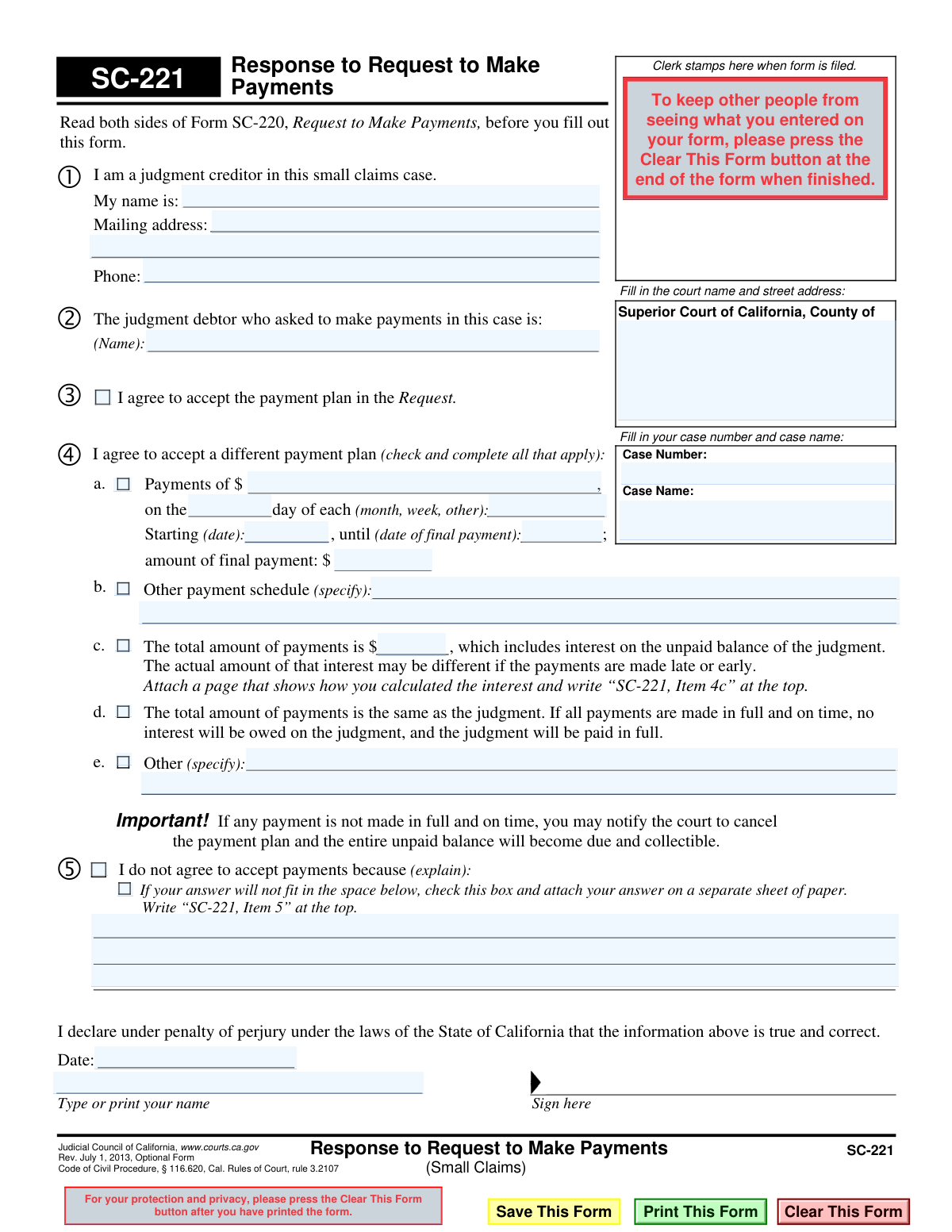
Yes! You can use AI to fill out Form SC-221, Response to Request to Make Payments (Small Claims)
Form SC-221, Response to Request to Make Payments, is a California Judicial Council form used in small claims court. It allows a person who won a judgment (the judgment creditor) to formally respond to a request from the person who owes the money (the judgment debtor) to pay the judgment in installments. The creditor can use this form to accept the proposed payment plan, reject it, or suggest an alternative payment schedule. Today, this form can be filled out quickly and accurately using AI-powered services like Instafill.ai, which can also convert non-fillable PDF versions into interactive fillable forms.
SC-221 is part of the
California court forms, court claim forms, court response forms and small claims forms categories on Instafill.
Our AI automatically handles information lookup, data retrieval, formatting, and form filling.
It takes less than a minute to fill out SC-221 using our AI form filling.
Securely upload your data. Information is encrypted in transit and deleted immediately after the form is filled out.
Form specifications
| Form name: | Form SC-221, Response to Request to Make Payments (Small Claims) |
| Number of fields: | 35 |
| Number of pages: | 1 |
| Language: | English |
Instafill Demo: How to fill out PDF forms in seconds with AI
How to Fill Out SC-221 Online for Free in 2026
Are you looking to fill out a SC-221 form online quickly and accurately? Instafill.ai offers the #1 AI-powered PDF filling software of 2026, allowing you to complete your SC-221 form in just 37 seconds or less.
Follow these steps to fill out your SC-221 form online using Instafill.ai:
- 1 Navigate to Instafill.ai and upload or select the SC-221 form.
- 2 Use the AI assistant to automatically fill in the court name, address, case number, and case name at the top of the form.
- 3 Provide your name as the judgment creditor and identify the judgment debtor who made the payment request.
- 4 Choose your response by checking the appropriate box: agree to the payment plan, propose a different plan, or reject the request to make payments.
- 5 If you are proposing a different payment plan, specify the payment amount, frequency, start date, and total amount.
- 6 If you are rejecting the request, provide a clear and concise explanation in the space provided.
- 7 Review all entered information for accuracy, then digitally sign and date the form under penalty of perjury before filing it with the court.
Our AI-powered system ensures each field is filled out correctly, reducing errors and saving you time.
Why Choose Instafill.ai for Your Fillable SC-221 Form?
Speed
Complete your SC-221 in as little as 37 seconds.
Up-to-Date
Always use the latest 2026 SC-221 form version.
Cost-effective
No need to hire expensive lawyers.
Accuracy
Our AI performs 10 compliance checks to ensure your form is error-free.
Security
Your personal information is protected with bank-level encryption.
Frequently Asked Questions About Form SC-221
This form is used by a judgment creditor (the person who won a small claims case) to respond to the judgment debtor's request to pay the court-ordered judgment in installments over time.
The judgment creditor, who is the person or business owed money from a small claims judgment, must fill out this form. The judgment debtor (the person who owes money) should not use this form.
You have three choices: you can agree to the payment plan the debtor proposed, you can propose a different payment plan with new terms, or you can reject the request for a payment plan entirely.
By checking this box, you are formally accepting the payment schedule exactly as the judgment debtor proposed it on their Form SC-220. The court will then likely approve this agreement.
To propose a new plan, check the box for Section 4 and fill in your preferred terms, such as the payment amount, how often payments should be made (e.g., monthly), and the start and end dates.
Option 4c includes the legally accrued interest in the total payment amount. Option 4d acts as an incentive, waiving the interest if the debtor makes all payments in full and on time.
Yes, you can check the box for Section 5 to reject the payment plan. However, you must provide a written explanation for your refusal in the space provided or on an attached sheet of paper.
The form states that if any payment is not made in full and on time, you can notify the court to cancel the payment plan. The entire unpaid balance of the judgment will then become due immediately.
You must file the completed and signed form with the clerk of the Superior Court where your small claims case was decided. Be sure to fill in the court's name and address at the top of the form.
Yes, if you are including interest in your proposed payment plan (Item 4c), you must attach a page showing how you calculated it. You also need to attach a page if your explanation for rejecting a plan (Item 5) does not fit in the space provided.
Yes, services like Instafill.ai use AI to accurately auto-fill form fields with your case information, saving you time and helping to prevent errors.
You can use a service like Instafill.ai to upload the SC-221 form and fill it out on your computer. The platform allows you to type directly into the fields, add a signature, and download the completed PDF for filing.
If you have a non-fillable or 'flat' PDF, you can upload it to a platform like Instafill.ai. Their technology can convert the document into an interactive, fillable form that you can complete online.
Compliance SC-221
Validation Checks by Instafill.ai
1
Mutually Exclusive Response Selection
Ensures that the user selects only one of the main response options: 'I agree' (Item 3), 'I agree to a different payment plan' (Item 4), or 'I do not agree' (Item 5). These options are mutually exclusive and selecting more than one creates an ambiguous response. If validation fails, the user should be prompted to choose only one of the three primary options before submission.
2
Case Number Presence and Format
Validates that the 'Case Number' field is not empty and conforms to the court's expected format (e.g., specific alphanumeric pattern, length). The case number is the primary identifier for the legal proceeding and is essential for correctly filing the document. A missing or malformed case number will result in the form being rejected or misfiled.
3
Completeness of 'Different Payment Plan' Details
If the user checks 'I agree to accept a different payment plan' (Item 4), this check verifies that the essential details of the new plan are provided. This includes the payment amount, frequency, start date, and end date. Without this information, the proposed new plan is incomplete and cannot be evaluated by the court or the other party.
4
Logical Payment Schedule Dates
Verifies that the 'until (date of final payment)' in Item 4 is on or after the 'Starting (date)'. An end date that precedes the start date is a logical impossibility for a payment schedule. This check prevents nonsensical data entry and ensures the proposed plan is coherent.
5
Explanation for Disagreement
If the user checks 'I do not agree to accept payments' (Item 5), this validation ensures that either an explanation is provided in the associated text box or the box indicating an attachment is checked. A simple disagreement without justification is insufficient for the court. Failure to provide a reason will result in an incomplete response.
6
Valid Currency and Numeric Formatting
Checks that all fields intended for monetary values (e.g., 'Payments of $', 'total amount of payments', 'amount of final payment') contain only valid numeric or currency data. This prevents data entry errors, such as including text characters, which would make calculations impossible. The system should reject non-numeric entries in these fields.
7
Valid Date Formatting
Ensures that all date fields ('Starting (date)', 'until (date of final payment)', and the signature 'Date') are entered in a valid and recognizable format (e.g., MM/DD/YYYY). This is crucial for establishing a clear timeline for the payment plan and for the legal validity of the signed declaration. An invalid format could lead to misinterpretation of key dates.
8
Required Filer and Debtor Identification
Validates that the names of the person filling out the form ('My name is:') and the judgment debtor are both provided. These fields are essential for identifying the parties involved in the response. A form without clear identification of both the respondent (creditor) and the petitioner (debtor) is invalid and cannot be processed.
9
Signature Name Consistency
Compares the printed name under the signature line with the filer's name provided at the top of the form ('My name is:'). The names should match to ensure the person signing the declaration is the same person identified as the judgment creditor. A mismatch could indicate an error or that the form is being filled out by an unauthorized individual.
10
Declaration Date Presence
Verifies that the 'Date' field next to the signature is filled out. This date is a critical component of the declaration 'under penalty of perjury,' as it establishes when the statement was attested to be true and correct. A missing signature date can call the legal validity of the document into question.
11
Mutually Exclusive Total Amount Selection
Within Item 4, this check ensures that if a different payment plan is proposed, the user selects only one of the sub-options for the total amount (Item 4c or 4d). A user cannot simultaneously claim the total includes interest and that no interest will be owed. This prevents contradictory statements within the proposed plan.
12
Required Total Amount for Plan with Interest
If the user checks Item 4c ('The total amount of payments is $..., which includes interest'), this validation confirms that a numeric value has been entered in the corresponding amount field. The checkbox is meaningless without the specified total amount. This ensures the proposed plan with interest is fully defined.
13
Valid Phone Number Format
Checks that the provided phone number follows a standard format (e.g., 10 digits, with or without parentheses and hyphens). This ensures the court or other parties have a valid means of contact for the filer. An improperly formatted number may be unusable, hindering communication.
14
Required Case Name
Ensures the 'Case Name' field is not left empty. Along with the case number, the case name (typically 'Plaintiff vs. Defendant') is a key identifier for the legal matter. Submitting a form without this information risks it being lost or misfiled, delaying the legal process.
Common Mistakes in Completing SC-221
This form is filled out by the judgment creditor (the person owed money). A common mistake is for the creditor to put their own name in the field for 'The judgment debtor'. This happens due to rushing or misunderstanding the legal terms. This error creates significant confusion, can invalidate the response, and will likely lead to the court rejecting the form, requiring a corrected refiling.
Filers often make typos when entering the Case Number or Case Name, or they may leave the fields blank. This usually occurs when transcribing information from another document, like the SC-220 Request form. An incorrect case number or name can cause the clerk to reject the document or, worse, file it in the wrong case, leading to major processing delays and potential legal complications.
Users frequently check multiple, mutually exclusive boxes, such as checking both 'I agree' (Item 2) and 'I do not agree' (Item 4). Another common error is checking 'I agree to a different payment plan' (Item 3) but failing to fill in the specific details of the proposed plan. This makes it impossible for the court to understand the filer's intent, resulting in the form being rejected as ambiguous and requiring the user to start over.
When proposing a different payment plan in Item 3, filers often provide unclear terms. For example, they might write 'monthly' for frequency without specifying a day, or leave the start and end dates blank. An ambiguous plan is unenforceable and will be rejected by the court, delaying resolution. To avoid this, be precise: specify exact payment amounts, the start date, the day of the month payments are due (e.g., 'the 1st day of each month'), and the final payment date.
Item 3c requires the filer to calculate the total payment amount including interest and attach a separate page showing the calculation. People often miscalculate the legal post-judgment interest or forget to include the mandatory attachment. An incorrect calculation or missing attachment will lead to the court rejecting the proposed plan. To prevent this, use the official court interest calculator and ensure the attachment is clearly labeled 'SC-221, Item 3c' and included with your filing.
When checking Item 4, 'I do not agree to accept payments,' filers must provide a reason. A common mistake is to leave this section blank or provide a vague, emotional, or legally irrelevant reason. The court needs a factual basis for the rejection, such as the debtor's history of non-payment or the unreasonableness of the proposed schedule. A weak explanation may be disregarded by the judge, who could then impose a payment plan against the creditor's wishes.
Forgetting to sign and date the declaration under penalty of perjury is one of the most frequent and critical errors. An unsigned or undated form is legally invalid and will be rejected immediately by the court clerk. This can cause you to miss filing deadlines and delay the entire process. Always double-check the signature and date lines as the very last step before filing the document.
Many people fill out forms by hand, but illegible handwriting can cause the court clerk to misinterpret critical information like names, addresses, or payment amounts. This can lead to data entry errors, misdirected mail, or outright rejection of the form. To avoid this, it is best to type the information. AI-powered tools like Instafill.ai can convert flat, non-fillable PDFs into fillable versions, allowing you to type for maximum clarity and professionalism.
Within Item 3, filers sometimes check both box 3c ('The total amount of payments is $..., which includes interest') and box 3d ('If all payments are made... no interest will be owed'). These options are mutually exclusive. This error creates a contradiction that makes the form impossible to process, leading to its rejection. You must decide on one approach: either include interest in the total (3c) or waive it contingent on timely payments (3d).
The form explicitly states when to attach a separate page for lengthy explanations (Item 4) or interest calculations (Item 3c). A common oversight is checking the box indicating an attachment but then failing to physically include the extra page with the filing. This renders the filing incomplete, as the court cannot evaluate the information that was supposed to be on the missing page. Always use a checklist to ensure all documents, including labeled attachments, are compiled before submission.
Saved over 80 hours a year
“I was never sure if my IRS forms like W-9 were filled correctly. Now, I can complete the forms accurately without any external help.”
Kevin Martin Green
Your data stays secure with advanced protection from Instafill and our subprocessors

Robust compliance program
Transparent business model
You’re not the product. You always know where your data is and what it is processed for.
ISO 27001, HIPAA, and GDPR
Our subprocesses adhere to multiple compliance standards, including but not limited to ISO 27001, HIPAA, and GDPR.
Security & privacy by design
We consider security and privacy from the initial design phase of any new service or functionality. It’s not an afterthought, it’s built-in, including support for two-factor authentication (2FA) to further protect your account.
Fill out SC-221 with Instafill.ai
Worried about filling PDFs wrong? Instafill securely fills form-sc-221-response-to-request-to-make-payments-small-claims forms, ensuring each field is accurate.