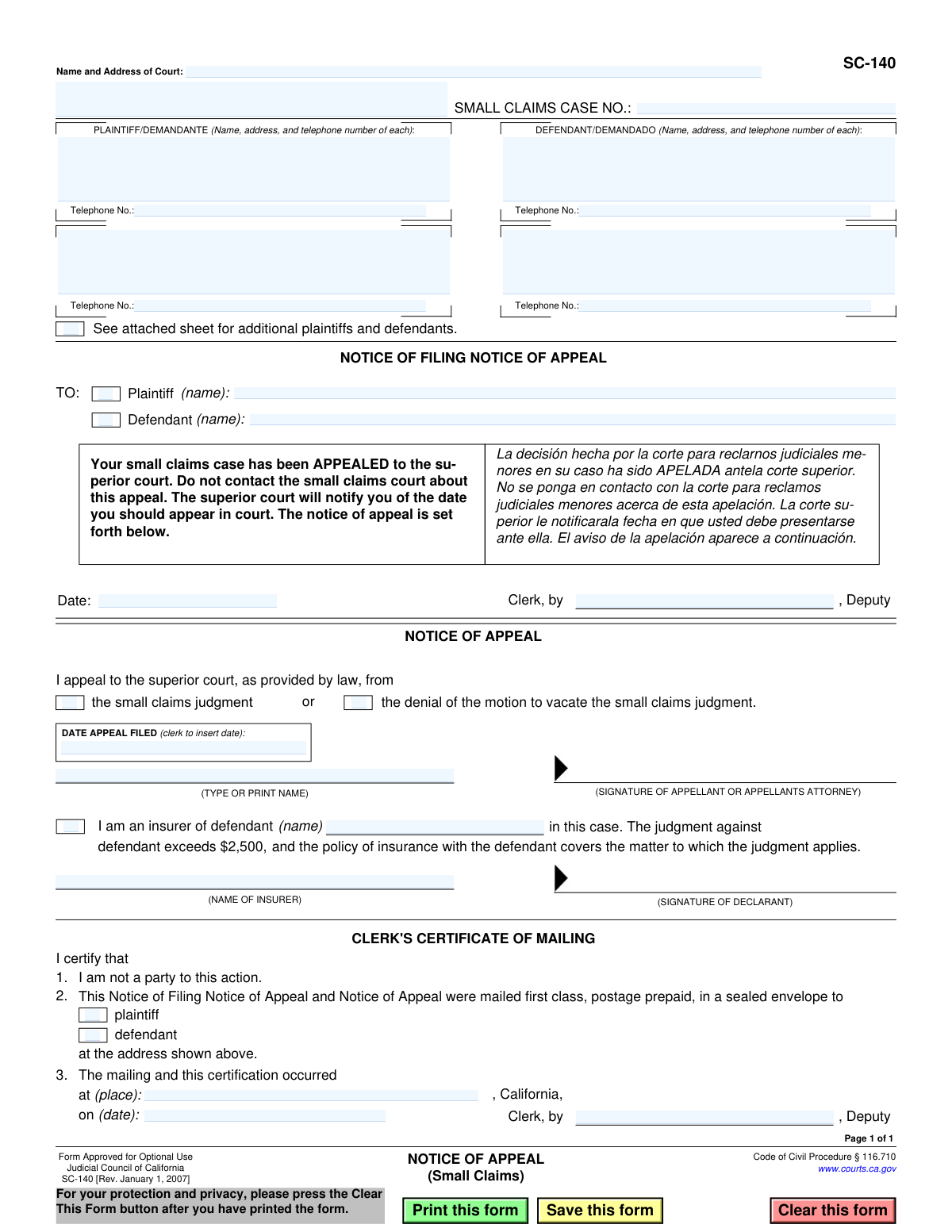
Yes! You can use AI to fill out Form SC-140, Notice of Appeal (Small Claims)
This is the Judicial Council of California's Form SC-140, the Notice of Appeal for small claims cases. It is used by a party (plaintiff or defendant) to officially notify the court and the opposing party that they are appealing the decision made in their small claims case to the superior court. Filing this form is the critical first step in the appeals process, which allows for a new hearing of the case. Today, this form can be filled out quickly and accurately using AI-powered services like Instafill.ai, which can also convert non-fillable PDF versions into interactive fillable forms.
SC-140 is part of the
California court forms, court appeal forms, court claim forms and small claims forms categories on Instafill.
Our AI automatically handles information lookup, data retrieval, formatting, and form filling.
It takes less than a minute to fill out SC-140 using our AI form filling.
Securely upload your data. Information is encrypted in transit and deleted immediately after the form is filled out.
Form specifications
| Form name: | Form SC-140, Notice of Appeal (Small Claims) |
| Number of fields: | 35 |
| Number of pages: | 1 |
| Language: | English |
Instafill Demo: How to fill out PDF forms in seconds with AI
How to Fill Out SC-140 Online for Free in 2026
Are you looking to fill out a SC-140 form online quickly and accurately? Instafill.ai offers the #1 AI-powered PDF filling software of 2026, allowing you to complete your SC-140 form in just 37 seconds or less.
Follow these steps to fill out your SC-140 form online using Instafill.ai:
- 1 Navigate to Instafill.ai and upload or select Form SC-140, Notice of Appeal (Small Claims).
- 2 Provide the court information, including the name and address of the court and the small claims case number.
- 3 Enter the full names, addresses, and telephone numbers for all plaintiffs and defendants as listed in the original case.
- 4 Indicate which party (plaintiff or defendant) is being served with the notice of appeal.
- 5 Check the appropriate box to specify whether you are appealing the small claims judgment or the denial of a motion to vacate the judgment.
- 6 Type or print your name as the appellant (or your attorney's name) and provide your signature.
- 7 Review all entered information for accuracy before downloading and filing the completed form with the court clerk as required.
Our AI-powered system ensures each field is filled out correctly, reducing errors and saving you time.
Why Choose Instafill.ai for Your Fillable SC-140 Form?
Speed
Complete your SC-140 in as little as 37 seconds.
Up-to-Date
Always use the latest 2026 SC-140 form version.
Cost-effective
No need to hire expensive lawyers.
Accuracy
Our AI performs 10 compliance checks to ensure your form is error-free.
Security
Your personal information is protected with bank-level encryption.
Frequently Asked Questions About Form SC-140
Form SC-140 is used to formally notify the court that you are appealing a decision made in a California small claims case. Filing this form requests a new trial in the superior court.
Typically, only the defendant who lost the case can file an appeal. A plaintiff can only appeal if the defendant filed a claim against them (a Defendant's Claim) and the plaintiff lost on that specific claim.
Receiving this form means the other party is appealing the judge's decision. You will need to present your case again at a new hearing in superior court, which will notify you of the date.
You will need the small claims case number, the court's name and address, and the full name, address, and telephone number for each plaintiff and defendant involved in the case.
You must file the Notice of Appeal with the clerk of the small claims court where your original case was heard, not the superior court.
The court clerk will mail a copy to the other party, and your case is transferred to the superior court for a new trial. The superior court will then send you a notice with the new court date.
Appeal the 'judgment' if you disagree with the judge's decision after the trial. Appeal the 'denial of the motion to vacate' if you missed your court date, lost by default, and the judge then denied your request to cancel that default judgment.
A defendant's insurance company can file the appeal if the judgment against the defendant is more than $2,500 and the insurance policy covers the matter of the lawsuit.
Yes, you must pay a filing fee when you submit the SC-140 form. If you cannot afford the fee, you can ask the court for a fee waiver.
You must file your Notice of Appeal within 30 days after the date the clerk mailed or handed you the Notice of Entry of Judgment (Form SC-130).
Yes, you can use AI-powered services like Instafill.ai to help fill out your form. These tools can accurately populate fields with your information, saving time and reducing potential errors.
Simply upload the SC-140 PDF to the Instafill.ai platform. The service will help you fill in the required fields, such as case details and party information, before you download the completed document for filing.
You can use a service like Instafill.ai to make the form interactive. Upload the non-fillable PDF, and the platform will convert it into a fillable version that you can complete online.
Compliance SC-140
Validation Checks by Instafill.ai
1
Case Number Presence and Format
This check ensures that the 'SMALL CLAIMS CASE NO.' field is not empty and conforms to the expected format for the jurisdiction. The case number is the primary identifier for the legal action and is essential for correctly routing and filing the appeal. If the case number is missing or malformed, the system should reject the submission and prompt the user to enter a valid case number to prevent filing errors.
2
Court Name and Address Completeness
Validates that the 'Name and Address of Court' field is fully completed. This information is critical for identifying the specific court where the original small claims case was heard and where the appeal will be processed. A missing court address could lead to the appeal being misfiled or significantly delayed, so the form should not be accepted without this information.
3
Plaintiff Information Completeness
This check verifies that the name and address for at least one plaintiff are provided. Identifying all parties to the case is a fundamental legal requirement for any court filing, including an appeal. Failure to provide complete plaintiff information would render the notice defective and could lead to dismissal, so the submission must be blocked until this information is present.
4
Defendant Information Completeness
This validation ensures that the name and address for at least one defendant are entered on the form. Proper notification of all parties is a cornerstone of due process, and the appeal cannot proceed without identifying the opposing party. The system should prevent submission if defendant details are missing, as it's a critical requirement for a valid legal notice.
5
Telephone Number Format
Verifies that all entered telephone numbers for plaintiffs and defendants follow a standard format (e.g., (XXX) XXX-XXXX or XXX-XXX-XXXX). Correctly formatted phone numbers are important for the court and other parties to make contact if necessary. If a number is entered in an invalid format, the system should display a warning and suggest the correct format, though it may not be a blocking error.
6
Exclusive Appeal Basis Selection
This check ensures that exactly one of the two checkboxes under 'NOTICE OF APPEAL' is selected, indicating whether the appeal is from the judgment or the denial of a motion to vacate. The basis of the appeal is a critical legal distinction that determines the scope of the superior court's review. The form submission must be rejected if zero or both options are selected, as this ambiguity makes the appeal legally invalid.
7
Appellant Name Requirement
Ensures that the '(TYPE OR PRINT NAME)' field for the appellant is filled out. This field identifies the specific individual or entity filing the appeal. An anonymous appeal is not legally permissible, so this information is mandatory for the document to be valid. The system must block submission if the appellant's name is not provided.
8
Appellant Signature Requirement
This check verifies that the signature field for the appellant or their attorney has been signed. A signature legally attests to the authenticity of the document and the filer's intent to appeal. An unsigned notice of appeal is invalid and will be rejected by the court clerk, so a digital or physical signature must be present before the form can be processed.
9
Conditional Insurer Declaration Completeness
If the 'I am an insurer of defendant' checkbox is selected, this validation ensures that the corresponding defendant's name, the insurer's name, and the declarant's signature are all provided. This section has specific legal implications and requires complete information to be valid. If the box is checked but any of the related fields are empty, the submission should be flagged as incomplete.
10
Insurer's Defendant Name Cross-Reference
When the insurer declaration is filled out, this check verifies that the defendant name provided in that section matches one of the defendants listed at the top of the form. This ensures the insurer is declaring their relationship to a legitimate party in the case. A mismatch could indicate a significant error, and the system should flag it for review or correction.
11
Appeal Filing Date Validity
This validation checks that the 'DATE APPEAL FILED' entered by the clerk is a valid, plausible date in the correct format (e.g., MM/DD/YYYY). This date is legally significant as it marks the official commencement of the appeal process and starts the clock for other deadlines. An invalid date would create legal uncertainty, so the system should require a valid date format upon entry.
12
Clerk's Mailing Date Logic
This check ensures the mailing date in the 'CLERK'S CERTIFICATE OF MAILING' is on or after the 'DATE APPEAL FILED'. It is logically impossible to mail a notice of an appeal before the appeal itself has been officially filed with the court. This validation prevents clerical errors that could create procedural defects in the appeal process.
13
Clerk's Mailing Recipient Selection
Verifies that in the 'CLERK'S CERTIFICATE OF MAILING' section, at least one box ('plaintiff' or 'defendant') is checked to indicate who received the mailed notice. This certification is proof of service, which is a mandatory step in the legal process. The form is incomplete without indicating who was served, so the clerk's submission should be blocked until a recipient is selected.
Common Mistakes in Completing SC-140
Users often mistype or omit digits from the original Small Claims Case Number. This is a critical identifier, and any error will prevent the court from linking the appeal to the correct case file. This can lead to an immediate rejection of the appeal or significant processing delays, potentially causing you to miss strict filing deadlines. Always double-check the case number against the original judgment or court documents before submitting.
Appellants frequently forget to include the full name, address, and telephone number for every single plaintiff and defendant involved in the original case. If all parties are not listed correctly, the court cannot provide proper legal notice of the appeal hearing, which can be grounds for dismissing the appeal. To avoid this, carefully fill out all details for each party and attach a separate sheet if there isn't enough space on the form.
The form requires the appellant to choose between appealing the 'small claims judgment' or 'the denial of the motion to vacate the small claims judgment.' Many filers don't understand the legal difference and check the wrong box, which can lead to the appeal being dismissed on procedural grounds. It is crucial to understand which court order you are appealing and select the corresponding option accurately.
This form has several sections clearly marked for official use only, such as 'DATE APPEAL FILED (clerk to insert date)' and the entire 'CLERK'S CERTIFICATE OF MAILING' section. Appellants sometimes fill these areas out themselves, which can confuse court staff and may require the form to be resubmitted. To prevent this, carefully read all instructions and only fill in the sections designated for the appellant.
An unsigned Notice of Appeal is legally invalid and will be rejected by the court clerk. This simple oversight is a common reason for failed filings, forcing the appellant to rush to refile before the deadline expires. Always perform a final review of the form to ensure the 'SIGNATURE OF APPELLANT' line is properly signed.
A defendant might mistakenly fill out the section intended for their insurer, which begins 'I am an insurer of defendant...'. This section has very specific legal requirements and is only to be completed by an insurance company appealing on behalf of the defendant under certain conditions. An individual appellant filling this out creates legal confusion and will likely result in the form being rejected.
The form explicitly states, 'See attached sheet for additional plaintiffs and defendants.' When a case involves more parties than can fit in the provided boxes, appellants often forget to create and include this required attachment. This is a fatal procedural error, as failure to list all parties of record can lead to the dismissal of the appeal.
Court forms are updated periodically, and the version is indicated by the revision date (e.g., 'Rev. January 1, 2007'). Submitting an obsolete form can lead to rejection by the clerk, as it may not comply with current laws or court rules. To avoid this, always download the latest version of the SC-140 form directly from the official California Courts website before filling it out.
When filling out the form by hand, illegible writing, especially in the name and address fields or the printed name below the signature, can cause significant problems. If court staff cannot read the information, it can lead to misidentification, returned mail, and processing delays. It is best to type the information or print very clearly in block letters. Since many court PDFs are not fillable, tools like Instafill.ai can convert them into easy-to-use fillable forms, ensuring all text is perfectly legible.
The appellant must list the exact name and address of the court where the original small claims case was decided. People sometimes get confused and list the superior court's address, or make a simple typo. Filing the notice at the wrong court location will cause you to miss the strict, non-extendable deadline for an appeal. AI-powered tools like Instafill.ai can help prevent this by auto-populating correct court information based on the case details, reducing the risk of manual entry errors.
Saved over 80 hours a year
“I was never sure if my IRS forms like W-9 were filled correctly. Now, I can complete the forms accurately without any external help.”
Kevin Martin Green
Your data stays secure with advanced protection from Instafill and our subprocessors

Robust compliance program
Transparent business model
You’re not the product. You always know where your data is and what it is processed for.
ISO 27001, HIPAA, and GDPR
Our subprocesses adhere to multiple compliance standards, including but not limited to ISO 27001, HIPAA, and GDPR.
Security & privacy by design
We consider security and privacy from the initial design phase of any new service or functionality. It’s not an afterthought, it’s built-in, including support for two-factor authentication (2FA) to further protect your account.
Fill out SC-140 with Instafill.ai
Worried about filling PDFs wrong? Instafill securely fills form-sc-140-notice-of-appeal-small-claims forms, ensuring each field is accurate.