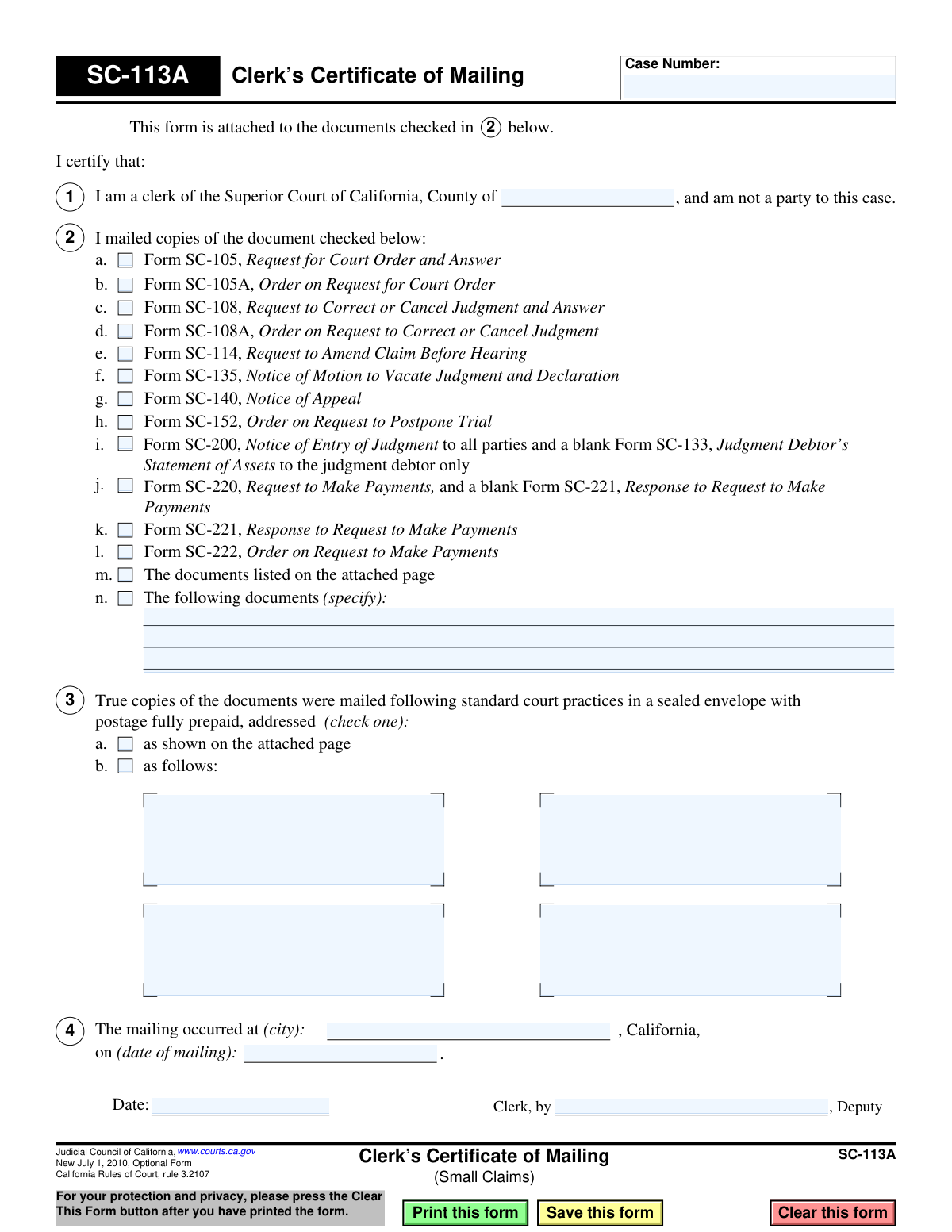
Yes! You can use AI to fill out Judicial Council of California, Form SC-113A, Clerk’s Certificate of Mailing (Small Claims)

The SC-113A, Clerk's Certificate of Mailing, is a legal document used by a clerk of the Superior Court of California to certify that they have mailed specific court documents to the parties involved in a small claims case. This form serves as official proof of service, ensuring there is a record that all parties have been properly notified of filings or court orders. Today, this form can be filled out quickly and accurately using AI-powered services like Instafill.ai, which can also convert non-fillable PDF versions into interactive fillable forms.
Our AI automatically handles information lookup, data retrieval, formatting, and form filling.
It takes less than a minute to fill out SC-113A using our AI form filling.
Securely upload your data. Information is encrypted in transit and deleted immediately after the form is filled out.

Form specifications

Form name: Judicial Council of California, Form SC-113A, Clerk’s Certificate of Mailing (Small Claims)
Number of fields: 32
Number of pages: 1
Language: English
main-image

Instafill Demo: How to fill out PDF forms in seconds with AI

How to Fill Out SC-113A Online for Free in 2026

Are you looking to fill out a SC-113A form online quickly and accurately? Instafill.ai offers the #1 AI-powered PDF filling software of 2026, allowing you to complete your SC-113A form in just 37 seconds or less.
Follow these steps to fill out your SC-113A form online using Instafill.ai:
  1. 1 Navigate to Instafill.ai and upload or select the SC-113A, Clerk's Certificate of Mailing form.
  2. 2 Enter the case number and the name of the Superior Court county in the designated fields.
  3. 3 Check the boxes corresponding to the specific documents that were mailed. If the document isn't listed, describe it in the 'specify' section.
  4. 4 Indicate how the documents were addressed by selecting the appropriate option, either referring to an attached page or listing the addresses directly.
  5. 5 Input the city and the exact date the mailing occurred.
  6. 6 Review all entered information for completeness and accuracy before the clerk or deputy clerk dates and signs the certificate.
  7. 7 Securely download, print, or save the completed Form SC-113A for court records.

Our AI-powered system ensures each field is filled out correctly, reducing errors and saving you time.

Why Choose Instafill.ai for Your Fillable SC-113A Form?

Speed

Complete your SC-113A in as little as 37 seconds.

Up-to-Date

Always use the latest 2026 SC-113A form version.

Cost-effective

No need to hire expensive lawyers.

Accuracy

Our AI performs 10 compliance checks to ensure your form is error-free.

Security

Your personal information is protected with bank-level encryption.

Frequently Asked Questions About Form SC-113A

This form is an official record used by the court clerk to certify that they have mailed specific legal documents to the parties in a small claims case. It serves as proof that the court sent out important notices or orders on a specific date.

No, you do not fill out Form SC-113A. It is an internal court form that is completed and signed only by a court clerk or deputy clerk to document their actions.

This form is for your records and confirms that the court sent you the documents checked in Section 2. You should carefully review the other documents it was attached to and take any action required by those forms.

The checked boxes in Section 2 indicate which specific court forms, such as a 'Notice of Appeal' (SC-140) or 'Notice of Entry of Judgment' (SC-200), were mailed to you along with this certificate. It acts as a table of contents for the mailing.

No, this form is not a court order itself. It is a procedural document that proves a separate order, notice, or request was mailed to you by the court.

If you are missing the primary documents that were supposed to be included, you should contact the clerk's office for the Superior Court handling your case immediately. Provide your case number and explain the situation to request a new copy.

While you receive a copy, the form is primarily for the court's official case file. It creates a legal record that all parties were properly notified of court proceedings or decisions by mail.

The clerk fills in the case number, the county, checks off the documents being mailed, specifies the mailing date and location, and signs the certificate. This information creates a complete record of the mailing.

Since this form is completed by the court clerk, you will not need to fill it out. However, for other small claims forms listed on the certificate, AI-powered services like Instafill.ai can help you accurately auto-fill your information and save significant time.

Simply upload a form like 'Request for Court Order' (SC-105) to the Instafill.ai platform. The AI will identify the fields and help you fill them out quickly and accurately online, even if the original is a non-fillable PDF.

If you have a non-fillable or 'flat' PDF form, you can use a service like Instafill.ai. It can convert the document into an interactive, fillable form that you can easily complete and sign electronically.

After signing, the clerk mails copies of the certificate and the attached documents to the parties listed. The original signed certificate is then placed in the official court file for your case.

Compliance SC-113A
Validation Checks by Instafill.ai

1
Ensures Case Number is Provided
This check verifies that the 'Case Number' field (CaseNumber_ft) is not empty. The case number is a critical identifier that links this certificate of mailing to a specific legal case in the court system. Without it, the document has no context and cannot be filed correctly, leading to processing delays or rejection.
2
Verifies County of Superior Court is Specified
This validation ensures that the county name in Section 1 (FillText01) has been filled in. Specifying the county is mandatory as it establishes the correct legal jurisdiction of the Superior Court handling the case. Failure to provide the county name makes the form legally insufficient as it's unclear which court is certifying the mailing.
3
Requires at least one Mailed Document to be Checked
This check confirms that at least one checkbox in Section 2 (items 2a through 2n) is selected. The entire purpose of this form is to certify that specific documents were mailed. If no document is indicated, the form is incomplete and serves no purpose, and it should be rejected.
4
Conditional Requirement for 'Other Documents' Description
This validation rule checks that if checkbox 2n ('The following documents (specify)') is selected, the corresponding text field (FillText06) is not empty. This is important to ensure that there is a clear record of exactly which non-standard documents were mailed. An empty description field would create ambiguity and defeat the purpose of the certification.
5
Ensures Exclusive Selection of Mailing Address Method
This check validates that exactly one of the two options in Section 3 ('as shown on the attached page' or 'as follows') is selected. These options are mutually exclusive and define how the mailing addresses are being provided. Selecting both or neither creates ambiguity and makes it impossible to determine the intended recipients, thus invalidating the certificate.
6
Conditional Requirement for 'As Follows' Address Details
If the radio button for Section 3b ('as follows') is selected, this check ensures the subsequent address fields are populated. This is crucial for creating a complete record of who received the documents directly on this form. If this option is chosen but no address is provided, the certification is incomplete and fails to document the mailing properly.
7
Validates Presence of Mailing City
This check verifies that the city of mailing in Section 4 (FillText12) is provided. This detail is a required component of the clerk's certification, establishing the location from which the documents were sent. Omitting the city makes the certification incomplete and could be grounds for challenging the validity of the mailing.
8
Validates Format and Logic of Mailing Date
This validation ensures the 'date of mailing' in Section 4 (FillText13) is a validly formatted date and is not a future date. The date must represent a past or present event to be a truthful certification. An invalid format would cause data entry errors, while a future date would be logically impossible and invalidate the sworn statement.
9
Validates Format of Clerk's Signature Date
This check ensures the 'Date' field where the clerk signs (FillText09) is filled with a validly formatted date (e.g., MM/DD/YYYY). A properly formatted date is essential for official record-keeping and legal validity. An invalid or unreadable date format would cause the form to be rejected during processing.
10
Ensures Logical Consistency Between Mailing and Signature Dates
This validation compares the 'date of mailing' (FillText13) with the clerk's signature 'Date' (FillText09), ensuring the signature date is on or after the mailing date. A clerk cannot legally certify that a mailing occurred before it has actually happened. A signature date that precedes the mailing date is a logical contradiction that invalidates the certificate.
11
Verifies Deputy Clerk Name is Provided
This check confirms that the 'Clerk, by, Deputy' field (T185) is filled out. This field identifies the specific court official who is performing the certification. An anonymous certification lacks accountability and legal standing, so the form must be rejected if the deputy's name is missing.

Common Mistakes in Completing SC-113A

Entering an Incorrect Case Number

Clerks may accidentally transpose digits or omit characters when entering the case number at the top of the form, often when working quickly. An incorrect case number can cause the certificate to be filed in the wrong case, invalidating the proof of mailing and causing significant procedural delays. To avoid this, always double-check the case number against the primary case file before finalizing the form. AI-powered tools like Instafill.ai can help ensure consistency by auto-populating the correct case number across all related documents.

Forgetting to Specify the County

The field for the county name in section 1 is small and can be easily overlooked during rapid processing. Failing to specify the county of the Superior Court makes the certificate legally incomplete, as it does not properly identify the court's jurisdiction. This omission could be grounds for challenging the validity of the service, so a systematic, field-by-field review is crucial before signing.

Checking the Incorrect Document Box

In section 2, a clerk might mistakenly check the box for a similar-sounding form number (e.g., SC-108 instead of SC-108A). This creates a false record of which documents were actually sent, which can invalidate the legal notice provided to the recipient and potentially lead to a judgment being overturned. To prevent this, carefully match the physical documents being mailed with the corresponding checkboxes on the form.

Failing to Specify 'Other' Documents in Section 2(n)

When a mailed document is not listed, the clerk must check box 2(n) and write a description. A common mistake is checking the box but leaving the description line blank, making the certificate useless as it fails to identify what was mailed. To prevent this, always complete the description field immediately after checking box 2(n). If the form is a non-fillable PDF, tools like Instafill.ai can convert it to a fillable version to make entering this text easier.

Incomplete Recipient Information in Section 3(b)

If option 3(b) is selected, the clerk must manually enter the names and addresses of all recipients. Mistakes include omitting a party, misspelling a name, or entering an incomplete address due to transcription errors from the case file. An inaccurate list of recipients can invalidate the proof of service for the incorrectly addressed party, so all details must be carefully verified.

Using the Preparation Date Instead of the Mailing Date

In section 4, the 'date of mailing' must be the exact date the documents were placed in the mail, not the date the form was filled out. Clerks often default to entering the current date out of habit, which is a critical error because legal deadlines are calculated from the official date of mailing. Using an incorrect date can disrupt the entire case timeline and must be avoided by confirming the actual postage date.

Forgetting to Sign and Date the Certificate

The final step is for the clerk or deputy clerk to date and sign the form, attesting to the truth of its contents. An unsigned or undated certificate has no legal weight and is not a valid proof of service. This oversight often happens when processing a large batch of documents, so a final check for a signature and date is essential before filing.

Failing to Check Any Document Box in Section 2

A clerk might attach the certificate to the documents being mailed but forget to check any of the boxes in section 2 to indicate what is being mailed. This oversight renders the certificate completely ineffective, as it does not certify that any specific document was sent. This defeats the entire purpose of the form as a proof of mailing, so it's critical to ensure at least one box in section 2 is checked and accurate.

Ambiguous Addressee Selection in Section 3

Section 3 requires the clerk to choose between mailing 'as shown on the attached page' (3a) or 'as follows' (3b). Clerks sometimes check both options or neither, creating ambiguity that weakens the integrity of the certificate. The form requires a single, clear choice to be legally sound, and failing to make one can make it unclear how recipients were identified.
Saved over 80 hours a year

“I was never sure if my IRS forms like W-9 were filled correctly. Now, I can complete the forms accurately without any external help.”

Kevin Martin Green

Your data stays secure with advanced protection from Instafill and our subprocessors

Robust compliance program

Transparent business model

You’re not the product. You always know where your data is and what it is processed for.

ISO 27001, HIPAA, and GDPR

Our subprocesses adhere to multiple compliance standards, including but not limited to ISO 27001, HIPAA, and GDPR.

Security & privacy by design

We consider security and privacy from the initial design phase of any new service or functionality. It’s not an afterthought, it’s built-in, including support for two-factor authentication (2FA) to further protect your account.

Fill out SC-113A with Instafill.ai

Worried about filling PDFs wrong? Instafill securely fills judicial-council-of-california-form-sc-113a-clerks-certificate-of-mailing-small-claims forms, ensuring each field is accurate.

Related forms by category

California court forms Judicial Council of California Form SC-105, Request for Court Order and Answer (Small Claims), Judicial Council of California Form SC-120, Defendant’s Claim and ORDER to Go to Small Claims Court (Small Claims), Judicial Council of California Form SER-001, Request for Sheriff to Serve Court Papers, Judicial Council of California Form SER-001, Request for Sheriff to Serve Court Papers, Affidavit for Collection of Personal Property California Probate Code Section 13100, Form POS-040, Proof of Service—Civil, Declaration of Facts of Death (California Superior Court), declaration-of-marriage-for-court-proceeding-california-family-law, ADOPT-200, Adoption Request, ADOPT-200, Stepparent Adoption Request, ADOPT-210, Adoption Agreement, ADOPT-310, Contact After Adoption Agreement, Judicial Council of California Form ADOPT-200, Adoption Request, Form ADR-107, Mediation Attendance Sheet, Form ADR-110, Order Appointing Referee, Form ADR-109, Stipulation or Motion for Order Appointing Referee, Form ADR-102, Request for Trial De Novo After Judicial Arbitration, Form ADR-108, Referee's Report (Code Civ. Proc., §§ 638, 639), Form ADR-106, Petition to Confirm, Correct, or Vacate Contractual Arbitration Award, Form ADR-104, Rejection of Award and Request for Trial After Attorney-Client Fee Arbitration · + 557 more →
California judicial forms Judicial Council of California Form FL-300, Request for Order, Judicial Council of California Form FL-150, Income and Expense Declaration, Judicial Council of California Form DE-111, Petition for Probate (Probate—Decedents Estates), Judicial Council of California Form SC-104, Proof of Service (Small Claims), Judicial Council of California Form SC-105, Request for Court Order and Answer (Small Claims), Judicial Council of California Form DE-111, Petition for Probate (Probate—Decedents Estates), Judicial Council of California Form SC-104, Proof of Service (Small Claims), Judicial Council of California Form SC-108, Request to Correct or Cancel Judgment and Answer (Small Claims), Judicial Council of California Form SC-120, Defendant’s Claim and ORDER to Go to Small Claims Court (Small Claims), Civil Case Cover Sheet (Judicial Council of California Form CM-010), Civil Case Cover Sheet (Judicial Council of California Form CM-010), Judicial Council of California Form TR-205, Request for Trial by Written Declaration (Trial by Written Declaration—Traffic), Judicial Council of California Form DE-120, Notice of Hearing—Decedent's Estate or Trust, Inventory and Appraisal Attachment (Judicial Council of California Form DE-161, GC-041), CLETS-001, Confidential Information for Law Enforcement (Judicial Council of California), Judicial Council of California Form SER-001, Request for Sheriff to Serve Court Papers, Judicial Council of California Form UD-105, Answer—Unlawful Detainer, CLETS-001, Confidential Information for Law Enforcement (Judicial Council of California), Judicial Council of California Form ADOPT-210, Adoption Agreement, Judicial Council of California Form DE-120, Notice of Hearing—Decedent's Estate or Trust · + 63 more →
court claim forms Form SC-100, Plaintiff's Claim and ORDER to Go to Small Claims Court, Judicial Council of California Form SC-105, Request for Court Order and Answer (Small Claims), SC-120, Defendant’s Claim and ORDER to Go to Small Claims Court (Small Claims), SC-105, Request for Court Order and Answer (Small Claims), Judicial Council of California Form SC-120, Defendant’s Claim and ORDER to Go to Small Claims Court (Small Claims), Form SC-100, Plaintiff’s Claim and ORDER to Go to Small Claims Court, Certificate of Service (Civil Court Claim), Form N161, Appellant’s notice (All appeals except small claims track appeals and appeals to the Family Division of the High Court), Plaintiff's Claim and ORDER to Go to Small Claims Court (SC-100), Form N161, Appellant's Notice (All appeals except small claims track appeals and appeals to the Family Division of the High Court), Form SC-100A, Other Plaintiffs or Defendants (Attachment to Plaintiff's Claim and ORDER to Go to Small Claims Court), Form N461: Claim for judicial review, Statement of Small Claim and Notice, Trial Court of Massachusetts, State of Michigan, Form MC 25, Notice of Intent to Escheat Unclaimed Personal Property, Form MC 35, Complaint, Claim and Delivery, Form MC 36, Motion for Possession Pending Judgment, Claim and Delivery, Order of Possession Pending Judgment, Claim and Delivery, Form MC 38, Bond, Claim and Delivery, Form MC 39, Judgment, Claim and Delivery, Form MC 55, Claim of Appeal · + 53 more →
Judicial Council forms Judicial Council of California Form FL-300, Request for Order, Judicial Council of California Form FL-150, Income and Expense Declaration, Judicial Council of California Form DE-111, Petition for Probate (Probate—Decedents Estates), Judicial Council of California Form SC-104, Proof of Service (Small Claims), Judicial Council of California Form SC-105, Request for Court Order and Answer (Small Claims), Judicial Council of California Form DE-111, Petition for Probate (Probate—Decedents Estates), Judicial Council of California Form SC-104, Proof of Service (Small Claims), Judicial Council of California Form SC-108, Request to Correct or Cancel Judgment and Answer (Small Claims), Judicial Council of California Form SC-120, Defendant’s Claim and ORDER to Go to Small Claims Court (Small Claims), Civil Case Cover Sheet (Judicial Council of California Form CM-010), Civil Case Cover Sheet (Judicial Council of California Form CM-010), Judicial Council of California Form TR-205, Request for Trial by Written Declaration (Trial by Written Declaration—Traffic), Judicial Council of California Form DE-120, Notice of Hearing—Decedent's Estate or Trust, Inventory and Appraisal Attachment (Judicial Council of California Form DE-161, GC-041), CLETS-001, Confidential Information for Law Enforcement (Judicial Council of California), Judicial Council of California Form SER-001, Request for Sheriff to Serve Court Papers, Judicial Council of California Form UD-105, Answer—Unlawful Detainer, CLETS-001, Confidential Information for Law Enforcement (Judicial Council of California), Judicial Council of California Form ADOPT-210, Adoption Agreement, Judicial Council of California Form DE-120, Notice of Hearing—Decedent's Estate or Trust · + 64 more →
small claims forms Form SC-100, Plaintiff's Claim and ORDER to Go to Small Claims Court, Judicial Council of California Form SC-104, Proof of Service (Small Claims), SC-108, Request to Correct or Cancel Judgment and Answer (Small Claims), Judicial Council of California Form SC-105, Request for Court Order and Answer (Small Claims), SC-120, Defendant’s Claim and ORDER to Go to Small Claims Court (Small Claims), Judicial Council of California Form SC-104, Proof of Service (Small Claims), Judicial Council of California Form SC-108, Request to Correct or Cancel Judgment and Answer (Small Claims), SC-105, Request for Court Order and Answer (Small Claims), Judicial Council of California Form SC-120, Defendant’s Claim and ORDER to Go to Small Claims Court (Small Claims), Form SC-100, Plaintiff’s Claim and ORDER to Go to Small Claims Court, Form N161, Appellant’s notice (All appeals except small claims track appeals and appeals to the Family Division of the High Court), Plaintiff's Claim and ORDER to Go to Small Claims Court (SC-100), Form N161, Appellant's Notice (All appeals except small claims track appeals and appeals to the Family Division of the High Court), Form SC-100A, Other Plaintiffs or Defendants (Attachment to Plaintiff's Claim and ORDER to Go to Small Claims Court), Form A, Claim Form, European Small Claims Procedure, Form EJ-001, Abstract of Judgment—Civil and Small Claims, Form SC-109, Authorization to Appear (Small Claims), Form SC-112A, Proof of Service by Mail (Small Claims), Form SC-114, Request to Amend Party Name Before Hearing (Small Claims), Form SC-132, Attorney-Client Fee Dispute (Attachment to Notice of Entry of Judgment) · + 27 more →