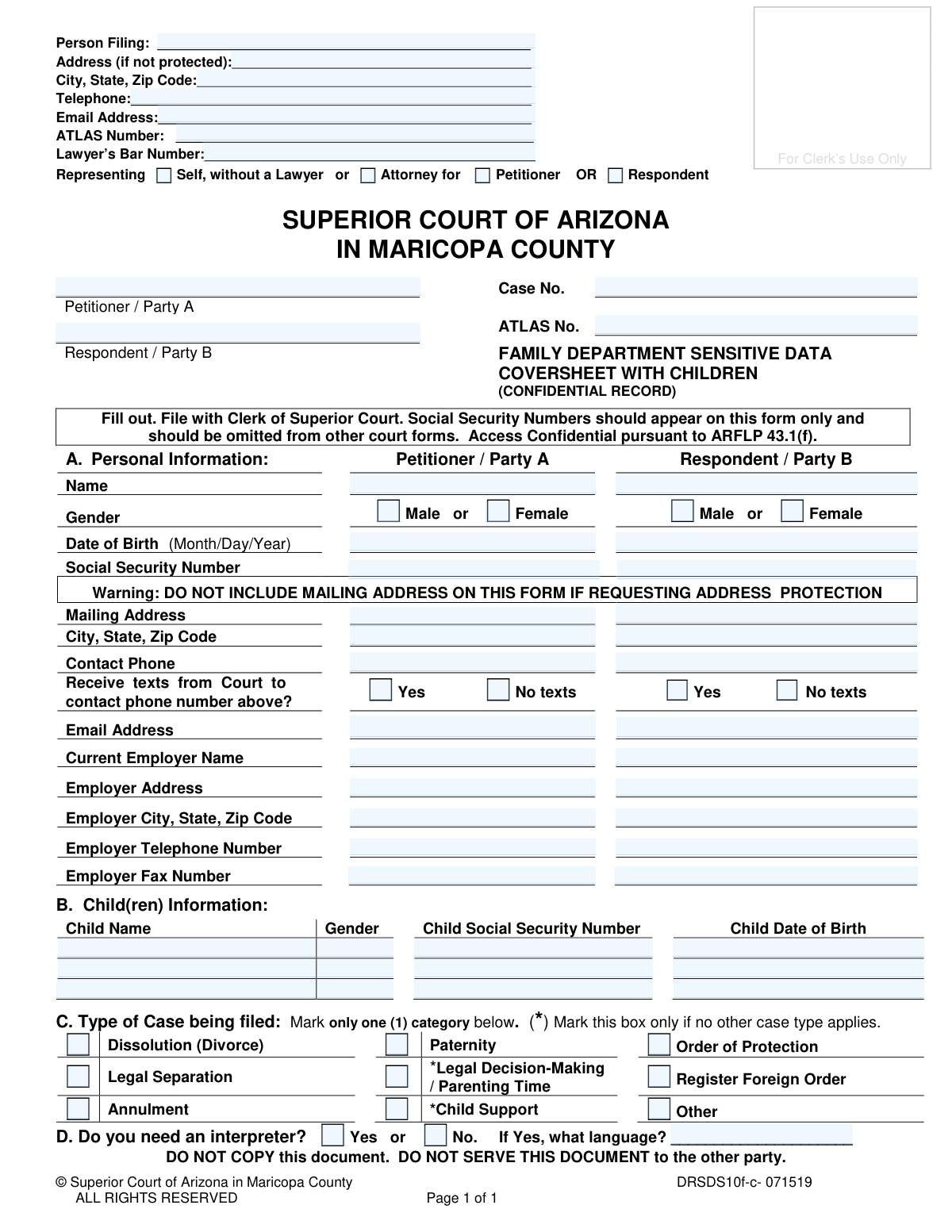
Yes! You can use AI to fill out Family Department Sensitive Data Coversheet with Children
This form is a confidential record required in family court proceedings in Maricopa County, Arizona, such as divorce or paternity cases involving children. Its purpose is to securely gather sensitive data like Social Security Numbers, dates of birth, and contact information for the parties and their children, keeping this information separate from the public case file. Today, this form can be filled out quickly and accurately using AI-powered services like Instafill.ai, which can also convert non-fillable PDF versions into interactive fillable forms.
DRSDS10f-c is part of the
County court forms, family court forms, family law forms and superior court forms categories on Instafill.
Our AI automatically handles information lookup, data retrieval, formatting, and form filling.
It takes less than a minute to fill out DRSDS10f-c using our AI form filling.
Securely upload your data. Information is encrypted in transit and deleted immediately after the form is filled out.
Form specifications
| Form name: | Family Department Sensitive Data Coversheet with Children |
| Number of fields: | 71 |
| Number of pages: | 1 |
| Language: | English |
Instafill Demo: How to fill out PDF forms in seconds with AI
How to Fill Out DRSDS10f-c Online for Free in 2026
Are you looking to fill out a DRSDS10F-C form online quickly and accurately? Instafill.ai offers the #1 AI-powered PDF filling software of 2026, allowing you to complete your DRSDS10F-C form in just 37 seconds or less.
Follow these steps to fill out your DRSDS10F-C form online using Instafill.ai:
- 1 Navigate to Instafill.ai and upload or select the 'Family Department Sensitive Data Coversheet with Children' (DRSDS10f-c).
- 2 Provide your information as the filing person, including your name, contact details, and representation status.
- 3 Enter the personal information for both the Petitioner/Party A and the Respondent/Party B, including names, dates of birth, Social Security Numbers, and employer details.
- 4 In Section B, carefully list the full name, gender, Social Security Number, and date of birth for each child involved in the case.
- 5 In Section C, mark the box corresponding to the type of case you are filing (e.g., Dissolution, Paternity).
- 6 Indicate whether an interpreter is needed and for which language.
- 7 Review all the information populated by the AI for accuracy, then download the completed confidential document to be filed with the Clerk of the Superior Court.
Our AI-powered system ensures each field is filled out correctly, reducing errors and saving you time.
Why Choose Instafill.ai for Your Fillable DRSDS10f-c Form?
Speed
Complete your DRSDS10f-c in as little as 37 seconds.
Up-to-Date
Always use the latest 2026 DRSDS10f-c form version.
Cost-effective
No need to hire expensive lawyers.
Accuracy
Our AI performs 10 compliance checks to ensure your form is error-free.
Security
Your personal information is protected with bank-level encryption.
Frequently Asked Questions About Form DRSDS10f-c
This form is used to collect confidential personal information, such as Social Security Numbers and dates of birth, for parties and children in a family court case. It keeps this sensitive data separate from public court records.
The person filing a new family court case involving children in the Superior Court of Arizona in Maricopa County must complete and submit this form.
No, this form is a confidential record. The information, especially Social Security Numbers, is kept private and is not accessible to the public.
This means you should not give a copy of this completed form to the other person involved in the case. It is for court use only and should be filed directly with the Clerk of the Superior Court.
No. The form explicitly warns: 'DO NOT INCLUDE MAILING ADDRESS ON THIS FORM IF REQUESTING ADDRESS PROTECTION.' Leave the address fields blank if you are concerned for your safety.
You should fill in all the information you have for both parties to the best of your ability. If you do not know certain details, you may leave them blank, but providing complete information helps the court process the case efficiently.
An ATLAS number is a unique identification number assigned by the Arizona court system for case management. If you have been involved in a previous case, you may have one; otherwise, you can likely leave it blank.
The form only has space for three children. If you have more, you should attach an additional sheet with the required information for the other children or contact the Clerk of Court for specific instructions.
You must mark only one box that best describes the legal action you are filing. Common examples include 'Dissolution (Divorce),' 'Paternity,' or 'Legal Decision-Making / Parenting Time.'
You must file the completed, original form with the Clerk of the Superior Court in Maricopa County along with your other initial case documents.
Yes, services like Instafill.ai use AI to accurately auto-fill form fields with your information, which can save you significant time and help prevent errors.
You can use a service like Instafill.ai to fill out this form online. Simply upload the PDF to their platform, and you can type your information directly into the fields before printing.
If you have a non-fillable or 'flat' PDF, you can use a tool like Instafill.ai. It can convert the document into an interactive, fillable form online, so you don't have to print and write by hand.
Compliance DRSDS10f-c
Validation Checks by Instafill.ai
1
Social Security Number Format and Requirement
This check verifies that the Social Security Number (SSN) for the Petitioner, Respondent, and each listed child is provided and follows the standard XXX-XX-XXXX format. As this is a confidential data sheet, the SSN is a critical identifier for legal and administrative purposes. A failure in this validation would prevent the form from being processed, as the SSN is essential for unique identification within the court system.
2
Exclusive Case Type Selection
This validation ensures that exactly one checkbox is selected in Section C, 'Type of Case being filed'. The form explicitly states to 'Mark only one (1) category', and selecting multiple types would create ambiguity in court filings and procedural routing. If more than one or zero case types are selected, the submission should be rejected with an error message prompting the user to choose a single, appropriate case type.
3
Conditional Interpreter Language Specification
This check validates that if the user answers 'Yes' to the question 'Do you need an interpreter?', the corresponding language field is not left blank. This is crucial for ensuring the court can arrange for the correct interpretation services, guaranteeing the individual's right to understand and participate in proceedings. If 'Yes' is selected without a language specified, the form submission should be blocked until the language is provided.
4
Date of Birth Validity and Chronology
This check ensures that all Date of Birth fields (for Petitioner, Respondent, and Children) contain a valid date in the past and are in the specified Month/Day/Year format. It also performs a logical check to confirm that a child's date of birth is chronologically after the parent's date of birth. This prevents data entry errors and ensures the logical consistency of family relationships presented to the court.
5
Conditional Lawyer's Bar Number
This validation rule checks that if the 'Attorney for' option is selected in the 'Representing' section, the 'Lawyer’s Bar Number' field is filled out. The Bar Number is a unique identifier for a licensed attorney and is required for the court to verify their credentials and standing. A submission with 'Attorney for' selected but a missing Bar Number would be considered incomplete and rejected.
6
Child Information Completeness for 'With Children' Form
Given that the form is titled 'Coversheet with Children', this validation ensures that information for at least one child is entered in Section B. This includes the child's name, gender, social security number, and date of birth. Submitting this specific form without any child data would contradict its purpose and likely indicate the wrong form was used, so the submission should be flagged for review or rejection.
7
Representation Selection Logic
This check ensures that the user selects either 'Self, without a Lawyer' or 'Attorney for', but not both. These options are mutually exclusive and define the filer's legal representation status. An invalid selection would create confusion about who is legally representing the party, so the form should not be accepted until a single, valid choice is made.
8
Required Party A (Petitioner) Information
This validation confirms that the essential personal information for the Petitioner / Party A, including their full name, date of birth, and social security number, is provided. The Petitioner is the primary party initiating the case, and their complete and accurate information is non-negotiable for the case to be opened. Failure to provide this core information would result in an immediate rejection of the filing.
9
Valid Email Address Format
This check verifies that all email address fields on the form contain a value that conforms to the standard email format (e.g., [email protected]). Correct email addresses are vital for electronic communication and official notifications from the court. An invalid format could lead to missed communications, so the system should flag the error and require correction before submission.
10
Valid Telephone Number Format
This validation ensures that all telephone number fields (personal and employer) are entered in a recognizable format, such as (XXX) XXX-XXXX or XXXXXXXXXX. Accurate phone numbers are essential for the court or legal representatives to make timely contact. The system should enforce a consistent format to ensure data integrity and usability.
11
ATLAS Number Format Validation
This check verifies that the ATLAS Number, if provided, adheres to the specific format required by the Arizona court system. The ATLAS number is a case management identifier, and an incorrect format could lead to misfiling or inability to link the document to the correct case file. If an ATLAS number is entered, it must be validated against the expected pattern (e.g., length, character type).
12
Gender Selection Requirement
This validation ensures that a gender is selected for the Petitioner, the Respondent, and any children listed on the form. This demographic data is required for court records and statistical purposes. The form should not be considered complete until a gender option is chosen for each individual.
13
Case Number Format
This check validates that the 'Case No.' field, if filled, follows the established format for Maricopa County Superior Court. Case numbers typically have a specific prefix (e.g., 'FC' for Family Court) and structure, which is critical for correctly associating the document with an existing case. An incorrectly formatted case number would cause the document to be rejected by the Clerk's office.
14
Zip Code Format Validation
This validation ensures that all zip code fields contain a valid 5-digit or 9-digit (ZIP+4) numeric code. Correct zip codes are essential for the proper mailing of court documents and for verifying geographical jurisdiction. An invalid zip code would be flagged, requiring the user to correct it to ensure mailability and data accuracy.
Common Mistakes in Completing DRSDS10f-c
The form explicitly states 'DO NOT COPY this document. DO NOT SERVE THIS DOCUMENT to the other party.' Many people mistakenly photocopy their entire filing packet, including this confidential sheet, and serve it to the opposing party. This action creates a severe privacy breach by exposing Social Security Numbers, dates of birth, and employer details. To avoid this, always remove this coversheet from the packet before making copies for service.
A prominent warning on the form says, 'DO NOT INCLUDE MAILING ADDRESS ON THIS FORM IF REQUESTING ADDRESS PROTECTION.' Despite this, individuals acting out of habit often fill in their address, nullifying their request for protection and potentially putting their safety at risk. Carefully read all warnings and leave the address fields blank if your location needs to be kept confidential from the other party.
This form is designed to be the ONLY document in the case file that contains Social Security Numbers (SSNs). A common error is entering SSNs on other, public-facing court documents, which exposes this sensitive data in the public record. To prevent identity theft and privacy violations, ensure SSNs are provided exclusively on this confidential coversheet and omitted from all other filings.
The form requires filers to 'Mark only one (1)' case type, but people often check multiple boxes or misunderstand the legal distinctions, such as confusing 'Dissolution (Divorce)' with 'Legal Separation'. This leads to filing rejections and processing delays as the court clerk must return the documents for correction. You must accurately identify the single, primary legal action you are initiating to ensure your case is docketed correctly.
Filers sometimes enter nicknames or informal names for themselves, the other party, or their children (e.g., 'Bobby' instead of 'Robert'). Court documents require full legal names as they appear on official identification like birth certificates or driver's licenses for proper identification and record-keeping. Using incorrect names can cause rejection of the filing or future legal complications.
People often provide a partial employer name (e.g., 'Starbucks') instead of the full legal business entity, or they may not know the correct corporate address. This information is critical for matters like child support enforcement and wage garnishment. Inaccurate details can significantly delay or prevent the court from enforcing orders, so it's vital to look up and verify the complete, official employer information.
Simple typos or transposed digits in Social Security Numbers, dates of birth, or the case number are extremely common and have serious consequences. An incorrect SSN can derail child support services, a wrong date of birth can cause identity verification to fail, and a wrong case number links the document to the wrong file. Always double-check every digit, as these errors can halt your case. AI-powered form-filling tools like Instafill.ai can help prevent these errors by validating data formats.
The person who initiates the legal action is the 'Petitioner / Party A,' and the other party is the 'Respondent / Party B.' Filers, especially those representing themselves, sometimes get confused and enter their information in the wrong column. This creates confusion in the court record and may require filing amended documents, causing delays. Before filling, confirm your role in the case and place all corresponding information in the correct column.
The question 'Do you need an interpreter?' is crucial for ensuring due process. Some individuals who are not fluent in English may overlook this box or fail to specify the required language, severely hindering their ability to understand and participate in legal proceedings. If you need language assistance, it is critical to check 'Yes' and write the specific language clearly.
This form is a confidential record for the court's use only and should not be served on the other party. However, filers often include it in the package of documents they are required to serve, inadvertently sharing sensitive personal information. This mistake violates the form's explicit instructions and compromises the privacy of all parties and children involved. This sheet should be filed with the Clerk but excluded from the service packet. If the form is a non-fillable PDF, tools like Instafill.ai can convert it into a fillable version, making it easier to manage and print separately.
Saved over 80 hours a year
“I was never sure if my IRS forms like W-9 were filled correctly. Now, I can complete the forms accurately without any external help.”
Kevin Martin Green
Your data stays secure with advanced protection from Instafill and our subprocessors

Robust compliance program
Transparent business model
You’re not the product. You always know where your data is and what it is processed for.
ISO 27001, HIPAA, and GDPR
Our subprocesses adhere to multiple compliance standards, including but not limited to ISO 27001, HIPAA, and GDPR.
Security & privacy by design
We consider security and privacy from the initial design phase of any new service or functionality. It’s not an afterthought, it’s built-in, including support for two-factor authentication (2FA) to further protect your account.
Fill out DRSDS10f-c with Instafill.ai
Worried about filling PDFs wrong? Instafill securely fills family-department-sensitive-data-coversheet-with-children forms, ensuring each field is accurate.