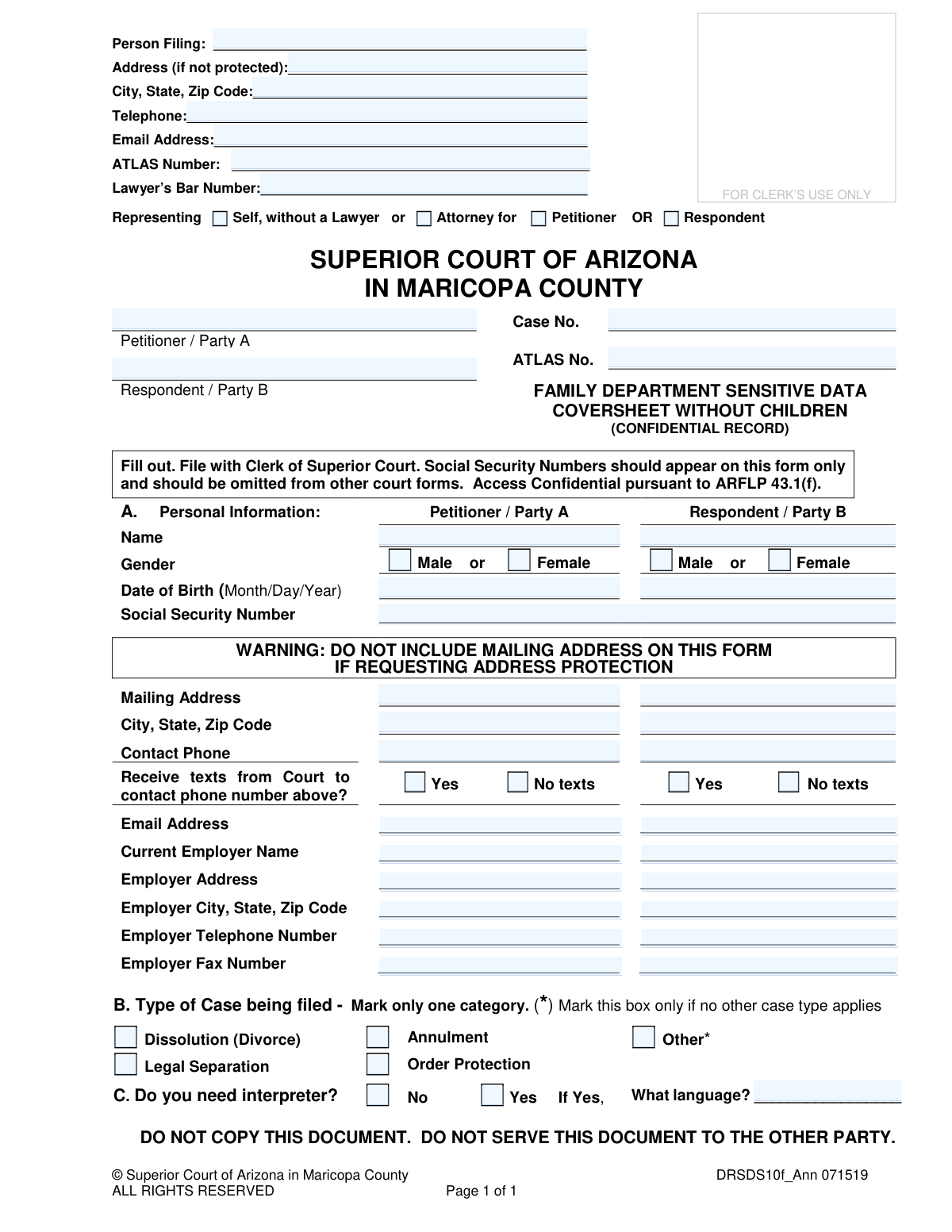
Yes! You can use AI to fill out Family Department Sensitive Data Coversheet without Children (Superior Court of Arizona in Maricopa County)

This form is a confidential document required by the Superior Court of Arizona in Maricopa County for family law cases that do not involve children. Its primary purpose is to securely collect sensitive personal data, such as Social Security Numbers and dates of birth, for the parties involved, keeping this information separate from public court records. Today, this form can be filled out quickly and accurately using AI-powered services like Instafill.ai, which can also convert non-fillable PDF versions into interactive fillable forms.
DRSDS10f is part of the County court forms, family court forms, family law forms and superior court forms categories on Instafill.
Our AI automatically handles information lookup, data retrieval, formatting, and form filling.
It takes less than a minute to fill out DRSDS10f using our AI form filling.
Securely upload your data. Information is encrypted in transit and deleted immediately after the form is filled out.

Form specifications

Form name: Family Department Sensitive Data Coversheet without Children (Superior Court of Arizona in Maricopa County)
Number of fields: 54
Number of pages: 1
Language: English
main-image

Instafill Demo: How to fill out PDF forms in seconds with AI

How to Fill Out DRSDS10f Online for Free in 2026

Are you looking to fill out a DRSDS10F form online quickly and accurately? Instafill.ai offers the #1 AI-powered PDF filling software of 2026, allowing you to complete your DRSDS10F form in just 37 seconds or less.
Follow these steps to fill out your DRSDS10F form online using Instafill.ai:
  1. 1 Navigate to Instafill.ai and upload or select the 'Family Department Sensitive Data Coversheet without Children' form.
  2. 2 Provide your information as the 'Person Filing' and specify your representation status (e.g., self-represented).
  3. 3 Use the AI assistant to accurately input the personal information for both Petitioner/Party A and Respondent/Party B, including full names, dates of birth, and Social Security Numbers.
  4. 4 Enter contact details and current employer information for both parties, ensuring you do not list a mailing address if you are requesting address protection.
  5. 5 Mark the appropriate box for the 'Type of Case' being filed, such as Dissolution (Divorce) or Legal Separation.
  6. 6 Indicate whether an interpreter is needed for either party and specify the language if applicable.
  7. 7 Review all the auto-filled information for accuracy, then download the completed confidential document, ready for filing with the Clerk of the Superior Court.

Our AI-powered system ensures each field is filled out correctly, reducing errors and saving you time.

Why Choose Instafill.ai for Your Fillable DRSDS10f Form?

Speed

Complete your DRSDS10f in as little as 37 seconds.

Up-to-Date

Always use the latest 2026 DRSDS10f form version.

Cost-effective

No need to hire expensive lawyers.

Accuracy

Our AI performs 10 compliance checks to ensure your form is error-free.

Security

Your personal information is protected with bank-level encryption.

Frequently Asked Questions About Form DRSDS10f

This form is used to collect confidential personal information, such as Social Security Numbers and dates of birth, for a family court case. It keeps your sensitive data separate from public court records to protect your privacy.

The person initiating a family court case (the Petitioner) in Maricopa County must file this form. It is specifically for cases, like divorce or legal separation, that do not involve minor children.

The court requires Social Security Numbers for proper identification and to enforce court orders. This form is a confidential record, meaning your SSN will not be accessible in the public case file.

If you are requesting address protection, the form explicitly warns you not to include your mailing address. You must file a separate request or motion with the court to protect your address.

This is a confidential document for court use only and should not be given to the other person in your case. You file the original with the Clerk of the Superior Court, and it is not part of the documents you serve.

You should fill in all the information you know for the other party as accurately as possible. If you do not know certain details, you may leave those specific fields blank.

Party A, the Petitioner, is the person who starts the court case by filing the initial documents. Party B, the Respondent, is the other person who will respond to the case filing.

An ATLAS number is an identification number used by the Arizona child support system. You only need to provide this number if you have an existing case with the Division of Child Support Services; otherwise, you can leave it blank.

Yes, this form is appropriate for your case if your children are adults. The 'without Children' designation on family court forms typically refers to minor children under the age of 18.

Yes, services like Instafill.ai use AI to help you accurately fill out your form. These tools can auto-fill fields from your saved profile, which helps reduce errors and saves time.

You can use a service like Instafill.ai to complete the form on your computer. Simply upload the PDF, and the platform will provide an interactive version for you to type your information into before printing.

If you have a non-fillable or 'flat' PDF, you can upload it to a platform like Instafill.ai. The service can convert it into an interactive, fillable form that you can complete online.

Compliance DRSDS10f
Validation Checks by Instafill.ai

1
Social Security Number Format
Verifies that the Social Security Number for both the Petitioner and Respondent is entered in the standard XXX-XX-XXXX format. This is critical for accurate identification and to prevent data entry errors on this sensitive, confidential form. A validation failure would prevent submission until the number is corrected, ensuring data integrity for court records.
2
Date of Birth Validity and Chronology
Ensures the Date of Birth for both parties is a complete, valid date in MM/DD/YYYY format and that the date is in the past, not the current day or a future date. This check prevents impossible or nonsensical data entry, which is essential for identity verification and age-related legal considerations. If the date is invalid, the user must correct it before proceeding.
3
Exclusive Case Type Selection
Validates that only one case type checkbox is selected in Section B ('Dissolution', 'Legal Separation', 'Annulment', 'Order Protection', 'Other'). This is crucial for correctly categorizing and routing the case within the court system from the moment of filing. If more than one box is checked, an error will be displayed, forcing the filer to choose a single, appropriate category.
4
Conditional Interpreter Language Requirement
Checks that if the 'Yes' box is marked for the question 'Do you need interpreter?', the corresponding 'What language?' field is filled out. This ensures that when a need for an interpreter is indicated, the specific language required is also provided, allowing the court to arrange for the necessary resources. A failure would prompt the user to specify the language or uncheck the 'Yes' box.
5
Attorney Representation and Bar Number Consistency
Verifies that if the 'Attorney for' option is selected in the header, the 'Lawyer’s Bar Number' field is not empty. This check ensures that a representing attorney is properly identified with their official registration number, which is required for verification and contact. If the bar number is missing, the form cannot be submitted until it is provided.
6
Completeness of Party Identification
Ensures that the full names for both 'Petitioner / Party A' and 'Respondent / Party B' are provided. These fields are fundamental to establishing the parties involved in the legal action. The form submission will be blocked if either name is missing, as a case cannot proceed without identifying all primary parties.
7
Standard Phone Number Formatting
Validates that all telephone and fax number fields ('Telephone', 'Contact Phone', 'Employer Telephone Number', 'Employer Fax Number') adhere to a standard 10-digit format (e.g., XXX-XXX-XXXX or (XXX) XXX-XXXX). This ensures the court has reliable and correctly formatted contact numbers for communication. An invalid format would trigger an error message requiring correction.
8
Valid Email Address Format
Checks that any provided email address is in a valid format (e.g., [email protected]). Correct email addresses are vital for electronic notifications and service of documents from the court. This validation prevents typos and ensures that the specified communication channel is viable.
9
Exclusive Gender Selection
For both the Petitioner and Respondent, this check verifies that only one gender option ('Male' or 'Female') is selected. This prevents ambiguous or invalid data entry for demographic and identification purposes. If both or neither are selected for a party, the user will be prompted to make a single, valid selection.
10
Case Number Format Adherence
Validates that the 'Case No.' field, if filled, conforms to the specific format used by the Maricopa County Superior Court (e.g., starts with 'FC' followed by a specific number of digits). This ensures the document is correctly associated with an existing case file in the court's system. An incorrect format would prevent the document from being linked to the proper case.
11
Conditional Language Field for Interpreter
This check ensures that the 'What language?' field is only filled out if the 'Yes' box for needing an interpreter is checked. If 'No' is selected, the language field must be empty. This prevents extraneous or contradictory information from being submitted, keeping the data clean and focused on actual needs.
12
Zip Code Format Validation
Verifies that all zip code fields contain a valid 5-digit or 9-digit (ZIP+4) numeric code. Accurate zip codes are essential for the correct mailing of court documents and for verifying geographical information. An invalid entry would prompt the user for correction to ensure mailability and data accuracy.

Common Mistakes in Completing DRSDS10f

Ignoring the Address Protection Warning

A critical mistake is entering a mailing address on this form when address protection is needed for safety. This often happens because the filer is in a hurry or misunderstands the gravity of the warning. Disclosing this information can compromise personal safety and undermine the purpose of a protected address, potentially leading to dangerous situations. To avoid this, carefully read the capitalized warning and leave the address fields blank if you are requesting or have been granted address protection.

Improperly Serving the Confidential Coversheet

The form explicitly states, 'DO NOT SERVE THIS DOCUMENT TO THE OTHER PARTY.' However, filers often bundle all their paperwork together and serve the entire packet, accidentally including this confidential sheet. This action breaches confidentiality, exposing sensitive data like Social Security Numbers and private contact information to the other party, which can lead to identity theft or harassment. Always separate this coversheet from the documents you are required to serve on the other party.

Including Social Security Numbers on Other Forms

The form instructs filers to put Social Security Numbers (SSNs) only on this confidential coversheet. A common error is to include the SSN on other, non-confidential court documents that become part of the public record. This exposes the individual to a high risk of identity theft. To prevent this, double-check all other documents in your filing to ensure they do not contain SSNs or other sensitive data that should be restricted to this form.

Confusing Petitioner/Party A and Respondent/Party B Columns

Filers, especially the Respondent, sometimes enter their own information into the column designated for the other party. This happens due to rushing or confusion about who is 'Party A' versus 'Party B'. This error creates a confusing and inaccurate court record, which can lead to processing delays, incorrect data entry by the clerk, and notices being sent to the wrong person. Always verify you are filling out the correct column corresponding to your role in the case.

Incorrectly Selecting the Case Type

In Section B, the form requires marking only one case type. People sometimes check multiple boxes (e.g., 'Dissolution' and 'Order Protection') if their situation is complex, or they incorrectly choose 'Other' when a more specific category applies. This can lead to the case being misclassified, causing administrative delays and requiring amendments later. Carefully review the options and select the single, most accurate category that represents the primary legal action you are filing.

Providing Incomplete Employer Information

Filers often provide only the name of their employer, omitting the full address, phone number, and other details requested. Others may leave the section entirely blank if they are unemployed, without noting 'Unemployed' or 'N/A'. This missing information can hinder court processes that may require verifying employment or income. Always provide the complete, accurate details for your current employer or clearly state your employment status if not currently working.

Using an Incorrect Date of Birth Format

The form specifies a 'Month/Day/Year' format for the date of birth, but people frequently use a different convention, such as 'Day/Month/Year', or write it out in long form. This seemingly minor error can cause data entry problems for the court clerk and may lead to failed identity verification in automated systems. To avoid this, strictly adhere to the MM/DD/YYYY format. AI-powered tools like Instafill.ai can help by automatically formatting dates correctly to meet form requirements.

Omitting the Case Number on an Existing Case

When this form is filed in relation to an already existing case, people sometimes forget to enter the Case Number at the top. This omission forces the court clerk to search for the case manually, significantly delaying the processing of the document. It can even lead to the document being rejected or misfiled. Always ensure the correct and complete Case Number is entered if one has already been assigned.

Failing to Specify Interpreter Language

A common oversight is checking 'Yes' to needing an interpreter in Section C but then failing to write in the specific language required. This leaves the court unable to arrange for the correct interpreter, causing significant delays on the day of a hearing. If you need an interpreter, you must check 'Yes' and clearly write the name of the language (e.g., 'Spanish', 'ASL', 'Cantonese') in the space provided.

Misunderstanding the 'Person Filing' Field

Filers can be confused by the 'Person Filing' field at the very top, sometimes re-entering the Petitioner's name or leaving it blank. This field is meant to identify the individual who is physically submitting the paperwork, which could be the party themselves, their lawyer, or a courier. Incorrect information can cause confusion if the clerk has a question about the submission. The person submitting the documents should enter their own name and contact information here.
Saved over 80 hours a year

“I was never sure if my IRS forms like W-9 were filled correctly. Now, I can complete the forms accurately without any external help.”

Kevin Martin Green

Your data stays secure with advanced protection from Instafill and our subprocessors

Robust compliance program

Transparent business model

You’re not the product. You always know where your data is and what it is processed for.

ISO 27001, HIPAA, and GDPR

Our subprocesses adhere to multiple compliance standards, including but not limited to ISO 27001, HIPAA, and GDPR.

Security & privacy by design

We consider security and privacy from the initial design phase of any new service or functionality. It’s not an afterthought, it’s built-in, including support for two-factor authentication (2FA) to further protect your account.

Fill out DRSDS10f with Instafill.ai

Worried about filling PDFs wrong? Instafill securely fills family-department-sensitive-data-coversheet-without-children-superior-court-of-arizona-in-maricopa-county forms, ensuring each field is accurate.

Related forms by category

County court forms Affidavit for Service by Publication/Posting (Circuit Court of Cook County, Illinois) (CCG 0013 A/B), Petition for Leave to Proceed In Forma Pauperis (Court of Common Pleas of Lehigh County, Pennsylvania, Civil Division), Designation of Record on Appeal (Civil) (Maricopa County Justice Courts, Arizona) (Form APP 8150-702), Maricopa County Justice Courts, Motion to Set Aside / Vacate Judgment, Circuit Court of Cook County, Illinois, Form CCM 0346, Order/Trial Call, Superior Court of Chatham County, Georgia, Hearing Request Form, Form CFS 601-2, County Treasurer's and Judge's Certification of Expenditures for Care and Support of Minors Other Than Wards of the Court, Tax Court of New Jersey, County Equalization Table Complaint (CN 10339), Application for Judgment to Apply Freeze Act using County Board of Taxation figures (N.J.S.A. 54:3-26), Family Department Pleading/Motion and Order, Disclosure Statement (Superior Court of Arizona in Maricopa County), Proposed Divorce / Legal Separation Resolution Statement, Notice of Default Hearing, Superior Court of Arizona in Maricopa County, Acceptance of Service for Family Court Cases, A.R.F.L.P. Rule 40(F), Affidavit of Direct Payments (Superior Court of Arizona in Maricopa County), Affidavit of Financial Information, Superior Court of Arizona in Maricopa County, Affidavit of Non-Compliance (Form DR41f), Affidavit Regarding Minor Children (Superior Court of Arizona in Maricopa County), Affidavit of Service with Signature Confirmation for Family Cases, Alternative Dispute Resolution Statement to the Court (A.R.F.L.P. 66(E)) · + 17 more →
family court forms Form 12.995(c), Safety-Focused Parenting Plan, Florida Supreme Court Approved Family Law Form 12.901(b)(3), Petition for Dissolution of Marriage with No Dependent or Minor Child(ren) or Property (02/18), Form N161, Appellant’s notice (All appeals except small claims track appeals and appeals to the Family Division of the High Court), Form N161, Appellant's Notice (All appeals except small claims track appeals and appeals to the Family Division of the High Court), Florida Supreme Court Approved Family Law Form 12.915, Designation of Current Mailing and E-mail Address, declaration-of-marriage-for-court-proceeding-california-family-law, Florida Supreme Court Approved Family Law Form 12.902(d), Uniform Child Custody Jurisdiction and Enforcement Act (UCCJEA) Affidavit, Florida Supreme Court Approved Family Law Form 12.941(a), Petition for Enforcement of Out-of-State Custody Decree and for Order to Pick Up Minor Child(ren), Florida Supreme Court Approved Family Law Form 12.970(a), Petition for Temporary Custody by Extended Family, Adoption Request (Stepparent), Florida Family Law Rules of Procedure Form 12.900(b), Notice of and Consent to Limited Appearance, Florida Family Law Rules of Procedure Form 12.900(d), Termination of Limited Appearance, Florida Family Law Rules of Procedure Form 12.900(e), Acknowledgment of Assistance by Attorney, Florida Family Law Rules of Procedure Form 12.900(g), Agreement Limiting Representation, Florida Family Law Rules of Procedure Form 12.900(h), Notice of Related Cases, Florida Family Law Rules of Procedure Form 12.901(a), Joint Petition for Simplified Dissolution of Marriage, Form 12.902(b), Family Law Financial Affidavit (Short Form), Florida Family Law Rules of Procedure Form 12.902(c), Family Law Financial Affidavit (Long Form), Florida Family Law Rules of Procedure Form 12.902(e), Child Support Guidelines Worksheet, Florida Supreme Court Approved Family Law Form 12.902(f)(1), Marital Settlement Agreement for Dissolution of Marriage with Dependent or Minor Child(ren) · + 73 more →
family law forms Form 12.902(b), Family Law Financial Affidavit (Short Form), Florida Supreme Court Approved Family Law Form 12.901(b)(3), Petition for Dissolution of Marriage with No Dependent or Minor Child(ren) or Property (02/18), Form FL-170, Declaration for Default or Uncontested Dissolution or Legal Separation (Family Law), Form FL-100, Petition—Marriage/Domestic Partnership (Family Law), Florida Supreme Court Approved Family Law Form 12.915, Designation of Current Mailing and E-mail Address, declaration-of-marriage-for-court-proceeding-california-family-law, Florida Supreme Court Approved Family Law Form 12.902(d), Uniform Child Custody Jurisdiction and Enforcement Act (UCCJEA) Affidavit, Florida Family Law Rules of Procedure Form 12.910(a), Summons: Personal Service on an Individual, Florida Supreme Court Approved Family Law Form 12.941(a), Petition for Enforcement of Out-of-State Custody Decree and for Order to Pick Up Minor Child(ren), Florida Supreme Court Approved Family Law Form 12.970(a), Petition for Temporary Custody by Extended Family, Form FL-110, Summons (Family Law), Form FL-120, Response—Marriage/Domestic Partnership (Family Law), ADOPT-200, Adoption Request, ADOPT-200, Stepparent Adoption Request, ADOPT-210, Adoption Agreement, ADOPT-310, Contact After Adoption Agreement, Adoption Assistance Program Nonrecurring Adoption Expense Agreement and Claim, Adoption Request (Stepparent), Adoption and Safe Families Act (ASFA) Survey, Florida Family Law Rules of Procedure Form 12.900(b), Notice of and Consent to Limited Appearance · + 74 more →
superior court forms FW-003, Order on Court Fee Waiver (Superior Court), FW-003, Order on Court Fee Waiver (Superior Court), Form FW-003, Order on Court Fee Waiver (Superior Court), Declaration of Facts of Death (California Superior Court), Form FW-003-GC, Order on Court Fee Waiver (Superior Court) (Ward or Conservatee), Superior Court of Chatham County, Georgia, Hearing Request Form, Form FW-006, Request for Hearing About Court Fee Waiver Order (Superior Court), Form FW-002, Request to Waive Additional Court Fees (Superior Court), Form FW-008, Order on Court Fee Waiver After Hearing (Superior Court), Form FW-002-GC, Request to Waive Additional Court Fees (Superior Court) (Ward or Conservatee), Form REC-001(N), Notice of Intent to Destroy Superior Court Records; Offer to Transfer Possession, Form REC-001(R), Request for Transfer or Extension of Time for Retention of Superior Court Records, Notice of Hearing on Request for Transfer or Extension of Time for Retention of Superior Court Records; Court Order; Release and Receipt of Superior Court Records, Form REC-002(R), Release and Receipt of Superior Court Records, Superior Court of New Jersey, Application for Appeal and Order, Superior Court of New Jersey Dissolution (FM) Case Management Order, New Jersey Judiciary – Superior Court, Appellate Division Application for Permission to File Emergent Motion, New Jersey Judiciary Superior Court - Appellate Division Civil Case Information Statement, New Jersey Judiciary Superior Court - Appellate Division Criminal Case Information Statement, New Jersey Judiciary Superior Court - Appellate Division Notice of Appeal (CN: 10502) · + 71 more →