
Yes! You can use AI to fill out Form SC-133, Judgment Debtor's Statement of Assets (Small Claims)
Don't type 81 fields by hand. Tell our AI about yourself, or upload a document you already have, and it fills every field in seconds. You check it, then download, print or sign.
The AI does the filling. You just check it.
No typing into boxes, nothing to install.
What this form asks for
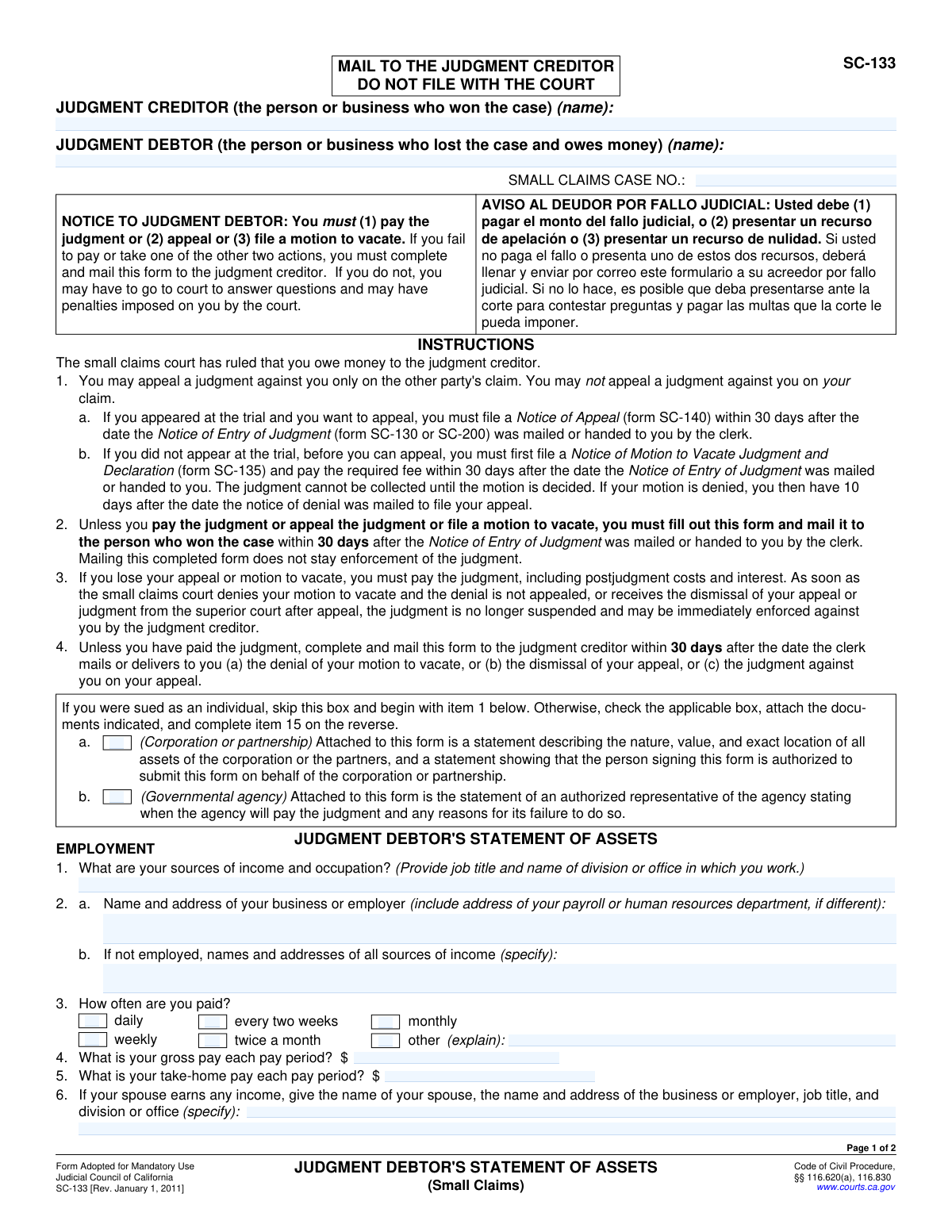
The AI fills all of it, from your answers or your documents.
The AI checks your answers before you download
14 checks built for this form, so a wrong date or a missing answer is caught before anyone else sees it.
This validation ensures that the value entered for 'take-home pay' (item 5) is not greater than the value for 'gross pay' (item 4). Gross pay is the total earnings before any deductions, while take-home pay is the amount after deductions. It is logically impossible for take-home pay to be more than gross pay, so this check prevents data entry errors. If this validation fails, the user should be prompted to correct the pay amounts.
This check verifies that if the 'other' checkbox is selected for pay frequency (item 3), the corresponding explanation text field is not empty. The form requires an explanation for any pay frequency that does not fit the standard options. This ensures complete and understandable information is provided to the judgment creditor. A failure would require the user to either provide an explanation or select a different frequency.
This validation rule checks that if the 'Yes' box is checked for item 12 ('Is anyone holding assets for you?'), the subsequent text field describing the assets and holder is filled in. This is a critical disclosure for asset discovery, and leaving the details blank after indicating 'Yes' would make the form incomplete. If the check fails, the system should prompt the user to provide the required details or change the answer to 'No'.
This rule validates that if the 'Yes' box is checked for item 13 ('Have you disposed of or transferred any asset within the last 60 days?'), the corresponding details field is completed. This information is crucial for the creditor to identify potentially fraudulent transfers intended to hide assets. Answering 'Yes' without providing specifics defeats the purpose of the question. The user must provide details or correct the answer to 'No'.
This check ensures that if a monthly payment amount is offered in item 14, a corresponding start date is also provided, and vice versa. An offer to pay is incomplete without a specified start date, and a date is meaningless without an amount. This validation ensures a complete and actionable payment proposal is made. If one field is filled, the other must also be completed.
This validation confirms that the payment start date provided in item 14 is a future date. A payment plan, by its nature, begins on a future date, not one that has already passed. This check prevents nonsensical or invalid data entry. If the date entered is in the past or today, the user should be prompted to enter a valid future date.
And 8 more checks
- Signature Date Presence and Format
- Printed Name Matches Judgment Debtor
- Case Number Presence
- Income Source Completeness
- Vehicle Identification Number (VIN) Format
- Bank Account Row Completeness
- Monetary Field Validation
- Declaration and Signature Fields Completion
Let AI fill out your SC-133
No typing. Every field filled in seconds, checked, ready to sign.
How to Fill Out SC-133 Online for Free in 2026
What the AI walks you through.
- Navigate to Instafill.ai and upload or select the SC-133 form.
- Use the AI assistant to input the names of the Judgment Creditor and Judgment Debtor, along with the Small Claims Case Number.
- Provide detailed information about your employment and all sources of income, including pay frequency and amounts.
- List all cash on hand and money held in financial institutions like banks and credit unions, specifying account details and balances.
- Disclose all owned property, including vehicles, boats, and real estate, detailing their value and any outstanding loans against them.
- List any other valuable personal property and answer questions regarding recent asset transfers.
- Review all entered information for accuracy, then digitally sign and date the declaration before mailing the completed form to the judgment creditor.
Common Mistakes in Completing SC-133
The ones the AI is built to catch.
Filing the Form With the Court
Entering Incorrect Case Number or Party Names
Providing Incomplete Employer Information
Confusing Gross Pay with Take-Home Pay
Omitting Jointly Held Bank Accounts
Missing Vehicle Identification Numbers (VIN)
Undervaluing or Omitting Assets
Failure to Disclose Recent Asset Transfers
Ignoring the Payment Proposal Section
Forgetting to Sign and Date the Form
Frequently Asked Questions About SC-133
Is it really free for 7 days?
Can I fill other forms too?
How do I cancel?
How does the AI fill out SC-133?
What happens to my information?
How complex is SC-133 to fill out?
What is the purpose of Form SC-133, Judgment Debtor's Statement of Assets?
Who is required to fill out this form?
What is the deadline to submit this form?
Where do I send the completed Form SC-133?
What happens if I don't send this form?
What kind of information do I need to provide on the form?
I can't afford to pay the full judgment amount at once. What are my options?
Does my spouse's income need to be included on this form?
Does submitting this form pause the collection of the debt?
I was sued as a corporation, not an individual. How do I complete the form?
Can I use an AI tool to help me fill out this form?
How can I fill out Form SC-133 online?
The PDF of the form I have is not fillable. What can I do?
Get your SC-133 filled out by AI
$0 today. Cancel before Nov 4 and you pay nothing.
Other forms like this one
California state forms: Judicial Council of California Form DE-111, Petition for Probate (Probate—Decedents Estates), DS 1891, Applicant/Vendor Disclosure Statement (State of California Department of Developmental Services), Judicial Council of California Form DE-120, Notice of Hearing—Decedent's Estate or Trust, Judicial Council of California Form DE-120, Notice of Hearing—Decedent's Estate or Trust, Murrieta Police Department Citizen Complaint Form (California Penal Code § 148.6 Advisory Statement), California Department of Social Services, Sworn Statement, State of California Department of Transportation California Civil Rights Laws Certification, State of California Department of Transportation Darfur Contracting Act Certification, Form DOT ADM-0077, State of California Department of Transportation, Contract Requirements, State of California Department of Transportation Subcontractor List, State of California Department of Transportation, Certified DVBE Summary, Bidder Declaration GSPD-05-105, State of California Level of Care Rate Determination Protocol Matrix, State of California Accessible Form, State of California Form SOC 321, Request for Order and Consent - Paramedical Services, State of California Darfur Contracting Act Certification, State of California Department of Veterans Affairs COMMERCIALLY USEFUL FUNCTION (CUF) CERTIFICATION FORM, Form ADR-100, Statement of Agreement or Nonagreement, Civil Appeal Case Information Statement, Form APP-014, Appellant's Proposed Statement on Appeal (Unlimited Civil Case)
California court forms: Judicial Council of California Form SC-105, Request for Court Order and Answer (Small Claims), Judicial Council of California Form SC-120, Defendant’s Claim and ORDER to Go to Small Claims Court (Small Claims), Judicial Council of California Form SER-001, Request for Sheriff to Serve Court Papers, Judicial Council of California Form SER-001, Request for Sheriff to Serve Court Papers, Affidavit for Collection of Personal Property California Probate Code Section 13100, Form POS-040, Proof of Service—Civil, Declaration of Facts of Death (California Superior Court), declaration-of-marriage-for-court-proceeding-california-family-law, ADOPT-200, Adoption Request, ADOPT-200, Stepparent Adoption Request, ADOPT-210, Adoption Agreement, ADOPT-310, Contact After Adoption Agreement, Judicial Council of California Form ADOPT-200, Adoption Request, Form ADR-107, Mediation Attendance Sheet, Form ADR-110, Order Appointing Referee, Form ADR-109, Stipulation or Motion for Order Appointing Referee, Form ADR-102, Request for Trial De Novo After Judicial Arbitration, Form ADR-108, Referee's Report (Code Civ. Proc., §§ 638, 639), Form ADR-106, Petition to Confirm, Correct, or Vacate Contractual Arbitration Award, Form ADR-104, Rejection of Award and Request for Trial After Attorney-Client Fee Arbitration
small claims forms: Form SC-100, Plaintiff's Claim and ORDER to Go to Small Claims Court, Judicial Council of California Form SC-104, Proof of Service (Small Claims), SC-108, Request to Correct or Cancel Judgment and Answer (Small Claims), Judicial Council of California Form SC-105, Request for Court Order and Answer (Small Claims), SC-120, Defendant’s Claim and ORDER to Go to Small Claims Court (Small Claims), Judicial Council of California Form SC-104, Proof of Service (Small Claims), Judicial Council of California Form SC-108, Request to Correct or Cancel Judgment and Answer (Small Claims), SC-105, Request for Court Order and Answer (Small Claims), Judicial Council of California Form SC-120, Defendant’s Claim and ORDER to Go to Small Claims Court (Small Claims), Form SC-100, Plaintiff’s Claim and ORDER to Go to Small Claims Court, Form N161, Appellant’s notice (All appeals except small claims track appeals and appeals to the Family Division of the High Court), Plaintiff's Claim and ORDER to Go to Small Claims Court (SC-100), Form N161, Appellant's Notice (All appeals except small claims track appeals and appeals to the Family Division of the High Court), Form SC-100A, Other Plaintiffs or Defendants (Attachment to Plaintiff's Claim and ORDER to Go to Small Claims Court), Form A, Claim Form, European Small Claims Procedure, Form EJ-001, Abstract of Judgment—Civil and Small Claims, Form SC-109, Authorization to Appear (Small Claims), Form SC-112A, Proof of Service by Mail (Small Claims), Form SC-114, Request to Amend Party Name Before Hearing (Small Claims), Form SC-132, Attorney-Client Fee Dispute (Attachment to Notice of Entry of Judgment)
court claim forms: Form SC-100, Plaintiff's Claim and ORDER to Go to Small Claims Court, Judicial Council of California Form SC-105, Request for Court Order and Answer (Small Claims), SC-120, Defendant’s Claim and ORDER to Go to Small Claims Court (Small Claims), SC-105, Request for Court Order and Answer (Small Claims), Judicial Council of California Form SC-120, Defendant’s Claim and ORDER to Go to Small Claims Court (Small Claims), Form SC-100, Plaintiff’s Claim and ORDER to Go to Small Claims Court, Certificate of Service (Civil Court Claim), Form N161, Appellant’s notice (All appeals except small claims track appeals and appeals to the Family Division of the High Court), Plaintiff's Claim and ORDER to Go to Small Claims Court (SC-100), Form N161, Appellant's Notice (All appeals except small claims track appeals and appeals to the Family Division of the High Court), Form SC-100A, Other Plaintiffs or Defendants (Attachment to Plaintiff's Claim and ORDER to Go to Small Claims Court), Form N461: Claim for judicial review, Statement of Small Claim and Notice, Trial Court of Massachusetts, State of Michigan, Form MC 25, Notice of Intent to Escheat Unclaimed Personal Property, Form MC 35, Complaint, Claim and Delivery, Form MC 36, Motion for Possession Pending Judgment, Claim and Delivery, Order of Possession Pending Judgment, Claim and Delivery, Form MC 38, Bond, Claim and Delivery, Form MC 39, Judgment, Claim and Delivery, Form MC 55, Claim of Appeal
Let AI fill out your SC-133
Your trial starts once a card is added. You pay nothing before Nov 4.
Our AI already knows this form, all 81 fields of it. Skip the typing: tell it about yourself, or upload what you have, and it fills the whole form in seconds.
- AI fills every field on both pages, checkboxes included
- No typing into boxes: answer a few questions, or upload a document you already have, an old copy of this form, a photo of a document
- The AI checks the answers; you review and change anything before you download
- Download the finished PDF, print it, or sign it online
- Encrypted, and never used to train AI
Cancel before Nov 4 and you pay nothing.
A card is needed to start the trial. Cancel in two clicks from your account.
Terms · Privacy