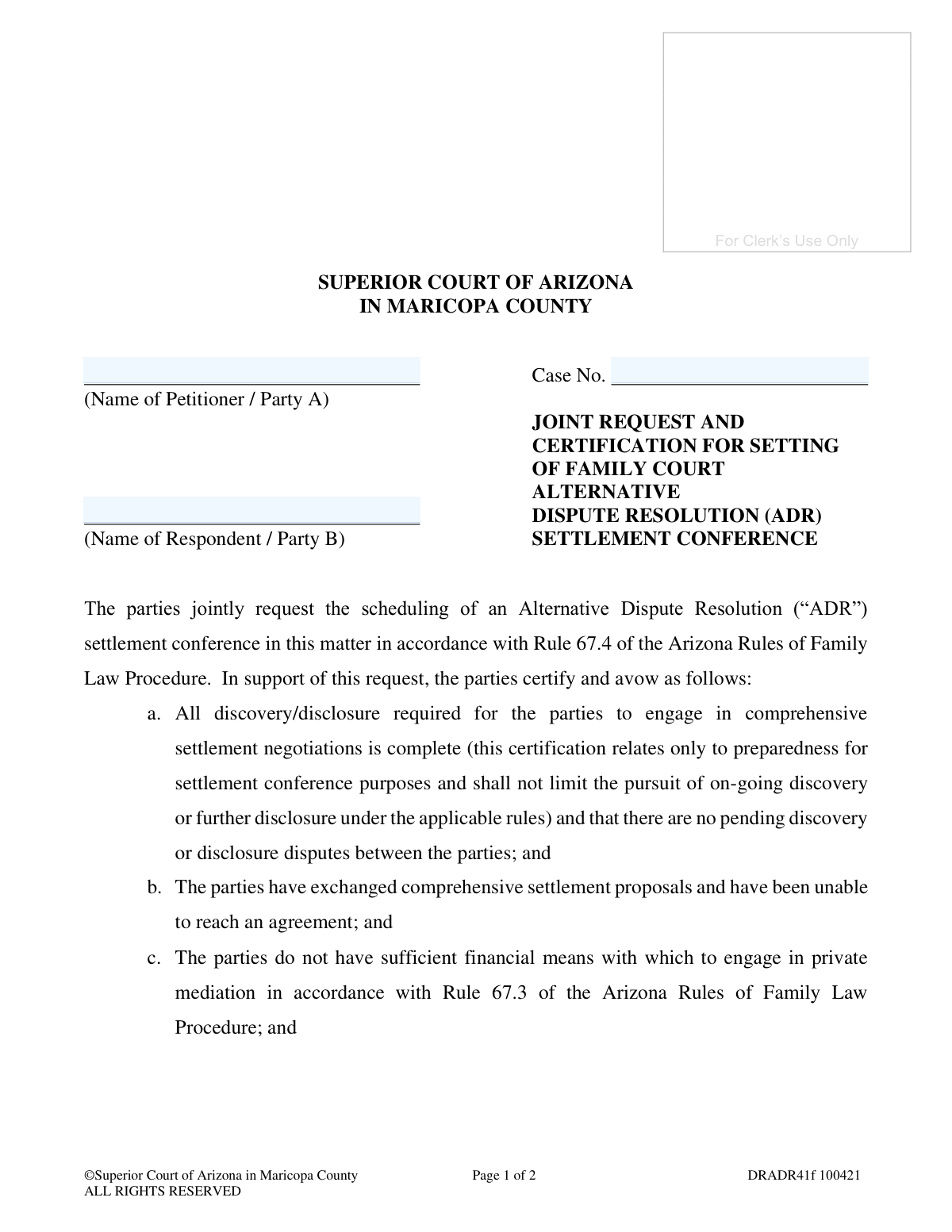
Yes! You can use AI to fill out Joint Request and Certification for Setting of Family Court Alternative Dispute Resolution (ADR) Settlement Conference
This form, officially known as DRADR41f, is a legal document submitted to the Superior Court of Arizona in Maricopa County by both parties in a family law case. It serves as a joint request to schedule an Alternative Dispute Resolution (ADR) settlement conference, certifying that discovery is complete, settlement proposals have been exchanged, and the parties cannot afford private mediation. Today, this form can be filled out quickly and accurately using AI-powered services like Instafill.ai, which can also convert non-fillable PDF versions into interactive fillable forms.
DRADR41f is part of the
County court forms, family court forms, family law forms and superior court forms categories on Instafill.
Our AI automatically handles information lookup, data retrieval, formatting, and form filling.
It takes less than a minute to fill out DRADR41f using our AI form filling.
Securely upload your data. Information is encrypted in transit and deleted immediately after the form is filled out.
Form specifications
| Form name: | Joint Request and Certification for Setting of Family Court Alternative Dispute Resolution (ADR) Settlement Conference |
| Number of fields: | 14 |
| Number of pages: | 1 |
| Language: | English |
Instafill Demo: How to fill out PDF forms in seconds with AI
How to Fill Out DRADR41f Online for Free in 2026
Are you looking to fill out a DRADR41F form online quickly and accurately? Instafill.ai offers the #1 AI-powered PDF filling software of 2026, allowing you to complete your DRADR41F form in just 37 seconds or less.
Follow these steps to fill out your DRADR41F form online using Instafill.ai:
- 1 Navigate to Instafill.ai and upload or select the DRADR41f form.
- 2 Use the AI assistant to automatically populate the case information, including the Case Number, Petitioner's Name (Party A), and Respondent's Name (Party B).
- 3 Carefully review the five certification statements to ensure all conditions for the request are met by both parties.
- 4 Enter the date the request is being submitted.
- 5 Have both Party A and Party B (or their respective attorneys) provide their digital signatures in the designated fields.
- 6 Complete the filing and mailing certification section, providing the dates of filing and delivery, and the name of the assigned Judicial Officer.
- 7 Review the entire document for accuracy, then download the completed form to file with the Clerk of the Superior Court and deliver to the Judicial Officer.
Our AI-powered system ensures each field is filled out correctly, reducing errors and saving you time.
Why Choose Instafill.ai for Your Fillable DRADR41f Form?
Speed
Complete your DRADR41f in as little as 37 seconds.
Up-to-Date
Always use the latest 2026 DRADR41f form version.
Cost-effective
No need to hire expensive lawyers.
Accuracy
Our AI performs 10 compliance checks to ensure your form is error-free.
Security
Your personal information is protected with bank-level encryption.
Frequently Asked Questions About Form DRADR41f
This form is used by both parties in a family court case to jointly ask the court to schedule an Alternative Dispute Resolution (ADR) settlement conference. It is intended for parties who have been unable to reach an agreement and cannot afford private mediation.
Both parties (Petitioner/Party A and Respondent/Party B) in a family law case who mutually agree to request a court-facilitated settlement conference must complete and sign this form.
Yes, this is a 'joint request,' so both parties or their attorneys must sign to certify their agreement. If one party does not agree to request the conference, this form cannot be used.
This means both parties have exchanged all the necessary financial and other relevant information required to have a meaningful and comprehensive discussion about settling the case. It certifies you are both prepared to negotiate.
This form is specifically for parties who certify they do not have sufficient financial means for private mediation. If you can afford private mediation, you should pursue that option as required by Rule 67.3.
Your Case Number is located on the top of all documents previously filed with the court for your case. The name of the assigned Judge or Commissioner (Judicial Officer) will also be on official notices and orders from the court.
You must file the original signed document with the Clerk of the Superior Court in Maricopa County. You must also mail or deliver a copy of the form to the Judicial Officer assigned to your case.
After you file the form, the court will review your joint request. If approved, the court will schedule an ADR settlement conference and notify you of the date and time.
Sanctions are penalties the court can impose if it finds that the information you certified on the form is untrue. These penalties could include fines or other legal consequences.
This refers to documents, such as a settlement memorandum or position statement, that you must submit to the court at least seven days before your scheduled conference. These documents outline the case issues and your settlement position for the judge.
Yes, services like Instafill.ai use AI to help you accurately auto-fill form fields with your personal information, which can save time and reduce errors.
To fill this form online, you can upload the PDF to a platform like Instafill.ai. The service will make the form interactive, allowing you to type your answers directly into the fields and then download the completed document.
If you have a non-fillable or 'flat' PDF, you can use a service like Instafill.ai. It can convert the non-fillable PDF into an interactive, fillable form that you can easily complete on your computer.
Compliance DRADR41f
Validation Checks by Instafill.ai
1
Ensures Case Number is Provided and Consistent
This check verifies that the 'Case No.' field is filled out on both pages of the document and that the value is identical in both locations. The case number is the unique identifier for the court proceeding, and its absence or inconsistency could lead to the document being misfiled or rejected. If the case number is missing or mismatched, the submission will fail, and the user will be prompted to enter and confirm the correct case number.
2
Requires Petitioner (Party A) Name
This validation ensures that the 'Name of Petitioner / Party A' field is not empty. Identifying Party A is fundamental to understanding who is making the joint request. Without this information, the document is legally incomplete and cannot be processed by the court. A failed validation will prevent submission and require the user to provide the petitioner's name.
3
Requires Respondent (Party B) Name
This validation ensures that the 'Name of Respondent / Party B' field is not empty. As this is a joint request, identifying both parties is mandatory for the document to be valid. The absence of the respondent's name makes the request incomplete and legally insufficient. The form cannot be submitted until the respondent's name is entered.
4
Verifies Joint Signatures from Both Parties
This check confirms that both 'Party A’s or Attorney’s Signature' and 'Party B’s or Attorney’s Signature' fields are signed. The form is a 'Joint Request,' meaning both parties must consent and certify the information provided. Missing one or both signatures invalidates the joint nature of the request, making it void. The system will block submission until both signature fields are completed.
5
Validates Submission Date Completeness
This check ensures that the 'day of' and year fields for the 'RESPECTFULLY SUBMITTED' date are filled out and constitute a valid calendar date. This date establishes when the parties formally made their joint request. An incomplete or invalid date (e.g., 32nd day of May) makes the document's timeline ambiguous and could lead to rejection. The user must provide a complete and valid date to proceed.
6
Validates Clerk Filing Date
This validation confirms that the 'Month', 'Day', and 'Year' fields for when the document was filed with the Clerk of the Superior Court form a complete and valid calendar date. This date must not be in the future, as one cannot certify an action that has not yet occurred. This date is crucial for the official court record and procedural timelines. An invalid or future date will trigger an error, requiring correction.
7
Validates Judicial Officer Mailing Date
This validation confirms that the 'Month', 'Day', and 'Year' fields for when the document was mailed to the Judicial Officer form a complete and valid calendar date. Similar to the filing date, this date cannot be in the future. This certification confirms compliance with procedural rules for serving the judge. An invalid or future date will block submission until corrected.
8
Requires Judicial Officer's Name
This check ensures the 'Name of Judicial Officer assigned to your case' field is completed. This information is critical for internal court routing, ensuring the document reaches the correct judge or commissioner responsible for the case. Failure to provide the name will likely result in the document not being reviewed. The form will be considered incomplete until the judicial officer's name is provided.
9
Verifies Final Certification Signature
This check ensures that the final signature field ('Your signature') is completed by the person certifying the filing and mailing of the document. This signature is made under penalty of law and confirms the actions described have been taken. Without this signature, the certification is invalid, and the court will not consider the document. Submission is blocked until this signature is present.
10
Ensures Chronological Order of Dates
This validation compares the 'Submission Date', 'Filing Date', and 'Mailing Date' to ensure they are in a logical chronological order. The filing and mailing dates must be on or after the submission date, as a document cannot be filed before it is signed. This check prevents logical errors and ensures the record of events is accurate. If dates are out of sequence, an error will be shown, requiring the user to correct them.
11
Validates Case Number Format
This check verifies that the 'Case No.' follows the expected format for Maricopa County Superior Court, such as starting with letters (e.g., 'FC', 'DR') followed by a series of numbers. While not a guarantee of correctness, it helps catch typos and formatting errors early. An improperly formatted case number may cause filing system errors or routing delays. The user would be alerted to a potential format issue.
12
Ensures Party Names are Distinct
This validation checks that the 'Name of Petitioner / Party A' is not identical to the 'Name of Respondent / Party B'. While legally complex situations exist, identical names for opposing parties in a family court case is highly improbable and usually indicates a data entry error. This check serves as a safeguard against simple copy-paste mistakes. If the names are the same, a warning will be issued to prompt the user to verify the information.
Common Mistakes in Completing DRADR41f
Users often forget to enter the Case Number on the second page after filling it in on the first. This happens due to oversight when dealing with multi-page documents. An incomplete or inconsistent case number can lead to the document being rejected by the clerk's office or misfiled, causing significant delays in scheduling the settlement conference.
This form is a 'Joint Request' and requires signatures from both Party A and Party B (or their attorneys). A common error is for one party to sign and submit it without securing the other's signature first. This invalidates the request, as it is no longer a joint action, and the court will reject it, forcing the parties to start the process over.
Parties may sign certification 'a' believing discovery is 'good enough' for settlement, even if formal requests are outstanding or disputed. This is a misinterpretation of the requirement for 'comprehensive settlement negotiations.' If the court finds discovery was not complete, it may cancel the conference and impose sanctions for making a false certification.
Certification 'b' requires that parties have already exchanged 'comprehensive settlement proposals.' People often mistake informal discussions or simple verbal offers for formal proposals. Failing to exchange detailed, written proposals before filing this request can result in the conference being deemed premature and canceled by the court.
A critical signature is required at the very bottom of the form, attesting that the document was filed with the clerk and delivered to the judge. Filers often complete the main signatures but overlook this final one. Without this signature, the court considers the certification of filing and service incomplete and will not review the document.
The form requires the name of the assigned Judge or Commissioner, but parties sometimes leave this blank, guess, or write an incorrect name. This causes administrative delays as court staff must manually determine the correct judicial officer to route the document to. To avoid this, parties should verify the assigned officer through the court's online portal or their case documents.
By signing, parties certify in section 'd' that they are aware of and will comply with specific rules (Rule 67.4(b)(3) and Rule 3.11(c)). Many sign without actually reading or understanding these rules, which detail mandatory pre-conference submissions. This can lead to missed deadlines and sanctions for non-compliance when the conference date approaches.
The form has separate date fields for when the document was submitted, when it was filed with the Clerk, and when it was delivered to the judge. Users frequently confuse these dates, leave them blank, or fill them in before the actions have occurred. Incorrect dates can invalidate the certification of service and cause the judge to disregard the filing.
Certification 'c' states the parties cannot afford private mediation, which is a prerequisite for using the court's ADR program. Parties might sign this to save money, even if they don't meet the court's criteria for financial hardship. Making a false certification to the court is a serious offense that can result in monetary sanctions or other penalties.
It is common for the filer to accidentally switch the names of the Petitioner (Party A) and the Respondent (Party B). This creates confusion and administrative work to correct the record. It is crucial to double-check the original case filing to ensure each party is listed in their correct role. AI-powered tools like Instafill.ai can help prevent this by saving and correctly populating party information across all related forms.
This form is often available as a non-fillable PDF, forcing users to print and fill it out by hand. This can result in illegible handwriting for critical information like names, dates, and the case number, leading to data entry errors by the clerk and processing delays. Tools like Instafill.ai can convert flat PDFs into fillable forms, ensuring all entries are clear, legible, and properly formatted.
Saved over 80 hours a year
“I was never sure if my IRS forms like W-9 were filled correctly. Now, I can complete the forms accurately without any external help.”
Kevin Martin Green
Your data stays secure with advanced protection from Instafill and our subprocessors

Robust compliance program
Transparent business model
You’re not the product. You always know where your data is and what it is processed for.
ISO 27001, HIPAA, and GDPR
Our subprocesses adhere to multiple compliance standards, including but not limited to ISO 27001, HIPAA, and GDPR.
Security & privacy by design
We consider security and privacy from the initial design phase of any new service or functionality. It’s not an afterthought, it’s built-in, including support for two-factor authentication (2FA) to further protect your account.
Fill out DRADR41f with Instafill.ai
Worried about filling PDFs wrong? Instafill securely fills joint-request-and-certification-for-setting-of-family-court-alternative-dispute-resolution-adr-settlement-conference forms, ensuring each field is accurate.