Yes! You can use AI to fill out Pre-Trial Statement for Family Court Cases, Superior Court of Arizona in Maricopa County
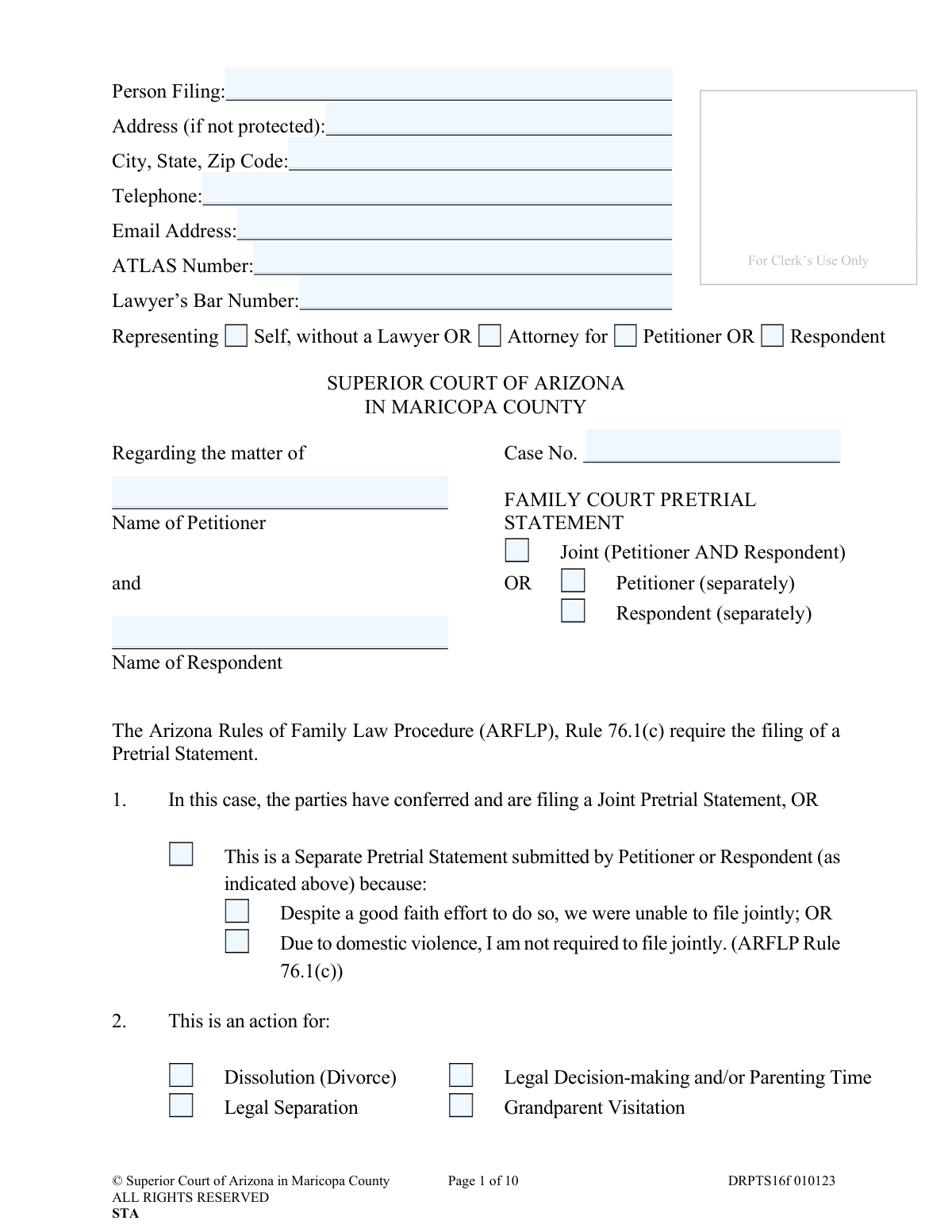
The DRPTS16f, Pre-Trial Statement for Family Court Cases, is a mandatory document filed with the Superior Court of Arizona in Maricopa County before a trial. Its purpose is to inform the judge about the case's status, including agreed-upon facts, contested issues, proposed resolutions, and lists of witnesses and exhibits from both the petitioner and respondent. This statement streamlines the trial process by clarifying what needs to be adjudicated. Today, this form can be filled out quickly and accurately using AI-powered services like Instafill.ai, which can also convert non-fillable PDF versions into interactive fillable forms.
DRPTS16f is part of the
County court forms, family court forms, family law forms and superior court forms categories on Instafill.
Our AI automatically handles information lookup, data retrieval, formatting, and form filling.
It takes less than a minute to fill out DRPTS16f using our AI form filling.
Securely upload your data. Information is encrypted in transit and deleted immediately after the form is filled out.
Form specifications
| Form name: | Pre-Trial Statement for Family Court Cases, Superior Court of Arizona in Maricopa County |
| Number of fields: | 284 |
| Number of pages: | 1 |
| Language: | English |
Instafill Demo: How to fill out PDF forms in seconds with AI
How to Fill Out DRPTS16f Online for Free in 2026
Are you looking to fill out a DRPTS16F form online quickly and accurately? Instafill.ai offers the #1 AI-powered PDF filling software of 2026, allowing you to complete your DRPTS16F form in just 37 seconds or less.
Follow these steps to fill out your DRPTS16F form online using Instafill.ai:
- 1 Navigate to Instafill.ai and upload the DRPTS16f form or select it from the template library.
- 2 Use the AI assistant to accurately fill in your personal details, case number, and information about the petitioner and respondent.
- 3 Indicate whether you are filing a joint or separate statement and specify the type of family law action (e.g., Dissolution, Legal Separation).
- 4 Provide details about the trial schedule, minor children, and the status of discovery and disclosure.
- 5 Clearly list all stipulations, uncontested facts, contested issues, and your proposed resolutions.
- 6 List all witnesses and exhibits you plan to use, and note any objections to the other party's evidence.
- 7 Review the entire completed statement for accuracy, then electronically sign, date, and download the document for filing with the court.
Our AI-powered system ensures each field is filled out correctly, reducing errors and saving you time.
Why Choose Instafill.ai for Your Fillable DRPTS16f Form?
Speed
Complete your DRPTS16f in as little as 37 seconds.
Up-to-Date
Always use the latest 2026 DRPTS16f form version.
Cost-effective
No need to hire expensive lawyers.
Accuracy
Our AI performs 10 compliance checks to ensure your form is error-free.
Security
Your personal information is protected with bank-level encryption.
Frequently Asked Questions About Form DRPTS16f
This form is used to provide the court with essential information before your trial. It outlines what both parties agree on, what is still in dispute, and lists the witnesses and evidence you plan to present.
Both the Petitioner and Respondent in a family court case in Maricopa County, such as divorce, legal separation, or child custody, are required to file a Pre-Trial Statement before their scheduled trial.
You are encouraged to confer with the other party and file a Joint Statement. However, you may file a Separate Statement if you were unable to file jointly despite a good faith effort, or if there is a history of domestic violence.
You must file an Affidavit of Financial Information (AFI). Depending on your case, you may also need to file an Inventory of Property & Debt (for divorce/separation) and a Child Support Worksheet (if child support is an issue).
No, the form explicitly states not to file or attach your exhibits. You should list them in the designated section and exchange copies with the other party, but do not submit the actual exhibits with this statement.
For each person you intend to call as a witness, you must provide their name, address, telephone number, and a brief description of their expected testimony on the attached witness list.
These are the specific disagreements between you and the other party that you need the judge to make a decision on at trial. This could include disputes over property division, child support amounts, or legal decision-making.
This section is for listing any facts or issues that you and the other party have already agreed upon. For example, you might agree on the value of a car or the date of separation.
You must deliver a copy of the completed statement to the other party (or their attorney) and to the assigned Judicial Officer. Section 18 of the form requires you to certify that you have done this.
If you are self-represented, you should sign and provide your contact information in the 'If Self-represented' section on page 6. Do not use the 'Attorney Information and Signature(s)' section.
Yes, services like Instafill.ai use AI to help you accurately auto-fill form fields with your information, which can save you significant time and reduce errors.
Simply upload the Pre-Trial Statement PDF to the Instafill.ai platform. The AI will make the form fillable and help you populate the fields with your saved personal information, case details, and other required data.
If you have a non-fillable or 'flat' PDF, you can use a service like Instafill.ai. It can convert the static PDF into an interactive, fillable form that you can easily complete on your computer.
This means you must provide the other party with a complete copy of every document, photo, or other piece of evidence you plan to show the judge at trial. This ensures both sides have a fair opportunity to review the evidence beforehand.
Compliance DRPTS16f
Validation Checks by Instafill.ai
1
Case Number Format and Presence
This check verifies that the 'Case No.' field is not empty and conforms to the court's required format, which is typically a prefix followed by a year and a sequence of numbers (e.g., DR2023-123456). This is critical for correctly routing and filing the document within the court's case management system. A missing or malformed case number will result in the document being rejected by the clerk.
2
Conditional Requirement for Lawyer's Bar Number
This validation ensures that if the 'Person Filing' selects 'Attorney for Petitioner' or 'Attorney for Respondent', the 'Lawyer’s Bar Number' field must be completed. The bar number is a unique identifier for a licensed attorney and is essential for verifying their authority to represent a party. Failure to provide it when required can lead to questions about representation and delays in the legal process.
3
Joint vs. Separate Statement Consistency
This check ensures that the selection in the case caption ('Joint', 'Petitioner (separately)', or 'Respondent (separately)') is consistent with the selection in Section 1. For example, if 'Petitioner (separately)' is checked in the caption, then the second option in Section 1 must also be checked. This consistency is vital for the court to understand the context of the filing and whether it represents the agreement of both parties or the position of just one.
4
Conditional Requirement for 'Other' Action Type
This validation rule checks that if the 'Other' checkbox is selected in Section 2 ('This is an action for:'), the corresponding text field must be filled out. This ensures that the specific nature of the 'Other' action is clearly defined for the court. An empty field would leave the purpose of the action ambiguous, potentially causing the filing to be deemed incomplete.
5
Logical Date Sequence for Marriage and Petition Service
This check validates that the 'Date of service of the Petition on Respondent' (Section 5) is on or after the 'Date of Marriage' (Section 4). It is logically impossible for a divorce or separation petition to be served before the marriage occurred. This check prevents data entry errors that would create a nonsensical timeline of events for the case record.
6
Minor Child Age Verification
This validation verifies that for each child listed in Section 6, the 'Age' entered is consistent with the 'Date of Birth' provided and is less than 18. This ensures the individuals listed are legally considered minor children, which is fundamental for matters of custody, parenting time, and child support. An incorrect age could lead to misapplication of laws and incorrect calculations for support.
7
Conditional Requirement for Inventory of Property & Debt Exhibit
This check enforces the rule stated in Section 8, requiring the 'Inventory of Property & Debt' checkbox to be marked if the action type in Section 2 is 'Dissolution (Divorce)', 'Legal Separation', or 'Annulment'. This exhibit is mandatory for dividing assets and liabilities in these specific case types. Failure to indicate this required attachment will result in an incomplete pretrial statement and likely a rejection or a court order to amend the filing.
8
Conditional Requirement for Child Support Worksheet Exhibit
This validation ensures the 'Child Support Worksheet' checkbox in Section 8 is marked if Section 6 lists any minor children or if 'Support (Child Support or Spousal)' is selected in Section 2. The worksheet is a required document for calculating and determining child support obligations. Omitting it when required would make the filing deficient and prevent the court from ruling on child support issues.
9
Settlement Statement Mutually Exclusive Options
This check validates that in Section 16, the user has either indicated that settlement was discussed (and provided a date) OR that it was not discussed (and provided a reason), but not both. These options are mutually exclusive and providing conflicting information would confuse the record. This validation ensures a clear and unambiguous statement regarding settlement efforts is provided to the court.
10
Signature Section Based on Representation
This validation ensures the correct signature block on page 6 is completed based on the representation status declared on page 1. If a party is 'Self-represented', their signature must appear in the 'If Self-represented' section; if represented by an attorney, the 'Attorney Information and Signature' section must be completed. An incorrect or missing signature invalidates the document and is a primary reason for rejection by the court clerk.
11
Trial Date Must Be in the Future
This check verifies that the 'Trial Date' entered in Section 3 is a future date relative to the filing date. A trial cannot be scheduled for a date that has already passed. This validation prevents simple data entry errors that would create an impossible schedule and require correction.
12
Separate Statement Reason Requirement
This validation ensures that if 'This is a Separate Pretrial Statement' is selected in Section 1, one of the two subsequent reasons ('Despite a good faith effort' or 'Due to domestic violence') must also be selected. The court requires a justification for why a joint statement was not filed. Failing to provide this reason makes the filing incomplete and may lead to judicial inquiry or rejection.
13
Email Address Format Validation
This check confirms that any value entered into an 'Email Address' field follows the standard '[email protected]' format. This is important for ensuring that court notices and communications sent via email are deliverable. An invalid email address could result in a party not receiving critical information about their case.
14
Telephone Number Format
This validation ensures that all telephone number fields (for parties, attorneys, and witnesses) contain a valid format, such as (XXX) XXX-XXXX or XXXXXXXXXX. Accurate contact information is crucial for the court and opposing parties to communicate effectively. An improperly formatted number could be unusable, hindering communication.
Common Mistakes in Completing DRPTS16f
The form explicitly requires certain attachments in Section 8, such as the Affidavit of Financial Information (AFI), Inventory of Property & Debt, and a Child Support Worksheet. Filers often overlook these requirements or forget to include the documents with their submission. This results in an incomplete filing that will be rejected by the clerk or admonished by the judge, causing significant delays and potentially requiring another court appearance.
A frequent error is physically attaching evidence to the pretrial statement, despite the clear instruction on pages 7 and 8: "(Do not file with, or attach your exhibits to, this document.)". Parties are only supposed to list and describe the exhibits. This mistake clutters the court file and demonstrates a failure to follow court procedure, which can frustrate the judge and require correction.
Filers often make errors in the top section of the first page, such as writing the wrong case number, misspelling the petitioner's or respondent's name, or failing to check the box indicating who they are representing. An incorrect case number is a critical error that can cause the document to be lost or misfiled indefinitely. To avoid this, double-check that the case number and names match all other court documents exactly.
In Sections 11, 12, and 13, parties are required to provide a detailed and concise statement of contested issues and their proposals for resolution. A common mistake is to write emotional, narrative-based complaints rather than clear, legally relevant points (e.g., "dispute over valuation of marital home"). This fails to properly inform the court of the specific legal issues to be decided at trial, making the process less efficient and potentially weakening the filer's position.
An unsigned or undated legal filing is invalid and will be rejected by the court. Given the length and complexity of this 10-page document, it is easy for a self-represented party to overlook the signature block on page 6. This simple oversight forces the filer to correct and resubmit the entire packet, which can cause them to miss critical court deadlines.
In Section 1, the form requires parties to indicate if they are filing jointly or, if filing separately, provide a reason. Many filers do not understand they have a duty to attempt a joint filing and may file separately without a valid reason, or they fail to provide a sufficient explanation. Checking the box for a separate filing without explaining why (e.g., "Despite a good faith effort..." or "Due to domestic violence...") can result in the filing being deemed improper by the court.
Sections 9, 10, and 11 have distinct legal purposes that are often confused by filers. People may list an issue they are fighting over in the "Uncontested Facts" section, or list a simple fact as a "Stipulation." This creates confusion for the court and opposing counsel, undermines the purpose of the statement, and may lead to unnecessary litigation over issues that should have been clearly defined.
The exhibit list sections on pages 7 and 8 include a space to object to the other party's proposed exhibits, noting that any exhibit not objected to may be admitted. A common error is to either leave this section blank or to write a generic, non-legal objection like "I don't like this document." This waives the filer's right to challenge the evidence at trial, potentially allowing harmful or improper evidence to be considered by the judge.
Throughout the form, filers must provide names, addresses, and employer information for both parties. Mistakes include using nicknames instead of full legal names, providing an old address, or having inconsistencies between the header and Section 4. This can lead to official court notices being sent to the wrong address and creates a confusing court record that must be clarified later. AI-powered tools like Instafill.ai can help prevent this by storing and consistently applying correct personal data across the document.
Section 8 clearly states which attachments are required for different case types, for example, the 'Inventory of Property & Debt' is required for divorce, but not for a simple child support modification. Filers often fail to read these instructions carefully and omit documents that are mandatory for their specific situation. This leads to an incomplete filing and can result in the judge continuing the trial until the required documents are submitted and reviewed by the other party.
Saved over 80 hours a year
“I was never sure if my IRS forms like W-9 were filled correctly. Now, I can complete the forms accurately without any external help.”
Kevin Martin Green
Your data stays secure with advanced protection from Instafill and our subprocessors

Robust compliance program
Transparent business model
You’re not the product. You always know where your data is and what it is processed for.
ISO 27001, HIPAA, and GDPR
Our subprocesses adhere to multiple compliance standards, including but not limited to ISO 27001, HIPAA, and GDPR.
Security & privacy by design
We consider security and privacy from the initial design phase of any new service or functionality. It’s not an afterthought, it’s built-in, including support for two-factor authentication (2FA) to further protect your account.
Fill out DRPTS16f with Instafill.ai
Worried about filling PDFs wrong? Instafill securely fills pre-trial-statement-for-family-court-cases-superior-court-of-arizona-in-maricopa-county forms, ensuring each field is accurate.