Yes! You can use AI to fill out IRA-5054 Private Equity Investment Authorization
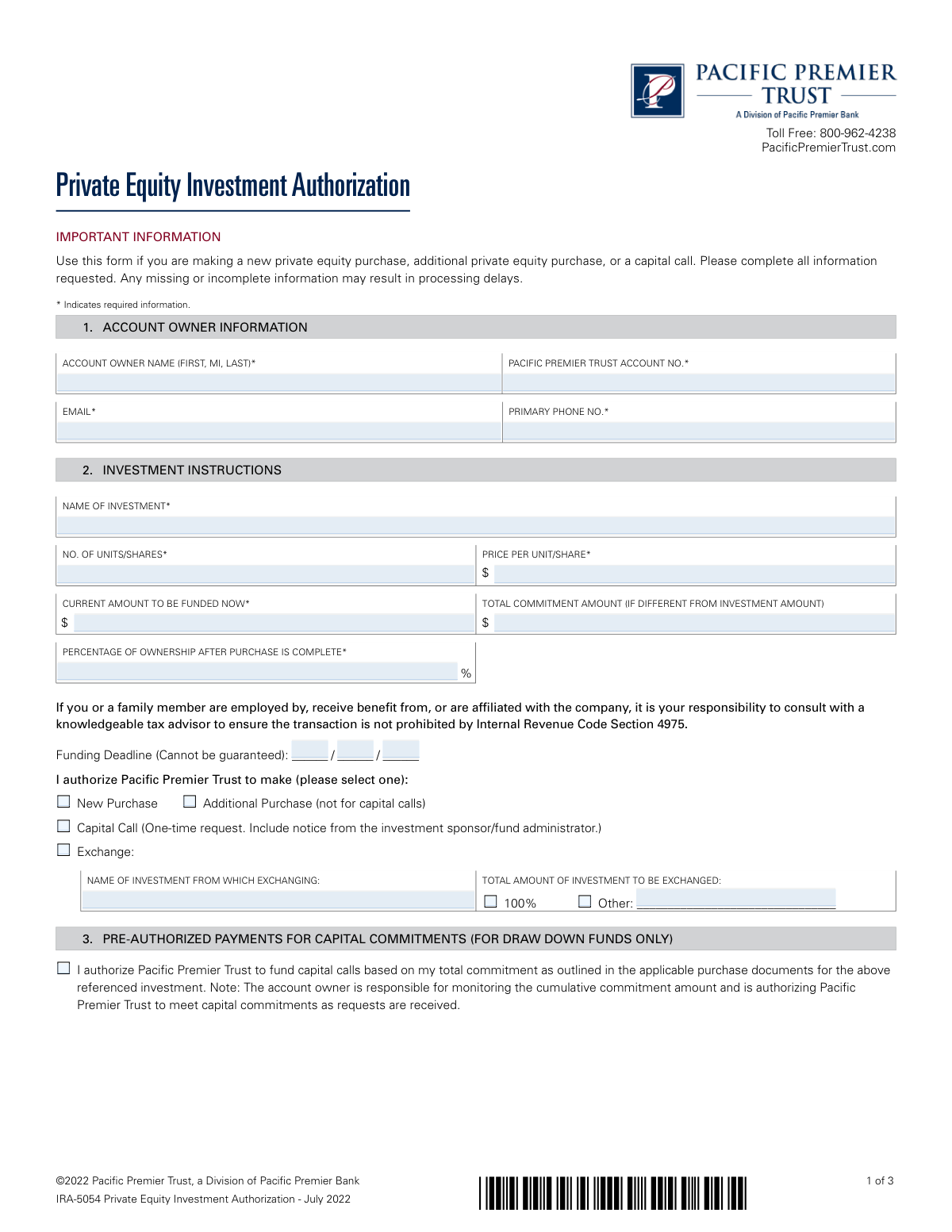
The IRA-5054 Private Equity Investment Authorization form is a document used by an account owner to instruct Pacific Premier Trust, acting as the custodian of their self-directed IRA, to execute a private equity investment. It is crucial for formally directing the purchase, specifying investment details, and acknowledging the risks associated with non-traditional assets within a retirement account. Today, this form can be filled out quickly and accurately using AI-powered services like Instafill.ai, which can also convert non-fillable PDF versions into interactive fillable forms.
IRA-5054 is part of the
investment forms, authorization forms, IRA forms, retirement account forms, private equity forms, investment authorization forms and private equity investment forms categories on Instafill.
Rather not fill this in by hand? Instafill is an online form filler that completes PDF forms automatically — upload the blank form, answer a few questions, and the AI fills every field.
Form specifications
| Form name: | IRA-5054 Private Equity Investment Authorization |
| Number of pages: | 1 |
| Language: | English |
Our AI automatically handles information lookup, data retrieval, formatting, and form filling.
It takes less than a minute to fill out IRA-5054 using our AI form filling.
Securely upload your data. Information is encrypted in transit and deleted immediately after the form is filled out.
Instafill Demo: How to fill out PDF forms in seconds with AI
How to Fill Out IRA-5054 Online for Free in 2026
Are you looking to fill out a IRA-5054 form online quickly and accurately? Instafill.ai offers the #1 AI-powered PDF filling software of 2026, allowing you to complete your IRA-5054 form in just 37 seconds or less.
Follow these steps to fill out your IRA-5054 form online using Instafill.ai:
- 1 Navigate to Instafill.ai and upload or select the IRA-5054 form.
- 2 Use the AI assistant to automatically fill in your Account Owner Information, including your name, Pacific Premier Trust account number, and contact details.
- 3 Complete the Investment Instructions section, specifying the investment name, amount to be funded, number of units, and the type of transaction (e.g., New Purchase, Capital Call).
- 4 Provide the Company (Issuer) Contact Information and the Funding Instructions, indicating whether the funds should be sent via wire or check.
- 5 Specify the Document Forwarding Instructions if they differ from the funding details.
- 6 Carefully review all sections, read the Acknowledgment & Signature terms, and then electronically sign and date the form.
- 7 Download the completed, signed form and submit it to Pacific Premier Trust using the email, fax, or mailing address provided on the document.
Our AI-powered system ensures each field is filled out correctly, reducing errors and saving you time.
Why Choose Instafill.ai for Your Fillable IRA-5054 Form?
Speed
Complete your IRA-5054 in as little as 37 seconds.
Up-to-Date
Always use the latest 2026 IRA-5054 form version.
Cost-effective
No need to hire expensive lawyers.
Accuracy
Our AI performs 10 compliance checks to ensure your form is error-free.
Security
Your personal information is protected with bank-level encryption.
Frequently Asked Questions About IRA-5054
This form is used to authorize Pacific Premier Trust to make a private equity investment on behalf of your IRA. You should use it for new purchases, additional purchases, or to fund a capital call.
Any Pacific Premier Trust account owner who wants to direct funds from their self-directed IRA to a private equity investment must complete this form.
You must provide your personal account information, details about the investment (name, price, amount), the issuer's contact information, and instructions for how to fund the purchase. Missing information may cause delays.
Yes, if you are making a one-time capital call, you must include the notice you received from the investment sponsor or fund administrator along with this form.
This optional section allows you to give Pacific Premier Trust standing authorization to fund future capital calls for an investment automatically. This is only for 'draw down' funds and saves you from submitting a new form for each call.
You can choose to have funds sent via check or wire transfer. You must provide the complete payee name and address for a check, or the full bank details, including ABA number, for a wire.
You can email the form to [email protected], fax it, or mail it to the Pacific Premier Trust Processing Center in Denver, CO.
This could be a prohibited transaction under IRS rules. The form states it is your responsibility to consult a knowledgeable tax advisor to ensure the transaction is permissible before you invest.
You can specify a funding deadline on the form, but the form explicitly states that funding deadlines cannot be guaranteed. Submitting a complete and accurate form promptly is the best way to avoid delays.
If the sponsor fails to provide confirmation of purchase or annual valuations, Pacific Premier Trust may resign as the custodian for that asset. This could be a tax-reportable event for your account.
Yes, services like Instafill.ai use AI to help you accurately auto-fill form fields, which can save time and help prevent common errors.
Simply upload the PDF to the Instafill.ai website. The platform will make the document fillable online, allowing you to type your information, add a digital signature, and download the completed form.
If you have a non-fillable PDF, you can use a service like Instafill.ai. It can convert flat PDFs into interactive, fillable forms that you can easily complete on your computer.
Compliance IRA-5054
Validation Checks by Instafill.ai
1
Account Number Consistency Across Sections
This check verifies that the 'PACIFIC PREMIER TRUST ACCOUNT NO.' entered in Section 1 (Account Owner Information) is identical to the account number entered in Section 7 (Acknowledgment & Signature). This is crucial for ensuring the authorization is applied to the correct account and prevents misallocation of funds or investments. A mismatch will halt the submission and require the user to correct the discrepancy before proceeding.
2
Investment Funding Amount Calculation
This validation ensures that the 'CURRENT AMOUNT TO BE FUNDED NOW' is equal to the 'NO. OF UNITS/SHARES' multiplied by the 'PRICE PER UNIT/SHARE'. This cross-field check confirms the mathematical accuracy of the investment instruction, preventing funding errors due to manual calculation mistakes. If the values do not reconcile, the form will display an error, prompting the user to review and correct the investment figures.
3
Investment Amount Consistency at Signature
This check confirms that the 'INVESTMENT AMOUNT' listed in the signature section (Section 7) matches the 'CURRENT AMOUNT TO BE FUNDED NOW' from the investment instructions (Section 2). This final verification ensures the signer is acknowledging the correct funding amount at the point of authorization. A discrepancy would indicate a potential data entry error and must be resolved to ensure the legal acknowledgment is valid.
4
Exclusive Investment Instruction Selection
This validation ensures that exactly one option is selected from the investment instruction choices in Section 2 (e.g., 'New Purchase', 'Capital Call', 'Exchange'). The system cannot process an ambiguous instruction with zero or multiple types of transactions selected. If the user fails to select exactly one option, an error message will appear, requiring them to make a single, clear choice.
5
Conditional Requirement for 'Exchange' Transaction
This check is triggered if the 'Exchange' option is selected in Section 2. It verifies that the 'NAME OF INVESTMENT FROM WHICH EXCHANGING' and 'TOTAL AMOUNT OF INVESTMENT TO BE EXCHANGED' fields are both completed. These fields are essential for processing an exchange, and leaving them blank would make the instruction impossible to fulfill. The form will not be submittable until this required information is provided.
6
ABA Routing Number Format
This validation examines the 'ABA NO.' field within the Wire funding instructions (Section 5). It ensures the entry consists of exactly nine digits and contains no letters or special characters. A valid ABA number is critical for the successful routing of funds, and an incorrect format will lead to a failed wire transfer and significant delays.
7
Completeness of Selected Funding Instructions
This check ensures that all required fields for the chosen funding method in Section 5 are filled out. If 'Wire' is selected, all bank details (Bank Name, ABA No., Account Name, Account No.) must be provided. If 'Check' is selected, all payee and mailing address details must be complete. Incomplete information will prevent the system from generating the payment and will block form submission.
8
Ownership Percentage Value Range
This validation verifies that the 'PERCENTAGE OF OWNERSHIP AFTER PURCHASE IS COMPLETE' in Section 2 is a numerical value greater than 0 and less than or equal to 100. This ensures the ownership stake is recorded as a valid percentage for legal and reporting purposes. Any value outside this logical range will be flagged as an error for correction.
9
Valid Email Address Format
This check applies to all email address fields on the form, including in Section 1 (Account Owner) and Section 4 (Company Contact). It verifies that the entry follows the standard '[email protected]' format. This is important for ensuring that communications, confirmations, and documents can be successfully delivered, and failure to provide a valid format will result in processing delays and communication breakdowns.
10
Signature and Date Presence
This validation confirms that the 'ACCOUNT OWNER/AUTHORIZED SIGNER SIGNATURE' and 'DATE' fields in Section 7 are both completed. The signature is a legal requirement for authorizing the transaction, and the date establishes when the authorization was given. The form cannot be legally processed without both a valid digital signature and a corresponding date.
11
Future Funding Deadline Date
If a date is entered in the 'Funding Deadline' field in Section 2, this check ensures it is a valid calendar date and is not in the past. A past date is an impossible deadline to meet, so this validation prevents logical errors in the instruction. If an invalid or past date is entered, the user will be prompted to either clear the field or provide a future date.
12
Investment Name Consistency
This validation ensures the 'NAME OF INVESTMENT' provided in Section 2 is identical to the 'NAME OF INVESTMENT' written in the signature block of Section 7. This consistency check confirms that the user is signing off on the same investment they detailed earlier in the form. A mismatch could indicate a copy-paste error or confusion and must be corrected to ensure the authorization is for the intended asset.
Common Mistakes in Completing IRA-5054
Users often enter one amount in Section 2 ('Current Amount to be Funded Now') and a different, conflicting amount in the signature block in Section 7. This discrepancy happens due to oversight or making a last-minute change in one field but not the other. This forces the processor to halt the transaction and contact the account owner for clarification, causing significant delays in the investment.
A single incorrect digit in the ABA routing number or bank account number in Section 5 can cause a wire transfer to fail or be sent to the wrong account, risking the entire investment. These errors are common due to manual data entry and can lead to irreversible financial loss. To prevent this, meticulously verify every number against the issuer's official wire instructions before submission. AI-powered form filling tools like Instafill.ai can help by validating routing numbers and reducing manual entry errors.
In Section 2, users frequently select the wrong transaction type, such as choosing 'New Purchase' for a 'Capital Call' or vice-versa. This error occurs from misunderstanding the terms or rushing through the form. This leads to incorrect processing, as a capital call requires different documentation (like a sponsor's notice) than a new purchase, causing the request to be rejected.
The form explicitly states that a 'Capital Call' request must include a notice from the investment sponsor. Filers often forget to attach this document, resulting in an incomplete submission. This forces the custodian to reject the request or place it on hold, which can cause the funding deadline to be missed and potentially incur penalties from the investment issuer.
In Section 2, users often get confused between the 'Current Amount to be Funded Now' and the 'Total Commitment Amount.' They might enter the total commitment in both fields for an initial investment, or leave the commitment field blank for a draw-down fund. This ambiguity requires clarification from the processor, delaying the investment. The 'Current Amount' is what you are paying now, while 'Total Commitment' is the full amount you've agreed to invest over time and should only be filled in if different.
The signature block in Section 7 requires not only a signature and date but also re-entering the account number, investment name, and investment amount. It is very common for filers to sign and date the form but forget to fill in these other required fields. An incomplete signature block invalidates the authorization and will cause the form to be rejected immediately, delaying the entire investment process.
In Section 3, checking the box for pre-authorized payments is only for 'draw down funds.' Some users check this for a one-time purchase, incorrectly authorizing Pacific Premier Trust to fund future capital calls that don't exist. This mistake stems from not carefully reading the section's purpose and can lead to unintended future transactions being processed against the account.
Section 4 requires the contact information for the investment's issuer, which the custodian uses for verification. Users may provide outdated, incomplete, or misspelled information, especially for the contact name or email address. This prevents the custodian from confirming investment details, which can halt the transaction or, as stated in the terms, lead to the custodian resigning from the asset.
This form is often distributed as a flat, non-fillable PDF, forcing users to print it and fill it out by hand. This frequently results in illegible handwriting, especially for critical numbers in the account and wire instruction sections. A single misread digit can lead to processing rejection or a failed wire transfer. To avoid this, it's best to use a tool like Instafill.ai, which can convert non-fillable PDFs into interactive, fillable forms, ensuring all entries are clear and legible.
Section 2 asks for 'No. of Units/Shares,' 'Price Per Unit/Share,' and 'Current Amount to be Funded Now.' Filers sometimes make a simple multiplication error, resulting in a 'Current Amount to be Funded' that does not equal the number of units multiplied by the price per unit. This mathematical inconsistency requires the processor to stop and seek clarification, delaying the funding.
Saved over 80 hours a year
“I was never sure if my IRS forms like W-9 were filled correctly. Now, I can complete the forms accurately without any external help.”
Kevin Martin Green
Your data stays secure with advanced protection from Instafill and our subprocessors




Robust compliance program
Transparent business model
You’re not the product. You always know where your data is and what it is processed for.
ISO 27001, HIPAA, and GDPR
Our subprocesses adhere to multiple compliance standards, including but not limited to ISO 27001, HIPAA, and GDPR.
Security & privacy by design
We consider security and privacy from the initial design phase of any new service or functionality. It’s not an afterthought, it’s built-in, including support for two-factor authentication (2FA) to further protect your account.
Fill out IRA-5054 with Instafill.ai
Worried about filling PDFs wrong? Instafill securely fills ira-5054-private-equity-investment-authorization forms, ensuring each field is accurate.
