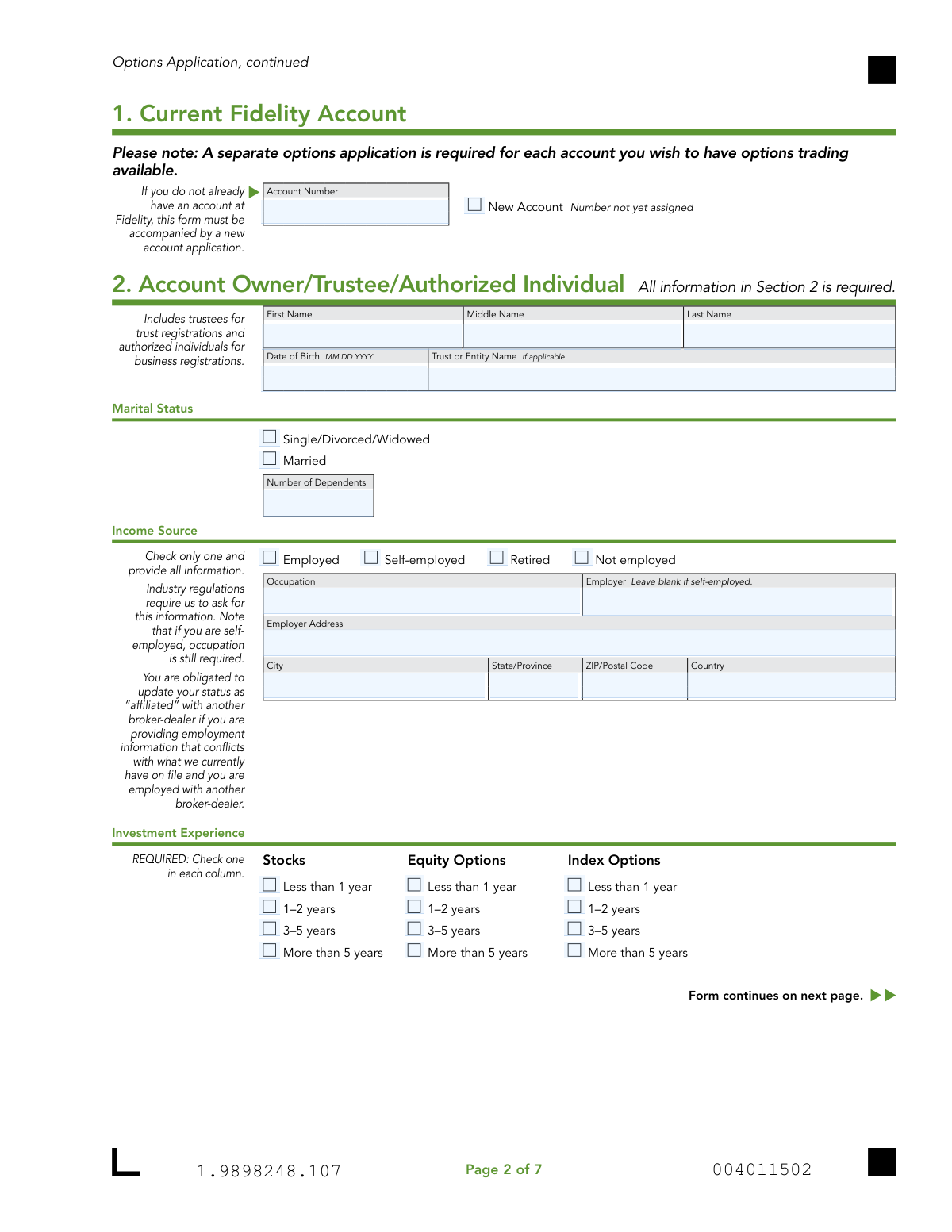
Yes! You can use AI to fill out Options Application - Fidelity Investments
The Fidelity Options Application is a form required by Fidelity Investments for account holders who wish to trade options. It gathers crucial information about the applicant's financial situation, investment experience, and risk tolerance to determine their eligibility for various options trading tiers. Today, this form can be filled out quickly and accurately using AI-powered services like Instafill.ai, which can also convert non-fillable PDF versions into interactive fillable forms.
Our AI automatically handles information lookup, data retrieval, formatting, and form filling.
It takes less than a minute to fill out Fidelity Options Application using our AI form filling.
Securely upload your data. Information is encrypted in transit and deleted immediately after the form is filled out.
Form specifications
| Form name: | Options Application - Fidelity Investments |
| Number of pages: | 1 |
| Language: | English |
| Categories: | investment forms, Fidelity forms |
Instafill Demo: How to fill out PDF forms in seconds with AI
How to Fill Out Fidelity Options Application Online for Free in 2026
Are you looking to fill out a FIDELITY OPTIONS APPLICATION form online quickly and accurately? Instafill.ai offers the #1 AI-powered PDF filling software of 2026, allowing you to complete your FIDELITY OPTIONS APPLICATION form in just 37 seconds or less.
Follow these steps to fill out your FIDELITY OPTIONS APPLICATION form online using Instafill.ai:
- 1 Navigate to Instafill.ai and upload or select the Fidelity Options Application form.
- 2 Provide your Fidelity account number and personal details for all account owners, including employment and contact information in Sections 1, 2, and 3.
- 3 Detail your investment experience, financial profile, and investment objectives in Section 4, providing information on your income and net worth.
- 4 Select your desired options trading strategy and tier, acknowledging the margin requirements if applying for Tiers 2 or 3.
- 5 Carefully review all the information auto-filled by the AI to ensure it is accurate and complete.
- 6 Electronically sign and date the application in Section 5 to certify the information and agree to the terms.
- 7 Download the completed application and submit it to Fidelity as instructed on the form.
Our AI-powered system ensures each field is filled out correctly, reducing errors and saving you time.
Why Choose Instafill.ai for Your Fillable Fidelity Options Application Form?
Speed
Complete your Fidelity Options Application in as little as 37 seconds.
Up-to-Date
Always use the latest 2026 Fidelity Options Application form version.
Cost-effective
No need to hire expensive lawyers.
Accuracy
Our AI performs 10 compliance checks to ensure your form is error-free.
Security
Your personal information is protected with bank-level encryption.
Frequently Asked Questions About Form Fidelity Options Application
This form is used to apply for the ability to trade options, such as calls and puts, within a new or existing Fidelity brokerage account. Completing it allows Fidelity to assess your eligibility and understanding of the risks involved.
You should first visit Fidelity.com/applyforoptions to check if your account is eligible for the online application, which is the preferred method. This paper form is only for specific account types, and it will be rejected if you were eligible to apply online.
The entire form must be completed by the account owner(s). For joint accounts, all owners must provide their information and sign Section 5.
You must provide personal details, employment information, your financial profile (including annual income and net worth), and your investment experience. All sections of the form must be filled out for your application to be considered.
The form outlines three tiers of trading strategies, from Tier 1 (e.g., covered calls, purchasing calls/puts) to the riskier Tier 3 (e.g., uncovered options writing). Your eligibility for higher tiers depends on your stated investment objective and financial profile.
Applying for Option Tiers 2 or 3 automatically includes an application for a margin account, which is required for those advanced strategies. If you apply for Tier 1, you can optionally request to add margin to your account.
Yes, retirement and health savings accounts, such as IRAs and HSAs, are typically limited to Tier 1 options strategies. Some IRAs may be eligible for spread trading, but this is subject to specific conditions and approval.
The primary account owner should complete Section 2, and the additional account owner must complete Section 3. All account owners are required to sign in Section 5.
If you do not already have an account with Fidelity, this Options Application must be submitted along with a new account application.
After filling out and signing the form, you need to scan or take a digital photo of all pages. You can then submit the files electronically by scanning the QR code on the form or by visiting Fidelity.com/upload-options.
If an authorized agent (such as someone with Power of Attorney) has authority on the account, they must complete Section 6 and sign Section 7. This is separate from account owners.
Yes, services like Instafill.ai use AI to accurately auto-fill form fields, which can save you time and help reduce errors. This is especially useful for lengthy forms requiring repetitive information.
Simply upload the Fidelity Options Application PDF to the Instafill.ai platform. The AI will identify all the fields, allowing you to enter your information once and have it automatically populated throughout the document for you to review and download.
If you have a non-fillable or 'flat' PDF, you can use a service like Instafill.ai. It can convert the document into an interactive, fillable form that you can easily complete online without needing to print it.
Compliance Fidelity Options Application
Validation Checks by Instafill.ai
1
Ensures All Account Owners Have Signed
Verifies that a signature and date are present in Section 5 for every account owner listed in Sections 2 and 3. This is a fundamental requirement for the agreement to be legally binding and confirms all parties agree to the terms. If any owner's signature is missing, the application is incomplete and cannot be processed.
2
Cross-Validates Investment Objective with Requested Option Tier
This check enforces the rule that the selected Trading Strategy Tier in Section 4 is consistent with the chosen Investment Objective. For example, Tier 2 requires a 'Growth' or higher objective, and Tier 3 requires 'Most Aggressive.' This suitability check is a regulatory requirement to protect investors from taking on inappropriate levels of risk, and a mismatch will result in rejection.
3
Validates Date of Birth Format and Age
Checks that the Date of Birth in Sections 2 and 3 is in a valid MM DD YYYY format and represents a plausible age for an investor (e.g., over 18 years old). This is crucial for identity verification and assessing the legal capacity to enter into a contract. An invalid date or an applicant who is a minor would cause the application to be rejected.
4
Verifies Account Identification
Confirms that in Section 1, either an existing Fidelity Account Number is provided or the 'New Account' checkbox is marked. The application must be associated with a specific account to enable options trading. Failure to provide this information means Fidelity cannot link the options agreement to an account, halting the process.
5
Ensures Employment Details Align with Income Source
Validates that if 'Employed' or 'Self-employed' is selected as the Income Source, the 'Occupation' field is filled. Additionally, if 'Employed' is chosen, the 'Employer' field must be completed. This information is required by industry regulations for Know Your Customer (KYC) and suitability assessments, and incomplete information will cause the application to be flagged.
6
Confirms All Investment Experience Fields are Completed
Checks that for each account owner (Sections 2 & 3) and authorized agent (Section 6), one option has been selected for each category of Investment Experience (Stocks, Equity Options, Index Options). This data is critical for Fidelity to assess the applicant's sophistication and suitability for options trading. Missing experience information makes it impossible to approve the application.
7
Validates Completion of Financial Profile
Ensures that one selection has been made in each column of the Financial Profile in Section 4: Annual Income, Estimated Net Worth, and Estimated Liquid Net Worth. This combined financial picture is essential for determining the applicant's financial capacity to bear the risks of options trading. An incomplete profile prevents the required suitability analysis and leads to rejection.
8
Verifies Margin Application Logic for Higher Tiers
Confirms that if an applicant selects Option Tier 2 or Tier 3, they acknowledge they are also applying for margin, as it is a requirement. The system should ensure the margin application process is triggered. This prevents a logical inconsistency where a user requests a product without meeting its prerequisites, which would otherwise cause processing delays.
9
Validates Eligibility for Spread Trading in IRAs
Checks if an applicant with an IRA account who requests 'Spread Trading' meets the eligibility criteria, such as not having an FDIC-Insured Deposit Sweep as the core position. It also confirms that Roth IRA for Kids accounts are not applying for spreads, as they are explicitly ineligible. This prevents the approval of trading strategies that are not permitted for specific retirement account types.
10
Ensures Authorized Agent Sections are Co-dependent
Verifies that if any information is entered in Section 6 (Authorized Agent details), then Section 7 (Authorized Agent Signature) must be completed with a signature and date. Conversely, if Section 7 is signed, Section 6 must be fully populated. This ensures that any agent granted authority is properly identified and has legally attested to the terms.
11
Validates Format of 'Number of Dependents'
This check ensures that the value entered for 'Number of Dependents' in Sections 2 and 3 is a non-negative integer. While seemingly minor, this maintains data integrity for the customer's financial profile. An invalid entry, such as text or a negative number, would require correction before the application can be fully processed.
12
Verifies Presence of Both Printed Name and Signature
This check ensures that for each signature line in Section 5 and Section 7, both the 'PRINT...NAME' field is filled out and the corresponding signature block is signed. A signature without a clearly printed name can be ambiguous and difficult to verify. This is a standard due diligence check to ensure the identity of the person signing the legal agreement is clear.
13
Validates Signature Date Plausibility
Checks that the signature dates in Sections 5 and 7 are in a valid MM DD YYYY format and are not in the future or an unreasonably distant past date. This is important for establishing the legal date of the agreement. An invalid or future date would render the signature invalid and require the applicant to re-sign and date the form correctly.
Common Mistakes in Completing Fidelity Options Application
The form explicitly states that if an account is eligible for the online application, the paper version will be rejected. Applicants often miss this crucial instruction on the first page and waste time filling out a form that will be automatically discarded. To avoid this, always visit Fidelity.com/applyforoptions first to check eligibility before starting any paperwork. This ensures you are using the correct and most efficient application channel from the start.
Applicants frequently select a conservative investment objective (e.g., 'Balanced') while requesting a high-risk trading tier (e.g., 'Tier 3'). The form clearly links required objectives to specific tiers, and this mismatch leads to an automatic rejection for suitability reasons. Before filling out Section 4, carefully review the requirements to ensure your stated risk tolerance aligns with the trading capabilities you are requesting. This demonstrates to the brokerage that you understand the risks associated with the higher tiers.
For joint accounts, it is a very common error to submit the form with only one owner's information and signature. The instructions mandate that 'ALL account owners must complete the account owner sections and sign Section 5.' An application missing the second owner's personal details in Section 3 or their signature in Section 5 is considered incomplete and will be returned, causing significant delays. Ensure every owner provides their information and signs in the designated areas.
In Section 2, the 'Income Source' part often causes confusion, especially for self-employed individuals. Applicants may check 'Self-employed' and then leave both the 'Occupation' and 'Employer' fields blank. However, the form specifies that 'occupation is still required' even if the employer field should be left blank. Failing to provide an occupation can halt the application, as this information is a regulatory requirement for assessing suitability.
The 'Investment Experience' grid in Sections 2, 3, and 6 requires a selection in each column (Stocks, Equity Options, Index Options). Applicants often only check boxes for products they have experience with, leaving the others blank. This is incorrect; the form requires an assessment for all categories, so 'Less than 1 year' must be checked for any areas where the applicant has no experience. An incomplete grid will result in the application being flagged for missing information.
The form has separate, distinct sections for additional account owners (Section 3) and authorized agents like a POA (Section 6). A frequent mistake is for an authorized agent to fill out the joint owner section or vice-versa. This error leads to processing delays and rejection because the legal capacity and required information for these roles are different. Carefully read the headings for Section 3 and Section 6 to ensure the correct person is completing the appropriate section.
In Section 4, the 'Financial Profile' (Annual Income, Net Worth) must logically support the requested options tier. An applicant requesting Tier 3 (uncovered options) while reporting low annual income and liquid net worth will likely be denied on suitability grounds. This happens when applicants either don't understand the risk implications or provide inaccurate data. Ensure the financial figures provided realistically reflect an ability to withstand the potential losses associated with the chosen trading strategy.
Omitting a signature or date in Section 5 is one of the most common and easily avoidable errors, leading to immediate rejection. For joint accounts, both owners must sign. Furthermore, the form specifies a 'MM DD YYYY' date format, and using a different convention can cause data entry problems. Double-checking that all signature and date fields are completed correctly before submission is a critical final step.
The instruction to use 'CAPITAL letters in black ink' is designed to ensure the document is legible for optical character recognition (OCR) and manual review. Submitting a form written in cursive, with light-colored ink, or providing a blurry or cropped scan can render it un-processable. This forces a rejection and requires the applicant to start over. AI-powered tools like Instafill.ai can convert non-fillable PDFs into fillable versions, eliminating handwriting issues and ensuring a clean, legible submission.
The trading strategies in Section 4 are separated for 'Non-Retirement Accounts' and 'IRAs or HSAs,' but applicants often get this wrong. An IRA owner might mistakenly check the box for Tier 2 or 3 in the non-retirement section, which is not permitted and will cause rejection. IRA and HSA owners must only select from the specific options listed under their account type's heading. Using an AI form-filler like Instafill.ai can help prevent this by using conditional logic to show only the valid options based on the account type.
Saved over 80 hours a year
“I was never sure if my IRS forms like W-9 were filled correctly. Now, I can complete the forms accurately without any external help.”
Kevin Martin Green
Your data stays secure with advanced protection from Instafill and our subprocessors

Robust compliance program
Transparent business model
You’re not the product. You always know where your data is and what it is processed for.
ISO 27001, HIPAA, and GDPR
Our subprocesses adhere to multiple compliance standards, including but not limited to ISO 27001, HIPAA, and GDPR.
Security & privacy by design
We consider security and privacy from the initial design phase of any new service or functionality. It’s not an afterthought, it’s built-in, including support for two-factor authentication (2FA) to further protect your account.
Fill out Fidelity Options Application with Instafill.ai
Worried about filling PDFs wrong? Instafill securely fills options-application-fidelity-investments forms, ensuring each field is accurate.